
MS Teams Meeting by Solbeg is the #20 ranked video app on Zendesk, with a 4.0 average rating from 8 reviews, priced multiple plans available, as of Sep 13, 2026.
MS Teams Meeting by Solbeg is a Zendesk Marketplace app by Solbeg. With a rating of 4.0★ from 8 reviews, it currently ranks #20 in the Video category.
AppRanks data: MS Teams Meeting by Solbeg ranks #20 in Video on Zendesk Marketplace, placing it in the top 22% of that category.
AppRanks verdict
Generated from live marketplace data — refreshed daily
MS Teams Meeting by Solbeg is a well-rated Zendesk app with a limited review volume. It is listed in the Video category on Zendesk Marketplace, which AppRanks treats as the canonical taxonomy node for ranking and competitor comparison. 8 reviews put it in the early-traction tier — useful for early-stage stores willing to be on the leading edge. Early-traction review counts are sensitive to single launch periods or feature events, so a 30-day re-check before bigger commitments often resolves whether the trend is sustained. Paid-only pricing means evaluating fit on the marketplace listing or via the developer's documentation before installing. AppRanks tracks rating, review count, pricing tier, and category position daily — the figures on this page reflect the most recent scrape from the canonical Zendesk Marketplace listing.
Pros
- +Published by Solbeg — established developer track record
Cons
- −Limited review base (8) — ratings can shift significantly with new feedback
- −Paid-only pricing (Multiple plans available) — evaluation requires committing payment details
Looking to switch from MS Teams Meeting by Solbeg?
See MS Teams Meeting by Solbeg's alternatives ranked by audit score, rating, and review velocity.
About MS Teams Meeting by Solbeg
How MS Teams Meeting by Solbeg works
Show full descriptionShow less
If you use Zendesk and have MS Teams account, with the help of our app you can create the Teams meeting link in your ticket easily and share it with the requester, or even schedule the Teams meeting, add it to your O365 calendar and put the meeting link inside your ticket automatically. Thus, you can plan your support calls with a ticket requester and help them to accelerate the resolution of desired questions.
Main features for free:
- Generate MS Teams meeting link in one click;
- Join Teams meeting from Zendesk directly;
- Simplify communication with a requester;
- Decrease your ticket resolution time;
- Improve your productivity;
- One-click and Teams meeting organized.
- Additional tag for identification using the extension.
Additional features with paid plans:
- Schedule MS Teams meetings in one click;
- Add meetings to your O365 calendar without leaving Zendesk ticket;
- Decide on meeting attendees and send them invitations
After installing Schedule MS Teams meeting extension open your Zendesk ticket.
In the right-side APP bar, you need to select the installed extension, open it, and authorize in your MS Teams account by clicking on Login to MS Teams account.
After clocking Login to MS Teams account, you will be redirected to the MS Teams login page and after successful authorization returned to the page with the app.
If you have already logged into O365 account in your browser, the authorization will be processed automatically.
NOTE: Depending on your security configuration, at the time of your first installation of the extension the system may ask you to request from MS office administrators access to online meetings.
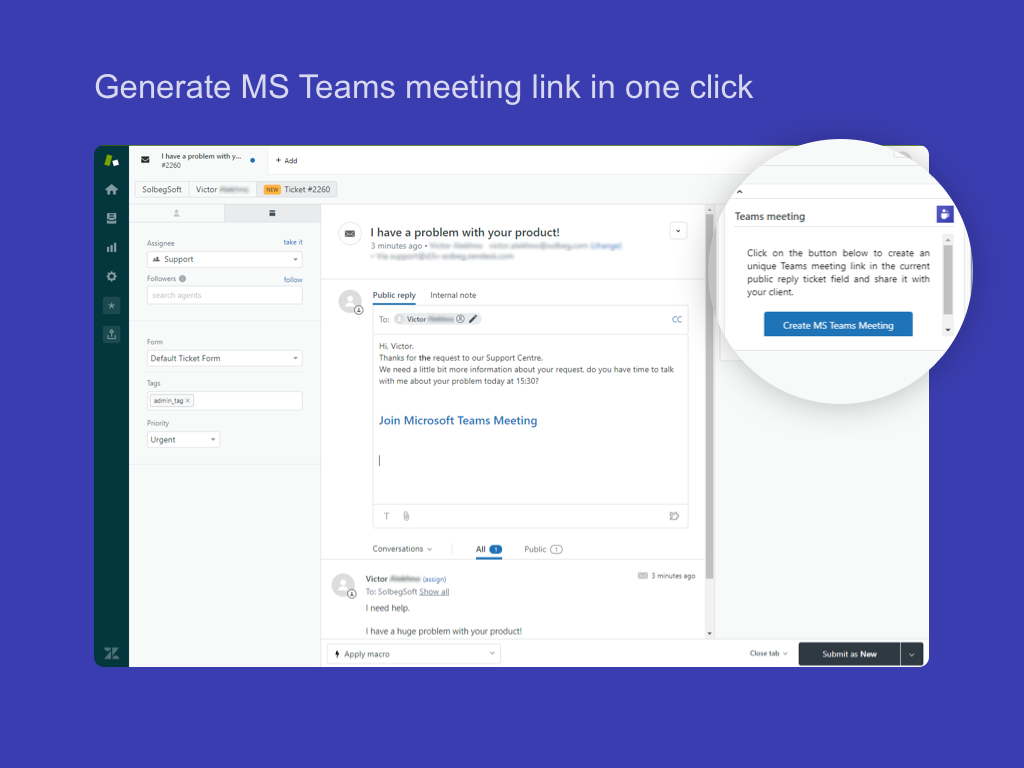
With free subscription plans, after successful authorization, you will see the button Create MS Teams Meeting on the APP panel. Click this button to generate a unique link for Teams Meeting with your ticket requester.
Please, specify a convenient time for the Team Meeting with your partner in the reply message for ticket.
After the time on both sides is agreed, the meeting participants can join Teams meeting following the created link.
Use all available functionality of MS Teams app to discuss the open questions.
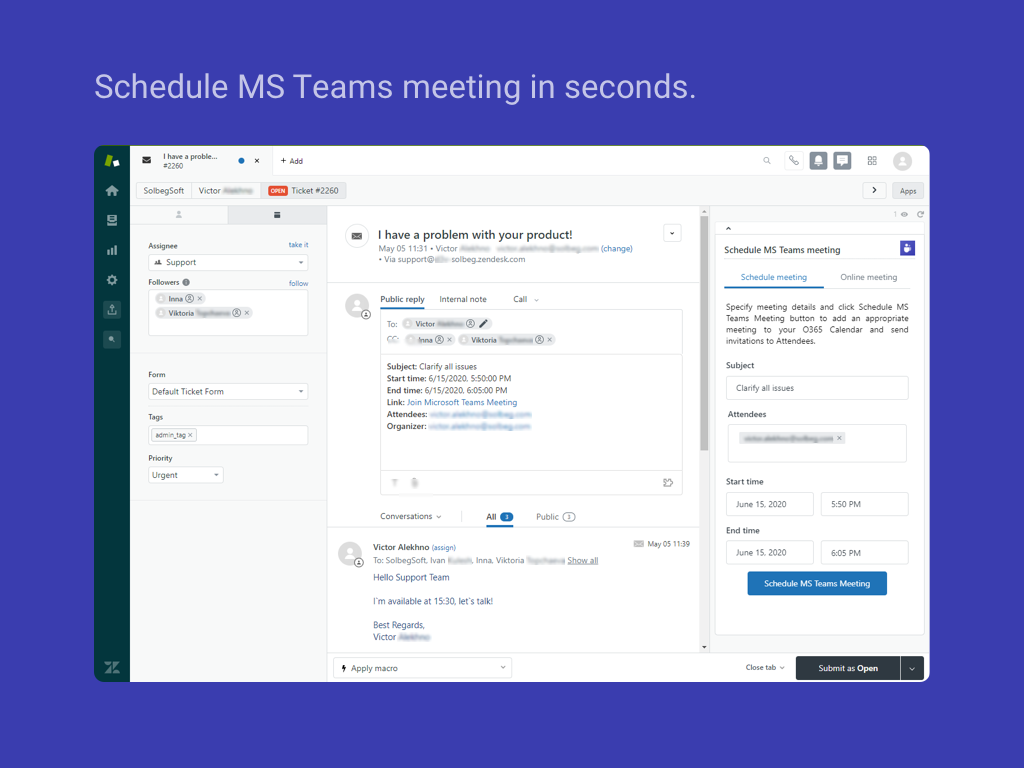
With both paid subscription plans, you will have additional tab in the right-side APP panel with functionality for scheduling MS Teams meeting.
On this tab, you need to put details of a meeting.
- Subject – give a title to a meeting to pay attention of attendees to its topic;
- Attendees – the field includes automatically added Requester, Assignee, and Followers in the loading page moment. You can edit the list of participants who will be invited to join a meeting.
NOTE: If you want to add participants for the meeting from the list of Followers, you added after the app is loaded, please click the reload button.
Simultaneously with creating MS Teams meeting the extension addes the tag for the ticket: “msteamsmeetinglink” - for unpaid version and “msteams_meeting” for paid plans.
Use all available functionality of MS Teams app to discuss your questions.
Screenshots
Category rankings
As of Sep 13, 2026See 90-day rank history for each category
Track daily rank changes, category shifts, and position volatility.
Competitors & alternatives
MS Teams Meeting by Solbeg doesn't have curated competitor matchups yet. Other tracked video apps on Zendesk:



 Compare

Where MS Teams Meeting by Solbeg stands in the Video category
MS Teams Meeting by Solbeg ranks #20 of 92 apps in the Video category, placing it in the top 22% of the listing.
Frequently asked questions
What is MS Teams Meeting by Solbeg?
MS Teams Meeting by Solbeg is an app for Zendesk. It currently holds a 4.0-star rating from 8 merchant reviews, and AppRanks has been tracking its public marketplace data on the refresh cadence published in our methodology. It is listed under the Video category on AppRanks, where you can see its current category position, review-velocity trend, and how it compares against the top alternatives in the same space. Developed by Solbeg.
Who uses MS Teams Meeting by Solbeg?
MS Teams Meeting by Solbeg is actively installed across Zendesk stores tracked by AppRanks. Its review base is still building, which usually maps to early-stage merchants and stores piloting a new workflow. It is part of the Video category on Zendesk.
Where does MS Teams Meeting by Solbeg rank on Zendesk?
MS Teams Meeting by Solbeg currently sits at position #20 in the Video category on Zendesk. That places it in the top 22% of 92 apps tracked in the same category. Category positions are read from the live marketplace ranking and refresh on each scrape, so the number you see here reflects the most recent crawl rather than a long-running average.