Split ‘n’ Close for Zendesk Marketplace
Split ‘n’ Close is the #24 ranked agent productivity app on Zendesk, with a 4.0 average rating from 82 reviews, priced multiple plans available, as of Sep 4, 2026.
Split ‘n’ Close is a Zendesk Marketplace app by SmallCubed Inc.. With a rating of 4.0★ from 82 reviews, it currently ranks #24 in the Agent Productivity category.
AppRanks data: Split ‘n’ Close ranks #24 in Agent Productivity on Zendesk Marketplace, placing it in the top 6% of that category.
AppRanks verdict
Generated from live marketplace data — refreshed daily
Split ‘n’ Close is a well-rated Zendesk app with a limited review volume. It is listed in the Agent Productivity category on Zendesk Marketplace, which AppRanks treats as the canonical taxonomy node for ranking and competitor comparison. 82 reviews put it in the early-traction tier — useful for early-stage stores willing to be on the leading edge. Early-traction review counts are sensitive to single launch periods or feature events, so a 30-day re-check before bigger commitments often resolves whether the trend is sustained. Paid-only pricing means evaluating fit on the marketplace listing or via the developer's documentation before installing. AppRanks tracks rating, review count, pricing tier, and category position daily — the figures on this page reflect the most recent scrape from the canonical Zendesk Marketplace listing.
Pros
- +Published by SmallCubed Inc. — established developer track record
Cons
- −Limited review base (82) — ratings can shift significantly with new feedback
- −Paid-only pricing (Multiple plans available) — evaluation requires committing payment details
Looking to switch from Split ‘n’ Close?
See Split ‘n’ Close's alternatives ranked by audit score, rating, and review velocity.
About Split ‘n’ Close
How Split ‘n’ Close works
Show full descriptionShow less
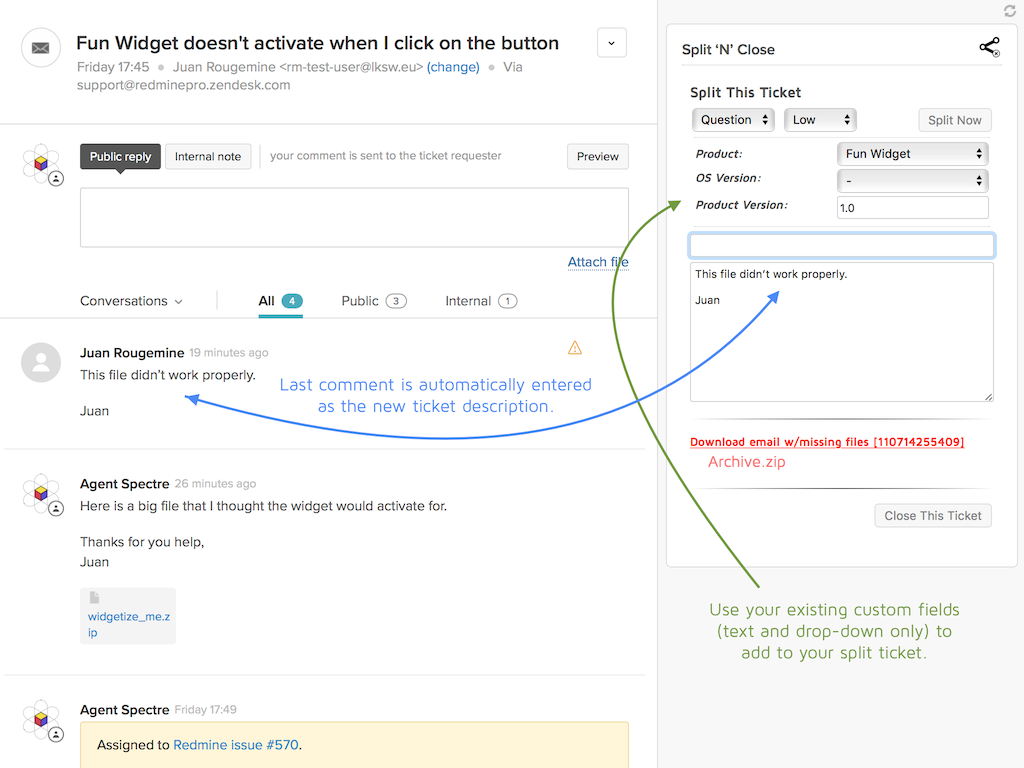
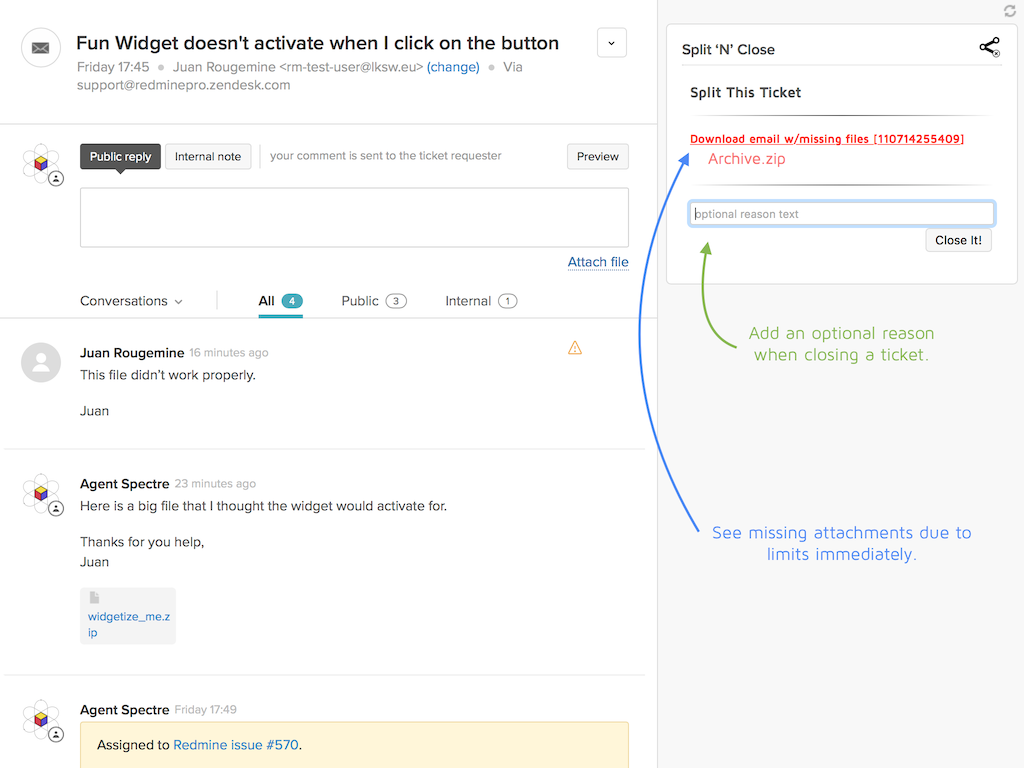
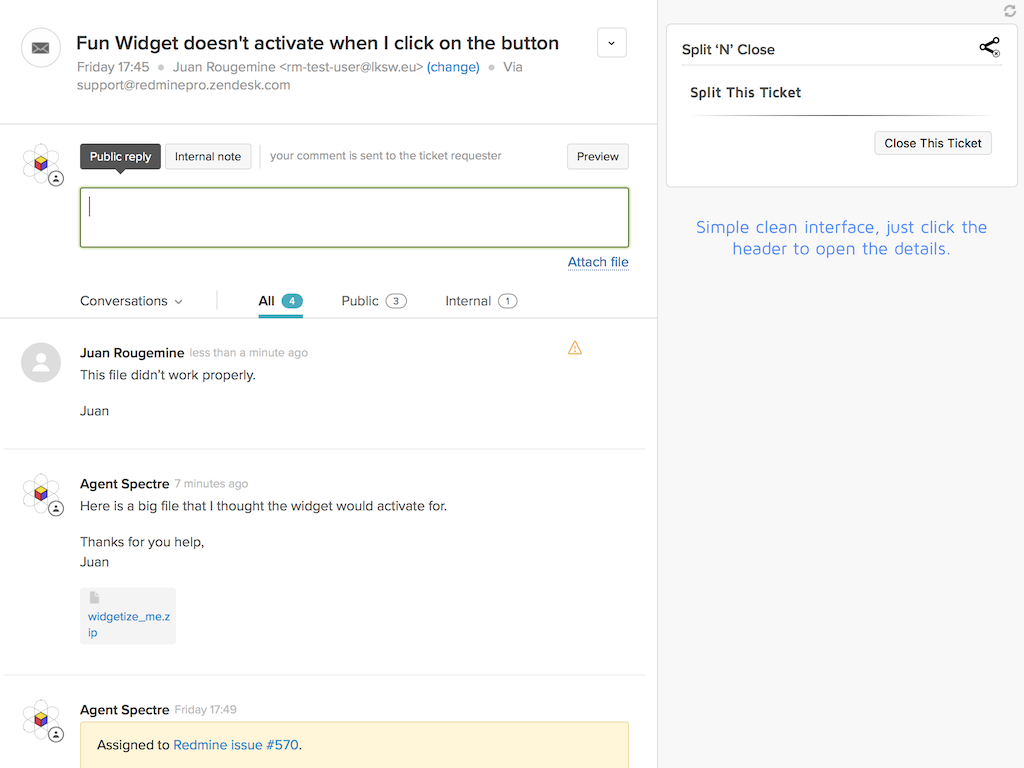
Split ‘n’ Close — Let's you split a ticket off into a new one, when the content has become a separate issue. In addition, it allows you to explicitly close a ticket, with an explanation of why. A last feature is that it shows you quite clearly when an attached file is too big and is not being displayed and lets you download the original email with a single click.
Split ticket
Create a new ticket based on the contents of the current one.
Automatically fills in from last comment, though you can edit.
Choose comments from original ticket to add to the new one. (Premium Feature)
Choose the assignee for the new ticket. (Premium Feature)
Allows all custom fields to be filled in. (Premium Feature)
Creates a note on both the old and new tickets to easily refer back and forth.
Add attachments from either the ticket or the file system. (Premium Feature)
Choose the requester for the new ticket. (Premium Feature)
Can optionally add tag(s) to the new ticket. (Premium Feature)
Indicate the group/agent to which the new ticket should be assigned. (Premium Feature)
Add comment (public or private) to the parent ticket.
Append all the CCs from the parent ticket to the child ticket.
Use the same form as the parent ticket, if there is one.
Define a default form (in settings) to always use for new tickets. (Premium Feature)
Close ticket
Add a comment as to why the ticket is being closed.
Quick action.
Allow administrator to disable this feature. (Premium Feature)
Notify for large email attachments
See clearly when a ticket has a file attachment that is too large
Single click to download the original email with the file to your desktop
SmallCubed, Inc. does not have access to nor store any data at all about users of the RedminePro plugin. The only information that is ever sent from the plugin to SmallCubed is a small set of usage data about which features are used. That information contains an IP address, an anonymized UUID, and the actual subdomain of the Zendesk application to be able to see how many users are using the product. No external code is used for this usage data transfer.
Latest Changes: (version 3.0.11)
Fix – Fixes issue where comments are not added correctly when suppress callout is set.
Latest Changes: (version 3.0.10)
Fix – Fixes issue where comments are not added in the proper order.
Latest Changes: (version 3.0.9)
Fix – Fixes issue where chats could not be added as comments.
Fix – Fixes usage calls.
Latest Changes: (version 3.0.8)
New – Add ability to make the customized additional text on parent tickets always public.
Latest Changes: (version 3.0.7)
New – Add feature to allow for a customized additional text on parent and child split tickets.
Latest Changes: (version 3.0.6)
Change – Logging to determine why requester is sometimes set incorrectly.
Latest Changes: (version 3.0.5)
Fix – If the localStorage is unavailable (i.e. Prevent Third Party Cookies), the Split Ticket button was being disabled.
Latest Changes: (version 3.0.4)
Fix – Fixes issue where the reference to the parent ticket isn't made in Free version.
Change - Add usage tracking for when a user splits a ticket. See our terms here.
Latest Changes: (version 3.0.3)
Fix – Adds a fix for a display issue when there where no custom fields and assignee was visible.
Latest Changes: (version 3.0.2)
New – Add ability to make all added comments private to avoid sending emails.
New – Add setting to set assignee to group of current assignee if none specified.
Fix – Check selected comments when dialog is reopened.
Fix – Fixes corrupt attachments.
Change – Reorder the settings to be a bit more organized.
Change – Add a Premium feature indicator for the settings.
Changes for version 3.0.1:
New – Split the functionality of the app into Free & Premium features.
New – Add the ability to bring comments from the original ticket over to the new one. Choose between, None, Choose…, All, or Public comments.
New – Assign different requester to split ticket.
Fix – Fix issue when the ticket assignee was invalid.
Fix – Fix issue where the app was not correctly resized.
Fix – Fix issue where the assignee value was invalid.
Change – Reorganize the app layout to be more consistent & coherent.
Change – Remove the ability to not close ticket if a required field is not filled in.
Change - Remove custom fields id setting. This has been selected from the actual custom fields for the form for a while.
Changes for version 2.0.12:
Fix – Fixes issue where a split message was not copying the recipient of the original message.
Changes for version 2.0.11:
Fix – Fixes issue where the Attachments window wouldn't show properly.
Changes for version 2.0.10:
Fix – Removes CORS compatibility for the attachment uploads again as advised by Zendesk.
Fix – The link for downloading large email attachments has been fixed to use the proper domain.
Change – The app can now only be installed once per Zendesk domain.
See the entire version history here.
Screenshots


Category rankings
As of Sep 6, 2026- Agent Productivity#24of 404Top 6%
See 90-day rank history for each category
Track daily rank changes, category shifts, and position volatility.
Competitors & alternatives
Split ‘n’ Close doesn't have curated competitor matchups yet. Other tracked agent productivity apps on Zendesk:
Where Split ‘n’ Close stands in the Agent Productivity category
Split ‘n’ Close ranks #24 of 404 apps in the Agent Productivity category, placing it in the top 6% of the listing.
Frequently asked questions
What is Split ‘n’ Close?
Split ‘n’ Close is an app for Zendesk. It currently holds a 4.0-star rating from 82 merchant reviews, and AppRanks has been tracking its public marketplace data on the refresh cadence published in our methodology. It is listed under the Agent Productivity category on AppRanks, where you can see its current category position, review-velocity trend, and how it compares against the top alternatives in the same space. Developed by SmallCubed Inc.
Who uses Split ‘n’ Close?
Split ‘n’ Close is actively installed across Zendesk stores tracked by AppRanks. Its review base is still building, which usually maps to early-stage merchants and stores piloting a new workflow. It is part of the Agent Productivity category on Zendesk.
Where does Split ‘n’ Close rank on Zendesk?
Split ‘n’ Close currently sits at position #24 in the Agent Productivity category on Zendesk. That places it in the top 6% of 404 apps tracked in the same category. Category positions are read from the live marketplace ranking and refresh on each scrape, so the number you see here reflects the most recent crawl rather than a long-running average.