
Multiple JIRA Instance By IntegrateCloud for Zendesk Marketplace
Multiple JIRA Instance By IntegrateCloud is the #106 ranked it and hr app on Zendesk, with a free plan available, as of Sep 10, 2026.
Multiple JIRA Instance By IntegrateCloud is a Zendesk Marketplace app by Integratedcloud.
AppRanks data: Multiple JIRA Instance By IntegrateCloud ranks #106 in IT and HR on Zendesk Marketplace, placing it in the top 79% of that category.
AppRanks verdict
Generated from live marketplace data — refreshed daily
Multiple JIRA Instance By IntegrateCloud is a newly-listed Zendesk app with a limited review volume. It is listed in the IT and HR category on Zendesk Marketplace, which AppRanks treats as the canonical taxonomy node for ranking and competitor comparison. no published reviews yet means feature claims are unverified by the wider merchant base. Without a published review base, the only fit-signal available is the developer's own documentation plus the marketplace's listing-quality audit (linked below). The free tier lets you trial the entry feature set without committing a payment method. AppRanks tracks rating, review count, pricing tier, and category position daily — the figures on this page reflect the most recent scrape from the canonical Zendesk Marketplace listing.
Pros
- +Free tier available — no card required to evaluate
- +Published by Integratedcloud — established developer track record
Cons
- −No public reviews yet — fit and reliability are unverified
Looking to switch from Multiple JIRA Instance By IntegrateCloud?
See Multiple JIRA Instance By IntegrateCloud's alternatives ranked by audit score, rating, and review velocity.
About Multiple JIRA Instance By IntegrateCloud
How Multiple JIRA Instance By IntegrateCloud works
Show full descriptionShow less
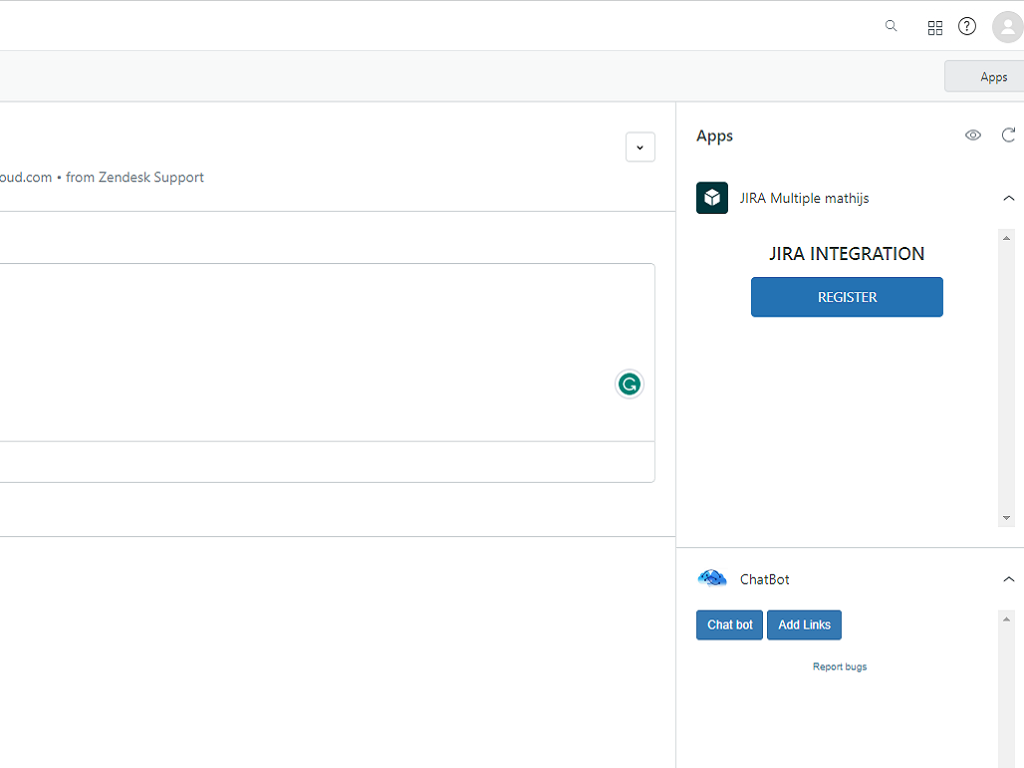
IntegrateCloud creates a seamless workflow between Zendesk Support tickets and Jira issues and unites your support and engineering teams.Support teams can easily escalate and link Zendesk tickets to Jira issues. Notify engineering of bugs that are impeding your customer's experience and get updates on the issue's resolution—all from within Zendesk
Link one or more Zendesk tickets to existing Jira issues.
Create a new Jira issue from within Zendesk with all the info your engineering team needs.
Notify a Jira user through a comment in Zendesk.
Tags from Zendesk to Jira are shared allowing you to power your workflows.
JIRA Integration App by IntegrateCloud allows the users to create JIRA Issues right inside the Zendesk form.It also allows you to link existing Zendesk tickets to an existing JIRA Issues.
Zendesk - Multiple JIRA app by IntegrateCloud also allows syncing of comments and status and other custom fields from Zendesk to JIRA and from JIRA to Zendesk .syncing of comments from Zendesk to JIRA and JIRA to Zendesk will help you alot in increasing the productivity of your team.
Zendesk - The Zendesk JIRA app by IntegrateCloud is easy to setup and use.The Zendesk -Multiple JIRA app provides huge number of features in the app like Create New JIRA Issue, Link Existing JIRA Issue, Notify linked JIRA Issues
Create JIRA Issue **
When clicked on the Create Issue button it loads the JIRA project, JIRA Issue type and based on the selection it will load all the JIRA fields like reporter, assignee custom fields The User can make the selection and click on Create Issue which would create issue in JIRA and then display the corresponding JIRA Id in the App.
Link Existing JIRA Issues
The Link button in the Zendesk-JIRA app allows the support agent to link an existing JIRA Workitem # to the current Zendesk ticket. Zendesk - JIRA app allows the user to create or link multiple JIRA Issues to one Zendesk ticket.
Notify linked JIRA Issues **
This button allows the user to send notifications to the JIRA team which would show up as comments in JIRA.
Syncing of Comments and Status
In the Zendesk-JIRA Integration app Syncing lets you enable the syncing of comments,status and attachments from JIRA to Zendesk and syncing of comments from Zendesk to JIRA instantly.
Note: The Zendesk JIRA integration app is available for full 30 day free trial For more information, please visit our website at https://integratecloud.com
for any help related to setup, please visit to our support website https://support.integratecloud.com/zendesk-multiple-jira-instances-integration/zendesk-multiple-jira-instance-integration
THIS APP SUPPORTS MULTIPLE JIRA INSTANCES With single Zendesk instances.
Screenshots


Category rankings
As of Sep 10, 2026- IT and HR#106of 135Top 79%
- Product and Project Management#153of 196Top 79%
See 90-day rank history for each category
Track daily rank changes, category shifts, and position volatility.
Keyword rankings
Multiple JIRA Instance By IntegrateCloud ranks for 1 keywords across Zendesk Marketplace. Here are the top 1:
- Rank #4
Competitors & alternatives
Multiple JIRA Instance By IntegrateCloud doesn't have curated competitor matchups yet. Other tracked it and hr apps on Zendesk:






Frequently asked questions
What is Multiple JIRA Instance By IntegrateCloud?
Multiple JIRA Instance By IntegrateCloud is an app for Zendesk. It is published on Zendesk Marketplace and tracked by AppRanks, and AppRanks has been tracking its public marketplace data on the refresh cadence published in our methodology. It is listed under the IT and HR category on AppRanks, where you can see its current category position, review-velocity trend, and how it compares against the top alternatives in the same space. Developed by Integratedcloud.
Who uses Multiple JIRA Instance By IntegrateCloud?
Multiple JIRA Instance By IntegrateCloud is actively installed across Zendesk stores tracked by AppRanks. Its review base is still building, which usually maps to early-stage merchants and stores piloting a new workflow. It is part of the IT and HR category on Zendesk.
Where does Multiple JIRA Instance By IntegrateCloud rank on Zendesk?
Multiple JIRA Instance By IntegrateCloud currently sits at position #106 in the IT and HR category on Zendesk. That places it in the top 79% of 135 apps tracked in the same category. Category positions are read from the live marketplace ranking and refresh on each scrape, so the number you see here reflects the most recent crawl rather than a long-running average.