Qvasa is the #7 ranked reporting and analytics app on Zendesk, with a 5.0 average rating from 17 reviews, with a free plan available, as of Sep 3, 2026.
Qvasa is a Zendesk Marketplace app by Qvasa Support. With a rating of 5.0★ from 17 reviews, it currently ranks #7 in the Reporting and Analytics category.
AppRanks data: Qvasa ranks #7 in Reporting and Analytics on Zendesk Marketplace, placing it in the top 3% of that category.
AppRanks verdict
Generated from live marketplace data — refreshed daily
Qvasa is a category-leading Zendesk app with a limited review volume. It is listed in the Reporting and Analytics category on Zendesk Marketplace, which AppRanks treats as the canonical taxonomy node for ranking and competitor comparison. 17 reviews put it in the early-traction tier — useful for early-stage stores willing to be on the leading edge. Early-traction review counts are sensitive to single launch periods or feature events, so a 30-day re-check before bigger commitments often resolves whether the trend is sustained. The free tier lets you trial the entry feature set without committing a payment method. AppRanks tracks rating, review count, pricing tier, and category position daily — the figures on this page reflect the most recent scrape from the canonical Zendesk Marketplace listing.
Pros
- +High average rating (5.0★) signals consistent merchant satisfaction
- +Free tier available — no card required to evaluate
- +Published by Qvasa Support — established developer track record
Cons
- −Limited review base (17) — ratings can shift significantly with new feedback
Looking to switch from Qvasa?
See Qvasa's alternatives ranked by audit score, rating, and review velocity.
About Qvasa
How Qvasa works
Show full descriptionShow less
Elevate Your Customer Support with Qvasa's Live Analytics
Qvasa transforms Zendesk analytics, offering an integrated platform that connects all aspects of customer support. From live dashboards to AI-driven insights, Qvasa brings unprecedented visibility and control over your Zendesk operations. Explore the powerful features Qvasa offers to revolutionize your support experience and enhance your operation with key features like Live Dashboards, Threshold Alerting, AI Analytics, and much more
Key Features:
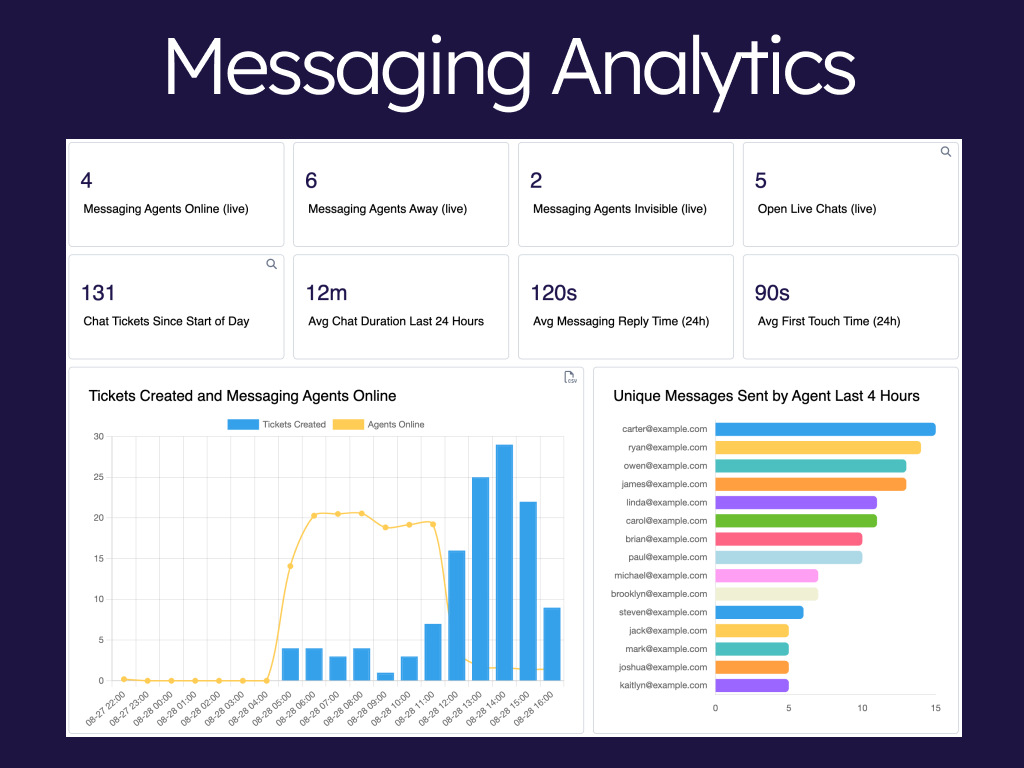
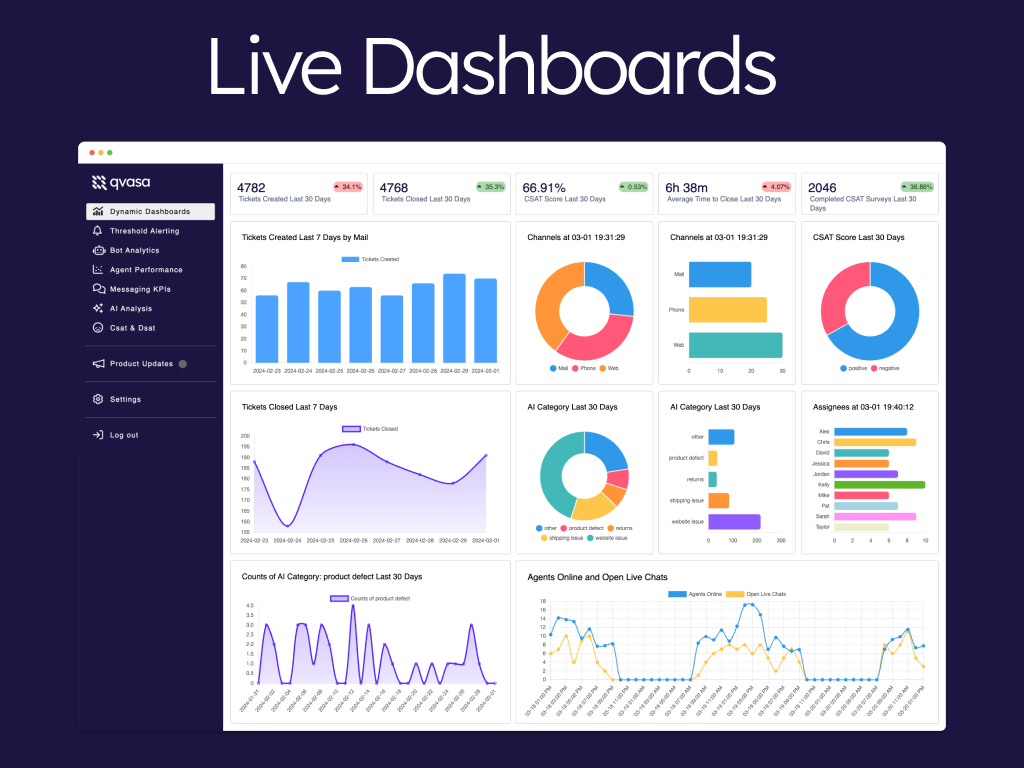
Live Dashboards: Real-time monitoring with customizable dashboards for messaging, chat, and talk.
Alerting & Monitoring: Proactive alerting with customizable thresholds for demand, wait times, and more.
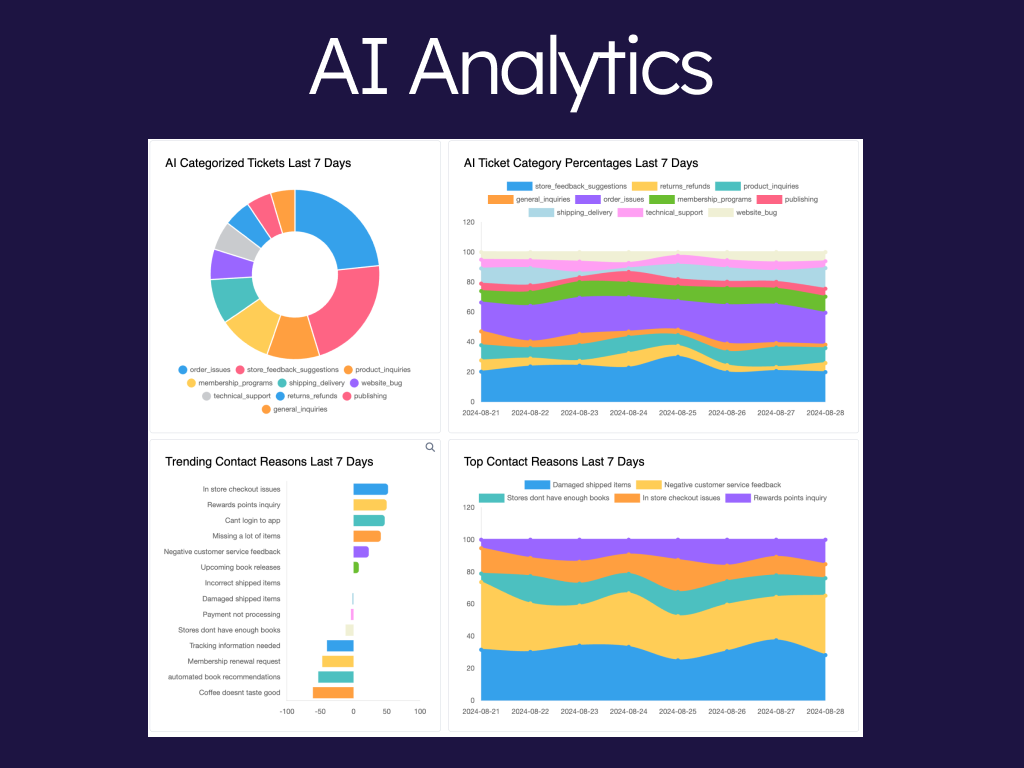
AI Analytics: AI-driven insights, auto-tagging, inferred CSAT, trend analysis, DSAT reasons and more for deep customer understanding.
Messaging Integration: Complete visibility into messaging operations, with detailed chat metrics and KPIs.
Agent Performance Monitoring: In-depth agent metrics to optimize performance and improve customer satisfaction.
Sunco Integration: Seamless integration with Sunco API for complete visibility into bot interactions.
Bot Analytics: Advanced analytics for tracking and improving bot performance, including deflection rate and self-serve rate improvements.
Custom Alerts: Set up configurable alerts for important thresholds, including organization-based alerts and brand alerts.
Staffing Projections: Accurate staffing forecasts powered by machine learning.
Slack & SMS Integration: Real-time alerts delivered directly to Slack or via SMS.
AI Tagging: Sophisticated auto-tagging with generative and fixed response capabilities.
1. Live Dashboards
Monitor Support Demand: Real-time views of chat metrics and ticket volumes to proactively manage spikes in demand.
Agent Productivity Tracking: Track agent performance metrics live, allowing for immediate response to any drop in efficiency.
Deep Data Analysis: Use AI-generated filters to uncover trends and patterns in customer interactions across channels.
Cross-Channel Insights: Integrate with Zendesk Messaging and Talk to monitor conversations across all customer touchpoints.
2. Alerting & Monitoring
Proactive Issue Identification: Set alerts for ticket volume surges or wait times to prevent service delays.
Targeted Notifications: Customize alerts for specific teams or organizations, ensuring relevant stakeholders are promptly informed.
Channel-Based Notifications: Get alerts via email, Slack, or SMS, making it easy to stay updated on support dynamics anytime, anywhere.
Historical Alert Analysis: Use alert history to understand recurring issues and improve operational response times.
3. AI Analytics
Auto-Tagging Contact Reasons: Automatically categorize tickets based on the reason for contact, allowing efficient triage and prioritization.
Emerging Issue Detection: Identify new customer concerns in real-time to address potential product or service issues swiftly.
Inferred CSAT Analysis: Predict customer satisfaction (CSAT) levels based on ticket content without explicit customer feedback. This inferred CSAT provides insight into customer sentiment across interactions, helping you to understand and improve service quality even when CSAT scores are unavailable.
Comprehensive Issue Insights: Leverage AI summaries to gain a snapshot of prevalent issues and track shifts in customer contact reasons.
Strategic Trend Analysis: Use AI to forecast potential support needs and refine support strategies based on customer behavior patterns.
4. Messaging Integration
Real-Time Chat Monitoring: Track conversation quality and agent performance in live chats, identifying areas for improvement.
Messaging Efficiency Insights: Assess KPIs such as response times and customer satisfaction specific to live chat to boost operational efficiency.
Multi-Channel Messaging View: Monitor all messaging platforms from a unified dashboard to streamline and manage omnichannel support.
Customer Satisfaction Tracking: Analyze customer feedback in live chats to improve the quality of service in real time.
5. Agent Performance Monitoring
Measure Individual Agent Impact: Monitor key metrics like message quality and resolution times to identify top and underperforming agents.
Analyze Work Patterns: Gain insights into agent activity, including break times and ticket handling rates, for improved resource planning.
Customer Experience Impact: Link agent performance data to customer satisfaction metrics, enhancing support strategies.
In-Depth KPI Analysis: Track detailed live chat KPIs to understand how each agent influences overall team performance.
6. Sunco Integration
Complete Bot Interaction Tracking: Capture data on bot conversations, including those that don't escalate, to improve self-serve rates.
Deflection Rate Measurement: Track bot effectiveness in resolving issues without human intervention, enhancing bot quality.
Customer Self-Service Optimization: Use insights from bot interactions to identify common inquiries and create efficient self-serve options.
Bot Conversation Analytics: Review historical bot interactions to refine responses and increase bot efficiency over time.
7. Bot Analytics
Deflection Efficiency Analysis: Understand both deflected and undeflected bot conversations to maximize bot effectiveness.
Bot Performance Optimization: Leverage real-time insights into bot interactions to continually improve response accuracy.
Self-Serve Improvement: Measure and boost self-serve rates by addressing customer inquiries through bots before they escalate to tickets.
Feedback Loop for Bots: Create a continuous feedback loop using analytics to refine and enhance bot responses based on customer interactions.
Qvasa: Your Comprehensive Support Solution
Qvasa is more than a tool; it's a strategic asset for transforming customer support. With live dashboards, AI-powered insights, Sunco integration, and comprehensive analytics, empower your team to deliver exceptional service backed by data-driven decisions. Utilize our volume forecasts and staffing forecast capabilities to manage your workforce efficiently and reduce costs.
Transform your support operations with our advanced analytics and insights. Install now to experience a new level of efficiency and customer satisfaction.
For information on how Qvasa handles and protects your data, please visit our Trust Center. See our Terms and Conditions for usage policies.
Screenshots


Category rankings
As of Sep 4, 2026- Reporting and Analytics#7of 256Top 3%
- AI and Bots#8of 377Top 3%
See 90-day rank history for each category
Track daily rank changes, category shifts, and position volatility.
Keyword rankings
Qvasa ranks for 2 keywords across Zendesk Marketplace. Here are the top 2:
- Rank #12
- Rank #14
Competitors & alternatives
Qvasa doesn't have curated competitor matchups yet. Other tracked reporting and analytics apps on Zendesk:
Where Qvasa stands in the Reporting and Analytics category
Qvasa ranks #7 of 256 apps in the Reporting and Analytics category, placing it in the top 3% of the listing.
Frequently asked questions
What is Qvasa?
Qvasa is an app for Zendesk. It currently holds a 5.0-star rating from 17 merchant reviews, and AppRanks has been tracking its public marketplace data on the refresh cadence published in our methodology. It is listed under the Reporting and Analytics category on AppRanks, where you can see its current category position, review-velocity trend, and how it compares against the top alternatives in the same space. Developed by Qvasa Support.
Who uses Qvasa?
Qvasa is actively installed across Zendesk stores tracked by AppRanks. Its review base is still building, which usually maps to early-stage merchants and stores piloting a new workflow. It is part of the Reporting and Analytics category on Zendesk.
Where does Qvasa rank on Zendesk?
Qvasa currently sits at position #7 in the Reporting and Analytics category on Zendesk. That places it in the top 3% of 256 apps tracked in the same category. Category positions are read from the live marketplace ranking and refresh on each scrape, so the number you see here reflects the most recent crawl rather than a long-running average.