
Lightning Macros for Zendesk Marketplace
Lightning Macros is the #26 ranked knowledge and content management app on Zendesk, with a 5.0 average rating from 3 reviews, with a free plan available, as of Sep 10, 2026.
Lightning Macros is a Zendesk Marketplace app by Lightning Macros. With a rating of 5.0★ from 3 reviews, it currently ranks #26 in the Knowledge and Content Management category.
AppRanks data: Lightning Macros ranks #26 in Knowledge and Content Management on Zendesk Marketplace, placing it in the top 13% of that category.
AppRanks verdict
Generated from live marketplace data — refreshed daily
Lightning Macros is a category-leading Zendesk app with a limited review volume. It is listed in the Knowledge and Content Management category on Zendesk Marketplace, which AppRanks treats as the canonical taxonomy node for ranking and competitor comparison. 3 reviews put it in the early-traction tier — useful for early-stage stores willing to be on the leading edge. Early-traction review counts are sensitive to single launch periods or feature events, so a 30-day re-check before bigger commitments often resolves whether the trend is sustained. The free tier lets you trial the entry feature set without committing a payment method. AppRanks tracks rating, review count, pricing tier, and category position daily — the figures on this page reflect the most recent scrape from the canonical Zendesk Marketplace listing.
Pros
- +High average rating (5.0★) signals consistent merchant satisfaction
- +Free tier available — no card required to evaluate
Cons
- −Limited review base (3) — ratings can shift significantly with new feedback
Looking to switch from Lightning Macros?
See Lightning Macros's alternatives ranked by audit score, rating, and review velocity.
About Lightning Macros
How Lightning Macros works
Show full descriptionShow less
Add text fields, integers, decimals, dropdown lists, and more to your macros! Increase productivity, reduce errors.
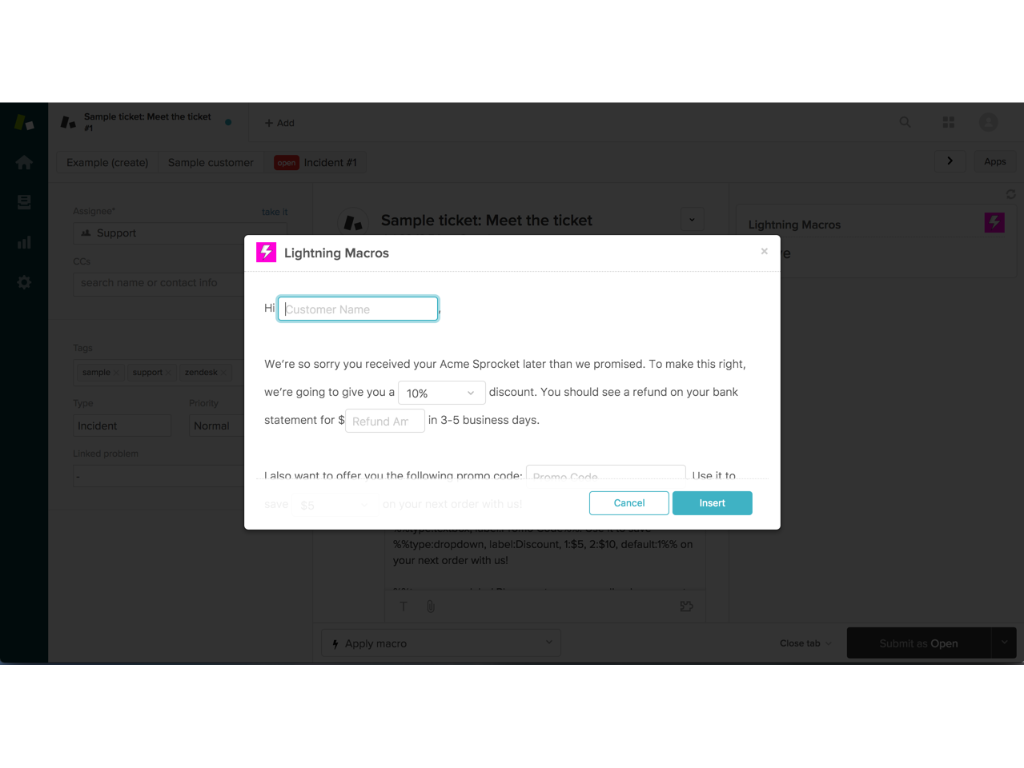
When an agent applies a Lightning Macro to a ticket, they’re automatically prompted with a form that enables them to quickly customize only the parts of the macro you specify (see screenshots).
By using the tab key, they can quickly complete the form without ever using their mouse. Add validation logic to your fields to eliminate errors!
See 'How to Install' for your 14 day free trial. For more information visit: http://www.lightningmacros.com
Example
Let's say you’ve created a macro to quickly respond to your customers that have received their order later than promised. Most of the text in your macro is standardized but you need to customize their name, the discount you’re providing them and the refund amount they should expect on their credit card statement.
Hi [INSERT CUSTOMER NAME HERE],
We’re so sorry you received your Acme Sprocket later than we promised. To make this right, we’re going to give you a [INSERT DISCOUNT AMOUNT HERE]% discount. You should see a refund on your bank statement for [INSERT REFUND AMOUNT HERE] in 3-5 business days.
[INSERT SOME PERSONALIZED TEXT HERE]
Sincerely,
{{current_user.name}}
While this works, it is less than ideal for two primary reasons:
Speed. To add customized text, the agent must drag their mouse over the parts they would like to change. In just this simple example, the agent must move their mouse, drag over text, and then type up to 6 times. This is extremely time consuming.
Accuracy. The customized text isn’t validated, so it’s too easy for your agents to accidentally add something like “we’re going to give you a 1000% discount.” Using macros this way is error-prone!
Wouldn’t it be great if your agents could easily add customized text without moving their mouse at all? And wouldn’t it be super sweet if macros validated custom text, preventing confusing and embarrassing typos? We agree—that’s why we created Lightning Macros.
With just a few tweaks to your existing macros, whenever an agent applies a macro, they’re immediately prompted with a validated entry form that they can complete quickly by pressing the tab key.
Field Types
Textbox: A short line of text.
Examples: name, apartment number, product name, etc.
Memo: Multiple lines of text.
Examples: address, product description, personalized message, etc.
Integer: An integer. Define minimum and maximum values.
Examples: quantity, age, discount amount, SKU number, etc.
Decimal: A decimal. Define minimum and maximum values.
Examples: dollar amount, precise discount amount, etc.
Dropdown List: A pre-defined list of options.
Examples: color, subscription type, membership level, category, etc.
Optional Text: An optional block of text.
Examples: return instructions, terms of service, etc.
Screenshots


Category rankings
As of Sep 10, 2026- Knowledge and Content Management#26of 205Top 13%
See 90-day rank history for each category
Track daily rank changes, category shifts, and position volatility.
Keyword rankings
Lightning Macros ranks for 1 keywords across Zendesk Marketplace. Here are the top 1:
- 1.macrosRank #4
Competitors & alternatives
Lightning Macros doesn't have curated competitor matchups yet. Other tracked knowledge and content management apps on Zendesk:






Frequently asked questions
What is Lightning Macros?
Lightning Macros is an app for Zendesk. It currently holds a 5.0-star rating from 3 merchant reviews, and AppRanks has been tracking its public marketplace data on the refresh cadence published in our methodology. It is listed under the Knowledge and Content Management category on AppRanks, where you can see its current category position, review-velocity trend, and how it compares against the top alternatives in the same space. Developed by Lightning Macros.
Who uses Lightning Macros?
Lightning Macros is actively installed across Zendesk stores tracked by AppRanks. Its review base is still building, which usually maps to early-stage merchants and stores piloting a new workflow. It is part of the Knowledge and Content Management category on Zendesk.
Where does Lightning Macros rank on Zendesk?
Lightning Macros currently sits at position #26 in the Knowledge and Content Management category on Zendesk. That places it in the top 13% of 205 apps tracked in the same category. Category positions are read from the live marketplace ranking and refresh on each scrape, so the number you see here reflects the most recent crawl rather than a long-running average.