UpdraftPlus
The UpdraftPlus Backup & Migration Plugin is trusted by the WordPress community to backup, restore and migrate their WordPress websites. UpdraftPlus is actively installed on more than 3 million websites around the world. Backup with UpdraftPlus UpdraftPlus is the world’s highest ranking and most popular scheduled backup and migration plugin. Backup to your preferred storage location and restore in just three clicks. Backup to Dropbox, Google Drive, Amazon S3 (or compatible), Rackspace Cloud, FTP, DreamObjects, Openstack Swift or email. The paid version also allows you to backup to Microsoft OneDrive, Microsoft Azure, Google Cloud, Backblaze B2, SFTP, SCP, pCloud, WebDAV or UpdraftVault, our integrated storage option for UpdraftPlus. Backup manually or schedule to run every 2, 4, 8 or 12 hours, daily, weekly, monthly or fortnightly. Restore with UpdraftPlus Your WordPress website is vulnerable. Your site may get hacked. Something could go wrong with an update or your server could crash. You might need to reverse a change made or a mistake caused by human error. Whatever the reason, you can restore your WordPress website in just a few clicks with UpdraftPlus. Choose which components to restore (e.g. plugins, themes, database etc.), click again to restore, then click again to return to the main screen. Migrate with UpdraftPlus It’s easy to migrate your WordPress website to another web host, server or domain with this free version of UpdraftPlus. To migrate, simply download your database, plugins, themes etc. from the source site, then upload them into your destination site. When migrating, a built-in search-and-replace engine identifies old strings and replaces these to reflect the new location. UpdraftPlus saves you time and reduces the risk of broken links or missing files associated with manual migrations. Why UpdraftPlus? Writing a reliable backup and migration plugin that ‘just works’ consistently across millions of different WordPress deployments is hard. UpdraftPlus is relied upon to do exactly that. We’re trusted and actively deployed on more websites around the world than any other WordPress backup and migration plugin. UpdraftPlus: Backs up, migrates and restores Offers a huge number of remote storage locations Allows you to schedule backups, so you can ‘set and forget’ Is comprehensive and easy to use Is proven to work on over 3 million sites. UpdraftPlus Premium The free version of UpdraftPlus will back up and migrate your website perfectly well. However if you need more features and options you can purchase our Premium version. Backup and Migrate with UpdraftPlus Premium, and: Get automatic backups before updates. Restore the very latest version if a WordPress or plugin update breaks your site. Backup Incrementally. Changes are added to the master, saving server resources vs repeatedly backing up in full. Get more remote storage options including Microsoft OneDrive, SFTP, Microsoft Azure, WebDAV, Google Cloud, SCP, Backblaze and pCloud. Get 1GB of integrated storage with UpdraftVault for 99.999% reliability, redundancy and scalability. Get more control over how many backups are stored in a specified interval. Restore from other backup plugins including BackWPup, BackupWordPress, Simple Backups and more. Run backups at set times e.g. during periods of low traffic. Backup to more than one location for added protection. Get detailed reports. Includes cryptographic checksums so you can verify the integrity of the backup files and more. Get Premium migration. Migrating to the destination site is more direct and can be done from the source site. Get Multisite / multi-network compatibility. Backup non-WP files and databases e.g. tables belonging to your e-commerce store or customisations to WordPress core. Get database encryption. Manage your backups and migrations from the WP-CLI. Get Premium Support. Find out more on our comparison page. UpdraftPlus Premium is available for purchase here. Managing multiple websites? UpdraftCentral is a powerful remote control dashboard for WordPress that allows you to manage your backups, as well as updates, users, pages, posts, plugins and themes from one central location. Choose between: UpdraftCentral (free, self-hosted) UpdraftCentral Premium (paid-for, self-hosted) UpdraftCentral Cloud (paid-for, fully-hosted) Optimize your sites centrally by combining the power of WP-Optimize and UpdraftCentral or manage your backups centrally by combining the power of UpdraftPlus with UpdraftCentral. Need to create a temporary clone of your site? UpdraftClone makes it quick and easy to create a temporary sandbox for changes you want to try out. Simply select the versions of WordPress and PHP that you want, and we’ll do the rest. More about UpdraftClone The full suite of plugins from Team Updraft and friends UpdraftPlus. Backup, migrate and restore. Rated 5* on the plugin directory and trusted by more than 3 million WordPress website owner WP-Optimize. Clean the database, compress images and caching. Optimize your WordPress website. 5* user rating. 1 million + active installs. All-In-One Security (AIOS). Secure your WordPress website. Comprehensive, feature rich and easy to use. 5* user rating and 1 million + active installs. WP Overnight. Quality Extensions for your WooCommerce store. 5* rated invoicing, order and product management, customer management solutions and more. Easy Updates Manager. Take control of updates. Lots of features for free, and a Premium version with even more – over 300,000 users. Internal Link Juicer.Boost your SEO. Automate internal links within your WordPress website. Save time and rank higher in the search engines. For other useful, free plugins see our lead developer’s profile, here. Are you multilingual? Can you translate? Do you want to help people that speak your language to backup, migrate and restore their WordPress websites? The UpdraftPlus backup, migration and restoration plugin is ready and waiting. The translation process is easy, and web-based – please go here for instructions: https://updraftplus.com/translate/. Or, if you’re already an expert WordPress translator, just pick out the .pot file from the wp-content/plugins/updraftplus/languages/ directory – if you scan for translatable strings manually, then you need to get these functions: _x(), __(), _e(), _ex(), log_e(). Many thanks to our existing translators. License Copyright 2011-26 David Anderson This program is free software; you can redistribute it and/or modify it under the terms of the GNU General Public License as published by the Free Software Foundation; either version 3 of the License, or (at your option) any later version. This program is distributed in the hope that it will be useful, but WITHOUT ANY WARRANTY; without even the implied warranty of MERCHANTABILITY or FITNESS FOR A PARTICULAR PURPOSE. See the GNU General Public License for more details. You should have received a copy of the GNU General Public License along with this program; if not, write to the Free Software Foundation, Inc., 51 Franklin St, Fifth Floor, Boston, MA 02110-1301 USA Non-English translators are provided by volunteers, and wordpress.org does not give plugin developers control over their translations; thus relying on them is at your own risk; UpdraftPlus cannot guarantee that translations from the original English are accurate. We recognise and thank those mentioned at https://updraftplus.com/acknowledgements/ for code and/or libraries used and/or modified under the terms of their open source licences.
Related Products – Create Upsells, Cross-sells, and Product Recommendations for WooCommerce
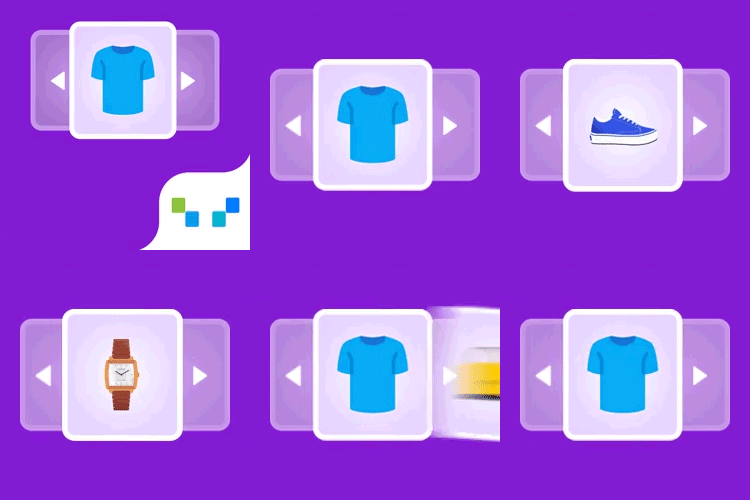
Related Products for WooCommerce plugin shows custom related products in WooCommerce. You can show WooCommerce related products by category, tags, or choose products to show as related products on the product details page of a specific product. Showing WooCommerce related products recommendation brings customers’ attention to other products in your store that they might be interested in. This persuades them to try those products, thus resulting in an increase in the average order value. You can also make use of the related product’s functionality in your WooCommerce store to suggest upsells, cross-sells and similar products to your customers and boost your sales. Key features of WooCommerce Related Products Plugin Disable default WooCommerce related products functionality Choose custom related products Option to set up WooCommerce related products for the entire store (by category, tags) Set up related products for individual products (by category, attributes, tags, or products) Exclude selected categories from showing as related products Exclude out of stock products from showing as related products Displays related products in the slider Customize the related products section on the front-end (heading, order of items, number of products, and more) Relate products by subcategory using a filter. Use WooCommerce related products shortcode ([wt-related-products product_id=”xx”]) to display related products for any posts/pages on your site Show the same set of related products for their translated versions as well when using WPML Remove theme’s default related products in WooCommerce Woocommerce related products widget is compatible with Block-based themes Import related products using the default WooCommerce importer Learn more ✅ Tested OK with WooCommerce 11.2.1 Related Products for WooCommerce Product Recommendations- Installation and Setup You can learn about the installation and setup of the WooCommerce related products plugin with the help of this setup guide. You can also check out this video to get a quick understanding of the WooCommerce related products plugin. Compatible plugins Product import export for WooCommerce WP all import export for WooCommerce Related Products as a Powerful Marketing Tool Suggesting related products in a WooCommerce store isn’t just a nice-to-have — it’s one of the most effective sales techniques available today. Whether you’re upselling premium items or cross-selling complementary products, displaying related products at key points in the customer journey can significantly increase your average order value and conversion rates. Just like Amazon’s powerful recommendation engine, WooCommerce product recommendation plugins can act as virtual sales assistants — guiding shoppers by showing them relevant suggestions based on what they’re already interested in. This keeps customers engaged and encourages them to explore more, ultimately leading to higher cart totals. By showing personalized product recommendations on product pages, cart pages, or even during checkout, you can help reduce decision fatigue and build buyer confidence. Customers are more likely to trust your store when they see thoughtful, relevant suggestions, making online shopping faster, easier, and more enjoyable — especially for those who dislike browsing or are short on time. Different Ways to Show Related Product Recommendations on your WooCommerce store WooCommerce Related Products feature is one of the important sales tools available for store owners. “Related products” can be employed on your website in different forms. When built-in features in WooCommerce enable you to showcase related products like upsells and cross-sells, third-party plugins enhance this capability. They can automatically recommend related products and create custom related product suggestions based on the activities of customers on your WooCommerce store. The three main methods to easily display similar product suggestions are: Upsells These products are shown on the product page as an alternative to the product customers have chosen to purchase. There will be an upgrade of the chosen product either in quality or price thereby persuading the customer to choose the better one. It comes under the default text “you may also like”. Cross-sells On contrary to up-sells, cross-sells are displayed on the cart page under the title “you may be interested in”. These products would complement the products currently in the cart. On seeing this customers would feel an urge to buy the complementary products along with the products in their cart thereby selling more products for the store. Notifying customers about phone cases while purchasing a phone would be a perfect example of cross-selling. Custom Related Products Set up and manage custom related products to display on your product pages. Use flexible options like categories, tags, attributes, or specific products to fine-tune the WooCommerce related products shown to your shoppers. Advanced WooCommerce Product Recommendations – Premium Version WooCommerce Product Recommendations is an advanced recommendation tool for WooCommerce stores. The plugin offers multiple product recommendation templates such as Related Products, Bestsellers, Top-rated Products, Frequently Bought Together, New Arrivals, Recently Viewed, and more. Apart from these recommendations, you can create custom recommendations, with advanced recommendation rules and conditions. Major features of WooCommerce Product Recommendations (Premium) Multiple pre-built recommendation templates: Related products, recently viewed, bestsellers, top-rated, frequently bought together, new arrivals, and more. Advanced filters for recommendations: Choose various filters and conditions to show recommendations. Display product recommendations on multiple store pages: Recommend products on multiple store pages, such as product page, category page, shop page, cart page, checkout page, and order received page to increase sales with product recommendations in WooCommerce. Create custom recommendations with custom rules: Create your own recommendation campaigns with custom rules and conditions. Customize the recommendation widgets: Customize the appearance of the recommendation widgets. Hide out-of-stock products: Choose to exclude out-of-stock products from the recommendation. Advanced sorting options: Sort the products in the recommendation widgets based on rating, price, popularity, and more. Built-in Recommendation Widgets Available on Advanced WooCommerce Product Recommendations Related Products: Improve sales with relevant WooCommerce related product recommendations. Bestsellers: Showcase your popular products to earn more sales. Top rated: Easily display the highest rated products of your store. Frequently Bought Together: Upsell and cross sell with relevant product bundles. New Arrivals: Show-off and grab customers attention to your store’s latest arrivals. Recently Viewed: Remind customers about the products they have previously viewed. Trending Now: Recommend items trending in the past 30 days. You May Also Need GDPR Cookie Consent is our flagship cookie consent plugin, which is a Google-certified CMP built specifically for WordPress websites. With this plugin, you can display a fully customizable cookie banner on your site to help ensure compliance with major privacy laws like the GDPR and CCPA. Key features include an advanced cookie scanner, automatic script blocking, and detailed consent log reporting. It also lets you deploy an IAB-compliant cookie banner and supports Google Consent Mode v2. Get GDPR Cookie Consent Plugin Now. About WebToffee WebToffee creates quality WordPress/WooCommerce plugins that are easy to use and customise. We are proud to have thousands of customers actively using our plugins across the globe.