Trackbase Analytics
Trackbase Analytics is the official WordPress plugin for Trackbase. It gives you two things in one simple settings page: Analytics Tracking — enter your Trackbase project ID once and the Trackbase analytics script is automatically loaded in the of every page on your site. Crawler Analytics — detect bot and crawler visits server-side and send them to Trackbase. Works without Cloudflare, without JavaScript, and without any extra infrastructure. This plugin requires a (free or paid) Trackbase account and relies on the Trackbase third-party service to function. Both features are opt-in: nothing is sent to Trackbase until you enter a project ID and/or a crawler key in the plugin settings. See the “External services” section below for full details on what data is transmitted and when. External services This plugin connects to Trackbase, a third-party software-as-a-service platform operated by Trackbase, to provide its analytics and crawler-tracking functionality. The plugin is not functional on its own and requires a Trackbase account. The plugin only contacts the Trackbase service when you have entered a project ID and/or crawler key on the settings page. The service is provided by Trackbase. Its terms and policies are available here: Terms of Service: https://trackbase.ai/terms-of-service/ Privacy Policy: https://trackbase.ai/privacy-policy/ 1. Analytics Tracking script (https://app.trackbase.ai/js/tracker.js) When a Trackbase project ID is configured, a tag is added to the front end of your site that loads the Trackbase analytics script from app.trackbase.ai. This script runs in your visitors’ browsers and collects standard web analytics data such as page URL, referrer, browser type, screen size, and approximate location derived from IP address. What it is used for: collecting website analytics so you can view visitor data in your Trackbase dashboard. Data sent: standard web analytics events triggered in the visitor’s browser (page URL, referrer, browser type, screen size, approximate location derived from IP address). When it is sent: on every page view by a visitor on the front end of your site, only when a project ID is configured. Service provider: Trackbase Terms of Service: https://trackbase.ai/terms-of-service/ Privacy Policy: https://trackbase.ai/privacy-policy/ 2. Crawler Analytics ingest endpoint (https://app.trackbase.ai/api/ingest/wordpress-crawler) When a Crawler Analytics key is configured, the plugin detects bot/crawler visits on your server and sends a small JSON payload to Trackbase’s ingest endpoint for each detected crawler hit. What it is used for: monitoring how search engine and AI crawlers interact with your website so you can view crawler analytics in your Trackbase dashboard. Data sent for each crawler hit: timestamp, requesting client IP address, User-Agent string, requested host, requested path, HTTP method, referrer, HTTP response status, the source identifier “wordpress-plugin”, and the plugin version. When it is sent: only on front-end page requests where the User-Agent matches a known crawler/bot pattern, and only when a crawler key is configured. Service provider: Trackbase Terms of Service: https://trackbase.ai/terms-of-service/ Privacy Policy: https://trackbase.ai/privacy-policy/ By installing this plugin and entering your credentials, you authorize the plugin to transmit the data described above to Trackbase. To stop all transmission, clear the project ID and crawler key fields in the plugin settings. Privacy This plugin transmits data to a third-party service (Trackbase) as documented in the “External services” section above. The plugin itself does not store personal data in your WordPress database — only your Trackbase project ID and crawler key are stored as plugin options. The plugin automatically registers a suggested privacy policy text using wp_add_privacy_policy_content(). To include it in your site’s privacy policy, go to Tools → Privacy in your WordPress admin and review the suggested text for “Trackbase Analytics”. Site owners in jurisdictions with consent requirements (such as GDPR/ePrivacy in the EU/EEA, or similar laws elsewhere) are responsible for obtaining the appropriate visitor consent before enabling analytics tracking on the front end of their site. Support Questions? Visit www.trackbase.ai or use the Contact Support button inside the plugin settings.
Top keywords
- trackbase34×5.04%
- analytics15×2.23%
- crawler14×2.08%
- ai11×1.63%
- trackbase ai10×1.48%
- service9×1.34%
- data8×1.19%
- https8×1.19%
- privacy8×1.19%
- id7×1.04%
- page7×1.04%
- project7×1.04%
Globe Visitors Counter
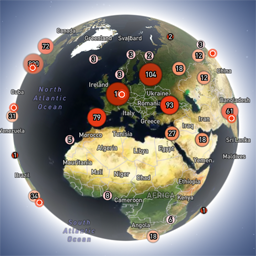
Globe Visitors Counter (Lite) adds a beautiful, fast, iframe-isolated 3D visitor globe to any WordPress site. It instantly shows your audience geography — fully locally, privately, and without any third-party tracking. This Lite version is designed for clarity, speed, and instant visual feedback — especially on landing pages and campaign pages. Use Case: Instant Visual Feedback for Advertising Campaigns The situation You have a product or a service. You launch an advertising campaign: Google Ads Facebook / Instagram TikTok banner ads email campaigns any other traffic source All traffic is sent to one landing page. Usually what comes next is boring: tables, charts, numbers, dashboards, “we’ll analyze it later”. The solution You place Globe Visitors Counter Lite directly on the landing page. No server setup. No external analytics. No configuration. And you start seeing your traffic with your own eyes. How it works (very simple) You launch the ads Visitors arrive at the page Each real visitor appears as a dot on the globe — in real time, from their actual location The globe comes alive and instantly shows: – whether people are coming at all – which countries and regions react – whether the campaign works or misses completely No dots — ads don’t work. Dots appear — ads are alive. Why Lite is perfect for landing pages Lite is not deep analytics. It’s a visual “life indicator”. Perfect when you need: – fast visual feedback – immediate confirmation that traffic is real – zero setup and zero learning curve – a simple “wow effect” for clients, teams, or investors You watch, not analyze. Key Features Interactive 3D Land-Cover globe included out of the box Real-time visitor logging using a tiny local JSON file Historical dots displayed automatically Zero configuration, works with all themes & editors Shortcode-based, easy placement on any page No cookies, no remote APIs, GDPR-friendly Ultra-fast loading thanks to iframe sandboxing How It Works When a page with the shortcode is opened, the plugin loads a fully self-contained viewer from: /wp-content/uploads/visitors-lite-landcover/ Each visit is logged locally as a minimal record (timestamp + coordinates + city + country) into: visitors.json Everything stays on your server. No tracking pixels. No third-party analytics. No cookies. Why Use It Ideal for landing pages and product launches Visualizes global audience instantly Safe for cached pages and CDNs Works even on heavily optimized sites When You May Need the Full Version Lite is intentionally simple and fast. If you need: – long-term statistics – multiple pages or sites – extended visitor history – advanced visual modes and skins – more control and customization …then the Full (Pro) version may be a better fit. Lite remains perfect for single pages, launches, tests, and quick visual validation. Tester Program (optional) We are tuning defaults and performance for upcoming builds. If you want to enable advanced features during testing at no cost (extra visual modes, effects, skins), join via Support: https://wordpress.org/support/topic/looking-for-testers-free-advanced-features-for-feedback/ Usage Shortcode: [visitors_globe_lite title=”VISITORS” width=”100%” height=”600″] Attributes: – title — optional caption above the globe – width — iframe width (100% or fixed px) – height — iframe height in px Place the shortcode anywhere — Classic or Block editor.