Popup Builder & Popup Maker for WordPress – OptinMonster
🤩 Make popups & optin forms to get more email newsletter subscribers, leads, and sales – #1 most popular popup builder plugin! 🚀 The Best Popup Builder for WordPress and Email Newsletter Popup Plugin OptinMonster is the best WordPress popup plugin and the most popular, too! Over 1.2 MILLION smart marketers like you trust us to make sure no good lead goes uncaptured! OptinMonster turns your website visitors into new leads, subscribers and sales. Excellent product and customer service “I love the product. I didn’t think popups were important, but with the seamless integration of other products such as MailChimp and WPForms, they are a winner! It makes it easier to collect data and leads. OptinMonster team is always ready to fix any problem you encounter when setting up the forms. They are patient, kind, and upbeat. They make life easier for those who are not developers. This plugin is a must for your business.” @sarana01 OptinMonster’s easy-to-use popup maker makes creating pop-ups and email subscription forms, sticky floating bars, engaging spin-a-wheel campaigns, and interactive popups a breeze. And our mobile popups ensure that your marketing messages look great on all devices. …all WITHOUT needing a coder or designer…saving you time AND money. OptinMonster integrates with dozens of the most popular email marketing services, CRMs and eCommerce platforms including MailChimp, Hubspot, ConvertKit, Klaviyo, Keap/Infusionsoft, Active Campaign, WooCommerce, Easy Digital Downloads, MemberPress, Google Analytics and many others. If we don’t have a native integration with your marketing platform, we’ve got you covered still with one of our no-code integrations: Copy/paste your form’s code using our Embedded Form block Embed WPForms, Gravity Forms, Formidable Forms, NinjaForms, CF7, or any other shortcode based form plugin for WordPress Use our powerful Webhooks to send lead information wherever you’d like Connect OptinMonster to Zapier Unlock hundreds of automations using Uncanny Automator for WordPress Do all this and more without sacrificing website performance because we’ve optimized the OptinMonster popup builder for both web and server performance. And we have the best Customer Support team! With almost 800 five-star reviews on WordPress.org, award winning support (including optional live chat or video calls), our team is here to help you win and win more often! OptinMonster is a SaaS service and requires an OptinMonster account. When you install this plugin, you’ll get to register for a free account that includes 3 campaigns and up to 500 campaign impression credits. Those credits are yours forever. If you use all of them, your account will be upgraded so your campaigns continue to display. Of course, you can always control your upgrade preferences within your account. When you’re ready to explode your growth, try OptinMonster Pro to access more advanced solutions like Exit-Intent, Campaign Scheduling, Countdown Timers and more. Here’s why smart business owners, designers, and developers love OptinMonster! Easy Pop-up Builder From OptinMonster Increase Conversions Lightbox Popups – Easily create custom popups to grow your email list, show coupons, make a WooCommerce cross-sell or WooCommerce upsell campaign, and more using our popup maker. Floating Bar Popups – Create sticky header bars, hello bars and floating bars to show free shipping notices, website announcement alert, sale countdown timer, and more. Slide-in Popups – Create scroll box popups that slide out from bottom of the screen to highlight your offer, like WooCommerce upsells, related posts, and coupon codes. Fullscreen Welcome Mats – Create full screen popups and welcome mats to focus your visitor’s attention on your best offer. Gamified Spin a Wheel Popup – Create coupon wheel optins to increase your store’s conversions with gamification. Inline Signup Forms – Unlike a popup, inline newsletter signup forms can be embedded anywhere inside your page content, or automatically at the start or end of each post. Sidebar Forms – Add an email newsletter signup form in your blog’s sidebar to get more subscribers using a shortcode or Gutenberg block. Content Locker Popups – Turn any inline campaign into a content locker or gated content with our easy to use inline optins. Countdown Timers – Boost urgency and scarcity for limited time offers with countdown timers (great for sales promotion, live events, webinars, and product launches). Both static and evergreen timers included. Yes / No Popups – Create multi-step, progressive optins that results in better list segmentation and higher marketing conversions. Mobile Popups – Create mobile-specific popups that are only shown to users on smart phones and tablets. Great for mobile app downloads or making specific offers to your mobile visitors. Canvas Custom Popup – Create campaigns from scratch using our drag & drop popup builder for any use case. AI Popups Smart Optimizations – Our Smart Optimizations use proven, time-tested, high-converting copywriting principles and Artificial Intelligence (AI) to automatically improve the copy present within a text block. Our Drag and Drop Popup Maker and Popup Templates Make It Easy Easily customize the look and feel of your campaigns, and even add dynamic elements like countdown timers, spin a wheel, etc that change based on user behavior (no code necessary). OptinMonster comes with hundreds of popup templates to help you save time, far more than competitors like Popup Builder, Popup Maker, Icegram (sometimes called Ice Gram), Sumo or Hustle. Easily search them by your industry, business goal, holiday or features. I have never before seen such effectiveness and efficiency in an optin tool than I have with OptinMonster. In under 2 hours of work, I doubled my daily optin rates thanks to OptinMonster’s incredible options. Dave Chesson, Owner of Kindlepreneur See Case Study Exit Intent Popups and OnSite Retargeting Did you know that over 70% of visitors abandoning your website will never return? OptinMonster’s signature exit-intent popup technology can help you convert abandoning visitors into subscribers and customers. With exit intent popups, visitors see a popup message with your best offer at the precise moment they’re about to leave. Exit popups are proven to convert an additional 2 – 4% of your visitors into email subscribers and paying customers. You can use exit intent popups combined with OnSite Retargeting to show different popup messages to new visitors vs returning visitors. These advanced popup triggers are highly effective in growing your email list, reducing cart abandonment, and saving you moeny on PPC advertising and retargeting ads. In only 7 months, we added more than 95,000 names to our email list using OptinMonster’s Exit Intent™ technology. We strongly recommend it! Michael Stelzner, Founder of Social Media Examiner See Case Study Smart Page Targeting and Behavior Based Personalization And the best WordPress popup plugin comes with advanced page targeting and behavior based personalization, too! This means you can show a popup for specific page or section of your site, or based on users’ geolocation, or even when a visitor clicks a specific link…and so much more. You can even show unique popups based on user’s past behavior such as: have they clicked on an existing marketing popup, seen another popup campaign, closed a marketing popup, viewed X number of pages, etc. These personalization features of OptinMonster popups make them highly effective in improving your lead generation, increasing subscribers, and growing sales. Using OptinMonster, I was able to increase sales $55,000 after capturing nearly 7% more leads with a single optin! Cole Joseph, Owner of Cole’s Classroom See Case Study Popup A/B Testing, Email Marketing Integrations, and Popup Analytics Unlike other WordPress lead generation plugins, OptinMonster comes with reliable A/B split testing and accurate analytics without slowing down your site. Most of them use wp-ajax to setup analytics. This slows down your site and also results in unreliable analytics due to cache plugin settings. Similarly, A/B testing in a most WordPress popup plugins is broken because caching plugins can skew the data. We fixed both these issues with our superior infrastructure, so you can have reliable A/B testing for popups, accurate conversion analytics, and seamless email marketing / CRM integrations for your marketing (bonus: lead storage & lead backup are included, too). Credits This WordPress popup plugin is created by Thomas Griffin and Syed Balkhi. Branding Guideline OptinMonster® is a registered trademark of Retyp LLC. When writing about the popup plugin by OptinMonster, please make sure to uppercase the letter O and M. OptinMonster (correct) Optin Monster (incorrect) optinmonster (incorrect) optin monster (incorrect) Exit-Intent®, OnSite Retargeting®, and OnSite Follow Up Campaigns® are also registered trademarks of Retyp LLC. See our Press & Brand Assets page for more details.
Product Variations Swatches for WooCommerce
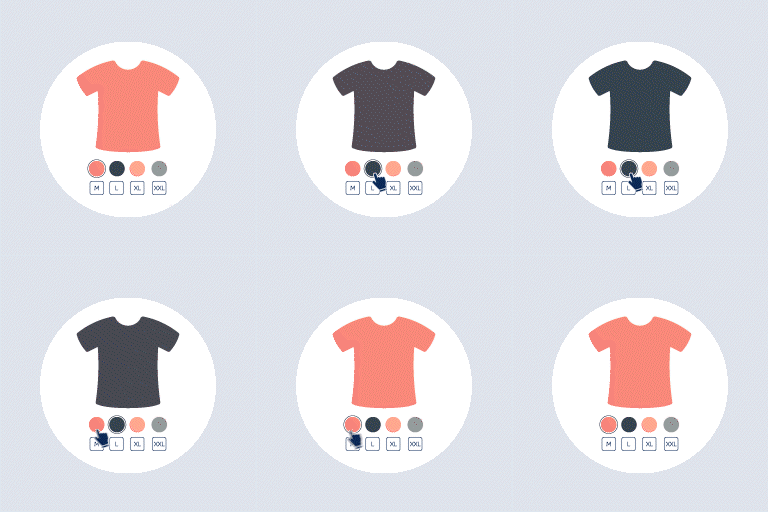
Product Variations Swatches for WooCommerce is a professional plugin that allows you to show and select attributes for variation products. The plugin displays variation select options of the products under colors, buttons, images, variation images, radio so it helps the customers observe the products they need more visually, save time to find the wanted products than dropdown type for variations of a variable product. Try the Demo |Documents |Pro Version | Facebook group Important Notice: Plugin works based on WooCommerce 7.x or higher, PHP 7.0+ It is released on WordPress.org and you can use plugin as free to build themes for sale. FEATURES ► Converting any variations dropdown type into swatches with a couple of clicks: When you activate WooCommerce Product Variations Swatches plugin, the variation products in the dropdown type will be converted into the variation swatches. ► Customizing the global attributes and custom attributes in the plugin setting: This plugin allows you to customize quickly all existing global attributes in WooCommerce through the swatches setting of this plugin. Search attribute: You can use the search bar to search for an existing global attribute Display Style: You can set to display global attributes in 2 styles: Horizontal or vertical Display Type: You can set to display global attributes in 5 types: Button, Color, Image, Variation Image, Radio Swatches profile: You can select to show one of the available swatches profile Edit terms of the global attributes: You can customize each attribute term of an existing global attribute ► Swatches profiles: WooCommerce Product Variations Swatches plugin allows you to design and style for swatches profiles. Customizing a swatches profile: You can customize to display a default swatch design pattern: Name, Padding, Height, Width, Font size, the size on mobile mode, on the product list, Color, Box-shadow effect Styling Hover status: You can customize the hover status including Color, Background, Border, Box-shadow effect, Reduce size Styling Selected status: You can customize the display status when a variation swatch is selected. The customization includes Color, Background, Border, Box-shadow effect, Reduce size Customizing Tooltip: You can customize the tooltip status when a variation swatch is selected. including Color, Border, Font size and Positions of the tooltip ► Works on mobile: WooCommerce product variations swatches work perfectly on mobile devices ► Easy to use: Friendly interface and easy to use PRO VERSION: ► All features from free version ► Unlimited Swatches profiles: You also can duplicate the current swatches profile to generate rapidly many swatch design patterns ► Show the particular attributes on product list: this allows you to show/hide a particular attribute on the product list ► Change product image: No matter type of swatches is, you can set image for each attribute term and make product image change accordingly when customer selects that attribute term ► Disable out-of-stock variation items: Out-of-stock attribute combination can be automatically detected and displayed as blur or crossed-out, clickable or not or even hidden ► Tooltip content: You can modify tooltip content and even use attribute/variation image in tooltip ► Installing easily to display custom attributes of the variation products on the front end: You can easily install to display custom attributes of the variations products on the front end by the custom attribute option. Custom attribute name: You can enter the name of the existing attributes, then customize them rapidly Assign category: Choose in which categories customizing the attribute be applied Display Style: You can select to display custom attributes in 2 styles: Horizontal or vertical Display Type: You can select to display custom attributes in 5 types: Button, Color, Image, Variation Image, Radio Swatches profile: Selecting to show custom attributes in one of the available swatches profile Show on product list: This allows you to show/hide a particular custom attribute on the product list ► Display product variations swatches in the product list and assigned pages: You can manage to show/hide the product variations swatches through some options in the display on the product list tab Show Add to cart button: You can enable to show the Add to cart button and it will show up after selecting attributes Show attribute name: You can select to show/hide the attribute name of variation swatches Position: You can customize the positions of the variation swatch on the shop page, category page, and the products list Text tooltip: This allows you to show or hide the variation text tooltip on the products list Maximum attribute item: You can manage the number of the attribute items shown on the swatches ► Multilingual support: If you use WPML to translate attributes, you only need configure attribute image in the primary language. Attribute image of translated attributes are inherited from original attribute. Documentation Getting Started Plugin Links Project Page Documentation Report Bugs/Issues MAY BE YOU NEED 9MAIL – WordPress Email Templates Designer 9Map – Map Multi Locations Abandoned Cart Recovery for WooCommerce Advanced Product Information for WooCommerce AFFI – Affiliate Marketing for WooCommerce ALD – Dropshipping and Fulfillment for AliExpress and WooCommerce Boost Sales for WooCommerce – Set up Up-Sells & Cross-Sells Popups & Auto Apply Coupon Bopo – WooCommerce Product Bundle Builder Bulky – Bulk Edit Products for WooCommerce Cart All In One For WooCommerce Catna – Woo Name Your Price and Offers Checkout Upsell Funnel for WooCommerce ChinaDS – Tmall-Taobao Dropshipping for WooCommerce Clear Autoptimize Cache Automatically COMPE – WooCommerce Compare Products Coreem – Coupon Reminder for WooCommerce Coupon Box for WooCommerce CURCY – Multi Currency for WooCommerce – Smoothly on WooCommerce 9.x Customer Coupons for WooCommerce DEPART – Deposit and Part payment for Woo Email Template Customizer for WooCommerce EPOI – WP Points and Rewards EPOW – Custom Product Options for WooCommerce EU Cookies Bar for WordPress EXMAGE – WordPress Image Links Faview – Virtual Reviews for WooCommerce FEWC – Extra Checkout Fields For WooCommerce Free Shipping Bar for WooCommerce GIFT4U – Gift Cards All in One for Woo HANDMADE – Dropshipping for Etsy and WooCommerce HAPPY – Helpdesk Support Ticket System Jagif – WooCommerce Free Gift LookBook for WooCommerce – Shoppable with Product Tags Lucky Wheel for WooCommerce – Spin a Sale Lucky Wheel Giveaway Notification for WooCommerce | Boost Your Sales – Recent Sales Popup – Live Feed Sales – Upsells Orders Tracking for WooCommerce Photo Reviews for WooCommerce Pofily – WooCommerce Product Filters PRENA – Product Pre-Orders for WooCommerce Product Builder for WooCommerce – Custom PC Builder Product Size Chart For WooCommerce REDIS – WooCommerce Dynamic Pricing and Discounts REES – Real Estate for Woo S2W – Import Shopify to WooCommerce Sales Countdown Timer SUBRE – Product Subscription for WooCommerce – Recurring Payments Suggestion Engine for WooCommerce Thank You Page Customizer for WooCommerce – Increase Your Sales TMDS – Dropshipping for TEMU and Woo VARGAL – Additional Variation Gallery for WooCommerce VillaTheme Core VIMA – Multi Customer Addresses for Woo VISeek – Easy Custom Search W2S – Migrate WooCommerce to Shopify WebPOS – Point of Sale for WooCommerce WPBulky – WordPress Bulk Edit Post Types