Lytics Personalization Engine (Official)
Used to seamlessly integrate the most powerful capabilities of the Lytics Personalization Engine directly into WordPress. Once activated, this plugin will automatically configure the Lytics collection and personalization tag on your website, allowing for the deployment of highly targeted web campaigns, personalized content, recommendations, and more. Features Installation: Seamlessly connect your website with Lytics in a few clicks. No development required. Profile Building / Collection: Collect comprehensive visitor data from your WordPress site in real-time, enriching Lytics customer profiles for both anonymous and known visitors. Identity Resolution: Unify user identities across devices and sessions, leveraging Lytics to dynamically personalize site content based on comprehensive user data and segments. Behavioral Insights: Gain deep insights into user behavior, allowing for dynamic content personalization based on actionable data and user segments identified by Lytics. Content Personalization: Enhance user experience by dynamically personalizing site content, tailored to individual user preferences and behaviors as understood by Lytics. Content Recommendation: Improve engagement and user retention through intelligent content recommendations, powered by Lytics’ deep learning about user preferences and behaviors. Lytics.com Feature Support Supports core Lytics tracking and personalization tag installation. Supports data collection and Lytics profile building. Supports creation and delivery of Lytics Web Experiences via Personalization SDK. Supports real-time Lytics powered content recommendations. Supports real-time personalization based on Lytics profile. Privacy User Data: This plugin does not collect any user data. However, the tracking code added by this plugin is used by Lytics to collect a variety of user data in support of building your private customer profiles. You can learn more about Lytics Privacy here. Cookies: The Lytics tracking tag installed uses first party cookies to identify both anonymous and known visitors as well as optional user preferences. Services: This plugin connects to the following Lytics APIs either directly or via the implemented tracking tag: Data Collection (GET/POST) Web Personalization (GET) Content Recommendation (GET) Segments/Collections (GET) Note: Additional API calls may be made to official APIs managed and maintained exclusively by Lytics. Usage Create Access Token: Your Lytics API Token can be found within your account settings on the Lytics platform. We recommend using the admin role. Enable Plugin: Access the Lytics plugin settings via the WordPress admin panel. Enter your Lytics Access Token as instructed and click save. Be sure to enable tag to ensure Lytics is configured properly. Support We’d love for you to join our growing community of Lytics developers. Simply visit https://lytics.com/joinslack and join the conversation.
Top keywords
- lytics26×6.31%
- user12×2.91%
- content9×2.18%
- data8×1.94%
- personalization8×1.94%
- supports5×1.21%
- tag5×1.21%
- collection4×0.97%
- tracking4×0.97%
- user data4×0.97%
- access3×0.73%
- building3×0.73%
Globe Visitors Counter
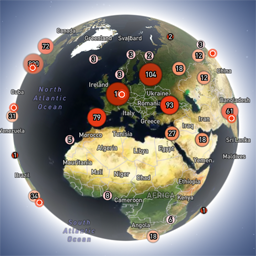
Globe Visitors Counter (Lite) adds a beautiful, fast, iframe-isolated 3D visitor globe to any WordPress site. It instantly shows your audience geography — fully locally, privately, and without any third-party tracking. This Lite version is designed for clarity, speed, and instant visual feedback — especially on landing pages and campaign pages. Use Case: Instant Visual Feedback for Advertising Campaigns The situation You have a product or a service. You launch an advertising campaign: Google Ads Facebook / Instagram TikTok banner ads email campaigns any other traffic source All traffic is sent to one landing page. Usually what comes next is boring: tables, charts, numbers, dashboards, “we’ll analyze it later”. The solution You place Globe Visitors Counter Lite directly on the landing page. No server setup. No external analytics. No configuration. And you start seeing your traffic with your own eyes. How it works (very simple) You launch the ads Visitors arrive at the page Each real visitor appears as a dot on the globe — in real time, from their actual location The globe comes alive and instantly shows: – whether people are coming at all – which countries and regions react – whether the campaign works or misses completely No dots — ads don’t work. Dots appear — ads are alive. Why Lite is perfect for landing pages Lite is not deep analytics. It’s a visual “life indicator”. Perfect when you need: – fast visual feedback – immediate confirmation that traffic is real – zero setup and zero learning curve – a simple “wow effect” for clients, teams, or investors You watch, not analyze. Key Features Interactive 3D Land-Cover globe included out of the box Real-time visitor logging using a tiny local JSON file Historical dots displayed automatically Zero configuration, works with all themes & editors Shortcode-based, easy placement on any page No cookies, no remote APIs, GDPR-friendly Ultra-fast loading thanks to iframe sandboxing How It Works When a page with the shortcode is opened, the plugin loads a fully self-contained viewer from: /wp-content/uploads/visitors-lite-landcover/ Each visit is logged locally as a minimal record (timestamp + coordinates + city + country) into: visitors.json Everything stays on your server. No tracking pixels. No third-party analytics. No cookies. Why Use It Ideal for landing pages and product launches Visualizes global audience instantly Safe for cached pages and CDNs Works even on heavily optimized sites When You May Need the Full Version Lite is intentionally simple and fast. If you need: – long-term statistics – multiple pages or sites – extended visitor history – advanced visual modes and skins – more control and customization …then the Full (Pro) version may be a better fit. Lite remains perfect for single pages, launches, tests, and quick visual validation. Tester Program (optional) We are tuning defaults and performance for upcoming builds. If you want to enable advanced features during testing at no cost (extra visual modes, effects, skins), join via Support: https://wordpress.org/support/topic/looking-for-testers-free-advanced-features-for-feedback/ Usage Shortcode: [visitors_globe_lite title=”VISITORS” width=”100%” height=”600″] Attributes: – title — optional caption above the globe – width — iframe width (100% or fixed px) – height — iframe height in px Place the shortcode anywhere — Classic or Block editor.