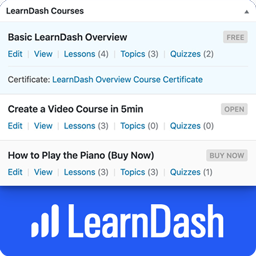
Dashboard Widgets for LearnDash
Dashboard Widgets for LearnDash adds 4 widgets to the Dashboard page in your WordPress admin area — Overview, Courses, Links & Recently Modified. The LearnDash Overview widget shows you the total number of courses, lessons, topics, certificates, quizzes, questions, assignments, essays & groups. The LearnDash Courses widget displays a list of up to 10 courses, with handy stats & quick links to edit content that belongs to that course. The Links widget exposes most internal LearnDash pages for quick navigation. The Recently Modified widget displays the 3 most recently modified courses, lessons & topics. Links are available to edit content, open the course builder or access the individual course settings page. NOTE: By default, only Administrators will see the widgets. See the FAQ below about “user/role permissions” to learn how to enable them for additional users. LearnDash Overview Widget The Overview widget provides the following information: Total Courses Total Lessons Total Topics Total Certificates Total Quizzes Total Questions Total Assignments Total Essays Total Groups Total Group Leaders Clicking on each total will take you to the admin page that lists out the respective content. LearnDash Courses Widget The Courses widget provides a scrollable list of up to 10 courses. The information displayed depends on the user’s capabilities & access to certain admin pages. I’ll explain each piece of information below. Visible to all: Course Title Course Status (draft, scheduled, pending review, etc.) Course Price Type Course Scheduled Date (if course is scheduled for a future date) “View” link Visible if user has BOTH edit_courses AND edit_published_courses capabilities: “Edit” link (to edit the course) Visible if user has edit_courses capability: Links to Lesson/Topic/Quiz list pages, along with the total number associated with the course Certificate Title, with a link to edit it (if a certificate has been associated with the course) Visible if user has list_users capability: “Students” link that displays the list of users who are enrolled in that course LearnDash Links Widget The Links widget contains the following sections, each with their own set of links to different admin pages. LearnDash Settings General | Registration | Payments | Emails | Custom Labels | Support Courses View All | Add New | Settings | Categories | Tags Lessons View All | Add New | Settings | Categories | Tags Topics View All | Add New | Settings | Categories | Tags Quizzes View All | Add New | Settings | Essays: Graded | Not Graded Assignments View All | Approved | Not Approved | Settings Groups View All | Add New | Settings | Administration | Group Leaders Visibility & Permissions Who sees each section, as well as the links within each section, will depend on a few things. Here are the important things to know: LearnDash Settings: Only visible to users with the manage_options capability, which by default, is only Administrators. Courses & Lessons: Only visible to users with the edit_courses capability. Topics & Quizzes: First, you must have at least one published Topic or Quiz for each section to be displayed. Then, they’re only visible to users with the edit_courses capability. Course/Lesson/Topic/Quiz/Assignment Settings: Only visible to users with the manage_options capability. Categories & Tags: Only visible to users with the manage_categories capability. Essays: At least one essay must exist. Then, only visible to users with the edit_essays capability. Assignments: At least one assignment must exist. Then, only visible to users with the edit_assignments capability. Groups: At least one group must exist. Then, only visible to users with the edit_groups capability. Group Administration: Only visible to Group Leaders. Group Leaders: Only visible to users with the list_users capability. LearnDash Recently Modified Widget This widget displays the 3 most recently modified courses, lessons, topics, and quizzes. For Courses, you can navigate directly to “Edit,” “Builder” or “Settings.” For Lessons, Topics, and Quizzes, each title links directly to the edit page for that piece of content. It also includes the last modified date/time (i.e. 3 days ago, 5 months ago, etc.). Other Features Just like all Dashboard widgets, they can be hidden by unchecking their respective boxes under “Screen Options” Tested with LearnDash 3.6.0.3 Roadmap There is no scheduled roadmap, but if you have any suggestions, please let us know in the support forum. From within WordPress Visit “Plugins > Add New” Search for “Dashboard Widgets for LearnDash” Click the “Install” button Click the “Activate” button
Display Server Info
Full Description: Display Server Info is a powerful WordPress plugin that provides detailed server information for administrators directly within the dashboard. It adds server, PHP, and database information to the dashboard, top admin bar, and footer for quick access. The settings menu includes a “Display Server Info” submenu with two tabs: Server Information Tab: In this tab, you will see the information about: Operating System Hostname Server IP Protocol Server Software Web Port CGI Version PHP Version Memory Limit Max Execution Time Upload Max Filesize Max File Uploads Database Server version Database Client version Database host Database username Database name Table prefix Database charset Database collation Please rate the Plugin if you find it useful, thanks. Settings Tab: Configure plugin behavior with four toggle switches to enable or disable server information display in the dashboard, admin bar, and footer. Additionally, users can activate shortcode functionality, allowing [disi_server_info] to display server information anywhere in posts or pages. The plugin is fully translated into 7 international languages, making it accessible for a global audience. Privacy This plugin respects your privacy. Any data collected (such as anonymous usage stats or optional feedback) is handled transparently and securely. All data, including any optional email address, is transmitted securely (via TLS/HTTPS) and retained only as long as necessary. For example, feedback data is retained for a maximum of 12 months to help us improve the plugin. For complete details on what data is collected, how it is stored (including hashing and encryption for email addresses), the legal basis under GDPR/CCPA, and your rights, please read our full privacy policy: https://robertwp.com/privacy-policy Source Code This plugin includes minified JavaScript and CSS files for performance and distribution purposes. The original, human-readable source code for these files is publicly available and maintained on GitHub: https://github.com/robert2021south/display-server-info The following files are minified in the plugin package: – assets/css/bootstrap.min.css – assets/css/disi-common-style.min.css – assets/css/disi-dashboard-style.min.css – assets/css/disi-more-style.min.css assets/js/bootstrap.min.js assets/js/disi-wajax-handle.min.js assets/js/disi-common.min.js