Dashboard Widgets for LearnDash for WordPress Plugin Directory
Dashboard Widgets for LearnDash is a WordPress app, with a 5.0 average rating from 1 review, as of Aug 31, 2026.
Dashboard Widgets for LearnDash is a WordPress Plugin Directory app by Escape Creative. With a rating of 5.0★ from 1 reviews.
AppRanks verdict
Generated from live marketplace data — refreshed daily
Dashboard Widgets for LearnDash is a category-leading WordPress app with a limited review volume. Category data on the canonical marketplace listing is currently incomplete, so AppRanks falls back to platform-wide rather than category-relative comparison for this listing. 1 reviews put it in the early-traction tier — useful for early-stage stores willing to be on the leading edge. Early-traction review counts are sensitive to single launch periods or feature events, so a 30-day re-check before bigger commitments often resolves whether the trend is sustained. Paid-only pricing means evaluating fit on the marketplace listing or via the developer's documentation before installing. AppRanks tracks rating, review count, pricing tier, and category position daily — the figures on this page reflect the most recent scrape from the canonical WordPress Plugin Directory listing.
Pros
- +High average rating (5.0★) signals consistent merchant satisfaction
- +Published by Escape Creative — established developer track record
Cons
- −Limited review base (1) — ratings can shift significantly with new feedback
Looking to switch from Dashboard Widgets for LearnDash?
See Dashboard Widgets for LearnDash's alternatives ranked by audit score, rating, and review velocity.
How Dashboard Widgets for LearnDash works
Show full descriptionShow less
Dashboard Widgets for LearnDash adds 4 widgets to the Dashboard page in your WordPress admin area — Overview, Courses, Links & Recently Modified.
The LearnDash Overview widget shows you the total number of courses, lessons, topics, certificates, quizzes, questions, assignments, essays & groups.
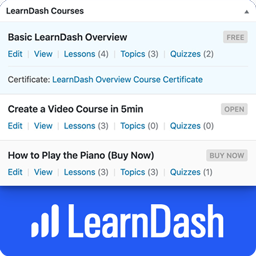
The LearnDash Courses widget displays a list of up to 10 courses, with handy stats & quick links to edit content that belongs to that course.
The Links widget exposes most internal LearnDash pages for quick navigation.
The Recently Modified widget displays the 3 most recently modified courses, lessons & topics. Links are available to edit content, open the course builder or access the individual course settings page.
NOTE: By default, only Administrators will see the widgets. See the FAQ below about “user/role permissions” to learn how to enable them for additional users.
LearnDash Overview Widget The Overview widget provides the following information:
Total Courses
Total Lessons
Total Topics
Total Certificates
Total Quizzes
Total Questions
Total Assignments
Total Essays
Total Groups
Total Group Leaders
Clicking on each total will take you to the admin page that lists out the respective content.
LearnDash Courses Widget The Courses widget provides a scrollable list of up to 10 courses. The information displayed depends on the user’s capabilities & access to certain admin pages. I’ll explain each piece of information below.
Visible to all:
Course Title
Course Status (draft, scheduled, pending review, etc.)
Course Price Type
Course Scheduled Date (if course is scheduled for a future date)
“View” link
Visible if user has BOTH edit_courses AND edit_published_courses capabilities:
“Edit” link (to edit the course)
Visible if user has edit_courses capability:
Links to Lesson/Topic/Quiz list pages, along with the total number associated with the course
Certificate Title, with a link to edit it (if a certificate has been associated with the course)
Visible if user has list_users capability:
“Students” link that displays the list of users who are enrolled in that course
LearnDash Links Widget The Links widget contains the following sections, each with their own set of links to different admin pages.
LearnDash Settings
General | Registration | Payments | Emails | Custom Labels | Support
Courses
View All | Add New | Settings | Categories | Tags
Lessons
View All | Add New | Settings | Categories | Tags
Topics
View All | Add New | Settings | Categories | Tags
Quizzes
View All | Add New | Settings | Essays: Graded | Not Graded
Assignments
View All | Approved | Not Approved | Settings
Groups
View All | Add New | Settings | Administration | Group Leaders
Visibility & Permissions Who sees each section, as well as the links within each section, will depend on a few things. Here are the important things to know:
LearnDash Settings: Only visible to users with the manage_options capability, which by default, is only Administrators.
Courses & Lessons: Only visible to users with the edit_courses capability.
Topics & Quizzes: First, you must have at least one published Topic or Quiz for each section to be displayed. Then, they’re only visible to users with the edit_courses capability.
Course/Lesson/Topic/Quiz/Assignment Settings: Only visible to users with the manage_options capability.
Categories & Tags: Only visible to users with the manage_categories capability.
Essays: At least one essay must exist. Then, only visible to users with the edit_essays capability.
Assignments: At least one assignment must exist. Then, only visible to users with the edit_assignments capability.
Groups: At least one group must exist. Then, only visible to users with the edit_groups capability.
Group Administration: Only visible to Group Leaders.
Group Leaders: Only visible to users with the list_users capability.
LearnDash Recently Modified Widget This widget displays the 3 most recently modified courses, lessons, topics, and quizzes.
For Courses, you can navigate directly to “Edit,” “Builder” or “Settings.”
For Lessons, Topics, and Quizzes, each title links directly to the edit page for that piece of content.
It also includes the last modified date/time (i.e. 3 days ago, 5 months ago, etc.).
Other Features
Just like all Dashboard widgets, they can be hidden by unchecking their respective boxes under “Screen Options”
Tested with LearnDash 3.6.0.3
Roadmap There is no scheduled roadmap, but if you have any suggestions, please let us know in the support forum.
From within WordPress
Visit “Plugins > Add New”
Search for “Dashboard Widgets for LearnDash”
Click the “Install” button
Click the “Activate” button
Keyword rankings
Dashboard Widgets for LearnDash ranks for 1 keywords across WordPress Plugin Directory. Here are the top 1:
- 1.quizRank #325
Competitors & alternatives
AppRanks tracks competitor sets per category. For Dashboard Widgets for LearnDash, the independent listing audit includes a competitive context section, and the full WordPress app index shows the broader marketplace landscape this app competes in. Sign up free to surface a side-by-side competitor matrix customized to your tracked apps.
Frequently asked questions
What is Dashboard Widgets for LearnDash?
Dashboard Widgets for LearnDash is an app for WordPress. It currently holds a 5.0-star rating from 1 merchant review, and AppRanks has been tracking its public marketplace data on the refresh cadence published in our methodology. AppRanks tracks its category position, review-velocity trend, and the top alternatives in the same space. Developed by Escape Creative.