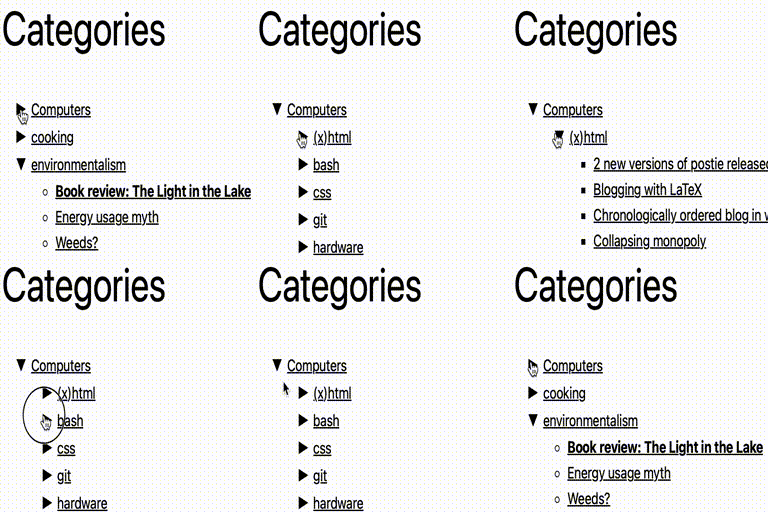
Collapsing Categories
Collapsing Categories creates an expandable list of categories and subcategories. It can also expand to show posts. The primary usage is as a widget, but you can also use the code in your theme manually if you wish (see installation instructions) Options Options can be set from the block panel. If you wish to insert the code into your theme manually instead of using a widget, you can use the following options. These options can be given to the collapsCat() function either as an array or in query style, in the same manner as the wp_list_categories function. $defaults=array( 'showPostCount' => true, 'inExclude' => 'exclude', 'inExcludeCats' => '', 'showPosts' => true, 'showPages' => false, 'linkToCat' => true, 'olderThan' => 0, 'excludeAll' => '0', 'catSortOrder' => 'ASC', 'catSort' => 'catName', 'postSortOrder' => 'ASC', 'postSort' => 'postTitle', 'expand' => '0', 'defaultExpand' => '', 'postTitleLength' => 0, 'accordion' => 0, 'catfeed' => 'none', 'taxonomy' => 'category', 'showPostDate' => false, 'postDateAppend' => 'after', 'postDateFormat' => 'm/d', 'useCookies' => true, 'showTopLevel' => true, 'postsBeforeCats' => false, 'expandCatPost' => true, 'debug'=>'0' ); inExclude Whether to include or exclude certain categories ‘exclude’ (default) ‘include’ inExcludeCats The categories which should be included or excluded showPages Whether or not to include pages as well as posts. Default if false linkToCat 1 (true), clicking on a category title will link to the category archive (default) 0 (false), clicking on a category title expands and collapses catSort How to sort the categorys. Possible values: ‘catName’ the title of the category (default) ‘catId’ the Id of the category ‘catSlug’ the url of the category ‘catCount’ the number of posts in the category ‘catOrder’ custom order specified in the categorys settings catSortOrder Whether categories should be sorted in normal or reverse order. Possible values: ‘ASC’ normal order (a-z 0-9) (default) ‘DESC’ reverse order (z-a 9-0) postSort How to sort the posts. Possible values: ‘postDate’ the date of the post (default) ‘postId’ the Id of the post ‘postTitle’ the title of the post ‘postComment’ the number of comments on the post ‘postOrder’ sort by menu order postSortOrder Whether post should be sorted in normal or reverse order. Possible values: ‘ASC’ normal order (a-z 0-9) (default) ‘DESC’ reverse order (z-a 9-0) expand The symbols to be used to mark expanding and collapsing. Possible values: ‘0’ Triangles (default) ‘1’ + – ‘2’ [+] [-] ‘3’ images (you can upload your own if you wish) ‘4’ custom symbols customExpand If you have selected ‘4’ for the expand option, this character will be used to mark expandable link categories customCollapse If you have selected ‘4’ for the expand option, this character will be used to mark collapsible link categories postTitleLength Truncate post titles to this number of characters (default: 0 = don’t truncate) accordion When set to true, expanding one category closes all others at that level catfeed Whether to add a link to the rss feed for a category. Possible values: ‘none’ (default) ‘text’ shows RSS ‘image’ shows an RSS icon taxonomy Type of taxonmy to display. Possible values: ‘category’ (default) ‘link_category’ ‘post_tag’ ‘both’ (categories and tags) any other registered taxononmy (e.g. recipe press uses recipe-categories) showPostDate When true, show the date of each post postDateAppend Show the date before or after the post title. Possible values: ‘after’ (default) ‘before’ postDateFormat What format the post date is in. This uses the standard php date formatting codes useCookies When true, expanding and collapsing of categories is remembered for each visitor. When false, categories are always display collapsed (unless explicitly set to auto-expand). Possible values: 1 (true) (default) 0 (false) showTopLevel When set to false, the top level category will not be shown. This could be useful if you only want to show subcategories from one particular top-level category 1 (true) (default) 0 (false) postsBeforeCats When set to true, posts in category X will be ordered before subcategories of category X 1 (true) 0 (false) (default) expandCatPost When set to true, any category to which a post is assigned will automatically be expanded on a single post page. 1 (true) (default) 0 (false) showEmptyCat When set to true, empty categories are shown 0 (false) (default) 1 (true) debug When set to true, extra debugging information will be displayed in the underlying code of your page (but not visible from the browser). Use this option if you are having problems Examples collapsCat('catSort=ASC&expand=3&inExcludeCats=general,uncategorized') This will produce a list with: * categories shown in alphabetical order * using images to mark collapsing and expanding * exclude posts from the categories general and uncategorized ` ‘postDate’, ‘postSortOrder’ => ‘DESC’, ) ); } else { wp_get_categories(‘your_options_here’); } echo “ \n”; ?> ` Demo I use this plugin in my blog at http://robfelty.com CAVEAT Currently this plugin relies on Javascript to expand and collapse the links. If a user’s browser doesn’t support javascript they won’t see the links to the posts, but the links to the categories will still work (which is the default behavior in wordpress anyways)
Top keywords
- true19×2.36%
- default18×2.24%
- categories16×1.99%
- category16×1.99%
- false12×1.49%
- post12×1.49%
- order9×1.12%
- possible9×1.12%
- possible values9×1.12%
- values9×1.12%
- set8×0.99%
- posts7×0.87%
DynoMenu – Auto-Generate Dynamic Menus for WordPress and WooCommerce
DynoMenu helps you create dynamic WordPress menus that stay in sync with your content. Build menus from posts, pages, categories, custom taxonomies, WooCommerce product categories, or existing WordPress menus, then place them anywhere with a shortcode. Instead of rebuilding navigation by hand every time products, categories, or content changes, DynoMenu generates the menu from the source you choose. It is useful for stores, blogs, directories, resource libraries, and any site where navigation should follow content structure. What DynoMenu Can Generate WooCommerce product category menus WordPress category and taxonomy menus Post, page, and custom post type menus Menus based on existing WordPress menus Nested dropdown menus with configurable submenu depth Styling and Layout Controls DynoMenu includes built-in appearance controls for menu layout, typography, colors, spacing, submenu styling, mobile toggles, and close buttons. You can preview changes in the admin screen and publish the menu with the [dynomenu] shortcode. Good Fits WooCommerce stores that need product category navigation Content-heavy WordPress sites with changing categories or sections Sites that need shortcode-based menus inside pages, builders, widgets, or templates Site owners who want configurable menu styling without writing custom CSS DynoMenu works with or without WooCommerce. WooCommerce support is optional and is used only when WooCommerce is active. External Services This plugin does not connect to third-party services or load remote assets. Source Code This plugin is licensed under GPLv2 or later. The complete source code, including all build tools and unminified assets, is available at: https://github.com/thekenanjunior/dynomenu-free Build notes: * Plugin assets in this repository are shipped as human-readable source files. * No project-specific minified/compiled JS or CSS build step is required to run the plugin.
Top keywords
- menus10×3.64%
- dynomenu6×2.18%
- woocommerce6×2.18%
- wordpress5×1.82%
- build4×