Collapsing Categories is a WordPress app, with a 4.1 average rating from 57 reviews, as of July 9, 2026.
Collapsing Categories is a WordPress Plugin Directory app by robfelty. With a rating of 4.1★ from 57 reviews.
AppRanks data: Collapsing Categories ranks #0 in Categories on WordPress Plugin Directory, placing it in the top 1% of that category.
AppRanks verdict
Generated from live marketplace data — refreshed daily
Collapsing Categories is a well-rated WordPress app with a limited review volume. It is listed in the Navigation category on WordPress Plugin Directory, which AppRanks treats as the canonical taxonomy node for ranking and competitor comparison. 57 reviews put it in the early-traction tier — useful for early-stage stores willing to be on the leading edge. Early-traction review counts are sensitive to single launch periods or feature events, so a 30-day re-check before bigger commitments often resolves whether the trend is sustained. Paid-only pricing means evaluating fit on the marketplace listing or via the developer's documentation before installing. AppRanks tracks rating, review count, pricing tier, and category position daily — the figures on this page reflect the most recent scrape from the canonical WordPress Plugin Directory listing.
Pros
- +Published by robfelty — established developer track record
Cons
- −Limited review base (57) — ratings can shift significantly with new feedback
Looking to switch from Collapsing Categories?
See Collapsing Categories's alternatives ranked by audit score, rating, and review velocity.
How Collapsing Categories works
Show full descriptionShow less
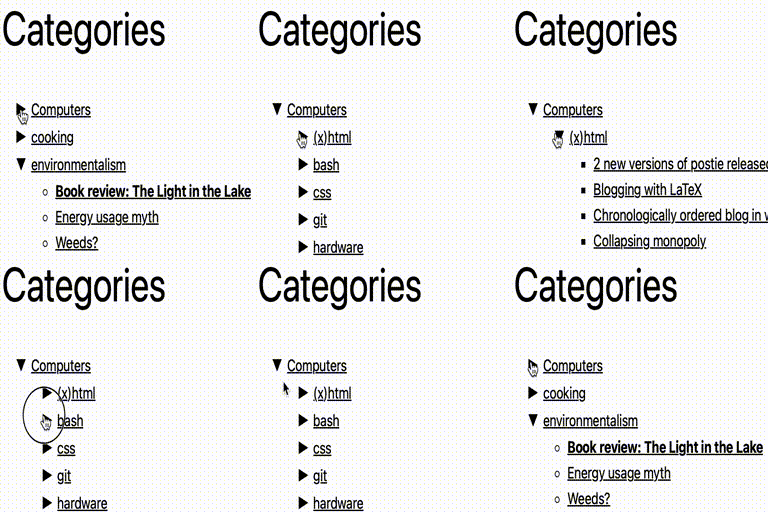
Collapsing Categories creates an expandable list of categories and
subcategories. It can also expand to show posts. The primary usage is as a
widget, but you can also use the code in your theme manually if you wish (see
installation instructions)
Options Options can be set
from the block panel. If you wish to insert the code into your theme manually
instead of using a widget, you can use the following options. These options
can be given to the collapsCat() function either as an array or in query
style, in the same manner as the wp_list_categories function.
$defaults=array( 'showPostCount' => true, 'inExclude' => 'exclude', 'inExcludeCats' => '', 'showPosts' => true, 'showPages' => false, 'linkToCat' => true, 'olderThan' => 0, 'excludeAll' => '0', 'catSortOrder' => 'ASC', 'catSort' => 'catName', 'postSortOrder' => 'ASC', 'postSort' => 'postTitle', 'expand' => '0', 'defaultExpand' => '', 'postTitleLength' => 0, 'accordion' => 0, 'catfeed' => 'none', 'taxonomy' => 'category', 'showPostDate' => false, 'postDateAppend' => 'after', 'postDateFormat' => 'm/d', 'useCookies' => true, 'showTopLevel' => true, 'postsBeforeCats' => false, 'expandCatPost' => true, 'debug'=>'0' );
inExclude
Whether to include or exclude certain categories
‘exclude’ (default)
‘include’

inExcludeCats
The categories which should be included or excluded
showPages
Whether or not to include pages as well as posts. Default if false
linkToCat
1 (true), clicking on a category title will link to the category archive (default)
0 (false), clicking on a category title expands and collapses
catSort
How to sort the categorys. Possible values:
‘catName’ the title of the category (default)
‘catId’ the Id of the category
‘catSlug’ the url of the category
‘catCount’ the number of posts in the category
‘catOrder’ custom order specified in the categorys settings
catSortOrder
Whether categories should be sorted in normal or reverse
order. Possible values:
‘ASC’ normal order (a-z 0-9) (default)
‘DESC’ reverse order (z-a 9-0)
postSort
How to sort the posts. Possible values:
‘postDate’ the date of the post (default)
‘postId’ the Id of the post
‘postTitle’ the title of the post
‘postComment’ the number of comments on the post
‘postOrder’ sort by menu order
postSortOrder
Whether post should be sorted in normal or reverse
order. Possible values:
‘ASC’ normal order (a-z 0-9) (default)
‘DESC’ reverse order (z-a 9-0)
expand
The symbols to be used to mark expanding and collapsing. Possible values:
‘0’ Triangles (default)
‘1’ + –
‘2’ [+] [-]
‘3’ images (you can upload your own if you wish)
‘4’ custom symbols
customExpand
If you have selected ‘4’ for the expand option, this character will be
used to mark expandable link categories
customCollapse
If you have selected ‘4’ for the expand option, this character will be
used to mark collapsible link categories
postTitleLength
Truncate post titles to this number of characters (default: 0 = don’t
truncate)
accordion
When set to true, expanding one category closes all others at that level
catfeed
Whether to add a link to the rss feed for a category. Possible values:
‘none’ (default)
‘text’ shows RSS
‘image’ shows an RSS icon
taxonomy
Type of taxonmy to display. Possible values:
‘category’ (default)
‘link_category’
‘post_tag’
‘both’ (categories and tags)
any other registered taxononmy (e.g. recipe press uses recipe-categories)
showPostDate
When true, show the date of each post
postDateAppend
Show the date before or after the post title. Possible values:
‘after’ (default)
‘before’
postDateFormat
What format the post date is in. This uses the standard php date
formatting codes
useCookies
When true, expanding and collapsing of categories is remembered for each
visitor. When false, categories are always display collapsed (unless
explicitly set to auto-expand). Possible values:
1 (true) (default)
0 (false)
showTopLevel
When set to false, the top level category will not be shown. This could
be useful if you only want to show subcategories from one particular
top-level category
1 (true) (default)
0 (false)
postsBeforeCats
When set to true, posts in category X will be ordered before
subcategories of category X
1 (true)
0 (false) (default)
expandCatPost
When set to true, any category to which a post is assigned will
automatically be expanded on a single post page.
1 (true) (default)
0 (false)
showEmptyCat
When set to true, empty categories are shown
0 (false) (default)
1 (true)
debug
When set to true, extra debugging information will be displayed in the
underlying code of your page (but not visible from the browser). Use
this option if you are having problems
Examples collapsCat('catSort=ASC&expand=3&inExcludeCats=general,uncategorized')
This will produce a list with:
* categories shown in alphabetical order
* using images to mark collapsing and expanding
* exclude posts from the categories general and uncategorized
`
<?php
echo '
‘ . “\n”;
if (function_exists(‘collapsCat’)) {
collapsCat(array(
‘postSort’ => ‘postDate’,
‘postSortOrder’ => ‘DESC’,
) );
} else {
wp_get_categories(‘your_options_here’);
}
echo “ \n”;
?>
`
Demo I use this plugin in my blog at http://robfelty.com
CAVEAT Currently this plugin relies on Javascript to expand and collapse the links.
If a user’s browser doesn’t support javascript they won’t see the links to the
posts, but the links to the categories will still work (which is the default
behavior in wordpress anyways)
Category rankings
As of Jul 9, 2026- Categories#0of 48Top 1%
- Navigation#0of 118Top 1%
- Sidebar#0of 118Top 1%
- Widget#69of 701Top 10%
See 90-day rank history for each category
Track daily rank changes, category shifts, and position volatility.
Competitors & alternatives
Collapsing Categoriesdoesn't have curated competitor matchups yet. Other tracked navigation apps on WordPress:
Where Collapsing Categories stands in the Navigation category
Collapsing Categories ranks #0 of 118 apps in the Navigation category, placing it in the top 1% of the listing.
Frequently asked questions
What is Collapsing Categories?
Collapsing Categories is an app for WordPress. It currently holds a 4.1-star rating from 57 merchant reviews, and AppRanks has been tracking its public marketplace data on a daily refresh cycle. It is listed under the Navigation category on AppRanks, where you can see its current category position, review-velocity trend, and how it compares against the top alternatives in the same space. Developed by robfelty.
Who uses Collapsing Categories?
Currently around 4,000 active stores have installed Collapsing Categories. Its review base is still building, which usually maps to early-stage merchants and stores piloting a new workflow. It is part of the Navigation category on WordPress.