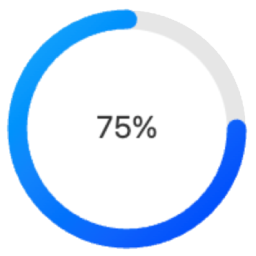
Circle Progress Bar Block
Circle Progress Bar Block is a modern Gutenberg block plugin that adds beautiful circular progress indicators to your WordPress site. Perfect for displaying progress, statistics, or metrics in a visually appealing way. Source Code All uncompiled source code is included in this plugin. The production code in build/index.js is compiled from: Main Source File Located at src/index.js, this is the complete React source code for the block: `javascript import { registerBlockType } from ‘@wordpress/blocks’; import { InspectorControls } from ‘@wordpress/block-editor’; import { PanelBody, RangeControl, ColorPicker, TextControl, SelectControl, } from ‘@wordpress/components’; registerBlockType(‘circle-progress-bar/progress’, { title: ‘Circle Progress Bar’, icon: ‘chart-pie’, category: ‘widgets’, description: ‘A customizable circle progress bar.’, keywords: [‘progress’, ‘circle’, ‘chart’], supports: { html: false }, attributes: { percentage: { type: ‘number’, default: 75 }, size: { type: ‘number’, default: 100 }, strokeColor: { type: ‘string’, default: ‘#00aaff’ }, bgColor: { type: ‘string’, default: ‘#e6e6e6’ }, text: { type: ‘string’, default: ‘Progress’ }, useShadow: { type: ‘boolean’, default: false }, useGradient: { type: ‘boolean’, default: false }, strokeWidth: { type: ‘number’, default: 10 }, fontSize: { type: ‘number’, default: 20 }, fontColor: { type: ‘string’, default: ‘#333’ } }, // Full source code available in src/index.js // See GitHub repository for complete implementation }); Build Tools The production code is generated using standard WordPress tools: * @wordpress/scripts – For development and build * Webpack – For module bundling * Babel – For modern JavaScript compatibility Building from Source The source is in src/index.js Build tools are configured in package.json To compile: bash npm install npm run build Output goes to build/index.js Directory Structure To work with the source code: 1. Clone the GitHub repository: https://github.com/jqsafi/circle-progress-bar 2. Install dependencies: npm install 3. Start development server: npm start 4. Build production version: npm run build Features Fully Customizable Design Adjustable circle size and stroke width Custom colors for progress bar, background, and text Optional gradient effects Configurable font size and text Shadow effects available Block Editor Integration Easy to use block controls Live preview in editor Works with Full Site Editing (FSE) Multiple instances support Performance Optimized Lightweight SVG-based rendering No external dependencies Optimized for modern browsers Usage Basic Configuration After adding the block, set your desired percentage (0-100) in the block settings panel Customize the appearance: Change circle size using the “Size” slider Adjust stroke width using the “Thickness” slider Set colors for the progress bar, background, and text Enable/disable gradient effect Add custom text above or below the percentage Advanced Features Shadow Effects: Enable and customize shadow effects in the “Effects” panel Text Options: Configure font size, weight, and position Development The Circle Progress Bar Block is developed using modern JavaScript and follows WordPress coding standards. The source code is available on GitHub: GitHub Repository: https://github.com/jqsafi/circle-progress-bar Building from Source Clone the repository Install dependencies: npm install For development with live reload: npm start For production build: npm run build The plugin uses the following build tools: * @wordpress/scripts for development and build processes * webpack for bundling * Babel for JavaScript transpilation * ESLint and Prettier for code formatting Source files are located in: * src/ – Uncompiled JavaScript source code * build/ – Compiled and minified production code
Top keywords
- build13×2.56%
- source12×2.37%
- code11×2.17%
- progress11×2.17%
- default10×1.97%
- type10×1.97%
- block8×1.58%
- npm8×1.58%
- wordpress8×1.58%
- circle7×1.38%
- source code7×1.38%
- bar6×1.18%
Nelio Popups
THE EASIEST WORDPRESS POPUP BUILDER FOR THE BLOCK EDITOR Nelio Popups is the most intuitive and well-designed popup creator for WordPress. Bend it to create any type of popup, modal, or content overlay for your WordPress website. With Nelio Popups you can turn website visitors into email subscribers, increase sales, and grow your business. Enjoy the popup creation process using the WordPress block editor and all its power. Reasons for choosing Nelio Popups Here’s why you should switch to Nelio Popups: #1. 🚀 It’s awesome Your popup creation experience is our #1 priority. Nelio Popups’ editor won’t annoy you when designing awesome popups and slide-ins like other WordPress popup plugins do. Nelio Popups uses the WordPress block editor and allows you to include any block within your popups. #2. 😎 It’s easy We were tired of the bloated and slow popup builder plugins with complex settings. That’s why we built Nelio Popups to adapt to your marketing workflow and allow you to create custom popups, newsletter opt-in forms, slide-ins, announcement bars, and other high converting lead generation forms within minutes. By using the standard WordPress drag & drop block editor, you can easily customize the look and feel of your campaigns, and even add third-party block elements like countdown timers, form integrations, or even block patterns, that change based on user behavior (no code necessary). #3. 🎨 Simplifies styling and design If you have an eye for detail you’ll love the additional customization options available with Nelio Popups. As well as basic appearance elements like layout, images, typography, and color that you can set with the WordPress block editor we use, Nelio Popups allows for more advanced detailing like popups borders, shadow, sizing, and more. In addition to it, the styles of your popup will match the ones in your WordPress theme without any further effort from you. #4. 🎯 Targets visitors with smart conditions As well as intelligent visibility conditions, Nelio Popups also allows you to set up a range of behavior triggers for your popups and slide-ins. Including: click, hover, scroll, exit-intent, and more. Furthermore, Nelio Popups has all the behavior and condition settings you’ll need to target visitors. Set up intelligent conditions such as: specific pages and posts, source of arrival, browser cookie, and a whole lot more. #5. ℹ️ You are not alone The desire of each customer and the problems that have arisen are the priority issues that have to be solved by our support team. That is why our team works very hard to help and satisfy the demands and wishes of all its customers. If there is a question that you would like to ask, or there is something unclear, then our support team is ready to answer each question in detail to satisfy any interest.
Top keywords