Easy Sort: Sorting Line Items/Products for Salesforce
- Category rank
- #34 in Quotes And Orders
- Price
- Free plan
- Listing audit
- 65/100
Easy Sort: Sorting Line Items/Products is a Salesforce AppExchange app by coolhandcoders ltd. With a rating of 4.3★ from 40 reviews, it currently ranks #34 in the Quotes And Orders category.
Easy Sort: Sorting Line Items/Products is the #34 ranked Quotes And Orders app on Salesforce, with a 4.3 average rating from 40 reviews, free to use, as of Nov 11, 2026.
AppRanks verdict
Generated from marketplace data as of Nov 11, 2026
Easy Sort: Sorting Line Items/Products ranks #34 of 218 in Quotes And Orders on Salesforce. It holds a 4.3★ average from 40 reviews on Salesforce. It is free to use.
Pros
- +Free plan available — no paid subscription needed to start
- +Listed on Salesforce since 2018
Cons
- −Only 40 reviews — the average can still move with a few new ratings
About Easy Sort: Sorting Line Items/Products
How Easy Sort: Sorting Line Items/Products works
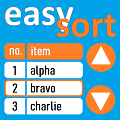
The App can be configured to allow Users to sort Quote Line Items, Opportunity Products using and Order Products using a list. Any number of Fields can be included as columns in the list. Clicking a column will sort by that column's Field and can be clicked again to toggle the sort in reverse order. Up and down arrows can be used to move items in the list.
The default sort order for Quote Line Items, Opportunity Products and Order Products can be defined for your Salesforce Org. Then from the click of a button on the Quote, Opportunity or Order screen, Line Items and Products can be ordered by the default. Multiple sort orders can also be defined, enabling the user to select one from a list.
Sorting can also be automated. The App can be configured to automatically re-sort Quote Line Items and Opportunity Products once an initial sort has been done. For example, if a user initially sorts a Quote's Line Items by Quantity, any further edits will cause the Line Items to be automatically re-sorted to retain the required Quantity order, no user interaction required.
Key features
- Use a list with the required columns needed to decide the required sorting. Click on a column header to sort by that column. Use arrows to move lines up and down the list.
- Use one or more pre-defined sort orders to sort Quote Line Items, Opportunity Products and Order Products