- Category rank
- #36 in Utilities
- Listing audit
- 62/100
Gimp Online is a Google Workspace Marketplace app by OffiDocs. With a rating of 4.0★ from 164 reviews, it currently ranks #36 in the Utilities category.
Gimp Online is the #36 ranked Utilities app on Google Workspace, with a 4.0 average rating from 164 reviews, as of Aug 11, 2026.
AppRanks verdict
Generated from marketplace data as of Aug 11, 2026
Gimp Online ranks #36 of 112 in Utilities on Google Workspace. It holds a 4.0★ average from 164 reviews on Google Workspace.
Pros
- No standout positives in the measured data.
Cons
- −Average rating below 4.0 (4.0★) — read recent low-star reviews before committing
About Gimp Online
How Gimp Online works
Show full descriptionShow less
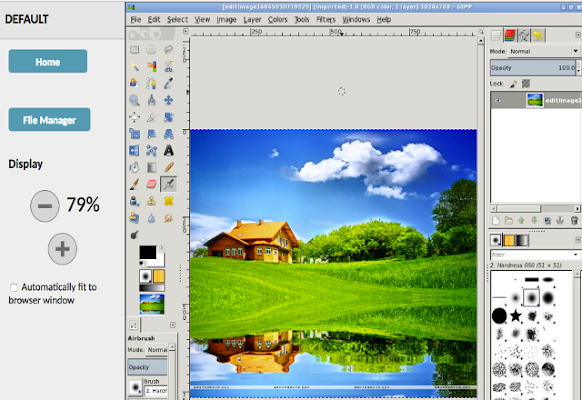
Gimp online Image Editor is an app for tasks as photo and image retouching, image composition and image authoring. It is an integration with the Linux Desktop app GIMP (GNU Image Manipulation), a freely distributed program that provides many capabilities. It can be used as a simple paint program, image editor, an expert quality photo retouching program, an image renderer, or an image format converter. GIMP is ideal for advanced photo retouching techniques. It gets rids you of unneeded details using the clone tool, or touch up minor details easily with the new healing tool. Moreover, numerous digital photo imperfections can be easily compensated for using GIMP. Fix perspective distortion caused by lens tilt simply choosing the corrective mode in the transform tools.
Its main features are:
- Suite of painting tools including Brush, Pencil, Airbrush, Clone, etc. - Image editor. - Sub-pixel sampling for all paint tools for high quality anti-aliasing. - Extremely powerful gradient editor and blend tool. - Supports custom brushes and patterns. - Full alpha channel support. - Layers and channels. - Multiple Undo/Redo. - Editable text layers. - Transformation tools including rotate, scale, shear and flip.
The file format support ranges from the common likes of JPEG (JFIF), GIF, PNG, TIFF to special use formats such as the multi-resolution and multi-color-depth Windows icon files.
A guide about how to use this app can be found at http://www.gimp.org/tutorials/
Gimp Image Editor uses the GIMP license: GPL. Hence it can be installed and distributed for free.