Form Builder for Google Workspace Marketplace
Form Builder is the #4 ranked utilities app on Google Workspace, with a 4.6 average rating from 6,235 reviews, with a free plan available, as of July 8, 2026.
Form Builder is a Google Workspace Marketplace app by Jivrus Technologies. With a rating of 4.6★ from 6,235 reviews, it currently ranks #4 in the Utilities category.
AppRanks data: Form Builder ranks #4 in Utilities on Google Workspace Marketplace, placing it in the top 4% of that category.
AppRanks verdict
Generated from live marketplace data — refreshed daily
Form Builder is a highly rated Google Workspace app with an established review history. It is listed in the Utilities category on Google Workspace Marketplace, which AppRanks treats as the canonical taxonomy node for ranking and competitor comparison. 6,235 reviews indicate the app has been load-tested at scale across diverse store sizes. Review velocity at scale typically signals broad merchant adoption rather than churn — fast-arriving negative reviews would have pulled the rating down by now if the app's core flows were unstable. The free tier lets you trial the entry feature set without committing a payment method. AppRanks tracks rating, review count, pricing tier, and category position daily — the figures on this page reflect the most recent scrape from the canonical Google Workspace Marketplace listing.
Pros
- +High average rating (4.6★) signals consistent merchant satisfaction
- +6,235 reviews provide statistical reliability for the rating average
- +Free tier available — no card required to evaluate
- +Published by Jivrus Technologies — established developer track record
Cons
- −Single-category specialization (business-tools) — useful but limited if you need broad capabilities
Looking to switch from Form Builder?
See Form Builder's alternatives ranked by audit score, rating, and review velocity.
About Form Builder
How Form Builder works
Show full descriptionShow less
🔥 It is official 🔥 Form Builder now works with non-native files like PDFs, MS Word, MS Powerpoint, and image files too from Drive™. Also automatically and intelligently identifies images in questions as well as answer options.
“Form Builder” helps you to build Google Forms™ in a very simple and fast way by importing fields/ questions/ quizzes from existing Google Sheets™, Google Docs™, Google Slides™, Google Forms™, Google Drive™, PDFs, MS Word, MS Powerpoint, image files, etc.
FEATURES
► Import from any source: Google Forms™, Google Sheets™, Google Docs™, Google Slides™, Google Drive™, PDFs, MS Word, MS Powerpoint, Image files, etc.
► Automagically and intelligently identify and parse questions, options, and images for questions & options.
► Importing questions, question & answers and quizzes into Google Forms™ including images.
► Easily select and import all or necessary fields/ questions/ quizzes into the Google Forms™.
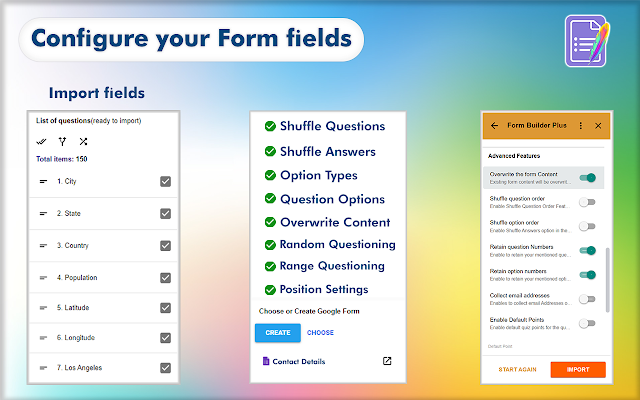
► Provides comprehensive customization of the configuration (type, options, etc) while importing.
► Lists all fields/ questions/ quizzes from the source files as a preview before importing.
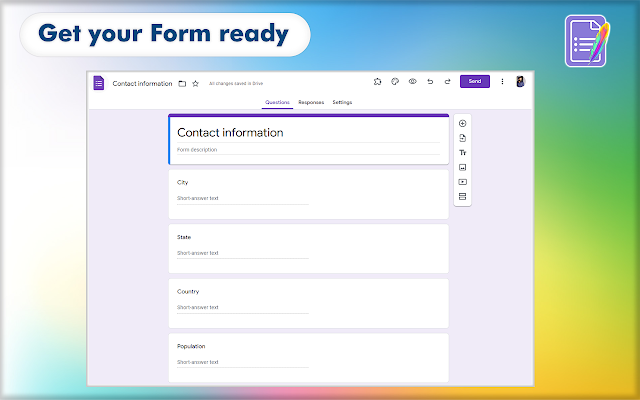
► Preview the form and adjust as you want using the feature-rich Preview application - drag to move, merge, split, edit, delete, set points, mark as required or not, and much more.
► Position the importing to bottom, top, after/before a selected field
► Shuffle (randomize) questions and answers before importing them into the form
► Automatically map data with a built-in intelligence engine to match user expectations.
► Pre-curated templates to reference and quickly start your form building.
► Create questions/questionnaires easily with the help of AI, There is a wide variety of gateway present in Form Builder like Chat-GPT, Gemini, Claude, Mistral
► and many more features
Read more at https://formbuilder.jivrus.com/features
VARIANTS
There are four variants of the same Form Builder add-on that work from different workspace apps: Google Forms™, Google Sheets™, Google Docs™, Google Calendar™, Gmail™, and Google Drive™. Paid users can use the same license for all variants and use any variant as per their convenience and need.
1. This add-on works from Google Forms™
2. Form Builder Plus add-on that works on Google Forms™, Google Sheets™, Google Calendar™, Gmail™, Google Drive™ can be seen in https://workspace.google.com/marketplace/app/form_builder_plus/235019714744
3. Form Builder for Docs add-on that works on Google Docs™ can be seen at https://workspace.google.com/marketplace/app/form_builder_for_docs/725512574241
4. Form Builder for Sheets add-on that works on Google Sheets™ can be seen at https://workspace.google.com/marketplace/app/form_builder_for_sheets/463417060578
Read more at https://formbuilder.jivrus.com/features/form-builder-variants
PRICING
Form Builder comes with free and paid plans. The basic or free plan will have a limited quota to help users to familiarize themselves with the use cases. Paid plans come with enhanced features and quotas for educational, professional, and business users.
Read more at https://formbuilder.jivrus.com/pricing
SUPPORT For more details refer to https://formbuilder.jivrus.com/support Contact us at https://formbuilder.jivrus.com/support/contact-us or email [email protected] for any query or feature request.
Built with 🔥 & 💚 by Jivrus Technologies.
Screenshots
Category rankings
As of Jul 8, 2026- Utilities#4of 110Top 4%
See 90-day rank history for each category
Track daily rank changes, category shifts, and position volatility.
Featured placements
Form Builder has been featured in the following sections on Google Workspace Marketplace in the last 30 days:
- homeTop rated
Keyword rankings
Form Builder ranks for 3 keywords across Google Workspace Marketplace. Here are the top 3:
Competitors & alternatives
Form Builderdoesn't have curated competitor matchups yet. Other tracked utilities apps on Google Workspace:
Frequently asked questions
What is Form Builder?
Form Builder is an app for Google Workspace. It currently holds a 4.6-star rating from 6,235 merchant reviews, and AppRanks has been tracking its public marketplace data on a daily refresh cycle. It is listed under the Utilities category on AppRanks, where you can see its current category position, review-velocity trend, and how it compares against the top alternatives in the same space. Developed by Jivrus Technologies.
Is Form Builder free?
Form Builder does not offer a permanent free plan on Google Workspace. Pricing starts at Free of charge with paid features. Trial availability and exact billing terms are mirrored from the live Google Workspace listing and may change between refresh cycles, so always confirm the headline price on the source marketplace before installing.
Who uses Form Builder?
Currently around 11,246,153 active stores have installed Form Builder. Its review base of 6,235 signals a mature user community spanning small, mid-market, and enterprise merchants. It is part of the Utilities category on Google Workspace.
Where does Form Builder rank on Google Workspace?
Form Builder currently sits at position #4 in the Utilities category on Google Workspace. That places it in the top 4% of 110 apps tracked in the same category. Category positions are read from the live marketplace ranking and refresh on each scrape, so the number you see here reflects the most recent crawl rather than a long-running average.