Pricing Table builder – Price List
WordPress Pricing Table plugin is a great tool for adding beautiful price tables to your website. This plugin has a lot of necessary features that you will like. You can check the demo page and see some live examples. Here is our plugin Demo page: Demo Features of Free version User friendly plugin Works with all actual WordPress versions Responsive design Unlimited tables and column themes Ability to set individual theme for each column Ability to set Distance between columns Unlimited columns Font Awesome icons 500+ nice icons Position control option Ability to set margins for all elements Ability to set paddings for all elements Title background color option Price background color option Features background color option Additional text background color option Button background color option Ability to set Title, feature, additional text, price colors Easily change the Additional text position Ability to set font size, font family for all elements Border options for all fields (color, radius, type, width) … and Much More You can upgrade the free version to the WordPress Pricing Table Premium for adding more functionality. Features of Premium version 37 animation effects 20 Awesome built-in themes Beautiful Background Gradients 15 unique and nice button styles Column scale option Column fields ordering Column type option Column outside box shadow option If you have any question or suggestion(for example, about adding new features) about our plugin, contact us at SUPPORT FORUM. You can use our plugin for different purposes, for example, you can create paid registration form or hosting plans. Let’s check how to use this plugin. First of all, you need to create and configure theme or use default themes. Also, you can duplicate themes and make changes to duplicated themes. It will save you time. You can duplicate themes, then make minimal changes and create several themes just in 5 minutes. For creating themes go to the admin panel and open our plugin themes admin page(Column Themes). Click on the “Add new” button. Type the theme name and start changing options. Set the Column width and Column minimum width, the second option is an important option for responsive design. Also, from the general settings tab, you can configure the column border options, such as border type, border width, border color and border radius. Don’t forget to set the text align as well. Then open the content styling tab. From here you can set the title, price and features styles. You can change from this page background colors, text colors, fonts, font sizes. Also, you can set paddings for these fields(Top, Right, Bottom, Left). You can set margin options as well. Check the border options as well. The next option is the additional text option. In the first field you can type the additional text and then configure other parameters. This field mostly will need for adding the Best Offer field. It will give an extra nice view to the current column. You can change the additional text positions and move it to Above the column, Above the title, Below the title, Above the price, Below the price. In this way, you can create unique and nice designs. Also, there are other necessary options for this field, such as background color, font family, font size, element position(left, center, right), element width and much more. The next tab is the button styling tab. It is another important tab that will affect the column design. In the free version, you can use only the standard version of button. The other button designs available only in the premium version. The standard button has several parameters that you can use. You can configure the Button row padding from the top, right, bottom and left. You can set the margin parameters as well. Don’t forget to configure the border settings as well. The other important parameter for the button is the background color, also, you can set the background hover color as well. Set the other parameters such as button text colors, font family, border options and button paddings. The last tab is the Animation tab. This option is available only in the Premium version and it will give an extra nice look. That’s all, just save the theme. Then open the Pricing Tables page. You can add, remove and configure columns from this page. The first thing you need to do is filling the columns fields. Type the plan name, price, features(type the first feature, press enter and type the next one and so on), button URL(payment URL), button text and choose the theme you created. You can change the column fields positions from the right side using the drop-down option(we would mention, that it is a premium feature as well). After that set the column distance and table position. You can use 500+ font awesome icons for all fields of a column. Just find the icon you need(from the right bottom side) and click on it. Then you will see that the icon code appears in the field above icons. Copy this code and paste to any column field. Then save the spreadsheet. You can insert spreadsheets to the page/post using our plugin shortcode button. You will find it from page/post editor(you can check screenshots and see how to use the shortcode button). After all, we can say, that a good plugin is part of success, including increased sales and a brightly displayed price spreadsheet, that will attract buyers to buy goods on your website. If we are talking about the beauty of style, then our plugin in the free version has a number of interesting solutions in various color options. It has several ready-made styles and they all look great with bright colors. Among the screenshots, it can be seen that our plugin can also be used as a comparative spreadsheet. It is one of the best and smart plugins for WordPress, easy to use and configure to display anywhere on the WordPress website page/post. It has a simple and understandable interface, it has a wealth of choice of styles, it has very beautiful themes. It looks very beautiful and the style is very fashionable.
Top keywords
- column17×1.65%
- button15×1.45%
- option15×1.45%
- set15×1.45%
- color11×1.07%
- themes11×1.07%
- background10×0.97%
- text10×0.97%
- border9×0.87%
- page9×0.87%
- font8×0.78%
- options8×0.78%
WRC Pricing Tables – Responsive CSS3 Pricing Tables
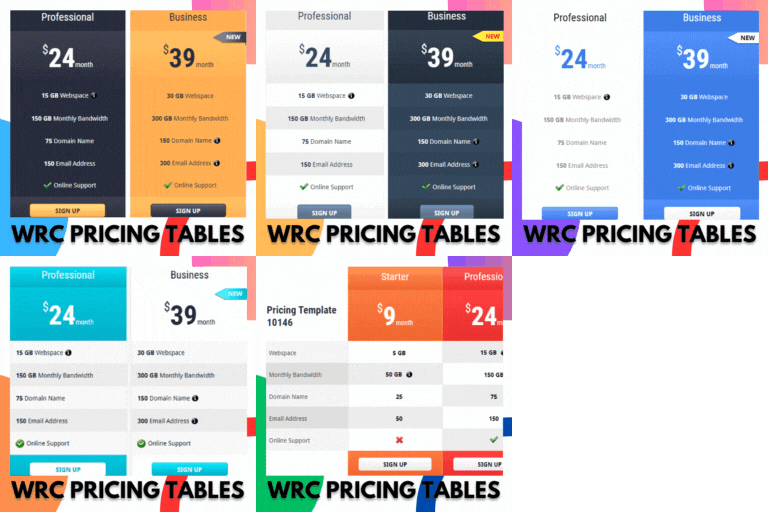
FREE VERSION DEMO | PRO VERSION DEMO | EXPLORE PRO | TEST DRIVE PRO Create Stunning Pricing Tables in Minutes – No Coding Required! WRC Pricing Tables is the ultimate WordPress plugin for effortlessly crafting beautiful, responsive pricing tables that drive conversions. With 22 professionally designed, ready-to-use templates available instantly, you can launch eye-catching pricing displays with just one click. This plugin is perfect for SaaS products, memberships, service packages, and more! Key Features That Set Your Pricing Apart: ✅ 22 Ready-to-Use Templates: Choose from a diverse collection of modern designs that automatically adapt to all devices – no CSS knowledge needed! ✅ Flexible Display Options: Showcase products individually or create powerful comparison tables to help customers make informed decisions. ✅ Unlimited Customization: Add as many features and pricing tiers as you need with our intuitive drag-and-drop interface. ✅ Visual Enhancements: Make tables pop with interactive elements: – Highlight special offers with ribbons – Add explanatory tooltips – Use clear ✔️/✖️ icons – Custom buttons with hover effects ✅ Smart Color Control Extended WordPress color picker with 18 vibrant presets lets you match any brand identity perfectly. ✅ Performance Optimized Lightweight code ensures your pricing tables load fast without slowing down your site. Why Professionals Choose WRC Pricing Tables: ✨ Mobile-Ready Designs – Flawless display and responsiveness on all devices. ✨ No Data Limits – Enjoy unlimited rows and columns for detailed pricing presentation. ✨ Live Previews – See your changes reflected instantly. ✨ Beginner Friendly – The intuitive point-and-click setup makes table creation effortless. ✨ Professional Results – Create enterprise-quality tables without the complexity. Perfect For: ✔ Digital product sellers ✔ Service providers ✔ Membership sites ✔ SaaS companies ✔ Agencies and freelancers Install in seconds and create your first pricing table faster than you can make coffee! Pro Tip: Make your Recommended package stand out automatically with our special column highlighting feature. Watch Free Version Video Walkthrough Upgrade to Pro Unlock the full potential with our premium version, offering an array of new CSS3 table designs, enhanced features, and extensive customization options, all accompanied by dedicated support. Key features of the WRC Pricing Tables Ultimate: Access to 60+ ready-made templates, enabling you to create stunning pricing tables instantly (Ultimate Version). Utilize Feature Categorization functionality to organize and highlight your product offerings effectively (Ultimate Version). Add Star Ratings to showcase customer reviews and ratings, building trust and credibility (Ultimate Version). Instantly make a copy of any existing pricing table, saving you time and effort. Easily import/export (backup) pricing tables between websites, simplifying the migration process. Seamless integration with PayPal buttons for convenient payment processing. Pricing Toggles functionality allows users to switch between monthly-yearly pricing plans, currencies, or any other configurable option. Efficiently hide empty features or any specific sections of the pricing table to streamline the presentation. Ready to take your pricing tables to the next level? Explore the Pro Version to discover the full range of premium features. Click to Watch Pro Version Walkthrough More About WRC Pricing Tables 1. Flexible Feature & Pricing Display: You have the flexibility to present the features and prices of your different products in two distinct ways: – Individual Feature Display: Showcasing the features of each product separately. This allows you to provide a detailed breakdown of the offerings for your customers to compare and evaluate. – Comparison Pricing Tables: Enable a side-by-side comparison of the features of each product. This format simplifies the decision-making process for your customers, helping them quickly identify the best fit for their requirements. 2. Unlimited Rows and Columns: Unlock the potential of your pricing tables with the ability to seamlessly craft an unlimited number of feature rows and package columns. Our intuitive drag-and-drop sorting feature ensures you have complete control over their arrangement, making customization a breeze. 3. Dynamic Visuals & Interactive Elements Our plugin seamlessly integrates ribbons, tooltips, tick and cross icons, buttons, and much more. These enhancements not only boost the visual allure of your tables but also enrich their functionality, offering your users a dynamic and engaging experience. 4. Effortless Color Customization Match your brand’s identity with our plugin’s seamless integration with the WordPress default Color Picker. Enjoy an extended palette of 18 vibrant color options, an enhancement from the default 8, giving you the creative freedom to craft stunning and lively pricing tables that resonate perfectly with your business’s branding. Experience the Difference Try our plugin today and see how our modern data-handling approach can improve your site’s speed, reduce database clutter, and make managing pricing tables a breeze. Additional Features Perfect on Any Device: Our tables adapt flawlessly to all screen sizes. User-Friendly: It’s designed for simplicity, so you can create tables effortlessly. Endless Color Possibilities: Choose from an unlimited range of background colors. Limitless Rows & Columns: Add as many as you need for detailed pricing. Full Customization: Every element in your tables is adjustable through easy-to-navigate menus. Subtle Animations: Enjoy smooth hover effects, like column enlargements and highlighted shadows. Template Switching: Swap templates without losing any data or settings. Highlight Special Columns: Make specific columns stand out with an enlarging effect. Hide, Don’t Delete: Conceal columns without deleting them, preserving your options. Shadow Control: Set column shadows and customize their colors to match your style. Flexible Currency Placement: Choose whether your currency appears on the right or left. Button Dimensions: Customize button height, width, and appearance as needed. Auto Column Sizing: Columns adjust automatically to optimize space usage. Sortable Content: Users can easily sort columns and feature items. Stylish Tooltips & Ribbons: Utilize CSS3 tooltips and ribbons for that extra flair. Checkmark/Cross Icons: Add intuitive tick and cross icons to clarify options. Effortless Implementation: Insert your pricing tables seamlessly with a shortcode. Universal Browser Support: Compatibility with all major web browsers ensures a smooth experience for everyone. Credits Developed By: Realwebcare Facebook Page Support For support and assistance, please visit the plugin support forum. License WRC Pricing Tables is licensed under the GPLv2 or later. For more details, see the License file.