Logo Slider – Logo Showcase, Logo Carousel, Logo Gallery and Client Logo Presentation
GS Logo Slider is a WordPress plugin that simplifies showcasing your partners, clients, brands, and sponsors. It allows you to create a logo slideshow quickly and easily. Featuring logos of respected companies on your website builds trust and credibility, while also boosting brand awareness for your partners, leading to stronger collaborations. The plugin is user-friendly, creating a dedicated logo post type and offering a user-friendly Shortcode generator for easy embedding. Its responsive design ensures that responsive sliders look great on all devices, and the lightweight plugin keeps your site running smoothly. Focus on what matters with GS Logo Slider. 🎬 Live Demo ⬆️ Upgrade to PRO 📚 Documentation 🙋♂️ Support Why are logo sliders useful for businesses? Logo sliders help businesses show their partners and clients, building trust and credibility. They save space on the website while highlighting important relationships. Not only it boosts brand recognition but can lead to more collaborations as well. What Sets GS Logo Slider Apart? Responsive Across All Screen Sizes: This responsive logo slider effortlessly adjusts to any screen dimension, maintaining a polished look on desktops, tablets, and smartphones. Your logo display holds its visual appeal on all devices. Comprehensive Documentation: The plugin includes thorough documentation that assists users with installation, configuration, and advanced customization options. It enables even those with limited technical skills to utilize it effectively. Regular Updates: GS Logo Slider receives frequent updates to integrate the latest advanced features and security improvements. This ensures the plugin stays reliable and compatible with the newest WordPress versions. High Performance: Engineered for speed and efficiency, GS Logo Slider delivers rapid loading times and smooth functionality. Its high performance enhances user experience and minimizes bounce rates. Plugin Features – Logo Carousel GS Logo Slider is a powerful plugin with a rich array of functionalities. Here’s its huge features list: Versatile Layouts: Choose from a variety of layouts including Grid, List, Table, Filter, Live Filter, Full Width Slider, Center Mode, Variable Width Slider, Vertical Center Slider, Vertical Ticker Up, Vertical Ticker Down, and 2 Rows Slider. 24 Different Themes: Choose from a variety of pre-designed themes. Image Size Control: Select logo image sizes from Thumbnail, Medium, Large, or other registered sources. Template Override: Override default templates for a personalized touch. Drag & Drop Reorder: Easily reorder logos as needed. Gutenberg Block Available: Seamlessly integrate logos with the block editor. Logo Shortcode Ready: Easily insert logos using Shortcodes. Tooltip Option: Add informative tooltip descriptions to logos. Multiple Sliders on Same Page: Display sliders from different categories on the same page. Advanced Settings Panel: Comprehensive slider settings panel with all necessary options. Slider Customization: There are customizable options such as adjusting slider carousel speed, slider autoplay pause, navigation, pagination, drag-and-drop feature, and color settings. Directional Control: Logos can move Right to Left (default) or Left to Right for Slider & Ticker Theme. Display Options: Display logos horizontally or vertically. Infinite Loop: Enable or disable infinite loop. Ticker Mode: Slide in ticker mode, similar to a news scroll. Grayscale Feature: Option to display logos in grayscale. Hover Control: Stop sliding on hover. Title Display: Display logos with or without titles. Link Target Specification: Specify the target for logo links to open in a new tab or same window. Transition Control: Set the number of logos to move during transition effects. Shortcode Parameters: tons of Shortcode parameters for customization. Category-wise Logos: Display logos based on categories. Lightweight and Plug-and-Play: Simple installation with no configuration or extra code required. Custom Post Type for Logo Posting: Dedicated post type for managing logos. Compatibility: Works with all WordPress themes. User-Friendly: It has an easy-to-use user interface for managing, editing, creating, and deleting logos without new knowledge. Developer Friendly: Simple to customize and extend its functionalities using Hooks. Priority Email Support: Get assistance via priority email support. Free Installation Help: Free installation service if needed. Continuous Updates: Stay updated with new features and improvements. Auto Update: Receive notifications for updates and easily update the plugin from your dashboard. Well-Documented: Comprehensive documentation and support. The plugin is advanced, feature-rich and is designed to provide a powerful, user-friendly, and customizable solution for displaying logos on your WordPress site. Available Fields While Adding a Logo Adding logos using this responsive carousel slider is very simple. There are only four fields to enter data into. They’re as follows: Company Name: Write the name of the brand of the logo that you’re going to enter here. Logo: Upload the brand logo image here. Company URL: Enter the website’s URL here. Logo Categories: Add new categories for the logo or choose from existing categories (if any). General Settings Go to GS Logos > Logo Shortcode. Here, you can either create a new Shortcode or edit the existing ones. Once inside, you’ll see the General Settings page. Name of the Shortcode: Decide on a unique name for your Shortcode. Style & Theming: Choose a style or theme for your Shortcode. Image Size: Select the image size for the logos from options such as medium, large and custom. Sliding Speed: Control the slider speed. Autoplay: Turn auto sliding of the logos on or off. Autoplay Delay: Set how long to delay the auto sliding. Pause on hover: Specify if autoplay should cease when the user hovers on a logo. Infinite Loop: Specify whether clicking the next button on the last slide logo will loop back to the first slide, and clicking the previous button on the first slide will loop to the last slide. Reverse Direction: Set logo sliding direction from right to left (default is left to right) Slider Navs: Activate/deactivate logo sliding buttons. Navs Position: Determine the position of the navigation arrows. Options for setting arrow icons are bottom nav, inside/outside the slider component. Slider Dots: Show or hide the dots under the slider. They make the navigation of the logos easier. Logo Title: Opt to display logos with titles or without. Logo Category: Select whether logos should be shown with accompanying titles. Secondary Image: Show different images when hovering on the logos. Tooltip: Decide whether to show tooltips when hovering on images or not. Style Settings Go to GS Logos > Logo Shortcode. In the second tab you’ll see the Style Settings Page. Logo style: Select whether logos will show in color or in grayscale. Adjustable Spacing: Set the margin between logos in pixel values. Desktop Logos: Set the number of logos to show on desktop screens. Tablet Logos: Choose how many logos to display on tablet screens. Mobile Logos: Configure the list of logos visible on mobile screens. Clickable Logos: Set whether clicking on a logo opens its link on a new page or in the current page. Query Settings Go to GS Logos > Logo Shortcode. In the third tab, after the General Settings and the Style Settings tab, you’ll see the Query Settings tab. Logos: Set the number of logos you want to show. Default value is -1, and it means all the logos will be shown. Order: Specify the order in which you want your logos to show. The criteria for ordering can be set from the Order By field. Order By: Choose whether to order your logos by name, id, date of adding or you can select a custom order of your choice. Also, you can randomize the logo sequence on every page refresh. Categories: Select a specific logo category to display logos from that category. You can select multiple categories here. Preferences Go to GS Logos > Logo Shortcode. On the top right navigation bar, click on Preferences. You’ll see the following fields: Disable Lazy Load: Disable or enable lazy loading of the logo images. Anchor Tag rel: Choose the value for the Anchor tag’s rel attribute to enhance security and SEO. By default, the value is set to dofollow. Custom CSS: Easily add your own custom CSS to the WordPress logo slider plugin for complete control over the appearance and styling of your logo displays. Page Builder Support Gutenberg Elementor WPBakery Divi Builders Genesis Framework Beaver Builder Oxygen Builder UX Builder – Flatsome TagDiv – Newspaper Shortcode Usage Basic Usage – From Version 3.0.0, shortcode generator was added with a preview. Select theme & other parameters. Shortcode will generate with id like [gslogo id=1] Use the following shortcode to display logos for partners, clients, or sponsors. [gslogo id=1] Shortcode PHP Usage Documentation If you have any questions regarding the WordPress Logo Carousel plugin and how to work with it, We recommend referring to our comprehensive online documentation. It provides detailed information and instructions to assist you in navigating and utilizing the plugin effectively. You can find the Documentation here. Quick Support & Bug Reporting If you encounter any problems or discover bugs, please post them in our Support channel. We aim to respond as soon as possible (excluding holidays). Pro users are requested to contact our support channel for dedicated assistance. 🙋♂️ Alternatively, you can reach out to us through our Support or WordPress.org support forum. Development Team Crafted and Developed with Passion by GS Plugins Confused? 🎬 View live Demos » 📚 Documentation » 🔥 You may like other plugins from GS Plugins Testimonial Slider – Testimonials slider displays rotating customer endorsements and recommendations, helping to build trust and credibility for a business or product. Portfolio – Filterable Portfolio plugin for WordPress allows you to easily display and showcase your projects, highlighting your skills and abilities. Team Members – Build a Stunning Team Page or Section and Show off Your Team’s Talents! Projects – Projects showcase displays detailed information including client reviews, ratings, galleries, and videos for a business’s work. Books Showcase – Books showcase displays detailed information including author, published date, reviews, ratings, and gallery, allowing users to easily find and explore books. Coaches – Coaches plugin displays coaches’ experience, skills, reviews, ratings, and certifications, helping users find the right coach for their needs. Posts Grid – WordPress Posts Grid plugin displays the latest posts in an elegant grid format, allowing for easy navigation and quick access to new content on a website. Posts Widget – WordPress Posts Widget plugin displays the latest posts in an elegant format on the sidebar or any widget area, allowing for easy navigation and quick access to new content on a website. 🎯 WooCommerce Plugins WooCommerce Products Slider – WooCommerce Product Slider plugin displays products in a visually pleasing, sliding manner, making it easy for customers to browse and find the products they want on an online store. WooCommerce Variation Swatches – WooCommerce Variation Swatches plugin replaces the default dropdown fields for variable products with visually appealing swatches, making it easier for customers to select product options and improve the overall shopping experience. WooCommerce Brands – WooCommerce Brands taxonomy plugin allows for easy cataloging of products by adding a brand taxonomy, making it simple to organize and filter products on an online store. 📣 Social Plugins Dribbble Portfolio – Dribbble Portfolio WP plugin enables you to display your Dribbble shots on your website in a portfolio layout, allowing you to showcase your design work to a wider audience. Behance Portfolio – Behance Portfolio WordPress plugin allows you to display your Behance projects on your website in a visually appealing layout, making it easy for your audience to view and appreciate your work. Pinterest Portfolio – Pinterest plugin for WordPress allows you to display your Pinterest pins on your website, giving your audience a chance to view and interact with your boards, and potentially drive more traffic to your Pinterest profile. Instagram Portfolio – Instagram plugin for WordPress allows you to display your Instagram posts on your website, making it easy for visitors to view and interact with your content and also to increase engagement on your website. Portfolio – Envato – Envato Portfolio Plugin allows you to display your Themeforest and Codecanyon items on your website, showcasing your digital products and making them easily accessible for potential customers. Youtube Gallery – YouTube Gallery plugin allows you to display videos from a YouTube channel or playlist on your website, creating a visually appealing gallery and making it easy for visitors to access and watch your videos. Twitter Feeds – Twitter Feeds plugin displays Twitter feeds, hashtags, user cards, and collections on a website, making it easy for visitors to view and interact with your Twitter content. 🏆 Branding Plugin Custom Login – GS Custom Login allows you to customize the WordPress login screen, providing an easy way to create a unique and visually appealing login experience for your website users. PowerUp – Enhance Your WordPress Experience with the Ultimate Security & Convenience Solution – Hide Admin Bar, Login & Logout Redirection, Disable Comments & Restrict WP-Admin Module.
Top keywords
- logos42×2.02%
- logo41×1.97%
- slider27×1.30%
- display19×0.91%
- shortcode17×0.82%
- wordpress15×0.72%
- website14×0.67%
- gs13×0.63%
- portfolio11×0.53%
- settings11×0.53%
- support10×0.48%
- allows9×0.43%
Product Slider, Product Grid, Product Masonry
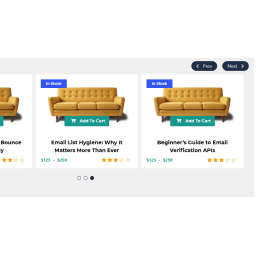
PickPlugins Product Slider is easy and user friendly carousel slider for WooCommerce products, You can create unlimited product slider by this plugin and display anywhere via shortcodes. We added layout builder for your product slider to build as you want, easy to customize and add your own CSS via layout editor you can build some fancy and unique layout. No coding is required to build custom layout and add elements to layout. we added tons of option to handle slider functionality to control slide speed, display or hide navigations and dots. Product Slider for WooCommerce by PickPlugins by http://pickplugins.com Buy Premium !» See the Live demo !» Support !» Documentation !» Plugin Features Slider column number You can set custom number of slider column number for different devices like desktop, tablet and mobile. Slider autoplay You can choose slider autoplay on page load completed, so that slider will automatically slide your product to display your customers. you can also set custom values for autoplay speed and timeout. Slider rewind & loop You can set the slider to re-wind when slide item reached to end of the slider and it will automatically start slider from first product. you can also set loop so that slider will never stop and continuously slide to loop through each product. Slider stop on hover When your customer want to see a product on the slider it will automatically stop sliding so that your customer can drag by mouse or touch on mobile device to check their desired products. Slider center You can choose slider item to display one product on center so both side will display 2 product on half size. Slider navigations You can display slider navigations so that user can click these to check or slide product one by one, you can also set position for navigation like top-right, top-left, bottom-left, bottom-right, middle, middle fixed. you can also choose some pre-defined style for navigations, set custom value for navigation sliding speed. also custom background color and text color also available to customize as you need. Slider dots You can display slider pagination or dots at bottom so that user can click these to check or slide product by each screen, you can set custom value for dots sliding speed. also custom background color and hover or active color also available to customize as you need. Slider RTL If you website is running with RTL languages you are feel free to use, this slider plugin has great support for RTL languages. Slider lazy load You can enable lazy load to delay load product thumbnails which product is not in current view, it will increase your page speed and great support for SEO friendly product slider for your WooCommerce. Touch & Mouse drag This is responsive product slider so your customer can slide product by mouse drag or touch dragging based on their devices. Query products limit You can set custom number of query products, like you want to display only 10 item from latest product release. it will save and minimize database query to load faster product slider. Product categories & terms You can choose any product categories or product tag to query product. you can also choose multiple product categories to query product to display on slider. we added terms relations for query product so you can choose conditional product query based on product categories or tags. Hide out of stock You can choose option to hide product these are out of stock, so that your custom will not see the products are not currently available in stock. this is user friendly product slider will minimize user frustration. Featured product You can choose to display or hide featured product on the slider. On-sale products You can display or hide on-sale product on the slider, this is really amazing feature for which customer are looking for on-sale products on your site, this will definitely help you to attract customer and increase product sale. Product by ids This is exclusive feature if you want to display product slider by product ids, if you have some exclusive product for customer you can display these easily. Query order & orderby You can choose product query order ascending or descending and various oderby options like title, date, author, comment count, menu order and randomly. Custom ribbons You can display custom ribbons for each slider, ribbons are very useful to understand slider product objective, you can also customize ribbons background color, text color, height, width and background image. you can also choose 4 pre-define positon to display ribbon at top-right, top-left, bottom-let, bottom-right. Slider item style You can customize slider item or product wrapper style by custom padding, margins, background color and text-align. Slider container style You can customize slider container or wrapper style by custom padding, margins, background color and background image. Premium Features Recently viewed products You can display recently viewed product by customer. Related products You can display product slider as a related products based on current product category and tags. related product also query based on upsells, cross-sells products. Best selling products You can display best selling products based on any categories or tags and custom taxonomies or attributes. Top Rated products You can display top rated products based on categories, tags or custom taxonomies or attributes. Advance meta fields query Query products based on meta fields for advance products queries. Featured products at first You can display featured products at first and then other products. Layout element advance layout elements Stock status, Stock quantity, Product Weight, Product Dimensions, Share button, Recently viewed text, Meta fields