Content Slider Block – Slide Through Text or Media Content
👉 Plugin Demo | Documentation | Get Pro Version 👈 Professionally showcase your carousel slider with the Content Slider Block plugin. This plugin adds a new block in the Block Editor by which you can create a professional-looking content slider! It is very effective in presenting your slider nicely. There are many options that you can use to decorate your carousel slider in any color you like. Customization is at the core of the Content Slider Block. With the ability to tailor each slide’s background to your liking—whether it’s a – vibrant gradient – captivating image – or sleek color palette. you can create a captivating visual experience that aligns perfectly with your brand identity. But it doesn’t stop there. Each slide can be enriched with compelling content, including titles, descriptions, and actionable buttons. With flexible typography settings, you have the freedom to fine-tune the appearance of text elements to ensure consistency with your website’s design aesthetic. Buttons, in particular, are highly customizable, allowing you to specify link behavior, padding, and border styles. Whether you want to drive conversions with bold call-to-action buttons or maintain a minimalist design approach, the options are endless. The Content Slider Block also puts you in control of content positioning, giving you the flexibility to arrange elements within slides according to your preferences. And with responsive design options, your sliders will look stunning on any device, ensuring a seamless user experience across desktops, tablets, and mobile devices. But what truly sets the Content Slider Block apart are its advanced features. You can create truly captivating sliders that leave a lasting impression on your audience with – options for autoplay settings – transition effects – and additional effects like cube and coverflow. With Pro features like advanced border styles, device-specific controls, and shortcode integration, the possibilities are endless. Whether you’re a blogger, marketer, or business owner, the Content Slider Block empowers you to tell your story in a way that resonates with your audience. Content Slider Block Features Set color, gradient, or image background for each slide. Title, Description, and Button for each slider. Set typography for the Title, Description, and Button. Specify link tab, padding, and border for the Button. Set different positions for the content. Also, can drag the slide content. Set different colors for slide title, and description. Also, set button colors and hover colors. Apply different columns for responsive devices. Set column gap, width, and height to set your desired layout. Multiple Slider options such as Loop, Touch Move, Slide Speed, Autoplay Slide, Fade, and Creative effects for the Slider. Show/Hide the Pagination and Navigation and configure their dynamic styles. Enable/Disable Pagination Clickable and Dynamic Bullets. Content Slider Block Pro Features Sortable: Sort the slides. Border: Border style options in every single slide. Delay time: Delay time option in autoplay. Disable on Interaction: Disable on Interaction option in autoplay. Reverse Direction: Reverse Direction option in autoplay. Pause on Mouse Enter: Pause on Mouse Enter option in autoplay. Stop on Last Slide: Stop on Last Slide option in autoplay. Free Mode: Free Mode option on drag slide. Sticky: Sticky option in free mode. Effects: Explore more effects such as Cube, Coverflow, Flip, and Cards. Keyboard Control: Slide with Keyboard control. Slide on Mousewheel: Slide on Mousewheel option. Pagination Device: Show/Hide pagination in different devices(tablet and mobile). Navigation Device: Show/Hide navigation in different devices(tablet and mobile). Background: Background style option for slider wrapper. Padding: Padding style option for slider wrapper. Shortcode: Shortcode option to use anywhere. How to use Content Slider Block First, install the Content Slider block plugin Add the Content Slider block from the block category called “Content Slider Block” in the Gutenberg editor. You can change block settings from the right-side settings sidebar. Enjoy! For installation help click on Installation Tab User Feedback ⭐⭐⭐⭐⭐ simple and effective ❛❛very simple very effective please keep updating it Best Regards❜❜ –tarekelnemrawy – Did you like this plugin? Dislike it? Have a feature request? Please share your feedback with us Check out the Parent Plugin of this plugin- B Blocks – A blocks collection and page building tool for Gutenberg. Check out our other WordPress Plugins- Html5 Video Player – Display videos as single and playlist in multiple skins. PDF Poster – Display/Embed PDF files with different styles. Html5 Audio Player – Listen audios with awesome visuals. StreamCast – Customizable radio player with different skins. 3D Viewer – Embed 3D models and 3D products with interaction. Advanced Post Block – Show posts and custom posts in different layouts. Source Code You can find the source code, report bugs, and contribute to the development of this plugin on our GitHub repository: Content Slider Block on GitHub Third-Party Libraries This plugin bundles the following third-party JavaScript/PHP libraries. Swiper Source: https://swiperjs.com/ GitHub: https://github.com/nolimits4web/swiper License: MIT – https://github.com/nolimits4web/swiper/blob/master/LICENSE Purpose: Modern touch slider used for Slider and News Ticker components. Freemius Lite SDK Source: https://bplugins.com/ GitHub: https://github.com/bPlugins/freemius-lite-sdk License: GPL-2.0-or-later – https://www.gnu.org/licenses/gpl-2.0.html Purpose: Provides an opt-in consent form for usage tracking and analytics to help improve the plugin. No data is sent before explicit user consent. External Services: Communicates with api.bplugins.com (activation events) and wp.freemius.com (opt-in processing) only after user opt-in. See bPlugins Privacy Policy and Freemius Privacy Policy. bpl-tools Source / GitHub: https://github.com/bPlugins/bpl-tools License: GPL-2.0-or-later – https://www.gnu.org/licenses/gpl-2.0.html Purpose: Shared utility library providing admin dashboard components and common Gutenberg editor controls. External Services: The library may connect to bPlugins, WordPress.org, and Freemius services for product data and checkout functionality. See full details: https://github.com/bPlugins/bpl-tools#external-requests–why-they-are-made
Top keywords
- slider23×2.41%
- block17×1.78%
- content17×1.78%
- slide14×1.47%
- content slider13×1.36%
- content slider block12×1.26%
- slider block12×1.26%
- option11×1.15%
- github10×1.05%
- com9×0.94%
- https9×0.94%
- different8×0.84%
Product Slider, Product Grid, Product Masonry
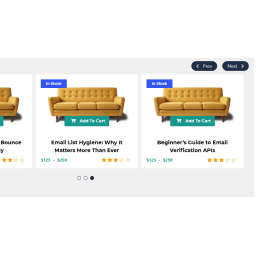
PickPlugins Product Slider is easy and user friendly carousel slider for WooCommerce products, You can create unlimited product slider by this plugin and display anywhere via shortcodes. We added layout builder for your product slider to build as you want, easy to customize and add your own CSS via layout editor you can build some fancy and unique layout. No coding is required to build custom layout and add elements to layout. we added tons of option to handle slider functionality to control slide speed, display or hide navigations and dots. Product Slider for WooCommerce by PickPlugins by http://pickplugins.com Buy Premium !» See the Live demo !» Support !» Documentation !» Plugin Features Slider column number You can set custom number of slider column number for different devices like desktop, tablet and mobile. Slider autoplay You can choose slider autoplay on page load completed, so that slider will automatically slide your product to display your customers. you can also set custom values for autoplay speed and timeout. Slider rewind & loop You can set the slider to re-wind when slide item reached to end of the slider and it will automatically start slider from first product. you can also set loop so that slider will never stop and continuously slide to loop through each product. Slider stop on hover When your customer want to see a product on the slider it will automatically stop sliding so that your customer can drag by mouse or touch on mobile device to check their desired products. Slider center You can choose slider item to display one product on center so both side will display 2 product on half size. Slider navigations You can display slider navigations so that user can click these to check or slide product one by one, you can also set position for navigation like top-right, top-left, bottom-left, bottom-right, middle, middle fixed. you can also choose some pre-defined style for navigations, set custom value for navigation sliding speed. also custom background color and text color also available to customize as you need. Slider dots You can display slider pagination or dots at bottom so that user can click these to check or slide product by each screen, you can set custom value for dots sliding speed. also custom background color and hover or active color also available to customize as you need. Slider RTL If you website is running with RTL languages you are feel free to use, this slider plugin has great support for RTL languages. Slider lazy load You can enable lazy load to delay load product thumbnails which product is not in current view, it will increase your page speed and great support for SEO friendly product slider for your WooCommerce. Touch & Mouse drag This is responsive product slider so your customer can slide product by mouse drag or touch dragging based on their devices. Query products limit You can set custom number of query products, like you want to display only 10 item from latest product release. it will save and minimize database query to load faster product slider. Product categories & terms You can choose any product categories or product tag to query product. you can also choose multiple product categories to query product to display on slider. we added terms relations for query product so you can choose conditional product query based on product categories or tags. Hide out of stock You can choose option to hide product these are out of stock, so that your custom will not see the products are not currently available in stock. this is user friendly product slider will minimize user frustration. Featured product You can choose to display or hide featured product on the slider. On-sale products You can display or hide on-sale product on the slider, this is really amazing feature for which customer are looking for on-sale products on your site, this will definitely help you to attract customer and increase product sale. Product by ids This is exclusive feature if you want to display product slider by product ids, if you have some exclusive product for customer you can display these easily. Query order & orderby You can choose product query order ascending or descending and various oderby options like title, date, author, comment count, menu order and randomly. Custom ribbons You can display custom ribbons for each slider, ribbons are very useful to understand slider product objective, you can also customize ribbons background color, text color, height, width and background image. you can also choose 4 pre-define positon to display ribbon at top-right, top-left, bottom-let, bottom-right. Slider item style You can customize slider item or product wrapper style by custom padding, margins, background color and text-align. Slider container style You can customize slider container or wrapper style by custom padding, margins, background color and background image. Premium Features Recently viewed products You can display recently viewed product by customer. Related products You can display product slider as a related products based on current product category and tags. related product also query based on upsells, cross-sells products. Best selling products You can display best selling products based on any categories or tags and custom taxonomies or attributes. Top Rated products You can display top rated products based on categories, tags or custom taxonomies or attributes. Advance meta fields query Query products based on meta fields for advance products queries. Featured products at first You can display featured products at first and then other products. Layout element advance layout elements Stock status, Stock quantity, Product Weight, Product Dimensions, Share button, Recently viewed text, Meta fields