Discount Rules for WooCommerce
Discount Rules for WooCommerce is a dynamic pricing and discounts plugin for WooCommerce that helps you create any type of bulk discounts, quantity discounts, product specific discounts, dynamic pricing, advanced discounts based on conditions, percentage discounts, tiered pricing discounts and more. With the PRO version, you can create advanced discount offers such as buy one and get one free (BOGO) deals, auto-apply coupons, free shipping discounts, bundle offers, discounts based on products, categories, attributes, tags, SKUs, user roles, cart items, purchase history and much more. The plugin offers a number of features that make it easy for customers to discover discounts and offers in your store: Show a bulk discount table on your product pages. This helps customers buy more in order to save more. Show the discounted price on product, cart & checkout pages with the original price crossed-out (with a line-through) Display “You saved” message on the cart & checkout pages Show a discount bar with your offers on the product pages Display a Sale badge on your shop & product pages View Demo | Documentation with examples | Ask Questions | PRO version | Examples DISCOUNT TYPES AND FEATURES WITH EXAMPLE SCENARIOS Free version features Create percentage discounts. Offer a storewide sale Example: A storewide 10% discount on all products Create bulk discounts. Example: Use quantity breaks to offer higher discounts on bulk purchases. Order total based discounts (Example: Spend more than $1000, get 10% discount) Set product specific percentage discounts (Example: Product A gets 10%, Product B gets 20%) Cart based discounts using the line items (Example: Purchase 4 different products or variants and get 10% discount) Exclude selected products from discount rules (product pricing discounts) Run special offers / sale for specific periods – Example: 10% discount only on BlackFriday Show bulk discount table on product pages Get the PRO version to create advanced discounts and grow sales PRO features All features of the free version, plus: Percentage discounts with advanced discount conditions. Fixed product discounts. Example: Get $9 discount for purchasing more than 6 items Category discounts – Get 25 % off on all items under Summer Collection Buy One Get One free offers – Buy a cap and get another cap for free Buy 2 and get 1 free offers – Buy 2 get 1 cheapest product free or Buy 2 and get 1 at 50% discount Buy one get one half off – Buy 2 get 1 at 50% off or buy one get the second product free or at 50% discount BOGO deals based on categories. Examples: Buy any product from Category A and get a product free from Category B. Buy Product A and Product B from Category Electronics and get a free product from category Accessories. Buy any product from Category Mobile and choose a free product from Category Hard Cases Volume discounts & tiered quantity discounts with conditions – Buy 6, get 10%, Buy 12, get 15% User role based discounts – Discounts for wholesale customers First order discount Product discounts with variant specific offers – Buy Product A with Variant X and get 10% discount Bundle discount – Buy 3 for $10, 6 for $20 Conditional discounts – Buy Product A and B and get discount on Product C Offer one or more free products. Multiple products could be offered free using a rule Apply discounts for multiple items using one coupon code Discount for product variants Attributes based discounts – Buy green color T-shirts and get 10% discount Discount for customers with specific domains – 10% discount for all emails ending with @example.com Customer specific discounts – 10% discount for selected customers Free shipping discount Shipping / Delivery location based discount Example: If shipping destination is California, get 15% discount Purchase history based discounts Example: Customers who spent at least $100 in previous purchases get 10% discount Discount based on the number of orders placed earlier. Example: 10% discount for customers with 5 or more orders Discount based on previously purchased products. Example: Customers who previously purchased Shoes get 10% discount Discounts based on sum of item quantities in cart – Order more than 10 items from any category and get 15 % discount Discount for the cheapest item in the cart – Add 3 products to the cart and get the Cheapest Item free Option to offer free products only from certain category Exclude products on SALE from discount rules SALE Badge for discounted products Highlight savings on the cart & checkout with “You saved” label Use a discount banner to highlight offers on product pages Option to show or hide the discounted price Priority support Discount Examples using PRO Features Category Discount The category discount feature allows you to offer discounts on all products in one or more categories. Simply choose one or more categories, set your discount offers, and the plugin will apply them automatically to every product in those categories. Here are some examples: Buy T-shirts from Apparel category and save 10% Get 30% off on Category A & Category B Purchase any 6 items from Category A and get a 25% discount on total cart value. Purchase 3 products from Category A or B or C or from all of them and get 20% discount valid from dd/mm/yyyy to dd/mm/yyyy Bulk Discount / Quantity Discount / Tiered Pricing Discounts Bulk Discount, also known as quantity discounts, tiered pricing discounts or volume discounts, allows you to reward customers for buying in bulk. As customers purchase more, they receive better pricing, encouraging bulk purchases. Here are some bulk discount examples: Buy 5 to 10 quantities, get 5% discount, 11-20 quantities, get 10% discount, 21-30, get 20% discount Buy 1 to 5 quantities, get $2 discount, Buy 6 or more, get $3 discount Storewide Sale Discount A Storewide Sale discount allows you to apply discounts on all products in your store, offering a simple yet powerful way to drive sales. Whether you’re running a seasonal sale, clearing out inventory, or rewarding loyal customers, a storewide discount makes it easy for shoppers to save on everything in your store. 20% discount on all products in the store on Black Friday or Christmas Auto apply coupon of 10% for all products 10% discount on all products for specific user role like Wholesale customers Buy One Get One Free Discount Offers BOGO is a popular discount strategy that allows you to create offers like buy one get one free, buy 2 get 1 free, buy one get one at half price, buy x and get y product free and more. Here are some examples: Buy one and get one free of the same product Buy 2 get one cheapest free Buy X get Y product free Eg: Buy 3 product and get a pendrive free (or with 50% discount) Buy Any 2 items from Category X, and get a Product free from Category B Buy X products and get X number of products free Buy 3 products from any category, get 1 free. Buy 6 products, get 2 products free…. Buy 12 products (any or category specific), get X number of cheapest among them free Free products can be a few selected products, cheapest products in the entire store or from selected categories. Products can be offered either free (100% discount) or at a percentage discount (50%) Spending based discounts Boost sales by offering discounts based on the customer spend. Here are some examples: Spend $500 or more and get 15% discount, spend $1000, get 20% discount Add two to six products in cart and get flat $30 discount. 10% discount for all retailers (User Role specific discount) All orders above $500 will get 15% discount Free shipping for orders above $100 Bundle Discount Encourage customers to buy multiple items together. For example, you can create deals like “Buy 3 for $10” or “Buy 6 for $20,” providing clear savings for bulk purchases. Create offers like Buy 3 items for $10. 4th item will be charged full price. Buy more, save more offers. Example: Buy 3 for $10, 6 for $20 Product Specific Discounts Shoes get 20% discount, T-Shirts get 5% discount Special Edition Shoe (A specific product) gets 15% discount for 10 days Buy 10 or more Mugs and get 5% off Buy 3 for $10, Buy 6 for $20 Fixed Product Pricing discounts $5 off on all products in Category A Set a fixed price per unit for bulk purchases (Product A cost is $20. Buy 5 to 10 quantity for $15 per unit, 11 and above for $10 each) User Role based discounts Useful when you have different types of customers in your store. For example, wholesale customers, retail customers Bulk discount based on user role for specific product or product categories. Example: Members of Wholesale customers group gets 40% discount, while Retail customers get 5% discount Discount for Product Variants Get 50% off on T-shirts Small and Large Sizes only Buy a Small Size Tee and get a small Size shorts free Conditional Discount Offers Buy Product A at full price and get 20% discount in Product B Buy 2 quantities of Product A, 2 quantities of Product and get 30% discount in Product C Buy 3 quantities of Product A and get flat $10 off in product B Buy a Mobile and get 20% off on headphone Attribute specific discount offers Useful when you want to offer discount when a product has a specific attribute. Example: 10% discount for purchase of T-Shirt with Small sizes. Shipping Address Based Discounts Flat 25% discount for customers from New York Customers from California get 10% discount while those from Texas get 5% Purchase history based discount Discount based on the total amount spent by the customer in previous orders. Example: Customers who spent $1000 get 10% on future orders. Discount based on the total number of orders placed by the customer – Customers who ordered 50 products get 15% on all future purchases Based on product purchase history (Example: Provide 10% discount to all customers who purchased Shoes earlier) Purchase history for a specific period (10% discount for those who spent $500 in the last 3 months) Discount Conditions The following conditions help you tailor your discount offers depending on certain criteria. Products Categories Attributes SKU Tags Cart Line Items & Properties Customers User Roles Shipping locations – ZipCode, City, State/Region, Country Subtotal Coupons Date & Time Purchase History – Last Order, First Order, Orders with X Items, Number of Orders Need help? Reach out to us Whether you want to double-check your setup or need help with a unique discount promo, we’re here to assist you. Feel free to reach out via the Live Chat on our website or through our support request form. We’re happy to guide you through the setup and ensure everything is running smoothly. Don’t worry—we’re here to help! Quick Links: PRO Version Documentation Helpdesk & Support External services Flycart CDN & documentation: The CDN is used to fetch static assets including images and contentand hosted at static.flycart.net, while the documentation for the plugin is hosted at docs.flycart.org and linked at various sections in the plugin to help merchants. Terms, privacy policy Google Charts: The library is used to display discount reports in a chart format. The service is provided by Google. Terms, privacy policy Credits Dutch Translation – @mvdburg1971 – Michael van der Burg
Top keywords
- discount92×4.92%
- buy52×2.78%
- product48×2.57%
- discounts44×2.35%
- 1035×1.87%
- products31×1.66%
- customers24×1.28%
- category21×1.12%
- example20×1.07%
- 10 discount18×0.96%
- offers18×0.96%
- specific15×0.80%
Variation Swatches for WooCommerce
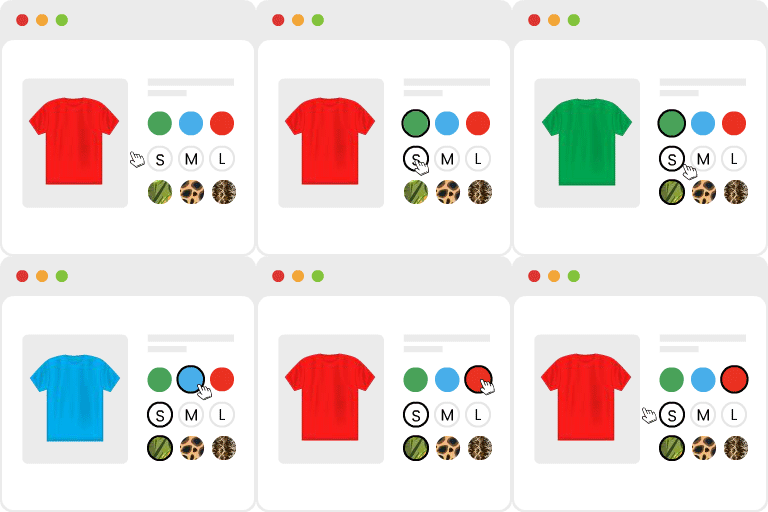
Trusted by 300,000+ WooCommerce stores and backed by 900+ five-star reviews—the highest-rated WooCommerce variation swatches plugin category. Lightweight, easy to set up, and powered by GetWooPlugins’ top-skilled developer & support team. How To Install Product Variation Swatches Plugin for WooCommerce Variable Products WooCommerce Variation Swatches makes selecting product options easier and more enjoyable. Say goodbye to dull dropdown menus—your customers can now choose sizes, colors, styles, and more using vibrant swatches, images, and labels. This transformation turns the shopping experience into something fun and visually appealing while efficiently supporting popular WordPress themes. Plus, it seamlessly integrates with product quick views, allows you to customize shapes into round or square, and even enables you to disable the plugin’s CSS to tailor it to your theme’s stylesheet. The best part? WooCommerce Variation Swatches automatically convert all variation select dropdowns into buttons right after installation—only a quick two-step configuration is needed for color and image swatches. Key Feature Comes with Variation Swatches For WooCommerce Plugin 👉 Auto Convert All Variation Dropdowns to Button Swatch by Default You can easily convert the variation select options from drop-down to buttons just by installing this WooCommerce Variation Swatches plugin. It will automatically convert your product variation select dropdowns to button swatches once the plugin is installed. Live Demo & Documentation 👉 Enable Color Swatches For Variable Product Attribute Variations For selling variable products, adding color variations is one of the best ways to bring more life into eCommerce stores. When you enable Color Swatches instead of traditional variation dropdown, you are making your customers easier to choose their desired products. Live Demo & Documentation 👉 Enable Image Swatches For Variable Product Attribute Variations Image swatches will provide a pleasant way to display variations of a product.This Image Variation Swatches plugin helps to display product variations easier and more stylishly. Live Demo & Documentation 👉 Enable Label/Text/Button Swatches For Variable Product Attribute Variations For showing available product variation-related details (such as colors and sizes), label/text/button variation swatches extensively boost conversion. It is one of the most effective ways to make all the available options visible for products. Live Demo & Documentation 👉 Convert Globally Created Attribute Variations Into Color, Image, and Label Swatches Globally created product attributes are used for many different products. With these Variation Swatches for WooCommerce plugin, you can globally create attributes into color, image, and label swatches. So, you don’t need to get inside each product of your store and enable variation swatches for them separately. Video Tutorial & Preview 👉 Option to Globally Select ROUNDED Attribute Variation Swatches Shape. The round shape is one of the unique and helpful features of this swatches plugin. You could grab the attention of buyers by using rounded attribute swatches. The feature helps convert potential buyers into sales. Live Demo & Documentation 👉 Option to Globally Select SQUARED Attribute Variation Swatches Shape. There are many scenarios where you need to show more than two or three characters in swatches or add color and image swatch exclusively. Instead of Round, using a Squared shape is the best practice in such situations. Live Demo & Documentation 👉 Show Cross Sign For Out of Stock Variation Swatches (Up To 30 Variations) By default, WooCommerce doesn’t cross out any variations that are out of stock. However,this plugin would help if you avoided user frustration by never letting them pick any variation product they can’t purchase. Live Demo & Documentation 👉 Blur For Out of Stock Variation Swatches (Up To 30 Variations) WooCommerce allows users to select the variation first, then let them know it’s out of stock. But, that’s time-consuming. When you use this swatches plugin, you can make blur for out-of-stock variation swatches up to 30 variations. Live Demo & Documentation 👉 Hide For Out of Stock Variation Swatches (Up To 30 Variations) Showing out-of-stock variation seems unnecessary. So most of the store owners want to hide out-of-stock variation products. This swatches plugin is helpful, as it has the option to hide out-of-stock variation swatches products. Live Demo & Documentation 👉 Product Page Swatches Size Control The Variation Swatches plugin has the option to control the size of the product page swatches. It will help you to present product variants more engagingly and appealingly. Live Demo & Documentation 👉 Show Selected Variation Name Beside Label This Variable Swatches plugin can show selected single color, image, and button attribute swatches name beside the label. Displaying selected variation names beside labels will help users to know about the product in a better way. Live Demo & Documentation 👉 Flexible Swatches Tooltip Insert and Display settings The plugin has awesome tooltip features. You can show extra information about the swatches. It helps the users to understand about the variation a more elaborately. Consequently, it helps to boost sales and conversion exponentially. Live Demo & Documentation 👉 Convert Buttons Swatches to Dropdown (If It’s needed) If you want to convert variation select dropdown into buttons. You don’t need to configure anything. Just you install the plugin, and you can notice variation select dropdown is converted to buttons. You can disable this feature on your requirement when you need. Live Demo & Documentation 👉 Type the Color Name, Get the Color Automatically No need to open the colorpicker for every term. Just type a color name, and WooCommerce Variation Swatches automatically picks a matching shade. You can still fine-tune it with the colorpicker when needed. Live Demo & Documentation 👉 Compatible With Elementor Page Builder Plugin Elementor works well with all the themes and plugins which respect the coding. The WooCommerce Variation Swatches plugin is compatible with the Elementor page builder plugin. Video Demo & Documentation 👉 Compatible With Printful WooCommerce Plugin The Variation Swatches plugin is compatible with the Printful WooCommerce plugin. You can enable color swatches with Printful Technology when customizing your shop. Video Demo & Documentation 👉 Compatible With Dokan MultiVendor WooCommerce Plugin Dokan Multivendor WooCommerce plugin and its functionalities are compatible with beautiful color, image, and button Variation Swatches for WooCommerce Product Attributes. Video Demo & Documentation 👉 Compatible With AliDropship WooCommerce Plugin Video Demo & Documentation 👉 Reorder Product Attribute Variation Swatches The Attribute Variation Swatches plugin expands your possibilities for displaying variation swatches options. You can reorder product attribute variation swatches with ease. 👉 Work on Variable Product Quick View Popup With the help of the WooCommerce Attribute Swatches plugin, you can show swatches on the product details page and archive page. In addition, you can provide shoppers with a “quick view” of the product. 👉 Compatible with popular WooCommerce Themes It is the only Variation Swatches plugin in the market that runs over 300K WooCommerce stores .The plugin is compatible with major themes in the market, including OceanWP, Flatsome, Divi and many more. 👉 Frequently Updated And Secured Codebase Our plugins are frequently updated with new features. We try our best to ensure that our plugin runs correctly on your site and keeps your site functional and secure. 👉 Option to disable default plugin stylesheet for theme developer Some plugins have styles that are not that easy to override. However, we provide the option to disable our default plugin’s stylesheet and use your own stylesheet instead. 👉 Compatible With Popular WooCommerce Plugins There are many other useful plugins that serve different purposes, and many users will install at least a few. Our Variation Swatches plugin is compatible with the most popular WooCommerce plugins. 🏆 Users’ Feedback For Variation Swatches For WooCommerce Tim Cumming, Founder at DevisionUK: ‘Really can’t rate this developer high enough!’ Not only is the plugin super cool but their support, is utterly mind-blowing! I had reason to ask a question and, without hesitation, Ahmed logged into our site, had a look around and responded with a solution, all within the space of 5 minutes!! It you’re looking for a great product with superlative support then look no further!’ Ruben Zuidervaart: ‘It just works, and the support is also pretty damn good for something that they offer for free.’ ‘Leaving a 5/5 is the least I could do 🙂’ cl4udio: ‘I like this plugin! Works great and the customer support is the best. Love it!’ PREMIUM FEATURES OF VARIATION SWATCHES FOR WOOCOMMERCE Live Demo | Upgrade to PRO | Documentation | Support How To Create Product Variation Swatches From Custom Product Level Attribute How To Show WooCommerce Variation Swatches on Shop Page Besides adding swatches on the product page, you can show WooCommerce variation swatches on shop page 👉 Auto Convert All Dropdowns to Image Swatch If Variation Has a Featured Image Set If you have already set featured images for variations, then it will automatically convert all dropdowns to image swatch. That means you don’t need the hassle to do it manually which in return will save your valuable time. Live Demo & Documentation 👉 Multi Color Variation Swatches Multi Color Variation Swatches allow you to insert dual color for a single variation product. The plugin is going to be handy in such situations where you have product variations in two colors. Live Demo & Documentation 👉 Show Entire Color, Image, Label And Radio Attributes Swatches In Catalog/ Category / Archive / Store/ Shop Pages Your variable product may have plenty of attributes. This Attribute Swatches plugin is very helpful for showing distinct color, image or label attribute swatches in catalog, category, archive or shop pages. Live Demo & Documentation 👉 Show Selected Single Color or Image Or Label Attribute Swatches In Catalog/ Category / Archive / Store / Shop Pages With the help of WooCommerce Variation Swatches plugin, you can show select attributes on archive page. So, don’t worry if you have too many variations on the product page. Live Demo & Documentation 👉 Convert attribute variations into radio button The radio button is a quicker way for the user to scan all the available options. That’s definitely a better choice for selecting from all the variation products. The plugin has the feature to convert product attribute variations into radio buttons. Live Demo & Documentation 👉 Product Basis Attribute Swatches Type Change This is another effective feature of the WooCommerce Variation Swatches plugin. For example, if you decide to change the swatch type of color attribute into an image, you can do it easily with this Attribute Swatches plugin. Live Demo & Documentation 👉 Show All Color, Image & Button Swatches Type In the Same Attribute You can choose your desired attribute swatches type in the same attribute from the drop-down menu. This Attribute Swatches plugin allows you to show any swatch attribute type, such as, color, image, or button in the same attribute list instead of dropdown. Live Demo & Documentation 👉 Insert New Image Replacing Globally Added Image For Image Variation Swatches In Each Product WooCommerce Variation Swatch plugin offers global swatches. It has the feature to insert a new image by replacing your globally added image. That means, you can replace your globally added images for variation swatches in each product. Live Demo & Documentation 👉 Insert New Color Replacing Globally Added Color In Color Variation Swatches For Each Product The Variation Swatches plugin also allows you to change your globally added color. You can insert new color replacing globally added color in color variation swatches for each product. Live Demo & Documentation 👉 Convert Manually Created Attribute Variations Into Color, Image, and Label Swatches WooCommerce by default has the option to show manually created attribute variations. However, the Attribute Variation Swatches plugin helps to convert manually created attribute variations into beautiful swatches like color, image and label swatches. Live Demo & Documentation 👉 Change Variation Product Gallery After Selecting Single Attribute Like Amazon Or AliExpress The shoppers don’t need to match the entire attribute variation when this WooCommerce Swatches plugin is used. Like Amazon or AliExpress, variation products gallery will be changed after selecting a single attribute. Live Demo & Documentation 👉 Generate Selected Attribute Variation Link This feature is useful when you want to send any specific link for variation products. Your customers may ask you to send them a direct link to a specific variation product link. It will help in making a quick purchase and save their valuable time. Live Demo & Documentation 👉 Option to Select ROUNDED and SQUARED Attribute Variation Swatches Shape In the Same Product. In the WooCommerce Variation Swatches plugin,there are options for styling swatches, such as rounded and squared attribute swatches shape. The round and square shapes are one of the unique features of this plugin. Live Demo & Documentation 👉 Show Cross Sign For Out of Stock Variation Swatches (Unlimited Variations Without hiding out of stock item from catalog) The free version of those Swatches plugin enables you to show cross signs up to 30 variations that are currently out of stock. However, the advanced version will allow to show cross signs for unlimited variations. Live Demo & Documentation 👉 Blur Out of Stock Variation Swatches (Unlimited Variations Without hiding out of stock item from catalog) The advanced version of the WooCommerce Variation Swatches plugin is useful for displaying out of stock variation swatches as blur. You can show unlimited variations without hiding stock items from the catalog. Live Demo & Documentation 👉 Hide Out of Stock Variation Swatches (Unlimited Variations Without hiding out of stock item from catalog) Default WooCommerce settings will hide out-of-stock items everywhere on your online store. But, this WooCommerce Swatches plugin enables you to hide out of stock for unlimited variation products without hiding from the catalog. Live Demo & Documentation 👉 Shop Page Swatches Size Control You will have control over swatch size when you are using this WooCommerce Variation Swatches plugin. You can decide how large or small the swatches will be on the product page. That means, you can set height, or width for the products for the shop page swatches. Live Demo & Documentation 👉 Make Selected Attribute Variation Swatches Size Larger Than Other Default Attribute Variations You may want to keep a single attribute standout from plenty of WooCommerce Variable Product. This plugin allows you to make your desired attribute variation swatches size larger than other default attribute variations. Live Demo & Documentation 👉 Keep Attribute Variation Selected on Product Page After Choosing from Catalog page like Walmart This Variation Swatches plugin has the option to keep attribute variation selected on the product page after choosing from the catalog page. When you choose a product from the catalog page, it will be selected on the product page like Walmart marketplace. [Live …