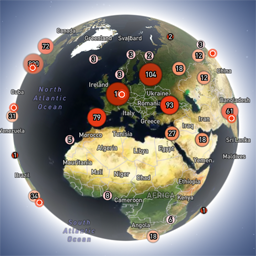
Globe Visitors Counter
Globe Visitors Counter (Lite) adds a beautiful, fast, iframe-isolated 3D visitor globe to any WordPress site. It instantly shows your audience geography — fully locally, privately, and without any third-party tracking. This Lite version is designed for clarity, speed, and instant visual feedback — especially on landing pages and campaign pages. Use Case: Instant Visual Feedback for Advertising Campaigns The situation You have a product or a service. You launch an advertising campaign: Google Ads Facebook / Instagram TikTok banner ads email campaigns any other traffic source All traffic is sent to one landing page. Usually what comes next is boring: tables, charts, numbers, dashboards, “we’ll analyze it later”. The solution You place Globe Visitors Counter Lite directly on the landing page. No server setup. No external analytics. No configuration. And you start seeing your traffic with your own eyes. How it works (very simple) You launch the ads Visitors arrive at the page Each real visitor appears as a dot on the globe — in real time, from their actual location The globe comes alive and instantly shows: – whether people are coming at all – which countries and regions react – whether the campaign works or misses completely No dots — ads don’t work. Dots appear — ads are alive. Why Lite is perfect for landing pages Lite is not deep analytics. It’s a visual “life indicator”. Perfect when you need: – fast visual feedback – immediate confirmation that traffic is real – zero setup and zero learning curve – a simple “wow effect” for clients, teams, or investors You watch, not analyze. Key Features Interactive 3D Land-Cover globe included out of the box Real-time visitor logging using a tiny local JSON file Historical dots displayed automatically Zero configuration, works with all themes & editors Shortcode-based, easy placement on any page No cookies, no remote APIs, GDPR-friendly Ultra-fast loading thanks to iframe sandboxing How It Works When a page with the shortcode is opened, the plugin loads a fully self-contained viewer from: /wp-content/uploads/visitors-lite-landcover/ Each visit is logged locally as a minimal record (timestamp + coordinates + city + country) into: visitors.json Everything stays on your server. No tracking pixels. No third-party analytics. No cookies. Why Use It Ideal for landing pages and product launches Visualizes global audience instantly Safe for cached pages and CDNs Works even on heavily optimized sites When You May Need the Full Version Lite is intentionally simple and fast. If you need: – long-term statistics – multiple pages or sites – extended visitor history – advanced visual modes and skins – more control and customization …then the Full (Pro) version may be a better fit. Lite remains perfect for single pages, launches, tests, and quick visual validation. Tester Program (optional) We are tuning defaults and performance for upcoming builds. If you want to enable advanced features during testing at no cost (extra visual modes, effects, skins), join via Support: https://wordpress.org/support/topic/looking-for-testers-free-advanced-features-for-feedback/ Usage Shortcode: [visitors_globe_lite title=”VISITORS” width=”100%” height=”600″] Attributes: – title — optional caption above the globe – width — iframe width (100% or fixed px) – height — iframe height in px Place the shortcode anywhere — Classic or Block editor.
Top keywords
- globe8×1.56%
- lite8×1.56%
- pages7×1.36%
- visual7×1.36%
- visitors6×1.17%
- ads5×0.97%
- landing5×0.97%
- page5×0.97%
- works5×0.97%
- traffic4×0.78%
- visitor4×0.78%
- analytics3×0.58%
WP-PostViews
WP-PostViews counts how many times each post, page or custom post type has been read and gives you somewhere to show the number. The count is kept as post meta, so it sorts, queries and exports like anything else WordPress stores about a post. Features A view count on any post, page or custom post type, printed by a template tag or by the [views] shortcode. Two templates you edit yourself, with tokens for the count, the title, the date, the excerpt, the thumbnail, the author and more. Choose who is counted — everyone, guests only or logged in users only — and leave known robots out. Template tags and a widget for the most and least viewed posts, optionally within a category or a tag. A sortable Views column on the post and page list tables. The count on the REST API as a views field, and an AJAX counting path for sites behind a page cache. A section on the WP-Stats page when that plugin is installed. Donations I spent most of my free time creating, updating, maintaining and supporting these plugins, if you really love my plugins and could spare me a couple of bucks, I will really appreciate it. If not feel free to use it without any obligations. Usage The simplest way, and the only one that works in a block theme without editing template files, is the shortcode. Put it in the post or page whose count you want shown: [views] shows the count for the post it appears in. [views id="1"] shows the count for post 1, wherever you put it. To show the count on every post automatically, a classic theme calls the template tag from index.php, archive.php, single.php or page.php, anywhere inside the loop: The settings live at WP-Admin -> Settings -> WP-PostViews, on two tabs. Settings is where you choose who gets counted and whether WP-Stats is offered a Views section; Templates is where you edit the markup a count is rendered with. Where the count appears is decided by where your theme calls the_views() or where you put the shortcode. To hide it somewhere in particular, answer the wp_postviews_should_display filter: add_filter( 'wp_postviews_should_display', function ( $show ) { return ! is_archive() && ! is_search(); } ); Showing The View Count In A Block One block is available in the editor, under Widgets: Post Views — the view count, rendered with the template from the Templates tab. Leave Post ID at zero to show the count of the post the block is in, which is what an empty [views] does, or set it to another post’s ID to show that post’s count instead. It renders on the server, so the block preview in the editor is the real number rather than an approximation, and the count keeps rising in every post showing it without anything being re-saved. Previewing the block in the editor does not count a view. The shortcode still works and is not going anywhere. [views] and [views id="1"] behave exactly as they always have, and a post already containing one needs no change. The block calls the same code the shortcode calls, so the two render identically — use whichever suits the post. WP-CLI wp postviews list wp postviews list --limit=50 --format=json wp postviews get 42 The command reads and never writes. No screen in this plugin edits a view count, so the command does not offer one either — wp post meta update views is still there for whoever genuinely needs it, and says plainly that it is reaching past the plugin. REST API POST /wp-json/postviews/v1/post/ /view Reading a count needs no route of its own. The count is already published as a read-only views field on the core post resource, so /wp-json/wp/v2/posts/ answers with the post and its count together, and a list of posts carries every count in one response. What the core field cannot do is write, which is what this route is for: it counts a view, and it exists for sites serving cached pages, where the view has to be reported after the page is delivered. It takes the same wp_postviews_nonce the counting script is given, as a nonce parameter. It is refused unless the site defers counting — that is, unless it has a page cache and has turned the AJAX counting path on. Otherwise the view has already been counted while the page rendered, and counting again here would record every view twice. A refusal answers 403 — a bad nonce, or a site that counts views while the page renders. A post that does not exist is 404. This route is an addition. The admin-ajax.php wp_postviews action is unchanged and still supported.