User Registration & Membership – Free & Paid Memberships, Subscriptions, Content Restriction, User Profile, Custom User Registration & Login Builder
Build membership sites with tiered plans, content restriction, drag-&-drop custom registration & login form builder, and built-in payment system. The Complete Membership Solution for WordPress Tired of juggling separate plugins for membership plans, user management, payment gateways, and user profile? User Registration & Membership (URM) helps you monetize your site by creating membership plans and accepting payments for gated content. Membership: Build membership plans, setup billing, and manage user access in a single connected flow. Custom User Registration Forms: Design custom registration form and for your users with drag-and-drop form builder. Payment Integration: Monetize your membership site with one-time fee, recurring subscription, and upgrade paths. Accept subscription payments through Stripe, PayPal, and bank transfer. Content Restriction: Restrict complete site, or individual pages and posts by membership subscription. 👉 Get Started Today 👉 Try Our Demo Complete Membership Solution Membership Groups and Plans: Create membership tiers with different access levels and benefits. Combine related plans into membership groups for organized front-end listing. Pre-Installed Membership Pages: Launch your membership site in minutes instead of hours with professional pages ready to use or customize: Registration, Login, My Account, Lost Password, Reset Password, Pricing, and Thank You pages. Content Restriction: Set restrictions globally, per page/post, or for specific content blocks within pages. Build complex access rules using membership plans, user roles, registration and login status. Membership Upgrade Path: Define clear upgrade paths between membership tiers and let users switch seamlessly without interrupting their access or membership status. Masteriyo Course Integration: Sell courses through memberships using our Masteriyo LMS integration. 10+ Membership Gutenberg Blocks: Create custom membership pages using our custom blocks: registration, my account, membership pricing, buy now block etc. Membership Analytics: Quickly glance over total registration, approved users, and pending requests with dedicated analytics dashboard. Custom User Registration Registration Form Builder: Build custom WordPress registration forms. Drag fields onto the canvas, arrange them visually, and configure settings with simple clicks. Login Form: Start with a pre-built login form and customize it to your needs. Choose form styles, configure login methods, add CAPTCHA, and set login/logout redirects. Live Form Preview: Preview registration and login forms in real-time to ensure everything looks and functions properly. Pre-built Form Templates: Save hours of setup time with professionally designed registration form templates. Use them as-is or customize fields and styling to match your specific needs. View All Form Templates Ajax Form Submission: Say goodbye to slow form submissions that reload the entire page. Users get instant confirmation or error messages. User Role Assignment: Assignment WordPress user roles (Administrator, Editor, Author, Contributor, Subscriber) to members during registration. Flexible Approval Method: Choose from auto-approval, email verification, and manual admin approval for new registration for quality control. Payment and Monetization Multiple Revenue Modules: Offer fixed-term memberships, recurring subscription or lifetime access. Trusted Payment Gateways: Accept secure payment with trusted global payment gateways even in the free version: PayPal Stripe Bank Transfer Payment History: Comprehensive transaction tracking with payment status, date, gateway, and more. complete history accessible to admins and members. User Registration & Membership PRO Features Membership and User Management Membership plans with tiered access control Admin approval for new registrations Member Directory with search filters searchable directories Role-based redirection after login Profile completeness indicator Advanced content restriction with complex rules User journey tracking Payment history tracking Social Connect (Facebook, Google, Twitter, LinkedIn login) Profile Connect (sync with other plugins) Block simultaneous logins Advanced Content Restriction Content drop for membership content URL-based restriction File download protection Conditional Content Restriction using AND, OR, and NOT logic. Registration Form Fields & Functionality 60+ form fields Conditional logic (show/hide fields based on user input) Multi-step forms with progress indicators Conversational forms (chat-like layout) Field visibility control Form restriction by custom rules Popup forms (modal display) Calculations Signature field Invite codes Repeater field (multiple entries per field group) Save and Continue (save partial progress) Monetization and Payment Processing Trial Period Multiple memberships per user Sell memberships to team Authorize.net Mollie integration Registration coupons and discounts Payment history dashboard Membership plan upgrades with pro-rated billing Discount coupon and codes Tax and EU VAT Sell in local currency Invoice generation Security & Spam Protection Email verification Google reCAPTCHA (V2, V3) hCaptcha Cloudflare Turnstile Akismet Honeypot spam protection SMS verification via Twilio Two-factor authentication (2FA) Auto-generated passwords Passwordless login Custom CAPTCHA field (math/Q&A) Whitelisted domains Design & Customization Email customizer Customize My Account page Style Customizer (visual form designer) Email Templates Advanced styling options for forms Analytics & Tracking Advanced analytics dashboard User journey tracking Advanced user/form analytics Dashboard with views, submissions, conversions Advanced Features PDF form submission (auto-generate PDFs) Frontend post submission Bulk user import (CSV) Invite codes for registration Geolocation data collection Private admin notes Form access by user role Cloud storage (Google Drive, Dropbox) Marketing and CRM Integrations Custom Email Notifications Mailchimp MailerLite MailPoet ActiveCampaign Klaviyo Brevo (formerly Sendinblue) Kit (formerly ConvertKit) Salesforce Zapier (5,000+ apps) Google Sheets Webhooks 👉 Get User Registration & Membership Pro Know your way around user registration with our tutorials How to Create a Membership Website in WordPress for Free (with Content Restriction) How to Create a Custom User Profile Page in WordPress? How to Create User Registration Form in WordPress Easily? How to Register Users with an Invitation Code in WordPress? How to Change Default WordPress Login URL to Custom URL? Get in Touch with us: Official Community | Twitter Important: Version 5.0 and above is a major update with significant improvements We strongly recommend backing up your site before updating. This update includes architectural changes that make your membership management more powerful and easier to use. Read the full blog post to see what’s new: User Registration & Membership v5.0
Top keywords
- membership32×3.40%
- registration23×2.44%
- user23×2.44%
- form21×2.23%
- custom12×1.28%
- login12×1.28%
- payment12×1.28%
- content11×1.17%
- restriction9×0.96%
- plans8×0.85%
- user registration8×0.85%
- wordpress8×0.85%
WP Login Form
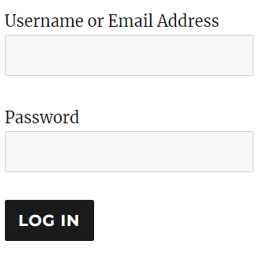
WP Login Form allows you to create a simple login form for use anywhere on the front end of your WordPress site. You can add it to a post, page or your sidebar with a shortcode. WP Login Form Add-ons Force Redirect Custom Error How to Create a Custom Login Page for WordPress In order to create a login form or custom login page for WordPress with the default options, all you need to do is use this shortcode: [wp_login_form] However, there are other parameters that you can pass in the shortcode to customize it. redirect An absolute URL to which the user will be redirected after a successful login. For example, [wp_login_form redirect="https://example.com/mypage/"] The default is to redirect back to the URL where the form was submitted. form_id Your own custom ID for the login form. For example, [wp_login_form form_id="myloginform"] The default is “loginform”. label_username Your custom label for the username/email address field. For example, [wp_login_form label_username="Login ID or Email"] The default is “Username or Email Address”. label_password Your custom label for the password field. For example, [wp_login_form label_password="Login Password"] The default is “Password”. label_remember Your custom label for the remember field. For example, [wp_login_form label_remember="Remember"] The default is “Remember Me”. label_log_in Your custom label for the form submit button. For example, [wp_login_form label_log_in="Submit"] The default is “Log In”. id_username Your own custom ID for the username field. For example, [wp_login_form id_username="wp_user_login"] The default is “user_login”. id_password Your own custom ID for the password field. For example, [wp_login_form id_password="wp_user_pass"] The default is “user_pass”. id_remember Your own custom ID for the remember field. For example, [wp_login_form id_remember="login_rememberme"] The default is “rememberme”. id_submit Your own custom ID for the form submit button. For example, [wp_login_form id_submit="login_form_submit"] The default is “wp-submit”. remember Specify whether to display the “Remember Me” checkbox in the WordPress login form. For example, [wp_login_form remember="0"] The default is “1” (true). value_username Your custom placeholder attribute for the username input field. For example, [wp_login_form value_username="Your Username"] The default is NULL. value_remember Specify whether the “Remember Me” checkbox in the form should be checked by default. For example, [wp_login_form value_remember="1"] The default is “0” (false). required_username Specify whether the username field should be required by default. For example, [wp_login_form required_username="true"] The default is “false”. required_password Specify whether the password field should be required by default. For example, [wp_login_form required_password="true"] The default is “false”. lost_password Specify whether to display a lost password link in the form. For example, [wp_login_form lost_password="0"] The default is “1” (true). label_lost_password Your custom label for the lost password link. For example, [wp_login_form label_lost_password="Reset Password"] The default is “Lost your password?”. How to Enable Google reCAPTCHA WP Login Form supports Google reCAPTCHA v3 to protect your login form against spam and other types of automated abuse. To enable this feature, go to “Settings > WP Login Form” and configure these options. Enable Google reCAPTCHA v3 Site Key For detailed documentation please visit the WordPress Login Form plugin page