TRooInbound Form Insights for Contact Form 7
TRooInbound Form Insights for Contact Form 7 transforms your Contact Form 7 submissions into powerful, actionable analytics. Get comprehensive insights into your form performance with beautiful charts, detailed reports, and advanced filtering capabilities. 🚀 Key Features 📊 Interactive Charts & Analytics * Real-time submission charts with multiple view types * Daily, weekly, and monthly trend analysis * Form-specific performance metrics * Visual data representation with Chart.js integration 📈 Comprehensive Reporting * Analysis Data page with detailed submission listings * Analysis Chart page with interactive visualizations * Summary view with key statistics * Contact-wise, Form-wise, and Field-wise analysis options 🔍 Advanced Filtering & Search * Time period filters: Today, Last 7/30/90 Days, This Year, Last Year * Custom date range selection * Contact email search functionality * Form-specific filtering * Field-level analysis and filtering 📋 Detailed Submission Management * Modal view for complete submission details * Form field data display with proper formatting * User metadata including IP address and user agent * Submission timestamp and contact information * Export-friendly data presentation 🔧 Technical Requirements WordPress 5.0 or higher Contact Form 7 plugin (active) PHP 7.4 or higher MySQL 5.6 or higher 🎯 Why Choose TRooInbound Form Insights for Contact Form 7? Unlike basic form plugins, TRooInbound Form Insights for Contact Form 7 provides enterprise-level analytics that help you understand your audience, optimize your forms, and make data-driven decisions. The plugin seamlessly integrates with your existing Contact Form 7 setup without requiring any configuration changes. Privacy Policy TRooInbound Form Insights for Contact Form 7 respects your privacy and follows WordPress privacy standards: Data Collection: Only collects data that Contact Form 7 already captures (form submissions, IP addresses, timestamps) Data Storage: All data is stored locally in your WordPress database Data Sharing: No data is transmitted to external servers or third-party services Technical Notes Database Tables The plugin creates custom database tables to efficiently store and query submission data. These tables are automatically created during plugin activation and removed during uninstallation (if you choose to delete data). Compatibility * WordPress 5.0+ (tested up to 6.4) * Contact Form 7 5.0+ (all recent versions) * PHP 7.4+ recommended (minimum 7.0) * Modern browsers with JavaScript enabled * Mobile responsive design
Globe Visitors Counter
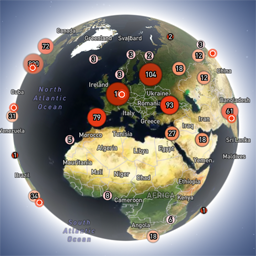
Globe Visitors Counter (Lite) adds a beautiful, fast, iframe-isolated 3D visitor globe to any WordPress site. It instantly shows your audience geography — fully locally, privately, and without any third-party tracking. This Lite version is designed for clarity, speed, and instant visual feedback — especially on landing pages and campaign pages. Use Case: Instant Visual Feedback for Advertising Campaigns The situation You have a product or a service. You launch an advertising campaign: Google Ads Facebook / Instagram TikTok banner ads email campaigns any other traffic source All traffic is sent to one landing page. Usually what comes next is boring: tables, charts, numbers, dashboards, “we’ll analyze it later”. The solution You place Globe Visitors Counter Lite directly on the landing page. No server setup. No external analytics. No configuration. And you start seeing your traffic with your own eyes. How it works (very simple) You launch the ads Visitors arrive at the page Each real visitor appears as a dot on the globe — in real time, from their actual location The globe comes alive and instantly shows: – whether people are coming at all – which countries and regions react – whether the campaign works or misses completely No dots — ads don’t work. Dots appear — ads are alive. Why Lite is perfect for landing pages Lite is not deep analytics. It’s a visual “life indicator”. Perfect when you need: – fast visual feedback – immediate confirmation that traffic is real – zero setup and zero learning curve – a simple “wow effect” for clients, teams, or investors You watch, not analyze. Key Features Interactive 3D Land-Cover globe included out of the box Real-time visitor logging using a tiny local JSON file Historical dots displayed automatically Zero configuration, works with all themes & editors Shortcode-based, easy placement on any page No cookies, no remote APIs, GDPR-friendly Ultra-fast loading thanks to iframe sandboxing How It Works When a page with the shortcode is opened, the plugin loads a fully self-contained viewer from: /wp-content/uploads/visitors-lite-landcover/ Each visit is logged locally as a minimal record (timestamp + coordinates + city + country) into: visitors.json Everything stays on your server. No tracking pixels. No third-party analytics. No cookies. Why Use It Ideal for landing pages and product launches Visualizes global audience instantly Safe for cached pages and CDNs Works even on heavily optimized sites When You May Need the Full Version Lite is intentionally simple and fast. If you need: – long-term statistics – multiple pages or sites – extended visitor history – advanced visual modes and skins – more control and customization …then the Full (Pro) version may be a better fit. Lite remains perfect for single pages, launches, tests, and quick visual validation. Tester Program (optional) We are tuning defaults and performance for upcoming builds. If you want to enable advanced features during testing at no cost (extra visual modes, effects, skins), join via Support: https://wordpress.org/support/topic/looking-for-testers-free-advanced-features-for-feedback/ Usage Shortcode: [visitors_globe_lite title=”VISITORS” width=”100%” height=”600″] Attributes: – title — optional caption above the globe – width — iframe width (100% or fixed px) – height — iframe height in px Place the shortcode anywhere — Classic or Block editor.