Country Code For Elementor Form Telephone Field
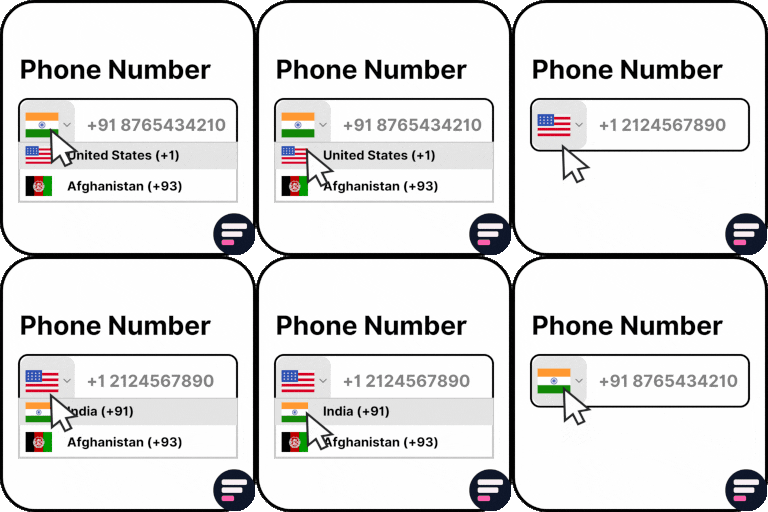
Use Country Code for Elementor Form Telephone Field plugin to easily add an international country code dropdown with flags inside the phone field of your Elementor form. 👉 VIEW FREE DEMO – COUNTRY CODE FOR ELEMENTOR FORM Upgrade to Cool FormKit to unlock more advanced features for Elementor forms – including range slider, signature field, conditional logic, calculator & more. Start building smarter forms with coolformkit today! Free Plugin Features: Seamless Integration with Elementor Forms: This ultimate Elementor addon helps users enter valid mobile numbers by selecting the correct country dial code before typing their phone number. It ensures properly formatted data, improves form validation, and reduces errors in contact forms, booking forms, registration forms, and more. Show Only Selected Countries: Limit the dropdown to display only specific countries. For example, if you only want to show Canada, India, United States, and United Kingdom, simply enter their alpha-2 codes in the Tel field settings like: ca,in,us,gb. Exclude Specific Countries: Show all countries but hide a few by entering their alpha-2 codes (e.g., af,pk removes Afghanistan and Pakistan). Set a Default Country: Preselect a default country code when the form loads. Control Dial Code Visibility: Show or hide the dial code while users type their phone number. Strict Mode Validation: Enable strict mode to block invalid numbers or extra digits based on the selected country. Compatibility with Hello Plus: This addon also works with the Hello Plus form lite widget. If you are creating forms using Elementor Free with Hello Plus, you can still add an international dial code dropdown to the phone field using this ultimate addon. Upgrade for More Features Auto Detect Country Code by User IP Automatically select the user’s country code in the phone field based on their IP address. You can enable this feature inside your Elementor form by using CoolFormKit pro version. Show Preferred Countries at Top By default, the dropdown lists countries alphabetically (A–Z). With this feature, you can pin specific countries (like India, US, UK) at the top for faster user selection. Show or Hide Country Flags Choose whether to display country flags alongside dial codes. For faster form loading, you can disable flags and only show the country dial codes. Country & State Field for Elementor Form Go beyond phone fields! With Cool FormKit Pro, you can add a Country + State dropdown field. Users first select a country, and then the state field updates dynamically with available states. 👉 GET COOL FORMKIT PRO More Essential Addons for Elementor Form Conditional Fields for Elementor Form Add conditional logic to Elementor form fields to show or hide inputs dynamically based on user choices. Make your forms smarter, cleaner, and easier to use. Form Input Masks for Elementor Forms Apply input masks so users enter properly formatted data like phone numbers, dates, credit cards, and more. Improves accuracy and reduces validation errors. Cool FormKit A complete form builder addon for Elementor Free & Pro. It extends Elementor Pro forms with advanced fields or provides a dedicated form builder widget if you’re on Elementor Free. Popular features include: Conditional Logic for Elementor Form Fields Range Slider for Elementor Form Signature Field for Elementor Form Select2 Field Image Radio & Checkbox Fields Rating Field for Elementor Form Calculator for Elementor Cloudflare Turnstile for Elementor Form hCAPTCHA for Elementor Form 👉 VIEW ALL FEATURES Other Popular Addons for Elementor Enhance your website-building workflow with these other ultimate Elementor addons by Cool Plugins: Loop Grid Extender for Elementor Pro Add ACF Repeater fields & advanced taxonomy filters inside Elementor Pro loop grids. AutoPoly – AI Translation for Polylang Instantly auto-translate Elementor pages using AI. Build multilingual websites faster with Polylang + AutoPoly. Timeline Widget for Elementor Display history, events, or milestones in beautiful vertical or horizontal timelines inside Elementor pages. Events Widgets for Elementor Add The Events Calendar widgets to Elementor — show events in grid, list, or carousel layouts with ease. LocoAI – Auto Translate for Loco Translate Translate WordPress plugins & themes automatically with AI. One-click string translation inside Loco Translate. Use of 3rd Party Services: This plugin connects to the Cool Plugins feedback server only for optional usage data sharing and voluntary feedback submission (for example, during plugin deactivation). Data is transmitted solely after explicit user consent. No hidden tracking is performed, and no frontend visitor or site user data is collected. For more details, please review our Data Usage Policy, TOS, and Privacy Policy.It also includes the intl-tel-input library, distributed under the MIT License .
Top keywords
- elementor32×4.31%
- form21×2.83%
- country15×2.02%
- elementor form14×1.88%
- field12×1.62%
- code10×1.35%
- forms10×1.35%
- show9×1.21%
- countries7×0.94%
- fields7×0.94%
- phone7×0.94%
- pro7×0.94%
Thim Kit for Elementor – Pre-built Templates & Widgets for Elementor
Thim Elementor Kit is a powerful plugin designed to extend the capabilities of the Elementor page builder, enabling you to construct professional and unique LearnPress websites with ease. With a collection of various advanced widgets and functionalities, Thim Elementor Kit empowers you to create any type of website, from personal blogs to complex online eLearning sites, without any coding knowledge. Key Features ✅ Seamless Elementor Integration – Works flawlessly with Elementor for a smooth design experience. ✅ Extensive Widget Library – Access a diverse set of advanced widgets to enhance functionality. ✅ Pre-Designed Templates & Blocks – Speed up your workflow with beautiful, ready-to-use designs. ✅ Pixel-Perfect Customization – Easily fine-tune every element to match your vision. ✅ Interactive & Dynamic Elements – Bring life to your pages with animations and effects. ✅ Fully Responsive & Mobile-Optimized – Ensure a seamless experience across all devices. ✅ Performance-Focused – Lightweight and optimized for fast loading speeds. Widgets & Features list Templates & Library: You can enjoy a rich library of pre-designed templates to start your projects quickly. Also, it’s simple to import and customize templates to align with your own brand and style. Dynamic Tags’ Customization Details: Discover how Dynamic Tags can be used to link dynamic content from several sources, resulting in adaptable and modern websites. Of course, it allows you to customize every detail of your website, from titles to images, based on dynamic data. The Widget List: Global widgets: 1. Nav Menu 2. Site Logo 3. Header Info 4. Social 5. Social Share 6. Mini Cart 7. List Blog 8. List Course 9. List Product 10. Team 11. Testimonial 12. Back To Top 13. Contact Form 7 14. Breadcrumb 15. Search Form 16. Categories 17. Image Accordion 18. Heading 19. Button 20. Tab 21. Accordion 22. Slider 23. Icon Box 24. Login Popup 25. Login Form 26. Instagram Feed 27. Video 28. Page Title 29. Dark Mode Switch 30. Archive Description 31. Countdown 32. Icon SVG Draw 33. Progress Tracker Archive Post: 34. Archive post Single Post: 35. Post Title 36. Post Content 37. Post Featured Image 38. Author Box 39. Post Comment 40. Post Navigation 41. Post Info 42. Post Related 43. Reading Time Post Archive Product: 44. Archive Product Single Product: 45. Product Title 46. Product Image 47. Product Price 48. Product Add to Cart 49. Product Rating 50. Product Notices 51. Product Meta 52. Product Short Description 53. Product Content 54. Product Tabs 55. Product Additional Information 56. Product Related 57. Product Upsells Archive Course: 58. Archive Course Single Course: 59. Course Title 60. Course Instructor 61. Course Meta 62. Course Categories 63. Course Tags 64. Course Image 65. Course Price 66. Course Graduation 67. Course User Time 68. Course User Progress 69. Course Tabs 70. Course Extra 71. Course Buttons 72. Course Related 73. Course Rating 74. Course Description 75. Course Offer End 76. Course Comment 77. Course Feature Review 78. Course Section 79. Course Items Progress 80. Course Search Form 81. Item Data 82. Course Curriculum 83. Course Item Navigation 84. Close Sidebar 85. Back To Course Benefits of Thim Elementor Kit Seamless Integration with Elementor – Enjoy smooth and hassle-free compatibility with Elementor for effortless website building. Extensive Widget & Template Library – Access a diverse collection of widgets and templates to enhance your site’s design. High Customization Capabilities – Create unique and professional websites with flexible styling options. Enhanced User Experience – Improve UI with interactive and dynamic functionalities for a more engaging site. Best themes using Thim Elementor Kit You can find some of our most popular themes built by Thim Elementor Kit below: Eduma Marketplace Live Demo Coaching Live Demo Course Builder Live Demo RealPress Live Demo Who Can Use This Plugin Thim Elementor Kit is designed for WordPress users who want effortless customization, flexibility, and professional design without coding. It’s ideal for: Creative Professionals – Bloggers, designers, and freelancers looking to build unique and engaging websites. Business Owners & Entrepreneurs – Those who need a polished, high-converting site with ease. Agencies & Developers – Experts who want efficiency, scalability, and deep customization. Educators & Course Creators – Users who need interactive and dynamic layouts for e-learning platforms. No matter your expertise level, Thim Elementor Kit empowers you to craft stunning, responsive, and high-performance websites with ease! 🚀 Every website can use Thim Elementor Kit as long as you install the free Elementor Website Builder. Documentation In case you need any assistance, you can find further help here: Documentation: Thim Elementor Kit’s tutorial guidance. Support Forum: Provide support for Thim Elementor Kit’s setup and bug fixing issues.