Tagbridge – Deep Integration for PostHog
Tagbridge is a simple, independent way to add PostHog to WordPress: PostHog for WordPress, without touching code. Enter your PostHog project API key, choose your region, and Tagbridge loads PostHog on your site with the settings you pick. Tagbridge is an independent project. It is not affiliated with, endorsed by, or sponsored by PostHog. “PostHog” is a trademark of its respective owner and is used here only to describe what this plugin connects to. What it does today Connect to PostHog Cloud (US or EU) or your own self-hosted or reverse-proxy host. Your project API key is checked with a live test call before it is saved, so you know right away if it is correct. Loads PostHog (posthog-js) from the host you configure, so self-hosted and reverse-proxy setups work without code. Plain-language toggles for what gets captured: pageviews, autocapture (clicks and form interactions), session recording, and person profile mode. Privacy-first cookieless mode that keeps visitor state in memory, so no PostHog cookie is set. Identity: tie logged-in WordPress users to one PostHog person across anonymous and logged-in sessions, using a stable hashed identifier (never the raw user ID). You choose whether to identify logged-in users and which properties to send (email, name, role). Server-side events: send key events (user logged in, user registered) from your own WordPress server, so they still arrive when a visitor’s browser blocks tracking. Runs on your existing hosting, with a per-event on/off switch. A failed or slow PostHog request never affects your pages. WooCommerce events (when WooCommerce is active): product viewed, added to cart, checkout started, and order completed with order value and currency. The same person is tracked from the browser session through to the completed order. A clean settings screen that fits WordPress and stays out of your way. On the roadmap Planned for future releases: A no-flicker feature-flag block and shortcode evaluated on the server. Optional starter dashboards created in your PostHog project. WordPress Consent API support. External services This plugin connects to PostHog, the analytics service you configure. It is required for the plugin to do anything, because the plugin’s purpose is to send your site’s analytics to your PostHog project. What is sent and when: When you save your settings in the admin, the plugin makes one request to the PostHog feature-flags endpoint (for example https://us.i.posthog.com/flags) with your project API key to confirm the key and host are valid. This request does not record any analytics event. On your site’s front end, after you have connected and only when configured, the plugin loads PostHog (posthog-js) from the host you choose (PostHog US cloud, EU cloud, or your own host). PostHog then sends visitor analytics such as pageviews and, if enabled, clicks and form interactions and session recordings, to your PostHog project. The exact data depends on the toggles you choose. When server-side events are enabled, your WordPress server sends those events (for example user logged in, or a completed WooCommerce order with its value and currency) directly to your configured PostHog host. This happens from your server, not the visitor’s browser. The host the data is sent to is the one you configure: US cloud: https://us.i.posthog.com EU cloud: https://eu.i.posthog.com Self-hosted or reverse proxy: the URL you enter PostHog terms of service: https://posthog.com/terms PostHog privacy policy: https://posthog.com/privacy Privacy No analytics are sent until you enter a PostHog project API key and connect. You control what is captured with the tracking toggles, and you can turn on cookieless mode so no PostHog cookie is set. You are responsible for telling your visitors what you collect and for obtaining any consent your jurisdiction requires. Support for the WordPress Consent API is planned for a future release.
Globe Visitors Counter
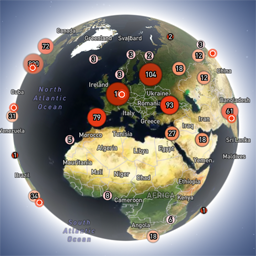
Globe Visitors Counter (Lite) adds a beautiful, fast, iframe-isolated 3D visitor globe to any WordPress site. It instantly shows your audience geography — fully locally, privately, and without any third-party tracking. This Lite version is designed for clarity, speed, and instant visual feedback — especially on landing pages and campaign pages. Use Case: Instant Visual Feedback for Advertising Campaigns The situation You have a product or a service. You launch an advertising campaign: Google Ads Facebook / Instagram TikTok banner ads email campaigns any other traffic source All traffic is sent to one landing page. Usually what comes next is boring: tables, charts, numbers, dashboards, “we’ll analyze it later”. The solution You place Globe Visitors Counter Lite directly on the landing page. No server setup. No external analytics. No configuration. And you start seeing your traffic with your own eyes. How it works (very simple) You launch the ads Visitors arrive at the page Each real visitor appears as a dot on the globe — in real time, from their actual location The globe comes alive and instantly shows: – whether people are coming at all – which countries and regions react – whether the campaign works or misses completely No dots — ads don’t work. Dots appear — ads are alive. Why Lite is perfect for landing pages Lite is not deep analytics. It’s a visual “life indicator”. Perfect when you need: – fast visual feedback – immediate confirmation that traffic is real – zero setup and zero learning curve – a simple “wow effect” for clients, teams, or investors You watch, not analyze. Key Features Interactive 3D Land-Cover globe included out of the box Real-time visitor logging using a tiny local JSON file Historical dots displayed automatically Zero configuration, works with all themes & editors Shortcode-based, easy placement on any page No cookies, no remote APIs, GDPR-friendly Ultra-fast loading thanks to iframe sandboxing How It Works When a page with the shortcode is opened, the plugin loads a fully self-contained viewer from: /wp-content/uploads/visitors-lite-landcover/ Each visit is logged locally as a minimal record (timestamp + coordinates + city + country) into: visitors.json Everything stays on your server. No tracking pixels. No third-party analytics. No cookies. Why Use It Ideal for landing pages and product launches Visualizes global audience instantly Safe for cached pages and CDNs Works even on heavily optimized sites When You May Need the Full Version Lite is intentionally simple and fast. If you need: – long-term statistics – multiple pages or sites – extended visitor history – advanced visual modes and skins – more control and customization …then the Full (Pro) version may be a better fit. Lite remains perfect for single pages, launches, tests, and quick visual validation. Tester Program (optional) We are tuning defaults and performance for upcoming builds. If you want to enable advanced features during testing at no cost (extra visual modes, effects, skins), join via Support: https://wordpress.org/support/topic/looking-for-testers-free-advanced-features-for-feedback/ Usage Shortcode: [visitors_globe_lite title=”VISITORS” width=”100%” height=”600″] Attributes: – title — optional caption above the globe – width — iframe width (100% or fixed px) – height — iframe height in px Place the shortcode anywhere — Classic or Block editor.