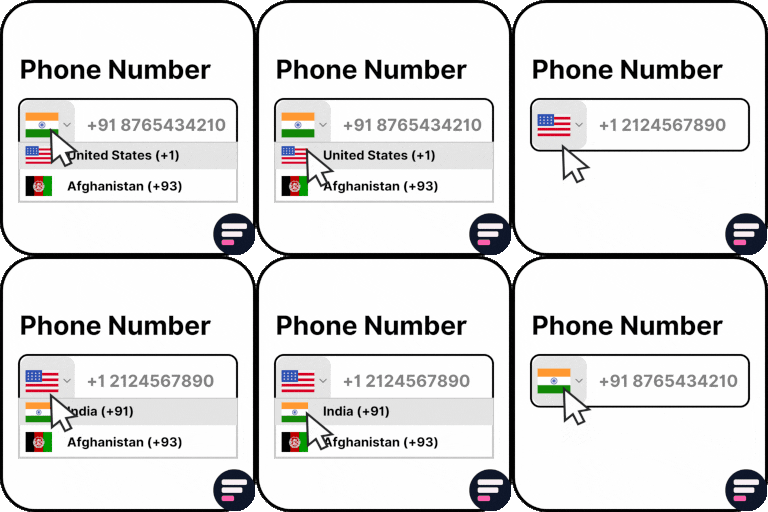
Country Code For Elementor Form Telephone Field
Use Country Code for Elementor Form Telephone Field plugin to easily add an international country code dropdown with flags inside the phone field of your Elementor form. 👉 VIEW FREE DEMO – COUNTRY CODE FOR ELEMENTOR FORM Upgrade to Cool FormKit to unlock more advanced features for Elementor forms – including range slider, signature field, conditional logic, calculator & more. Start building smarter forms with coolformkit today! Free Plugin Features: Seamless Integration with Elementor Forms: This ultimate Elementor addon helps users enter valid mobile numbers by selecting the correct country dial code before typing their phone number. It ensures properly formatted data, improves form validation, and reduces errors in contact forms, booking forms, registration forms, and more. Show Only Selected Countries: Limit the dropdown to display only specific countries. For example, if you only want to show Canada, India, United States, and United Kingdom, simply enter their alpha-2 codes in the Tel field settings like: ca,in,us,gb. Exclude Specific Countries: Show all countries but hide a few by entering their alpha-2 codes (e.g., af,pk removes Afghanistan and Pakistan). Set a Default Country: Preselect a default country code when the form loads. Control Dial Code Visibility: Show or hide the dial code while users type their phone number. Strict Mode Validation: Enable strict mode to block invalid numbers or extra digits based on the selected country. Compatibility with Hello Plus: This addon also works with the Hello Plus form lite widget. If you are creating forms using Elementor Free with Hello Plus, you can still add an international dial code dropdown to the phone field using this ultimate addon. Upgrade for More Features Auto Detect Country Code by User IP Automatically select the user’s country code in the phone field based on their IP address. You can enable this feature inside your Elementor form by using CoolFormKit pro version. Show Preferred Countries at Top By default, the dropdown lists countries alphabetically (A–Z). With this feature, you can pin specific countries (like India, US, UK) at the top for faster user selection. Show or Hide Country Flags Choose whether to display country flags alongside dial codes. For faster form loading, you can disable flags and only show the country dial codes. Country & State Field for Elementor Form Go beyond phone fields! With Cool FormKit Pro, you can add a Country + State dropdown field. Users first select a country, and then the state field updates dynamically with available states. 👉 GET COOL FORMKIT PRO More Essential Addons for Elementor Form Conditional Fields for Elementor Form Add conditional logic to Elementor form fields to show or hide inputs dynamically based on user choices. Make your forms smarter, cleaner, and easier to use. Form Input Masks for Elementor Forms Apply input masks so users enter properly formatted data like phone numbers, dates, credit cards, and more. Improves accuracy and reduces validation errors. Cool FormKit A complete form builder addon for Elementor Free & Pro. It extends Elementor Pro forms with advanced fields or provides a dedicated form builder widget if you’re on Elementor Free. Popular features include: Conditional Logic for Elementor Form Fields Range Slider for Elementor Form Signature Field for Elementor Form Select2 Field Image Radio & Checkbox Fields Rating Field for Elementor Form Calculator for Elementor Cloudflare Turnstile for Elementor Form hCAPTCHA for Elementor Form 👉 VIEW ALL FEATURES Other Popular Addons for Elementor Enhance your website-building workflow with these other ultimate Elementor addons by Cool Plugins: Loop Grid Extender for Elementor Pro Add ACF Repeater fields & advanced taxonomy filters inside Elementor Pro loop grids. AutoPoly – AI Translation for Polylang Instantly auto-translate Elementor pages using AI. Build multilingual websites faster with Polylang + AutoPoly. Timeline Widget for Elementor Display history, events, or milestones in beautiful vertical or horizontal timelines inside Elementor pages. Events Widgets for Elementor Add The Events Calendar widgets to Elementor — show events in grid, list, or carousel layouts with ease. LocoAI – Auto Translate for Loco Translate Translate WordPress plugins & themes automatically with AI. One-click string translation inside Loco Translate. Use of 3rd Party Services: This plugin connects to the Cool Plugins feedback server only for optional usage data sharing and voluntary feedback submission (for example, during plugin deactivation). Data is transmitted solely after explicit user consent. No hidden tracking is performed, and no frontend visitor or site user data is collected. For more details, please review our Data Usage Policy, TOS, and Privacy Policy.It also includes the intl-tel-input library, distributed under the MIT License .
Top keywords
- elementor32×4.31%
- form21×2.83%
- country15×2.02%
- elementor form14×1.88%
- field12×1.62%
- code10×1.35%
- forms10×1.35%
- show9×1.21%
- countries7×0.94%
- fields7×0.94%
- phone7×0.94%
- pro7×0.94%
StillAnotherSite
StillAnotherSite is a free Elementor template library with 3,000+ ready-to-use design blocks and page sections. Browse over 30 categories of professionally designed templates — hero sections, call-to-action blocks, testimonials, pricing tables, footers, and more — preview thumbnails, and import any block into your Elementor page with a single click. No coding required. Whether you are building a landing page, a sales page, a business website, or a portfolio, StillAnotherSite gives you pre-designed sections that you can drag, drop, and customize. Skip the blank canvas and start with high-end layouts. Key features: 100+ free blocks — available immediately, no license or account required. Start building right away. 3,000+ premium blocks via the template service — connect your license key to access the full library of Elementor design blocks and starter templates. One-click import — each block is inserted directly into your current Elementor page as a new section. Pick, insert, done. 30+ categories — hero, navbar, footer, FAQ, testimonials, call-to-action, pricing, gallery, team, features, counters, contact, blog grid, and more. PRO badge — blocks that require Elementor Pro widgets are clearly marked so you know what you need before importing. Landing pages & sales pages — combine hero, features, testimonials, and CTA blocks to build high-converting pages in minutes. License management — activate and deactivate your license from the WordPress Settings page (Settings → StillAnotherSite). External services This plugin connects to an external service hosted at stillanothersite.studionamaste.net, which is operated by the plugin author (Studio Namaste). The service provides the template library and license management. Template library When browsing or importing templates inside the Elementor editor, the plugin fetches template data (JSON, images, ZIP archives) from the service API. The service determines which templates are available based on the user’s authentication status. Data sent: an access token (issued after license validation) and the requested template/category identifiers. This happens every time the user opens the template library or imports a block. License activation and validation When a user activates, validates, or deactivates a license key, the plugin sends the license key and the site URL to the service API. The license key is used to authenticate with the template service. This also happens automatically in the background to refresh the license status, and on plugin uninstall to release the license. Service: https://stillanothersite.studionamaste.net Terms of use: https://stillanothersite.studionamaste.net/terms-of-use/ Privacy policy: https://stillanothersite.studionamaste.net/privacy-policy/
Top keywords