Statify
Statify provides a straightforward and compact access to the number of site views. It is privacy-friendly as it uses neither cookies nor a third party. An interactive chart is followed by lists of the most common reference sources and target pages. The period of statistics and length of lists can be set directly in the dashboard widget. Data Privacy In direct comparison to statistics services such as Google Analytics, WordPress.com Stats and Matomo (Piwik) Statify doesn’t process and store personal data as e.g. IP addresses – Statify counts site views, not visitors. Absolute privacy compliance coupled with transparent procedures: A locally in WordPress created database table consists of only four fields (ID, date, source, target) and can be viewed at any time, cleaned up and cleared by the administrator. Due to this tracking approach, Statify is 100% compliant with GDPR and serves as an lightweight alternative to other tracking services. Display of the widget The plugin configuration can be changed directly in the Statify Widget on the dashboard by clicking the Configure link. The amount of links shown in the Statify Widget can be set as well as the option to only count views from today. Of course, older entries are not deleted when changing this setting. The statistics for the dashboard widget are cached for four minutes. Period of data saving Statify stores the data only for a limited period (default: two weeks), longer intervals can be selected as option in the widget. Data which is older than the selected period is deleted by a daily cron job. An increase in the database volume can be expected because all statistic values are collected and managed in the local WordPress database (especially if you increase the period of data saving). JavaScript tracking for caching compatibility For compatibility with caching plugins like Cachify Statify offers an optional switchable tracking via JavaScript. This function allows reliable count of cached blog pages. For this to work correctly, the active theme has to call wp_footer(), typically in a file named footer.php. Skip tracking for spam referrers The comment blacklist can be enabled to skip tracking for views with a referrer URL listed in comment blacklist, i. e. which considered as spam. Support If you’ve problems or think you’ve found a bug (e.g. you’re experiencing unexpected behavior), please post at the support forums. Contribute Active development of this plugin is handled on GitHub. Pull requests for documented bugs are highly appreciated. If you want to help us translate this plugin you can do so on WordPress Translate.
Top keywords
- statify8×1.86%
- data6×1.40%
- tracking6×1.40%
- widget6×1.40%
- period5×1.16%
- views4×0.93%
- wordpress4×0.93%
- dashboard3×0.70%
- database3×0.70%
- only3×0.70%
- statistics3×0.70%
- active2×0.47%
Globe Visitors Counter
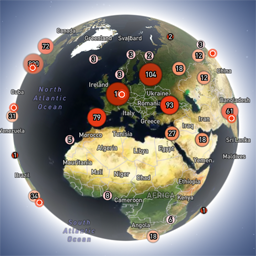
Globe Visitors Counter (Lite) adds a beautiful, fast, iframe-isolated 3D visitor globe to any WordPress site. It instantly shows your audience geography — fully locally, privately, and without any third-party tracking. This Lite version is designed for clarity, speed, and instant visual feedback — especially on landing pages and campaign pages. Use Case: Instant Visual Feedback for Advertising Campaigns The situation You have a product or a service. You launch an advertising campaign: Google Ads Facebook / Instagram TikTok banner ads email campaigns any other traffic source All traffic is sent to one landing page. Usually what comes next is boring: tables, charts, numbers, dashboards, “we’ll analyze it later”. The solution You place Globe Visitors Counter Lite directly on the landing page. No server setup. No external analytics. No configuration. And you start seeing your traffic with your own eyes. How it works (very simple) You launch the ads Visitors arrive at the page Each real visitor appears as a dot on the globe — in real time, from their actual location The globe comes alive and instantly shows: – whether people are coming at all – which countries and regions react – whether the campaign works or misses completely No dots — ads don’t work. Dots appear — ads are alive. Why Lite is perfect for landing pages Lite is not deep analytics. It’s a visual “life indicator”. Perfect when you need: – fast visual feedback – immediate confirmation that traffic is real – zero setup and zero learning curve – a simple “wow effect” for clients, teams, or investors You watch, not analyze. Key Features Interactive 3D Land-Cover globe included out of the box Real-time visitor logging using a tiny local JSON file Historical dots displayed automatically Zero configuration, works with all themes & editors Shortcode-based, easy placement on any page No cookies, no remote APIs, GDPR-friendly Ultra-fast loading thanks to iframe sandboxing How It Works When a page with the shortcode is opened, the plugin loads a fully self-contained viewer from: /wp-content/uploads/visitors-lite-landcover/ Each visit is logged locally as a minimal record (timestamp + coordinates + city + country) into: visitors.json Everything stays on your server. No tracking pixels. No third-party analytics. No cookies. Why Use It Ideal for landing pages and product launches Visualizes global audience instantly Safe for cached pages and CDNs Works even on heavily optimized sites When You May Need the Full Version Lite is intentionally simple and fast. If you need: – long-term statistics – multiple pages or sites – extended visitor history – advanced visual modes and skins – more control and customization …then the Full (Pro) version may be a better fit. Lite remains perfect for single pages, launches, tests, and quick visual validation. Tester Program (optional) We are tuning defaults and performance for upcoming builds. If you want to enable advanced features during testing at no cost (extra visual modes, effects, skins), join via Support: https://wordpress.org/support/topic/looking-for-testers-free-advanced-features-for-feedback/ Usage Shortcode: [visitors_globe_lite title=”VISITORS” width=”100%” height=”600″] Attributes: – title — optional caption above the globe – width — iframe width (100% or fixed px) – height — iframe height in px Place the shortcode anywhere — Classic or Block editor.