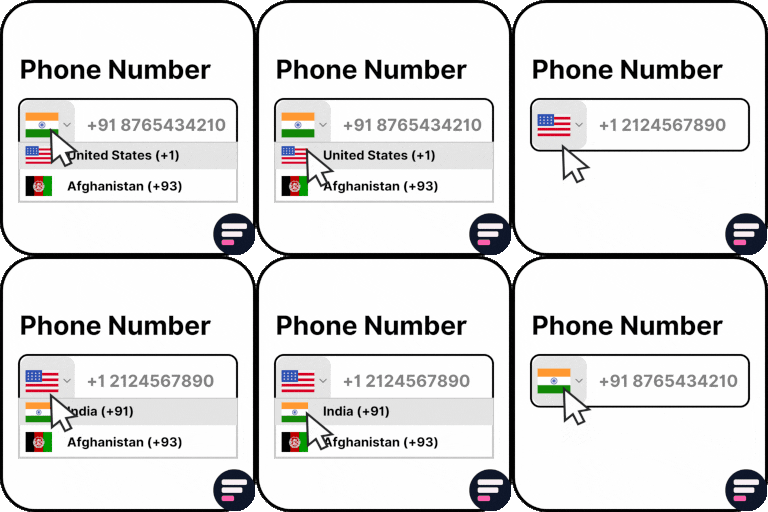
Country Code For Elementor Form Telephone Field
Use Country Code for Elementor Form Telephone Field plugin to easily add an international country code dropdown with flags inside the phone field of your Elementor form. 👉 VIEW FREE DEMO – COUNTRY CODE FOR ELEMENTOR FORM Upgrade to Cool FormKit to unlock more advanced features for Elementor forms – including range slider, signature field, conditional logic, calculator & more. Start building smarter forms with coolformkit today! Free Plugin Features: Seamless Integration with Elementor Forms: This ultimate Elementor addon helps users enter valid mobile numbers by selecting the correct country dial code before typing their phone number. It ensures properly formatted data, improves form validation, and reduces errors in contact forms, booking forms, registration forms, and more. Show Only Selected Countries: Limit the dropdown to display only specific countries. For example, if you only want to show Canada, India, United States, and United Kingdom, simply enter their alpha-2 codes in the Tel field settings like: ca,in,us,gb. Exclude Specific Countries: Show all countries but hide a few by entering their alpha-2 codes (e.g., af,pk removes Afghanistan and Pakistan). Set a Default Country: Preselect a default country code when the form loads. Control Dial Code Visibility: Show or hide the dial code while users type their phone number. Strict Mode Validation: Enable strict mode to block invalid numbers or extra digits based on the selected country. Compatibility with Hello Plus: This addon also works with the Hello Plus form lite widget. If you are creating forms using Elementor Free with Hello Plus, you can still add an international dial code dropdown to the phone field using this ultimate addon. Upgrade for More Features Auto Detect Country Code by User IP Automatically select the user’s country code in the phone field based on their IP address. You can enable this feature inside your Elementor form by using CoolFormKit pro version. Show Preferred Countries at Top By default, the dropdown lists countries alphabetically (A–Z). With this feature, you can pin specific countries (like India, US, UK) at the top for faster user selection. Show or Hide Country Flags Choose whether to display country flags alongside dial codes. For faster form loading, you can disable flags and only show the country dial codes. Country & State Field for Elementor Form Go beyond phone fields! With Cool FormKit Pro, you can add a Country + State dropdown field. Users first select a country, and then the state field updates dynamically with available states. 👉 GET COOL FORMKIT PRO More Essential Addons for Elementor Form Conditional Fields for Elementor Form Add conditional logic to Elementor form fields to show or hide inputs dynamically based on user choices. Make your forms smarter, cleaner, and easier to use. Form Input Masks for Elementor Forms Apply input masks so users enter properly formatted data like phone numbers, dates, credit cards, and more. Improves accuracy and reduces validation errors. Cool FormKit A complete form builder addon for Elementor Free & Pro. It extends Elementor Pro forms with advanced fields or provides a dedicated form builder widget if you’re on Elementor Free. Popular features include: Conditional Logic for Elementor Form Fields Range Slider for Elementor Form Signature Field for Elementor Form Select2 Field Image Radio & Checkbox Fields Rating Field for Elementor Form Calculator for Elementor Cloudflare Turnstile for Elementor Form hCAPTCHA for Elementor Form 👉 VIEW ALL FEATURES Other Popular Addons for Elementor Enhance your website-building workflow with these other ultimate Elementor addons by Cool Plugins: Loop Grid Extender for Elementor Pro Add ACF Repeater fields & advanced taxonomy filters inside Elementor Pro loop grids. AutoPoly – AI Translation for Polylang Instantly auto-translate Elementor pages using AI. Build multilingual websites faster with Polylang + AutoPoly. Timeline Widget for Elementor Display history, events, or milestones in beautiful vertical or horizontal timelines inside Elementor pages. Events Widgets for Elementor Add The Events Calendar widgets to Elementor — show events in grid, list, or carousel layouts with ease. LocoAI – Auto Translate for Loco Translate Translate WordPress plugins & themes automatically with AI. One-click string translation inside Loco Translate. Use of 3rd Party Services: This plugin connects to the Cool Plugins feedback server only for optional usage data sharing and voluntary feedback submission (for example, during plugin deactivation). Data is transmitted solely after explicit user consent. No hidden tracking is performed, and no frontend visitor or site user data is collected. For more details, please review our Data Usage Policy, TOS, and Privacy Policy.It also includes the intl-tel-input library, distributed under the MIT License .
Top keywords
- elementor32×4.31%
- form21×2.83%
- country15×2.02%
- elementor form14×1.88%
- field12×1.62%
- code10×1.35%
- forms10×1.35%
- show9×1.21%
- countries7×0.94%
- fields7×0.94%
- phone7×0.94%
- pro7×0.94%
SiteCraft – Elementor Addons with Widgets & Extensions
SiteCraft is the artisan’s toolkit for Elementor — a comprehensive collection of modern widgets and extensions designed to elevate your WordPress site building experience. Live Demo | Documentation | Support 🚀 Why SiteCraft Stands Out: – Modern Design Language – Every widget follows current design trends – Lightweight & Fast – Optimized code that won’t slow your site – Future-Ready Architecture – Built for tomorrow’s features today – Developer Friendly – Clean, documented, extensible codebase ✨ Core Features: 🎨 Modern Widgets (28+) – Advanced Post Grid with multiple layouts – Stylish Testimonials & Team showcases – Video Popup, Image Gallery, Counters – Contact Form 7 styler, Social Icons – And many more professionally designed widgets ⚡ Powerful Extensions – Custom CSS – Custom CSS within Elementor for precise design control – Wrapper Link – Transform any container into a clickable link – Scroll to Top – Elegant, customizable back-to-top button 🔧 For Developers – Clean, documented codebase – Action/filter hooks for customization – Disable unused widgets for performance – Compatible with major WordPress plugins 🛣️ Roadmap (Coming Soon): – ✅ GSAP Animations for smooth scroll and reveals – ✅ Template Library with ready-to-use designs – ✅ Custom Post Type Builder for advanced users – ✅ WooCommerce Widgets for online stores – ✅ Premium Extension Ecosystem with advanced features 🎯 Perfect For: – Freelancers needing reliable, modern tools – Agencies building client websites efficiently – Developers wanting extensible, clean code – Business Owners creating professional sites quickly 🎨 Complete Widget List SiteCraft offers a comprehensive collection of Elementor widgets: Heading – Style your headings beautifully Paragraph – Elegant typography options Button – Create visually appealing buttons Image Gallery – Sleek gallery layouts Team – Showcase your team with style Video Popup – Engaging video presentations Contact Form 7 – Style CF7 forms effortlessly Social Icons – One-click social sharing Testimonials Grid – Client feedback showcase Advanced Accordion – Stylish FAQ sections Icon Box – Feature highlights with icons Counter – Animated number counters Countdown – Timer for events and offers Site Logo – Display your brand identity Nav Menu – Custom navigation menus 🧩 Dynamic Widgets (Theme Builder) Posts – Display dynamic posts Post Title – Display dynamic post titles Post Excerpt – Show post summaries dynamically Post Content – Render full post content Post Featured Image – Display featured images dynamically Post Comments – Built-in comments and reply support Post Meta – Author, date, categories, and metadata Post Pagination – Previous and next post navigation Social Share – Share current posts easily Archive Title – Dynamic archive titles Search Form – Add search anywhere Search Query – Current search term display Search No Result – Custom no-results templates 🔧 Extensions Custom CSS – Add custom CSS within Elementor for precise design control Wrapper Link – Transform entire sections into clickable links Scroll To Top – Elegant, customizable back-to-top button with progress indicator 🔒 Brought to you by SecureSofts SiteCraft is developed with enterprise-grade security and performance standards. Every line of code is crafted for reliability and scalability. Development The plugin includes unminified source files for all custom JavaScript and stylesheets. Source files: – /assets/src/js/ – /assets/src/scss/ Production assets: – /assets/js/ – /assets/css/ Production assets are generated from the source files during the build process. Links Official Website Documentation Support Forum