Simple Membership
A flexible, well-supported, and easy-to-use WordPress membership plugin for offering free and premium content from your WordPress site The simple membership plugin lets you protect your posts and pages so only your members can view the protected content. Unlimited Membership Access Levels Set up unlimited membership levels (example: free, silver, gold etc) and protect your posts and pages using the membership levels you create. Flexible Membership Duration Options Simple Membership supports multiple membership duration models, including: Fixed duration (days, weeks, months, or years) No expiry / until canceled Fixed future expiry date Annual memberships (calendar or fiscal year based) Subscription-driven access Each membership level can be configured independently to match your access rules. User Friendly Interface for Content Protection When you are editing a post or page in the WordPress editor, you can select to protect that post or page for your members. Non-members who try to view a protected page will be prompted to log in or become a member. Have Free and Paid Memberships You can configure your site to offer free memberships, paid memberships, or both. Paid membership payments are handled securely via PayPal, Stripe, or Braintree. Both one-time and recurring (subscription) payments are supported for PayPal and Stripe. Both one-time and recurring/subscription payments are supported for PayPal and Stripe. Use the subscription payment feature to offer memberships that renew automatically on a regular basis (for example, every month or every year), or offer one-time payment memberships that do not renew automatically. Braintree supports one-time membership payments. Option to make membership payment buttons using the new PayPal Checkout API. For free memberships, you can enable email activation or email confirmation during the registration process. Membership Payments Log All the payments from your members are recorded in the plugin. You can view them anytime by visiting the payments menu from the admin dashboard. Developer API There are lots of action and filter hooks that a developer can use to customize the plugin. There is also an API that can be used to query, create, update member accounts. Member Login Widget on The Sidebar You can easily add a member login widget on the sidebar of your site. Simply use the login form shortcode in the sidebar widget. You can also customize the member login widget by creating a custom template file in your theme (or child theme) folder. Option to show a password visibility toggle option in the login form. Documentation Read the setup documentation after you install the plugin to get started. Plugin Support If you encounter any issues with this plugin, please visit our website to post on the support forum or contact us directly. https://simple-membership-plugin.com/ You can create a free forum account to ask your questions. Additional Features Works with any WordPress theme. Ability to protect photo galleries. Ability to protect attachment pages. Show teaser content to convert visitors into members. Comments on your protected posts will also be protected automatically. There is an option to enable debug logging so you can troubleshoot membership payment related issues easily (if any). Ability to customize the content protection message that gets shown to non-members. Ability to partially protect post or page content. You can apply protection to posts and pages in bulk. Ability to use merge vars in the membership email notification. Membership management side is handled by the plugin. Ability to manually approve your members. Ability to import WordPress users as members. Search for a member’s profile in your WP admin dashboard. Filter members list by account status. Filter members list by membership level. Site admins can save private notes about members, providing a convenient way to keep track of important information. Can be translated to any language. Hide the admin toolbar from the frontend of your site. Allow your members to delete their membership accounts. Send quick notification email to your members. Email all members by membership level, with an option to filter by account status. Customize the password reset email for members. Use Google reCAPTCHA on your member registration form. Use Google reCAPTCHA on your member login and password reset form. The login and registration widgets will be responsive if you are using a responsive theme. Ability to restrict the commenting feature on your site to your members only. Front-end member registration page. Front-end member profiles. Front-end member login page. Option to configure after login redirection for members. Option to configure after registration redirect for members. Option to configure after logout redirection for members. Option force the members to use strong password. Option to make the users agree to your terms and conditions before they can register for a member account. Option to make the users agree to your privacy policy before they can register for a member account. Option to hide the registration/join option. Useful if you prefer visitors not to see the registration option on your site. Option to automatically logout the members when they close the browser. Ability to forward the payment notification to an external URL for further processing. Option to configure whitelisting for user email addresses to allow registration only from specific email addresses or email domains. Option to configure blacklisting for user email addresses to block registration from certain email addresses or email domains. Allows you to set an active login limit for members, helping to prevent account sharing. Option to enable and set failed login attempt limit, which helps to protect against brute force attacks. Option to enable login event tracking, allowing you to view the history of member logins. Option to reset the settings and data of the plugin to start fresh. Option to configure PayPal payment buttons for memberships (one-time and recurring payments). Option to configure Stripe payment buttons for memberships (one-time and recurring payments). Option to configure Braintree payment buttons for memberships (one-time payments). Free Social Login addon that lets users log in with their Google or Facebook accounts. The plugin is actively maintained and we are working on new features for the plugin. Browse the plugin documentation to learn more about the features of this plugin. Language Translations The following language translations are already available: English German French Spanish Spanish (Venezuela) Chinese Portuguese (Brazil) Portuguese (Portugal) Swedish Macedonian Polish Turkish Russian Dutch (Netherlands) Dutch (Belgium) Romanian Danish Lithuanian Serbian Japanese Greek Latvian Indonesian Hebrew Catalan Hungarian Bosnian (Bosnia and Herzegovina) Slovak Italian Norwegian Mexican Arabic Czech Finnish You can translate the plugin using the language translation documentation.
Top keywords
- option23×2.15%
- members20×1.87%
- membership19×1.78%
- member14×1.31%
- login13×1.22%
- email12×1.12%
- memberships10×0.94%
- payments10×0.94%
- ability9×0.84%
- configure9×0.84%
- registration9×0.84%
- option to configure8×0.75%
WP Login Form
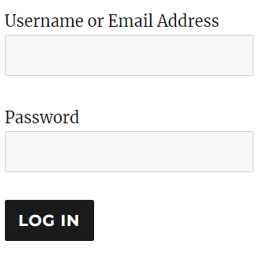
WP Login Form allows you to create a simple login form for use anywhere on the front end of your WordPress site. You can add it to a post, page or your sidebar with a shortcode. WP Login Form Add-ons Force Redirect Custom Error How to Create a Custom Login Page for WordPress In order to create a login form or custom login page for WordPress with the default options, all you need to do is use this shortcode: [wp_login_form] However, there are other parameters that you can pass in the shortcode to customize it. redirect An absolute URL to which the user will be redirected after a successful login. For example, [wp_login_form redirect="https://example.com/mypage/"] The default is to redirect back to the URL where the form was submitted. form_id Your own custom ID for the login form. For example, [wp_login_form form_id="myloginform"] The default is “loginform”. label_username Your custom label for the username/email address field. For example, [wp_login_form label_username="Login ID or Email"] The default is “Username or Email Address”. label_password Your custom label for the password field. For example, [wp_login_form label_password="Login Password"] The default is “Password”. label_remember Your custom label for the remember field. For example, [wp_login_form label_remember="Remember"] The default is “Remember Me”. label_log_in Your custom label for the form submit button. For example, [wp_login_form label_log_in="Submit"] The default is “Log In”. id_username Your own custom ID for the username field. For example, [wp_login_form id_username="wp_user_login"] The default is “user_login”. id_password Your own custom ID for the password field. For example, [wp_login_form id_password="wp_user_pass"] The default is “user_pass”. id_remember Your own custom ID for the remember field. For example, [wp_login_form id_remember="login_rememberme"] The default is “rememberme”. id_submit Your own custom ID for the form submit button. For example, [wp_login_form id_submit="login_form_submit"] The default is “wp-submit”. remember Specify whether to display the “Remember Me” checkbox in the WordPress login form. For example, [wp_login_form remember="0"] The default is “1” (true). value_username Your custom placeholder attribute for the username input field. For example, [wp_login_form value_username="Your Username"] The default is NULL. value_remember Specify whether the “Remember Me” checkbox in the form should be checked by default. For example, [wp_login_form value_remember="1"] The default is “0” (false). required_username Specify whether the username field should be required by default. For example, [wp_login_form required_username="true"] The default is “false”. required_password Specify whether the password field should be required by default. For example, [wp_login_form required_password="true"] The default is “false”. lost_password Specify whether to display a lost password link in the form. For example, [wp_login_form lost_password="0"] The default is “1” (true). label_lost_password Your custom label for the lost password link. For example, [wp_login_form label_lost_password="Reset Password"] The default is “Lost your password?”. How to Enable Google reCAPTCHA WP Login Form supports Google reCAPTCHA v3 to protect your login form against spam and other types of automated abuse. To enable this feature, go to “Settings > WP Login Form” and configure these options. Enable Google reCAPTCHA v3 Site Key For detailed documentation please visit the WordPress Login Form plugin page