Local Google Analytics for WordPress – caches external requests
This plugin helps to plug in Google Analytics code to the website pages without affecting the theme code. All you have to do is to enter the tracking code. That’s all. Unlike other plugins, this one cares about your website performance and caches Google Analytics scripts. How does plugin cache Google Analytics scripts and why? When you activate and fill in plugin settings, it downloads remote file named analytics.js and places it to the Cache folder on your hosting (server). This file is updated once a day – it helps to avoid external requests to the Google remote server and speeds up the website pages. Also if you want to gain 100 performance rating on Google Pagespeed Insights, then you’ll definitely need to cache Google Analytics, otherwise you’ll get a warning. PLUGIN FEATURES Helps to place analytics code to the website header or footer. Monitors bounce rates. The point is that you set up the event triggered after a user spends a certain amount of time on the landing page, telling Google Analytics not to consider these users as a bounce. The user can visit your website, find all necessary information (for example, phone number), and then – simply close the website without visiting other pages. If the bounce rate hasn’t been adjusted, then this user is considered as a bounce, even though he had a successful experience. By defining time limits as from when the user should be considered as a bounce, you get more accurate performance of the user experience (for example, whether he’s been able to find what he was looking for or not). Define the analytics code position. Google Analytics code loads prior to other scripts and JavaScript code by default. But if you set up the value 100, for example, then the Google Analytics code will be loaded after all scripts. Adjusting the priority helps to set up the code’s position on the page. Disable all Display Network functions. Find more: https://developers.google.com/analytics/devguides/collection/analyticsjs/display-features Use anonymous IP address (required by the law in some countries). More details: (https://support.google.com/analytics/answer/2763052) Track administrators. You can disable tracking for administrators’ activities and get more accurate statistics. Do not update the analytics.js local script. Plugin creates cron task to update cache of Google Analytics scripts daily. Once this feature is enabled, the plugin won’t update the Google Analytics cache file. Translations English – default, always included Russian If you want to help with the translation, please contact me through this site or through the contacts inside the plugin. THANKS TO THE PLUGINS’ AUTHORS We used some plugins functions: GA Google Analytics, NK Google Analytics, Complete Analytics Optimization Suite (CAOS), Clearfy — WordPress optimization plugin and disable ultimate tweaker, Enhanced Ecommerce Google Analytics Plugin for WooCommerce Recommended separate modules We invite you to check out a few other related free plugins that our team has also produced that you may find especially useful: Clearfy – WordPress optimization plugin and disable ultimate tweaker Disable Comments for Any Post Types (Remove Comments) Cyrlitera – transliteration of links and file names Cyr-to-lat reloaded – transliteration of links and file names Disable admin notices individually Hide login page Disable updates, Disable automatic updates, Updates manager WordPress Assets manager, dequeue scripts, dequeue styles
Top keywords
- analytics19×3.45%
- google16×2.90%
- google analytics12×2.18%
- code9×1.63%
- disable8×1.45%
- scripts6×1.09%
- website6×1.09%
- analytics code5×0.91%
- bounce5×0.91%
- cache5×0.91%
- file5×0.91%
- user5×0.91%
Globe Visitors Counter
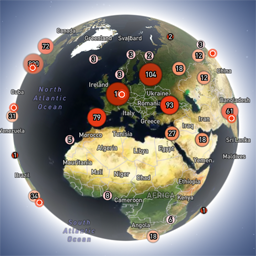
Globe Visitors Counter (Lite) adds a beautiful, fast, iframe-isolated 3D visitor globe to any WordPress site. It instantly shows your audience geography — fully locally, privately, and without any third-party tracking. This Lite version is designed for clarity, speed, and instant visual feedback — especially on landing pages and campaign pages. Use Case: Instant Visual Feedback for Advertising Campaigns The situation You have a product or a service. You launch an advertising campaign: Google Ads Facebook / Instagram TikTok banner ads email campaigns any other traffic source All traffic is sent to one landing page. Usually what comes next is boring: tables, charts, numbers, dashboards, “we’ll analyze it later”. The solution You place Globe Visitors Counter Lite directly on the landing page. No server setup. No external analytics. No configuration. And you start seeing your traffic with your own eyes. How it works (very simple) You launch the ads Visitors arrive at the page Each real visitor appears as a dot on the globe — in real time, from their actual location The globe comes alive and instantly shows: – whether people are coming at all – which countries and regions react – whether the campaign works or misses completely No dots — ads don’t work. Dots appear — ads are alive. Why Lite is perfect for landing pages Lite is not deep analytics. It’s a visual “life indicator”. Perfect when you need: – fast visual feedback – immediate confirmation that traffic is real – zero setup and zero learning curve – a simple “wow effect” for clients, teams, or investors You watch, not analyze. Key Features Interactive 3D Land-Cover globe included out of the box Real-time visitor logging using a tiny local JSON file Historical dots displayed automatically Zero configuration, works with all themes & editors Shortcode-based, easy placement on any page No cookies, no remote APIs, GDPR-friendly Ultra-fast loading thanks to iframe sandboxing How It Works When a page with the shortcode is opened, the plugin loads a fully self-contained viewer from: /wp-content/uploads/visitors-lite-landcover/ Each visit is logged locally as a minimal record (timestamp + coordinates + city + country) into: visitors.json Everything stays on your server. No tracking pixels. No third-party analytics. No cookies. Why Use It Ideal for landing pages and product launches Visualizes global audience instantly Safe for cached pages and CDNs Works even on heavily optimized sites When You May Need the Full Version Lite is intentionally simple and fast. If you need: – long-term statistics – multiple pages or sites – extended visitor history – advanced visual modes and skins – more control and customization …then the Full (Pro) version may be a better fit. Lite remains perfect for single pages, launches, tests, and quick visual validation. Tester Program (optional) We are tuning defaults and performance for upcoming builds. If you want to enable advanced features during testing at no cost (extra visual modes, effects, skins), join via Support: https://wordpress.org/support/topic/looking-for-testers-free-advanced-features-for-feedback/ Usage Shortcode: [visitors_globe_lite title=”VISITORS” width=”100%” height=”600″] Attributes: – title — optional caption above the globe – width — iframe width (100% or fixed px) – height — iframe height in px Place the shortcode anywhere — Classic or Block editor.