Shortcodes Ultimate – Content Elements
Building new pages with Gutenberg? Explore VovaBlocks, a focused collection of native marketing and content blocks from the creator of Shortcodes Ultimate. View VovaBlocks → About Shortcodes Ultimate Shortcodes Ultimate is a WordPress shortcode plugin for adding tabs, accordions, buttons, FAQs, sliders, carousels, lightboxes, columns, boxes and other reusable content elements without coding. It is ideal for site owners who want richer content layouts and practical UI elements without switching to a full page builder. Use Shortcodes Ultimate in the Block Editor, Classic Editor, widgets and template files. Generate shortcodes visually, preview the result before inserting it, and reuse the same elements across posts, pages and existing shortcode-based content. Trusted by hundreds of thousands of WordPress sites, Shortcodes Ultimate helps you replace multiple single-purpose UI plugins with one maintained toolkit. Explore live examples What you can build With Shortcodes Ultimate, you can quickly add common WordPress content elements such as: Accordions and FAQ sections Responsive tabs CTA buttons and download buttons Boxes, notes and callouts Columns and layout helpers Sliders and carousels Lightboxes for images and custom content Post lists and dynamic content blocks Spoilers, toggles and expandable content Media embeds and visual content blocks Instead of installing a separate plugin for every small content element, Shortcodes Ultimate gives you one maintained toolkit for everyday WordPress content tasks. Works with modern and classic WordPress workflows Shortcodes Ultimate works with the Block Editor, Classic Editor, widgets and template files. You can insert shortcodes manually, use WordPress shortcode blocks or use the built-in shortcode generator to configure elements visually. This makes the plugin useful for: Site owners who want to improve content without coding Bloggers and affiliate publishers who need reusable CTA and content blocks Agencies and freelancers maintaining multiple WordPress sites Developers who want shortcode-friendly output in templates Existing sites with older content that already uses shortcodes Why use Shortcodes Ultimate? 50+ ready-to-use WordPress shortcodes Visual shortcode generator Live preview Works with the Block Editor and Classic Editor Shortcodes can be used in posts, pages, widgets and template files Responsive elements that work with your theme Built-in Custom CSS editor Developer-friendly hooks and documentation Free version available on WordPress.org Pro version available for advanced shortcodes, extra styles and premium support Why shortcodes still matter in WordPress The WordPress Block Editor is great for visual content editing, but shortcodes are still useful when you need portable, reusable content elements that work across different parts of a WordPress site. Shortcodes are especially helpful when you want to: Reuse the same content element in many posts or pages Add dynamic content inside widgets or templates Maintain older WordPress sites that already use shortcodes Work across Classic Editor and Block Editor workflows Add content elements without switching to a full page builder Keep common UI elements available through a simple text-based syntax Shortcodes Ultimate is designed for these practical workflows. It gives you a large collection of ready-made shortcodes and a visual generator, so you do not need to write shortcode syntax manually unless you want to. Free and Pro The free version of Shortcodes Ultimate includes a large collection of useful shortcodes for everyday WordPress content tasks. Shortcodes Ultimate Pro adds advanced shortcodes, additional styles, Content Slider, Pricing Table, Testimonials, Shortcode Creator, Elementor support and premium support. Compare Free and Pro Useful links Documentation Live Examples Pro features Support
Top keywords
- shortcodes25×4.50%
- content21×3.78%
- wordpress14×2.52%
- shortcodes ultimate12×2.16%
- ultimate12×2.16%
- editor10×1.80%
- elements9×1.62%
- shortcode6×1.08%
- block5×0.90%
- block editor5×0.90%
- blocks5×0.90%
- classic5×0.90%
Staylodgic – Booking & Activity Manager for Boutique Hotels
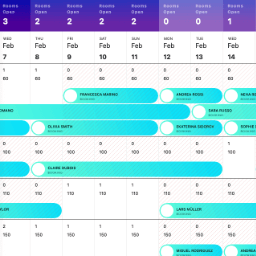
Staylodgic is a user-friendly hotel management plugin designed to simplify and enhance operations for small to medium-sized hotels, guesthouses, and boutique properties. With a comprehensive suite of features, Staylodgic allows you to manage room bookings, activity reservations, guest registration, invoicing, and more. Developed by a boutique hotel owner, with real-world needs in mind. Introduction video: Shortcodes [staylodgic_activity_booking_search] Displays a search form for guests to browse and book available activities. [staylodgic_hotel_booking_search] Provides a search form for guests to find and book available rooms. Helps streamline the booking process by showing room availability based on their preferences. [staylodgic_hotel_booking_details] Displays status about a specific hotel booking. [staylodgic_guest_registration] Adds a customizable guest registration form to your website. Ideal for collecting guest details online or facilitating pre-arrival registration via shared links or QR codes. Features Hotel Management Setup new hotel settings. Online Payments Accept online payments via WooCommerce (e.g., WooCommerce Payments and other compatible gateways). Enable from StayLodgic → Settings. After a booking is made, guests can complete payment online. Payments are logged as WooCommerce orders; booking details show payment status and link to the order in wp-admin. Room Management Create rooms for reservations. Add room rates. Set room quantity. Create and manage reservations. Activity Management Create activities for guests. Add scheduled times to the weekly calendar. Create and manage activity reservations. Dashboard Tools View bookings overview. View activities overview. Check availability calendar. Monitor annual availability. Customer Management Create and manage customer profiles. Guest Registration Customize guest registration forms. Create guest registrations. Enable online registration. Share registration links or QR codes. Invoicing Generate booking invoices. Generate activity invoices. Import/Export Data Export bookings as CSV files. Export guest registration data for a specific month. Tax Management Apply fixed taxes. Set percentage-based taxes. Add per-day taxes. Configure per-person taxes. Meal Plans Create free meal plans. Create paid meal plans. Per Person Pricing Add fixed price increments per occupant. Apply percentage-based increments per occupant. Discounts Offer last-minute booking discounts. Provide early booking discounts. Enable long-stay discounts. Benefits Streamlined Hotel Operations Simplify and centralize hotel and room management. Manage reservations, activities, and guest registration in one platform. Time-Saving Automation Automate guest registration with customizable forms and online submissions. Generate invoices for bookings and activities instantly. Comprehensive Dashboard Gain insights with an overview of bookings and activities. View availability calendars and annual availability at a glance. Enhanced Guest Experience Offer flexible meal plans and activity reservations. Provide seamless guest registration with links or QR codes. Flexible Pricing and Discounts Configure per-person pricing with fixed or percentage-based increments. Apply discounts for early bookings, last-minute reservations, or long stays. Efficient Tax Management Set up taxes per booking, per person, per day, or as a percentage. Data Management Made Easy Export bookings and guest registration data for analysis or reporting. Customizable for Small to Medium Hotels Adaptable to guesthouses, boutique hotels, and properties with specific needs. Affordable and Scalable Ideal for small businesses. Scales easily for larger hotels and businesses. User-Friendly Interface Designed for ease of use with intuitive navigation and clear workflows. Improved Decision-Making Leverage data insights to optimize operations and improve guest satisfaction. Helpful How-To Get started quickly with these helpful guides from the Staylodgic Help PDF: Configure Hotel Settings Set up your hotel’s pages, discounts, taxes, meal plans, and general settings. (See pages 6–13 of the PDF) Create Rooms and Bed Layouts Add rooms, set base rates, configure occupants, and define bed types. (See pages 14–20) Manage Availability and Rates Use the Availability Calendar to control room quantity and pricing by date. (See pages 21–35) Add a Booking Manually Step-by-step on how to create a reservation manually. (See pages 36–40) Generate Booking Invoices Quickly print or save invoices for room bookings. (See page 41) Set Up Guest Registration Customize forms, generate QR codes, and track registration status. (See pages 42–46) Create Activities & Reservations Define activities, schedule time slots, and manage guest signups. (See pages 47–53) Generate Activity Invoices Produce printable invoices for activity bookings. (See page 54) Use the Booking Dashboard Track arrivals, departures, and revenue trends using the graphs. (See pages 55–58) Annual Availability View Get a yearly bird’s-eye view of all your bookings. (See pages 59–60) Export Bookings and Registrations Download CSV files of all bookings and guest data. (See pages 61–63) Development This plugin uses minified JS and CSS files for better performance. Source files are available in the following repository: driver.js https://github.com/kamranahmedse/driver.js DataTables https://github.com/DataTables/DataTablesSrc Lightbox for Bootstrap 5 https://github.com/trvswgnr/bs5-lightbox HTML2Canvas https://github.com/niklasvh/html2canvas Signature Pad https://github.com/szimek/signature_pad VelocityJS https://github.com/julianshapiro/velocity Fontawesome https://github.com/FortAwesome/Font-Awesome QRcode JS https://github.com/davidshimjs/qrcodejs PDFMake https://github.com/bpampuch/pdfmake Flatpickr https://github.com/flatpickr/flatpickr jsPDF https://github.com/parallax/jsPDF Chart.js https://github.com/chartjs/Chart.js Select2 https://github.com/select2/select2