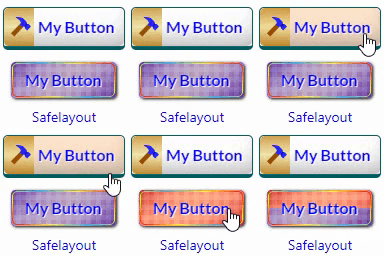
Safelayout Brilliant Buttons – WordPress Buttons
Skip the tedious styling configurations and custom code. Safelayout Brilliant Buttons delivers an instant library of pre-designed, high-converting Call to Action (CTA) buttons and layout sections that drop straight into your content with a single click. Using our dedicated “Insert Button from Library” feature, you can browse, preview, and deploy stunning design buttons instantly. Whether you use Gutenberg (Block Editor), Elementor, or the Classic Editor, this lightweight companion brings effortless aesthetic upgrades to your website. There is no manual layout building required—simply pick a ready-made option from the library featuring multi-color gradient fills, background patterns, or elegant text subheadings. 📦 Ready-Made Call to Action Patterns & Blocks Want more than just a single button? Access pre-configured layout blocks designed to capture leads instantly: * High-Converting Sections: Instant boxes complete with bold marketing headers (e.g., “Get 40% Off Across All Categories” or “Ready to Bring Your Ideas to Life?”) with beautiful buttons like “Visit Shop” and “Shop Deals”. * Native Integration: Insert these ready-made patterns directly from your Gutenberg block panel or Elementor widget dashboard with zero building required. ⏳ Effortless “After Click” States (Zero Frustration) Standard WordPress buttons leave users wondering if a page has frozen after a click. Safelayout Brilliant Buttons fixes this user experience gap instantly with automated after-click loading features. With no complex setup, your buttons can automatically display: * Live Processing Statuses: Watch the button label immediately update to helpful feedback like “Please wait…” or “Redirecting…”. * An Inline Loading Spinner: A smooth, integrated visual animation shows users the site is actively working. This unique feature eliminates duplicate form submissions and keeps traffic calm on slower web servers. ⚡ Instant “Click Effects” & Fluid Hover Transitions Give your website visitors immediate, tactile satisfaction. The plugin includes pre-configured click animation profiles and fluid micro-interactions. Your buttons respond the exact millisecond they are pressed with interactive ripple waves, tactile micro-depressions, and energetic layout pulses. 🚀 Optimized for Core Web Vitals (No Font Files) Protecting your website page speed is our highest priority. Unlike alternative visual blocks that drag down loading times by fetching heavy external icon toolkits, this plugin displays iconography using 100% pure inline HTML SVG icons. Your pages load lightning-fast, keeping your Core Web Vitals clean across modern desktop and mobile browsers. 🎨 Native Theme & Full-Site Editing (FSE) Compatibility Every pre-set styling choice plays perfectly with responsive modern layouts. Enjoy absolute cross-browser rendering reliability and native Full-Site Editing (FSE) support that seamlessly syncs with your theme’s global font sets and wrapper container environments. Features High quality buttons. Available in Block editor, Classic editor and Elementor. Many beautiful button effects. Many beautiful Hover animation effects. Includes buttons with various background patterns. Includes buttons with various click effects. Ability to show loading animation and change text after click. Include icon button. Include Sub text. Include multi color icon packs. No icon fonts, just inline SVG. Gradient color for icon fill and stroke as well as background color. Fully compatible with Full-Site Editing. Cross browser compatible. Fully customizable. Work with Any Theme. Live Demo Safelayout Brilliant Buttons Demo. Pro Version Safelayout Brilliant Buttons Pro is available. Upgrade to pro version and get full features! Safelayout other plugins Safelayout Elegant Icons – WordPress icon block Safelayout Cute Preloader – CSS3 WordPress Preloader Safelayout Animated Header Footer
Top keywords
- buttons13×2.43%
- safelayout8×1.49%
- click7×1.31%
- icon6×1.12%
- button5×0.93%
- animation4×0.75%
- block4×0.75%
- brilliant4×0.75%
- brilliant buttons4×0.75%
- editor4×0.75%
- effects4×0.75%
- layout4×0.75%
SVG Block
This SVG block allows you to display SVG images as inline HTML markup. You can either choose an icon from the icon library with more than 3000 icons or you can upload or input your custom SVG images directly in the block’s setting. It also allows you to upload SVG images to the WordPress media library, and load them into the icon library. Only SVG files that have XML declaration at the top like can be uploaded to the WordPress media library. Key Features Accessibility ready with ‘img’ role, automatically generates title and description from settings. Automatically sanitize SVG markup to make it safe and lightweight. Include almost all settings to customize the SVG image. Include a collection of common non-rectangular dividers. An icon library included icons from “Bootstrap Icons”, “Ionicons”, “Dashicons” and new “WordPress Icons”. Allow uploading SVG images to the WordPress media library Automatically load SVG images from the media library into the icon library Video tutorials How to create an icon with custom styles using the icon library: How to create a non-rectangular background section: How to create icon buttons: Please take a look at these custom block patterns that use this block to see how it can be applied to real-world sites. If this plugin is useful for you, please do a quick review and rate it on WordPress.org to help us spread the word. I would very much appreciate it. Please check out my other plugins if you’re interested: Content Blocks Builder – Build custom layouts and blocks visually in the Block Editor without needing a code editor, using only core blocks and native Gutenberg features. Meta Field Block – A single block to display custom fields in the Block Editor without coding. It supports ACF, MetaBox, WooCommerce, meta, rest field, shortcode and more. Works everywhere: in the Site Editor (FSE), the Block Editor, inside Query Loop, WooCommerce Product Collection, Term Query blocks, and even in template files. Icon separator – A tiny block just like the core/separator block but with the ability to add an icon. Breadcrumb Block – A simple breadcrumb trail block that supports JSON-LD structured data and is compatible with WooCommerce. Block Enhancements – Adds practical features to blocks like icons, box shadows, transforms, etc. Counting Number Block – A block to display numbers with a counting effect Better YouTube Embed Block – A block to solve the performance issue with embedded YouTube videos. It can also embed multiple videos and playlists. The plugin is developed using @wordpress/create-block.
Top keywords
- block18×4.34%
- icon10×2.41%