Restaurant & Cafe Addon for Elementor
Restaurant & Cafe Addon for Elementor covers all the must-needed elements for creating a perfect Restaurant website using Elementor Page Builder. 50+ Unique & Basic Elementor widget covers all of the Restaurant elements. Learn More All Elements List | Demo Restaurant Website Create a Awesome Restaurant Website How-To Use Restaurant Addon Elements? – Playlist Videos 50+ Restaurant Website Widgets (Free & Pro) Each elementor widget crafted based on Restaurant Websites in Mind. So, this plugin covers all 35+ free must-needed elementor widgets to fulfill your restaurant website needs. At the same time, it grabs your visitor’s attention. 🙂 Easy to Customize User-Friendly wise Elementor is the best choice of Page Builder in WordPress. We assured that same editing experience in our Addons plugin too. Every widget comes with plenty of options with easy to edit user experience. Professional Support Our experienced Team supports your every question carefully, and your points/notes will take to the core development team to improving our plugin gradually. Detailed Documentation We’ve explained everything about the plugin in our detailed documentation, it does not only explain the (How to’s?) instead it’ll explain the effective way of using the addon. Basic Elements Documentation Unique Elements Documentation 50+ Restaurant Free/Pro Widgets & Counting You can find all of the following 50+ most useful widgets of your Awesome Restaurant Website. All elements list: Elements List Basic Widgets About Me – Name, Profession, Social Media Links, Description, and Button link. About Us – All Basic Company Details Meta Information, Social Icons, Description, and Alignments. Blog – Columns up to four, Limit, Order & Order by, Certain Category posts, Certain ID’s, Excerpt and it’s length, Pagination, and more. Chart Free/Pro – Contains – Bar and PIE Charts. Contact – Contact form box, Title, Short Content and Contact form shortcode. Gallery – Filter, Title, Subtitle, Positioning Controls, Zoom, and Links. Get Apps – App Store, Play Store, and Chrome Browser Extension images, and links. Title, Sub-title, and short content. History – Time or Year, Title, Short Content, and Read More link. With Swappable Image. Image Compare – Before and After Images with a vertical and horizontal controller. Process – Includes Three Types of Different Design Layouts, Title, Icon, or Numbers and, Short Content. Separator – Vertical Alignment and Horizontal Alignment with Headings, Icon, or Text between separator lines. Services – Five style types of a service element, icon or image, Headings, Short Content and, Read More link. Slider – Sider animation control, background image uploads, Heading, Short Content and, two buttons. Subscibe – Title, Short Content with Shortcode Placement area. That you can able to install any third-party subscribe form plugin and include that shortcode into this design. Table – Easy to add row and columns, Supported multiple inside elements. Team Single – Name, Profession, Meta Informations, Contact Details, Social Links, and, Short Content. Team – Four Styles, Name, Short Content, Social Links, and Profession. Testimonials – Three Styles, Images, Content, and Client Name, Professions. Type Writter – Typing Animation Controls, Speed, and Cursor Controls. Video – Title, Cover Image with Animated Button – Video Popup. Restaurant-Specific Widgets Addon Menu – Pro – Title, Description, Added Items List, Star Review, Price and Button Benefits – Pro – Icon, Title, Description Branch Slider – Pro – Map, Title, Addresses, Email and Phone Numbers Branches – Map, PinPoint, Point Title Chefs Recipe – Chef Photo, Name, Profession, Button, Gallery Slider, Contact Details Food Item – Pro – Food Item Style, Listing Style, Limits, Order, Order By, Food Item Column, Show Certain Categories, Hide Certain Categories, Show Certain Product, And All Carousel Controls like Speed Limit, Loop, Navigation, Auto Play so on… Food Menu – Image, Title, Description, Price, Type Food Tab – Image, Title, Name, Description, Number Gift Card – Pro – Title, Form, Form Controls, Price. Ingredients – Icon, Title Layered Image – Pro – Each Image as in separate layer and Controls of scrollings Offers – Title, Buttons, % of Offers value and more. Open Table – Pro – Pre-Defined Open-Table Form, Image, Title, Address Details, Offer Details and, Styles Image Parallax – Pro – Two Images scroll on parallax mode, speed control, positioning. Particular Recipe – Pro – Video in Popup, Ingredients, Nutrition info, Steps to Prepare Food and, more. Pricing Tab – Pro – Title, Description, Pricing Value, Features, Images and Buttons. Pricing – Title, Features, Pricing Value and Currency, Button, Featured Pack. Restaurants – Whole Image BG, Icon, Title, Description and, link. Rooms – Title, Sub-Title, Image, Description, Pricing, Button and, Features. Rooms Slider – Pro – Same as Rooms widget but with full screen slider. Specialties – Image, Title, Description, Points and, Positions. Stats – Icon, Title, Counter Values. Tab – Pro – Tab Title, Image, Content Title, Description, Button and, More. Valuable Box – Icon, Title, Description and Link. Working Hours – Title, Sub-Title, Days and Time. Food Banner – Pro – Title, Sub-Title, Link Text & Link. WooCommerce Specific – All In Premium Version Product Addon – Pro – Limit, Order, Orderby, Show Particular Products by Categories & Product Titles, Hide Particular Products by Categories & Product Titles. Product Filter – Pro – Limit, Order, Orderby, Show Particular Products by Categories & Product Titles, Hide Particular Products by Categories & Product Titles, Filter “All” text, Product Columns, Categories Limit, Filter Enable & Disable, Filter Type(Ajax, Normal), Pagination. Food Item – Pro – Food Item Style, Listing Style, Limits, Order, Order By, Food Item Column, Show Certain Categories, Hide Certain Categories, Show Certain Product, And All Carousel Controls like Speed Limit, Loop, Navigation, Auto Play so on… Product Food Menu – Pro – Menu Style, Limit, Order, Show Certain Categories, Hide Certain Categories, Show Certain Product, Order, Order By.
Top keywords
- title28×3.20%
- pro20×2.28%
- image15×1.71%
- description12×1.37%
- categories11×1.26%
- certain11×1.26%
- content11×1.26%
- food11×1.26%
- order11×1.26%
- product11×1.26%
- restaurant11×1.26%
- elements9×1.03%
Restaurant Food Menu by WP Darko – Drag & Drop Restaurant Menu Builder for WordPress
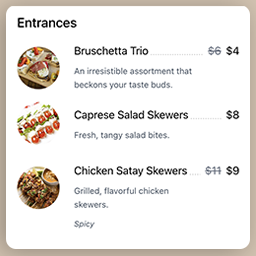
Quickly set up and display a restaurant menu on your website, fully responsive and easy to use. Create food items, add them to your restaurant menu and copy-paste the shortcode into any posts/pages. WordPress Restaurant Menu Builder plugin Introducing WP Darko’s new restaurant menu builder. We’ve designed this WordPress plugin to be as user-friendly as possible, making it ideal for beginners. You can begin building captivating food lists within minutes. When activated, WP Darko’s restaurant menu builder will add two new sections to your WordPress admin panel: “Food Items” and “Food Menus.” These sections will enable you to effortlessly create restaurant menus by adding food items (complete with food descriptions, regular and sale prices, food images, and more), add them to one or multiple menus and display them anywhere on your website using your restaurant menu shortcodes. Get Started in Minutes with Restaurant Food Menu Drag & Drop Restaurant Menu Builder Restaurant Food Menu is an intuitive drag & drop food menu builder plugin for WordPress. After you’ve added your food items in the admin panel, it only takes a few minutes to display your restaurant menu beautifully on your page. Simply create a new menu, then drag & drop your food items from the food list into your menu sections. Adjust the menu’s layout, add headings, and paragraphs to make it look like an authentic restaurant menu, and you’re good to go! With this WordPress plugin, WP Darko ensures that you can focus on what matters most: your restaurant business. Creating a restaurant menu for your WordPress site is easy with our menu builder, and you should be able to have yours ready in minutes. Available fields & settings When creating food items in the admin panel, you’ll be able to use the following fields: Food title Food image Regular and sale price: if you add a sale price to your food item, the regular price will be crossed out Additional info: this is a free field where you can add information about the food, such as spiciness level, allergies, gluten-free, vegetarian, and more Food description: here is where you can let your creativity shine and describe your food in a way that makes it sound delicious to your visitors Fully Responsive and Optimized Restaurant Food Menu is a 100% mobile-friendly and fully responsive restaurant menu builder plugin for WordPress that has been tested with a wide range of devices and browsers. The menu’s food sections will gracefully transition from 3-2 columns to a single column on smaller devices, ensuring they remain perfectly readable and visually appealing. Our WordPress restaurant menu plugin is also fully compatible with the latest versions of WordPress and PHP. The future of our Restaurant Food Menu WordPress plugin Restaurant Food Menu was recently released, and we have exciting plans for its future. We are planning to introduce new features very soon! Among these upcoming features, we will provide the option to include full-width images within the restaurant menu, allowing you to align it more closely with your food business. Additionally, we will be working on various options for indicating spiciness levels, allergies, and different dietary preferences. We have an extensive roadmap, and you can contribute to it by reaching out to us and sharing your ideas for the direction you’d like this food menu builder WordPress plugin to take!