Logo Carousel – showcase client logos professionally
Turn your client list into instant social proof – display client logos in a smooth, responsive carousel anywhere on your site. Plugin Demo | Documentation Why Logo Carousel? Logo Carousel is an easy-to-use and versatile WordPress plugin that showcases a responsive carousel slider of your clients’ logos or images. An engaging, professional display of the brands you’ve worked with helps build trust with your visitors from the very first scroll. The plugin comes with a range of customizable settings, so your carousel seamlessly matches your site’s branding and design. Control the animation style, speed, and the number of images to display, and add links to each logo that send visitors to your clients’ websites or pages. Logo Carousel is fully responsive and mobile-friendly, so your slider looks great on all devices and screen sizes. Upload images from your media library or import them from an external URL, and the plugin automatically generates the carousel for you – fine-tune the appearance further with the built-in style editor or your own CSS. Free Features Unlimited Carousels: Create as many logo carousels as you need. Any Image Type: All common image formats are supported. Shortcode Driven: Place carousels anywhere in WordPress – posts, pages, widgets, and templates. Pointer Direction Control: Control the slide direction with the mouse pointer. Deep Customization: Control speed, behavior, width, height, border, background, and more. Logo Links: Link each image to a client website or any page. User-Friendly Interface: Add and manage logos with ease. Broad Browser Support: Works on all major browsers. Lightweight & Fast: Minimal footprint for quick page loads. How to Use – Quick Start Install and activate Logo Carousel. Open the plugin’s admin menu and create a new carousel. Upload your client logos and adjust speed, size, and style options. Copy the generated shortcode and paste it into any post, page, or widget. Use Cases Client & Partner Logos: Show the brands you work with to build credibility. Sponsor Showcases: Display event or community sponsors in a rotating strip. Portfolio Highlights: Present your own work or product images in a carousel. Testimonial Branding: Pair customer logos with your testimonial sections. Feedback Liked this plugin? Hate it? Want a new feature? Send your feedback ⭐ Checkout our other WordPress Plugins- 🔥 Html5 Audio Player – Best audio player plugin for WordPress. 🔥 Html5 Video Player – Best video player plugin for WordPress. 🔥 PDF Poster – A fully-featured PDF Viewer Plugin for WordPresss. 🔥 StreamCast – A fully-featured Radio Player Plugin for WordPresss. 🔥 3D Viewer – Display interactive 3D models on the webs. 🔥 Store Finder for WooCommerce – Lists your store contact info professionally.
Top keywords
- carousel10×2.36%
- logo7×1.65%
- logos6×1.42%
- client5×1.18%
- display5×1.18%
- player5×1.18%
- wordpress5×1.18%
- control4×0.95%
- images4×0.95%
- logo carousel4×0.95%
- carousels3×0.71%
- image3×0.71%
WP Flow Plus
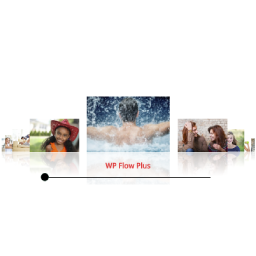
WP Flow Plus Display attractive flow style carousel galleries with or without reflections. Each image links to either a Lightbox preview or to a URL. The Lightbox pop-up supports cycling through all the photos – left/right arrows appear when hovering over the photos. This is a light script that uses the basic JQuery library. It will display a simple thumbnail list if Javascript is disabled in the browser. Demo and Documentation Features CSS reflections Configure carousel image size Configure carousel aspect ratio Multiple galleries per page Configure the background color, text color, container width and choose black or white for the scrollbar. Auto-rotation of the images Configure the starting slide number Touch control of the scrollbar Optional link field in the image editor to link an image to a URL instead of the lightbox Option to open links in the same window or a new window Enable/disable automatic rotation for each instance of a gallery Supports full text description in the popup window of a gallery from the media library Display with or without reflections Gallery based on images from the Media Library or a simple folder of images Featured post support Shortcode generator NextGen gallery support Extended carousel animation styles Circular continuous carousel Configure the number of images on each side of the carousel Lightbox arrow options Slide-up captions Languages Italian translation courtest of Andrea Benedet Serbian translation courtesy of Ogi Djuraskovic Spanish translation courtesy of Ogi Djuraskovic Swedish translation courtesy of Kenneth Andersson
Top keywords
- carousel6×2.44%
- configure5×2.03%
- gallery4×1.63%
- image4×1.63%
- images4×1.63%
- lightbox4×1.63%