Reactflow Visitor Recording and Heatmaps
Reactflow playback your customer’s activity recordings like a video that you can watch, Compile Heatmaps, Funnel Analytics, Bugs, Console Logs and provide feedbacks which helps you to understand customer’s pain points, solve them. For free. Heatmap and Recording from each user can be used to enhance user journey, user interface and user experience. It can be used to debug errors that user might encouter in their journey as well as 404 errors. Call to action buttons can be improved to deliver best experience. Why visitors leave or abandon their carts? Reactflow allows you to know exactly what your users are doing on your website and what needs to be changed. Session replay is a powerful tool that record your visitor activity & interaction on your website. Unlike traditional web stats and statistics plugins where you see your visitors path, pages, entry and exit pages, and other web analytics, Reactflow goes deeper by providing you with the actual session activity and interaction that customer do on your website. Free Click Heatmap, scroll and mouse hover heatmap provide you with an aggregate view of your website visitors. You can see which important button is not getting the attention it needs, in a glance. bug and error analysis will look for any Javascript, network or 404 errors that your visitors might face during their interaction the website. You will receive a notification whenever a new bug occurs for your visitors. Free funnel analytics allows you to set steps required for a visitor to perform the desired action on the website such as from the Product page to Thank you page and watch reason of dropouts as they happen. Feedback widgets allow your website users to take a screenshot of issues they see on your website and report them to you, or conduct a poll or survey. You can use widgets to collect leads data as well. Mouse activities such as mouse click, mouse movement, mouse scroll, even touch taps from your desktop, tablet and mobile visitors will be included in recording and be used to analyze your customers activity and generate heatmap based on this data. Reactflow is a cloud-hosted service that record your visitor’s session activity and plays them to you like a movie in Reactflow servers, so you do not have to worry about storage space of recording or server performance. Reactflow notable features: Session Replay: Playback what your users do on your website like a video. Used to identify what is causing your users to leave your website. Heatmap: Dynamic heat map of which elements in pages are getting the most attention. Used to identify which important element is getting low clicks. Bug notification: Notify you whenever a plugin or button is broken, making your website does not work as expected. Console log of your users will be included in recording and you can playback what they did that caused that bug or issue. users list and pages they visited: Full detailed history of pages each of your visitors viewed, with a play button next to them allowing you to playback what they did. Funnel Analytics: Breakdown of important steps on your website where you can see why users drop in each step. and you can watch recording of those who successfully reach your funnel goal page. Page Speed Meter: Each session recording calculate time it took for your page to load for your users. Feedback Widget: Allows your users to take a screenshot of issues they see on your website and give you feedback about it. Survey widget: Allow you to conduct a questionnaire from your users. Poll widget: Allows you to conduct some quick polls from your users. Lead widget: Allows you to catch lead information such as name, phone or email from your users. New world analytics. Try Reactflow to prove more features than HotJar, VWO, Lucky Orange, ClickTale, SmartLook, Mouseflow, Inspectlet, Hoverowl, SessionCam, Mousestats, Wisdom, Fullstory. Reactflow recorder record with higher accuracy and more analytics data. Upgrade from traditional web analytics. Try Reactflow to feel an upgrade from Clicky, StatCounter, HiStats, Piwik, Woopra, MixPanel, GoSquared, ChartBeat, Wassup, Slimstat or even Google Analytics. Know more about Reactflow Terms and Condition Privacy Policy Register
Top keywords
- website13×1.86%
- users12×1.72%
- reactflow10×1.43%
- analytics8×1.15%
- visitors7×1.00%
- recording6×0.86%
- activity5×0.72%
- allows5×0.72%
- heatmap5×0.72%
- mouse5×0.72%
- page5×0.72%
- pages5×0.72%
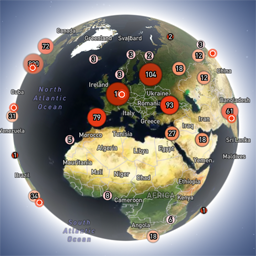
Globe Visitors Counter
Globe Visitors Counter (Lite) adds a beautiful, fast, iframe-isolated 3D visitor globe to any WordPress site. It instantly shows your audience geography — fully locally, privately, and without any third-party tracking. This Lite version is designed for clarity, speed, and instant visual feedback — especially on landing pages and campaign pages. Use Case: Instant Visual Feedback for Advertising Campaigns The situation You have a product or a service. You launch an advertising campaign: Google Ads Facebook / Instagram TikTok banner ads email campaigns any other traffic source All traffic is sent to one landing page. Usually what comes next is boring: tables, charts, numbers, dashboards, “we’ll analyze it later”. The solution You place Globe Visitors Counter Lite directly on the landing page. No server setup. No external analytics. No configuration. And you start seeing your traffic with your own eyes. How it works (very simple) You launch the ads Visitors arrive at the page Each real visitor appears as a dot on the globe — in real time, from their actual location The globe comes alive and instantly shows: – whether people are coming at all – which countries and regions react – whether the campaign works or misses completely No dots — ads don’t work. Dots appear — ads are alive. Why Lite is perfect for landing pages Lite is not deep analytics. It’s a visual “life indicator”. Perfect when you need: – fast visual feedback – immediate confirmation that traffic is real – zero setup and zero learning curve – a simple “wow effect” for clients, teams, or investors You watch, not analyze. Key Features Interactive 3D Land-Cover globe included out of the box Real-time visitor logging using a tiny local JSON file Historical dots displayed automatically Zero configuration, works with all themes & editors Shortcode-based, easy placement on any page No cookies, no remote APIs, GDPR-friendly Ultra-fast loading thanks to iframe sandboxing How It Works When a page with the shortcode is opened, the plugin loads a fully self-contained viewer from: /wp-content/uploads/visitors-lite-landcover/ Each visit is logged locally as a minimal record (timestamp + coordinates + city + country) into: visitors.json Everything stays on your server. No tracking pixels. No third-party analytics. No cookies. Why Use It Ideal for landing pages and product launches Visualizes global audience instantly Safe for cached pages and CDNs Works even on heavily optimized sites When You May Need the Full Version Lite is intentionally simple and fast. If you need: – long-term statistics – multiple pages or sites – extended visitor history – advanced visual modes and skins – more control and customization …then the Full (Pro) version may be a better fit. Lite remains perfect for single pages, launches, tests, and quick visual validation. Tester Program (optional) We are tuning defaults and performance for upcoming builds. If you want to enable advanced features during testing at no cost (extra visual modes, effects, skins), join via Support: https://wordpress.org/support/topic/looking-for-testers-free-advanced-features-for-feedback/ Usage Shortcode: [visitors_globe_lite title=”VISITORS” width=”100%” height=”600″] Attributes: – title — optional caption above the globe – width — iframe width (100% or fixed px) – height — iframe height in px Place the shortcode anywhere — Classic or Block editor.