QA Assistants – Driven by data
QA Assistants goes beyond analytics — it’s a companion that helps your data speak, with Assistants that reveal insights you can act on. Each Assistant offers a unique way to look at your site — from quick overviews to social trends and growth insights. You can still explore familiar tools like heatmaps, session replays, and reports — and Assistants will gradually bring more context to them. No complex setup or technical skills needed. QA Assistants makes discovering your site’s stories simple, visual, and a little fun too. Features Assistants — your data-driven companions to explore your site Assistants help you understand your site through data — in a clear and easy-to-understand way. Each Assistant focuses on a different perspective, such as traffic trends, content performance, or user behavior. More Assistants will continue to be added over time, expanding what you can explore and understand. In-dashboard Assistants Assistants can be downloaded from the official site and appear in the plugin dashboard. They provide deeper insights and reports based on accumulated data. On-page Assistant The built-in Page Analysis Assistant appears directly on your site pages. While browsing, you can quickly check pageviews, key metrics, and device-specific heatmaps — a lightweight assistant for logged-in admins. Heatmaps & Session Replays — see how visitors behave Visualize how people interact with your site: where they click, scroll, and pause. Session Replays let you follow their real journeys, helping you discover friction points and hidden opportunities. Reports & Trends — your site at a glance Access clear, intuitive charts and summaries that show what’s working and where to improve. Switch to Advanced Mode to unlock detailed metrics and comparison tools. Cookie-less Tracking — privacy made simple Track user behavior responsibly. QA Assistants includes a cookie-less tracking mode, so you can comply with privacy rules without losing insight. Built for WordPress — light, secure, and extendable Designed to blend seamlessly with your dashboard. QA Assistants follows WordPress coding standards, loads only what’s needed, and supports modular extensions for future Assistants. All of these features are completely free — just install and start exploring. Important Notes QA Assistants collects data in real time, but analytical reports are processed overnight. You can see live visit counts immediately, while detailed insights (used by Assistants) become available the following day. Please do not compress or minify JavaScript used by QA Assistants or WordPress. Some optimization plugins may interfere with tracking; exclude QA Assistants–related scripts if needed. Make sure your PHP memory limit is sufficient for data processing. If your server uses a very low limit (for example, 256 MB or less), some processes may fail. For detailed technical guidance or troubleshooting steps, please see the Documentation.
Top keywords
- assistants16×3.66%
- site8×1.83%
- qa7×1.60%
- qa assistants7×1.60%
- assistant5×1.14%
- data5×1.14%
- insights4×0.92%
- reports4×0.92%
- detailed3×0.69%
- explore3×0.69%
- heatmaps3×0.69%
- needed3×0.69%
Globe Visitors Counter
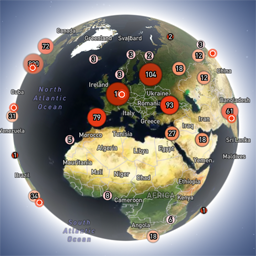
Globe Visitors Counter (Lite) adds a beautiful, fast, iframe-isolated 3D visitor globe to any WordPress site. It instantly shows your audience geography — fully locally, privately, and without any third-party tracking. This Lite version is designed for clarity, speed, and instant visual feedback — especially on landing pages and campaign pages. Use Case: Instant Visual Feedback for Advertising Campaigns The situation You have a product or a service. You launch an advertising campaign: Google Ads Facebook / Instagram TikTok banner ads email campaigns any other traffic source All traffic is sent to one landing page. Usually what comes next is boring: tables, charts, numbers, dashboards, “we’ll analyze it later”. The solution You place Globe Visitors Counter Lite directly on the landing page. No server setup. No external analytics. No configuration. And you start seeing your traffic with your own eyes. How it works (very simple) You launch the ads Visitors arrive at the page Each real visitor appears as a dot on the globe — in real time, from their actual location The globe comes alive and instantly shows: – whether people are coming at all – which countries and regions react – whether the campaign works or misses completely No dots — ads don’t work. Dots appear — ads are alive. Why Lite is perfect for landing pages Lite is not deep analytics. It’s a visual “life indicator”. Perfect when you need: – fast visual feedback – immediate confirmation that traffic is real – zero setup and zero learning curve – a simple “wow effect” for clients, teams, or investors You watch, not analyze. Key Features Interactive 3D Land-Cover globe included out of the box Real-time visitor logging using a tiny local JSON file Historical dots displayed automatically Zero configuration, works with all themes & editors Shortcode-based, easy placement on any page No cookies, no remote APIs, GDPR-friendly Ultra-fast loading thanks to iframe sandboxing How It Works When a page with the shortcode is opened, the plugin loads a fully self-contained viewer from: /wp-content/uploads/visitors-lite-landcover/ Each visit is logged locally as a minimal record (timestamp + coordinates + city + country) into: visitors.json Everything stays on your server. No tracking pixels. No third-party analytics. No cookies. Why Use It Ideal for landing pages and product launches Visualizes global audience instantly Safe for cached pages and CDNs Works even on heavily optimized sites When You May Need the Full Version Lite is intentionally simple and fast. If you need: – long-term statistics – multiple pages or sites – extended visitor history – advanced visual modes and skins – more control and customization …then the Full (Pro) version may be a better fit. Lite remains perfect for single pages, launches, tests, and quick visual validation. Tester Program (optional) We are tuning defaults and performance for upcoming builds. If you want to enable advanced features during testing at no cost (extra visual modes, effects, skins), join via Support: https://wordpress.org/support/topic/looking-for-testers-free-advanced-features-for-feedback/ Usage Shortcode: [visitors_globe_lite title=”VISITORS” width=”100%” height=”600″] Attributes: – title — optional caption above the globe – width — iframe width (100% or fixed px) – height — iframe height in px Place the shortcode anywhere — Classic or Block editor.