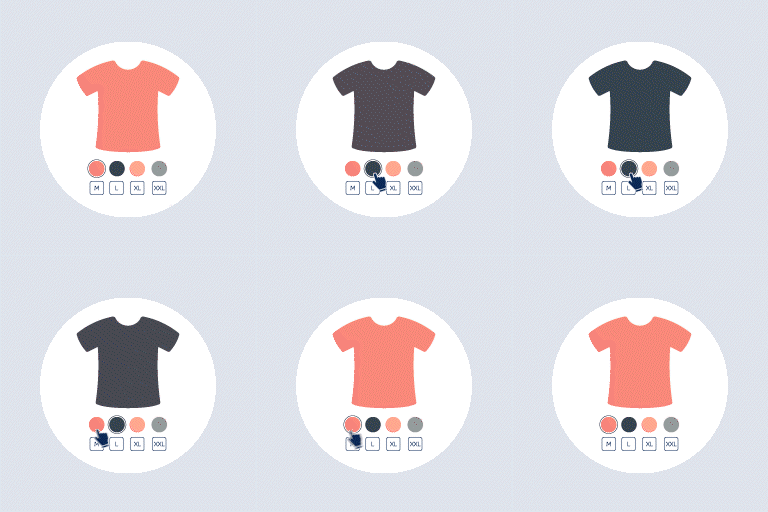
Choosly – Product Variations Swatches for WooCommerce
Product Variations Swatches for WooCommerce is a professional plugin that allows you to show and select attributes for variation products. The plugin displays variation select options of the products under colors, buttons, images, variation images, radio so it helps the customers observe the products they need more visually, save time to find the wanted products than dropdown type for variations of a variable product. Try the Demo |Documents |Pro Version | Facebook group Important Notice: Plugin works based on WooCommerce 7.x or higher, PHP 7.0+ It is released on WordPress.org and you can use plugin as free to build themes for sale. FEATURES ► Converting any variations dropdown type into swatches with a couple of clicks: When you activate WooCommerce Product Variations Swatches plugin, the variation products in the dropdown type will be converted into the variation swatches. ► Customizing the global attributes and custom attributes in the plugin setting: This plugin allows you to customize quickly all existing global attributes in WooCommerce through the swatches setting of this plugin. Search attribute: You can use the search bar to search for an existing global attribute Display Style: You can set to display global attributes in 2 styles: Horizontal or vertical Display Type: You can set to display global attributes in 5 types: Button, Color, Image, Variation Image, Radio Swatches profile: You can select to show one of the available swatches profile Edit terms of the global attributes: You can customize each attribute term of an existing global attribute ► Swatches profiles: WooCommerce Product Variations Swatches plugin allows you to design and style for swatches profiles. Customizing a swatches profile: You can customize to display a default swatch design pattern: Name, Padding, Height, Width, Font size, the size on mobile mode, on the product list, Color, Box-shadow effect Styling Hover status: You can customize the hover status including Color, Background, Border, Box-shadow effect, Reduce size Styling Selected status: You can customize the display status when a variation swatch is selected. The customization includes Color, Background, Border, Box-shadow effect, Reduce size Customizing Tooltip: You can customize the tooltip status when a variation swatch is selected. including Color, Border, Font size and Positions of the tooltip ► Works on mobile: WooCommerce product variations swatches work perfectly on mobile devices ► Easy to use: Friendly interface and easy to use PRO VERSION: ► All features from free version ► Unlimited Swatches profiles: You also can duplicate the current swatches profile to generate rapidly many swatch design patterns ► Show the particular attributes on product list: this allows you to show/hide a particular attribute on the product list ► Change product image: No matter type of swatches is, you can set image for each attribute term and make product image change accordingly when customer selects that attribute term ► Disable out-of-stock variation items: Out-of-stock attribute combination can be automatically detected and displayed as blur or crossed-out, clickable or not or even hidden ► Tooltip content: You can modify tooltip content and even use attribute/variation image in tooltip ► Installing easily to display custom attributes of the variation products on the front end: You can easily install to display custom attributes of the variations products on the front end by the custom attribute option. Custom attribute name: You can enter the name of the existing attributes, then customize them rapidly Assign category: Choose in which categories customizing the attribute be applied Display Style: You can select to display custom attributes in 2 styles: Horizontal or vertical Display Type: You can select to display custom attributes in 5 types: Button, Color, Image, Variation Image, Radio Swatches profile: Selecting to show custom attributes in one of the available swatches profile Show on product list: This allows you to show/hide a particular custom attribute on the product list ► Display product variations swatches in the product list and assigned pages: You can manage to show/hide the product variations swatches through some options in the display on the product list tab Show Add to cart button: You can enable to show the Add to cart button and it will show up after selecting attributes Show attribute name: You can select to show/hide the attribute name of variation swatches Position: You can customize the positions of the variation swatch on the shop page, category page, and the products list Text tooltip: This allows you to show or hide the variation text tooltip on the products list Maximum attribute item: You can manage the number of the attribute items shown on the swatches ► Multilingual support: If you use WPML to translate attributes, you only need configure attribute image in the primary language. Attribute image of translated attributes are inherited from original attribute. Documentation Getting Started Plugin Links Project Page Documentation Report Bugs/Issues MAY BE YOU NEED 9MAIL – WordPress Email Templates Designer 9Map – Map Multi Locations Abandoned Cart Recovery for WooCommerce Advanced Product Information for WooCommerce AFFI – Affiliate Marketing for WooCommerce ALD – Dropshipping and Fulfillment for AliExpress and WooCommerce Boost Sales for WooCommerce – Set up Up-Sells & Cross-Sells Popups & Auto Apply Coupon Bopo – WooCommerce Product Bundle Builder Bulky – Bulk Edit Products for WooCommerce Cart All In One For WooCommerce Catna – Woo Name Your Price and Offers Checkout Upsell Funnel for WooCommerce ChinaDS – Tmall-Taobao Dropshipping for WooCommerce Clear Autoptimize Cache Automatically COMPE – WooCommerce Compare Products Coreem – Coupon Reminder for WooCommerce Coupon Box for WooCommerce CURCY – Multi Currency for WooCommerce – Smoothly on WooCommerce 9.x Customer Coupons for WooCommerce DEPART – Deposit and Part payment for Woo Email Template Customizer for WooCommerce EPOI – WP Points and Rewards EPOW – Custom Product Options for WooCommerce EU Cookies Bar for WordPress EXMAGE – WordPress Image Links Faview – Virtual Reviews for WooCommerce FEWC – Extra Checkout Fields For WooCommerce Free Shipping Bar for WooCommerce GIFT4U – Gift Cards All in One for Woo HANDMADE – Dropshipping for Etsy and WooCommerce HAPPY – Helpdesk Support Ticket System Jagif – WooCommerce Free Gift LookBook for WooCommerce – Shoppable with Product Tags Lucky Wheel for WooCommerce – Spin a Sale Lucky Wheel Giveaway Notification for WooCommerce | Boost Your Sales – Recent Sales Popup – Live Feed Sales – Upsells Orders Tracking for WooCommerce Photo Reviews for WooCommerce Pofily – WooCommerce Product Filters PRENA – Product Pre-Orders for WooCommerce Product Builder for WooCommerce – Custom PC Builder Product Size Chart For WooCommerce REDIS – WooCommerce Dynamic Pricing and Discounts REES – Real Estate for Woo S2W – Import Shopify to WooCommerce Sales Countdown Timer SUBRE – Product Subscription for WooCommerce – Recurring Payments Suggestion Engine for WooCommerce Thank You Page Customizer for WooCommerce – Increase Your Sales TMDS – Dropshipping for TEMU and Woo VARGAL – Additional Variation Gallery for WooCommerce VillaTheme Core VIMA – Multi Customer Addresses for Woo VISeek – Easy Custom Search W2S – Migrate WooCommerce to Shopify WebPOS – Point of Sale for WooCommerce WPBulky – WordPress Bulk Edit Post Types
TI WooCommerce Wishlist
Increase Sales and Conversions Boost your WooCommerce sales with the TI WooCommerce Wishlist plugin. This powerful tool allows your customers to save their favorite products for later, increasing the likelihood of return visits and purchases. The wishlist feature is easy to use and can encourage customers to buy more products than they initially planned. Plus, the ability to share wishlists can attract new potential customers and increase your site’s visibility. 🔗 Live Preview 🔗 View documentation Basic Features Setup Wizard Select the Wishlist page or set it under the WooCommerce My Account section Storewide stats for each product on the “Add to Wishlist” button Wishlist products counter Position of “Add to Wishlist” button on the product page and catalog Shortcode for the “Add to Wishlist” button to place it anywhere on the page Predefined icons for the “Add to Wishlist” button Upload your custom “Add to Wishlist” button icon Default custom product fields support and extended integrations with other plugins Redirect to the wishlist page after adding items to the wishlist Customizable wishlist table columns Automatically remove the product from the wishlist after adding it to the cart Share wishlist on social channels (Facebook, Twitter, Pinterest, Google+, WhatsApp, email) Fully customizable appearance Custom CSS styles Translation-ready Multilingual-ready with WPML or Polylang plugins Over 50 integrations with other plugins Fast AJAX interaction for all frontend events Cache-friendly REST API Premium Features Upgrade to the TI WooCommerce Wishlist Premium version for even more powerful marketing tools! ➡ GET PREMIUM VERSION NOW! 🔹 Multi-wishlists per user 🔹 Wishlist privacy settings 🔹 Wishlist products sorting by drag & drop 🔹 Wishlist total price 🔹 Products quantity 🔹 Product analytics for admin 🔹 Promotional emails 🔹 Ask for an estimate feature 🔹 Following the wishlist feature 🔹 Advanced settings almost for all basic features 🔹 Additional shortcodes and widgets 🔹 Premium predefined styles skin 🔗 Check the difference between free and premium versions of the most powerful Wishlist solution for WooCommerce. 💰 100% Money Back Guarantee COMPATIBILITY WITH MOST USED PLUGINS/ADDONS We understand that our plugin is not the only one you’ll use for your WooCommerce store and that it’s important for different plugins to work well with each other. That’s why we’ve ensured compatibility with the most used WooCommerce add-ons: WooCommerce Bookings, WooCommerce Subscriptions, WooCommerce Composite Products, WooCommerce Product Bundles, WooCommerce Mix and Match, WooCommerce Gravity Forms Product Add-Ons, WooCommerce Gift Cards, WooCommerce TM Extra Product Options, and WooCommerce Product Add-ons. It’s also essential for any WordPress website to use cache plugins, so we’ve made sure that our WooCommerce Wishlist works well with popular caching plugins such as WP Rocket, WP Super Cache, and W3 Total Cache. Add to Wishlist button You can customize the Add to Wishlist button settings to make it work best for your website. Make it a link or a button, choose from predefined icons or upload your own. Select a predefined button position or place it wherever you want using the shortcode. Customizable Wishlist table You can show or hide any column in the Wishlist table on the Wishlist page. This allows you to decide what information to show and what to omit. Make your Wishlist page as informative or simple as you want. Make it fit your website perfectly TI WooCommerce Wishlist comes with over 60 appearance options such as colors, font size, and borders, allowing you to tailor it to your website’s design. And if that’s not enough, you can add your custom CSS styles directly in the admin panel. Translation Ready TI WooCommerce Wishlist is translation-ready, making it easy to translate into any language. You can use the poEdit tool, Loco Translate, WP Multilang, or WPML to translate the plugin. Responsive We understand the importance of responsive websites for online stores. That’s why we made sure that TI WooCommerce Wishlist looks and works perfectly on any device and that the layouts are user-friendly. You can check out the screenshots or preview to see for yourself. GDPR Ready TI WooCommerce Wishlist is GDPR ready, as it does not collect any personal data from website visitors. This makes the plugin compliant with GDPR regulations. Translations If you want to add a new language to TI WooCommerce Wishlist, you can contribute through translate.wordpress.org. Suggestions If you’re excited about TI WooCommerce Wishlist and want to contribute, you can get involved in our GitHub repository. Documentation You can find the full documentation for TI WooCommerce Wishlist here.