Product Price History for WooCommerce
Product Price History for WooCommerce tracks and records product price changes over time. The plugin allows you to display a price history chart on the product page and show the lowest price recorded within the last 30 days when a product is on sale. In the European Union, displaying the lowest price from the previous 30 days is required for discounted products (Omnibus Directive). This plugin helps store owners present that information in a clear and structured way. Price history data is stored automatically and can be displayed using built-in placement options or a shortcode, depending on configuration. DOCUMENTATION | PRODUCT PRICE HISTORY PRO Who is plugin for? eCommerce Store Owners: Simplify and enhance your pricing strategy while gaining the trust of your customers. Agencies building shops for clients: Offer added value to your clients by incorporating transparent pricing history features into their webshops. Anyone striving to create a better user experience: Empower customers to make informed decisions and build trust through transparency. Anyone aiming to increase shop performance: Optimize your pricing strategy, boost profits, and stay competitive with detailed price history insights. Anyone seeking to add more dynamism to the shop: Make your webshop visually appealing and engaging with customizable price history charts. Features Track product price history: Keep a record of price changes over time for every product in your WooCommerce shop. Chart module: Visualize the price history using an intuitive bar chart for easy analysis. Customizable chart: Customize the appearance and styling of the price history chart to match your website’s design. Lowest Price module: Display the lowest price recorded within the last 30 days for each product. Customizable lowest price message: Personalize the message. Option to hide certain prices: Choose to hide specific prices from the price history chart and/or the lowest price display. Ready to unlock even more features? Check out PRODUCT PRICE HISTORY PRO! Chart Features PRO Line Chart: Enjoy the additional feature of displaying price history as a line chart. Stepped Chart: Leverage the stepped chart option to present the price history in a step-by-step manner. Toggle Chart Ranges: Empower users to toggle between different time ranges on the price history chart. Chart Shortcode: Utilize a shortcode to embed the price history chart anywhere on your product page. Chart Shortcode with ID: Display multiple charts on the same page anywhere on the site. Chart Summary Options: Show lowest, highest, and average price summaries. Exclude Prices: Exclude prices below or above certain thresholds from the chart. Daily Average: Show the average price per day. Description Text: Set a description text above the chart. General Features PRO Currency Switcher Plugins Compatibility: FOX (former name is WOOCS) CURCY – Multi Currency for WooCommerce WooCommerce Multilingual by OnTheGoSystems (WPML) Record Prices in Multiple Currencies: Compatible with WooCommerce Multilingual. Edit or Delete Recorded Prices: Set custom dates, currencies, and more. Lowest Price: Set custom lowest price. With Product Price History PRO, you not only get access to all the advanced features but also enjoy premium support to ensure a seamless experience. Support We’re here to help. Feel free to open a new thread on the Support Forum. Documentation You can check out the Product Price History documentation for more information. Reviews It’s funny how much joy all those 5-star reviews bring to our team. It really keeps us going and motivates us to bring more cool features. If you like this plugin, feel free to leave a review. Other Plugins by Devnet Here are some other plugins we have developed that you might find useful: Free Shipping Label – Increase order revenue by showing your customers just how close they are to your free shipping threshold. FSL Discount Add-On – By setting customizable thresholds for single, double, or triple-step discounts, you’ll motivate shoppers to add more to their carts. Product Price History – Track product price history with customizable charts and graphs on your WooCommerce store. Show lowest price and increase customer trust. Easy Subscribe – Effortlessly integrate customizable subscription forms on your WordPress site with a simple shortcode. Easy Subscribe – WooCommerce Add-On lets you place a subscription form directly on product pages to capture leads at the moment of interest and grow targeted subscriber lists based on customer preferences. Easy Booking Calendar – Turn any product into a reservation-ready item. This plugin adds a customizable calendar to product pages, allowing customers to select date ranges for bookings. BizNotes – Exclusive admin notes for seamless order management among multiple admins. Effortless collaboration, powered up. Snap Blocks – A lightweight plugin that lets you create reusable content blocks in WordPress. PingVid – A lightweight WordPress plugin that adds a floating video widget to your site.
Top keywords
- price32×4.15%
- history20×2.59%
- chart19×2.46%
- price history19×2.46%
- product17×2.20%
- lowest10×1.30%
- lowest price9×1.17%
- product price9×1.17%
- product price history8×1.04%
- customizable7×0.91%
- woocommerce7×0.91%
- prices6×0.78%
Show only lowest prices in variable products for WooCommerce
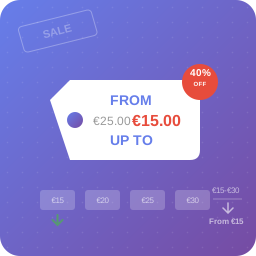
Transform your store’s pricing display and boost conversions by showing only what matters most to your customers: the lowest available price. Instead of showing confusing price ranges like “$10 – $50” that can overwhelm and confuse customers, this plugin displays clean, simple pricing that encourages purchases. You decide the price prefix (“From”, “Starting at”, or whatever you want), the suffix after the price, and whether the price shown is the lowest, the highest or both. Key Features: * Pick what to show – Lowest price (“From $40”), highest price (“Up to $60”), both with text (“From $40 up to $60”) or both with a separator (“$40 – $60”) * Your own price prefix – Replace “From” with any text you want, with a separate prefix for the highest price so each one translates on its own * Your own price suffix – Text after the amount, for units or recurrences like “/ month” or “per person” * Sales stay visible – The regular price is kept crossed out next to the sale price, so discounts are not lost in shop and archive pages * Discount badge – Optionally show the discount percentage next to the price * Out of stock aware – Leave sold out variations out of the calculation, so the price you advertise is one your customers can actually buy * Where it applies – Everywhere, shop and archives only, or product pages only * Smart prefix – Hide it automatically when every variation costs the same * Live preview – See exactly how your price will read while you set it up, without saving or leaving the settings page * Yours to style and extend – Custom CSS class for the price, plus a filter to add your own information next to it * No performance impact – Lightweight and efficient, reusing the price data WooCommerce already caches * Translation ready and fully compatible with WooCommerce and WordPress, HPOS included Perfect for: * Stores with complex variable products * Fashion and clothing retailers * Electronics stores with multiple variants * Any shop wanting cleaner price displays The plugin automatically detects your WooCommerce installation and starts working immediately. Access the settings through Marketing > Lowest Prices in your admin dashboard. Support Need private support or custom development? Do you need one-on-one help, priority troubleshooting, or a custom feature, integration, or tweak built specifically for your site? I offer private support and custom development. Just contact me and tell me what you need. Need help or have suggestions? Official website WordPress support forum YouTube channel Documentation and tutorials Love the plugin? Please leave us a 5-star review and help spread the word! About AyudaWP.com We are specialists in WordPress security, SEO, AI and performance optimization plugins. We create tools that solve real problems for WordPress site owners while maintaining the highest coding standards and accessibility requirements.
Top keywords