WowStore – Store Builder & Product Blocks for WooCommerce
🥇 First ever WooCommerce Builder for Gutenberg 📈 Build professional eCommerce stores and boost earnings 💕 A WPXPO plugin that supports over 60K businesses! 📞 Benefit from dedicated support, with a 4.9/5 Trustpilot customer rating! 😲 Free Demo | 🔥 WowStore Pro | 📃 Documentation WowStore – #1 WooCommerce Builder & Blocks Plugin with Sales Boosting Features! WowStore comes with numerous features to expand the default WooCommerce functionality. So you can give your eCommerce site a professional look. On top of that, its additional features help you to get more sales, boost conversions, and increase the average order value. ✅ Gutenberg WooCommerce Blocks ✅ WooCommerce Builder ✅ Product Grid Layout ✅ Product List Layout ✅ Product Slider and Carousel ✅ Advanced Product Filter ✅ WooCommerce Wishlist ✅ WooCommerce Compare ✅ WooCommerce Product Comparison ✅ Variation Swatches ✅ Quick View for WooCommerce ✅ WooCommerce Product Video ✅ WooCommerce Size Chart ✅ Preorder ✅ Backorder ✅ Partial Payments ✅ Call for Price ✅ Currency Switcher ✅ Stock Progress Bar ✅ Name Your Price ✅ Animated Add to Cart ✅ Add to Cart Text ✅ Sales Push Notification ✅ Sticky Add to Cart ✅ Cart Reserved Timer ✅ Up-Selling ✅ Cross-Selling ✅ Free Shipping Bar WooCommerce Blocks WooCommerce blocks help you to display the products in an organized and professional way. WowStore has the following blocks. ✔ Product Grid Blocks ✔ Product List Blocks ✔ Product Slider Blocks ✔ Product Category Blocks ✔ List Blocks ✔ Product Search Blocks ✔ Button Group Blocks ✔ Row and Column Blocks ✔ Banner Maker Blocks The Ultimate WooCommerce Builder for Gutenberg WowStore helps you build store pages without leaving the Gutenberg ecosystem. It also comes with professionally designed templates for: ✔ Home Page ✔ Shop Page ✔ Product Archive Pages ✔ Product Category Pages ✔ Single Product Page ✔ Product Search Pages ✔ Cart Page ✔ Checkout Page ✔ My Account Page ✔ Thank You Page ✔ 404 Page ✔ And, Headers & Footers 👉 Explore All Templates Shopping Experience After having a good-looking eCommerce website, the next step is to ensure a better shopping experience for the customers. And, WowStore has the right features for that. Product Filter: Help shoppers find their desired products fast with product filtering – filter products by category, color, price, rating, and more. Variation Swatches: Convert product variations to variation swatches to help shoppers select the right colors. Wishlist: Let the potential buyers create a wishlist of interested products. So they can decide later whether they want to buy them or not. Quick View: It helps customers to instantly view the product details in a pop-up without visiting the specific product pages. Compare: Help customers make the buying decisions faster by letting them compare multiple products side by side. Product Video: Replace featured images with product videos. The videos can be played upon clicking or continuously in the loop. Size Chart: Create and add Size Charts to product pages. So the shoppers will be able to choose the right sizes. Boost Your Sales WowStore has multiple effective features to increase sales. Explore and implement them all to see major improvements in your sales! Pre-Order: Showcase upcoming products in your stores with a countdown of releasing date and let shoppers preorder products. Backorder: Enable backorder to keep taking orders for the products that are currently not available in stock but will be available soon. Partial Payments: Split product prices into two parts with partial payment features and let shoppers book products with a deposit amount. Call for Price: Hide product prices and the Add to Cart button with a “Call for Price” button. It encourages shoppers to call you to know the prices. Currency Switcher: Let customers pay with their local currencies using WowStore’s currency switcher. Stock Progress Bar: Create FOMO (Fear of Missing Out!) among customers by visually highlighting the total and remaining quantity of products. Increase Conversion Getting customers to your WooCommerce store is challenging and not being able to convert them is frustrating. Don’t worry, WowStore WooCommerce Builder has multiple features that help you to ensure better conversion rates. Name Your Price: Empower your shoppers to purchase products with their desired price. You can add some suggested prices with minimum and maximum price restrictions. Animated Add to Cart: Animate the Add to Cart buttons to encourage shoppers to buy sooner rather than later. Add to Cart Button Text: Replace the text of the Add to Cart buttons effortlessly. You can add your desired text for all types of products including Simple, Variable, Grouped, and External products. Sales Push Notification: Highlight recently purchased notifications to give your store’s visitors confidence to place orders. Sticky Add to Cart: Make the Add to Cart button sticky while scrolling the product pages. Reduce Cart Abandonment WowStore also has solutions to reduce Cart Abandonment rates. Check out the features below: Smart Cart Page: WowStore’s WooCommerce Builder gives you the control to make cart pages from scratch to ensure the process is simpler for the shoppers. Cart Reserved Timer: It allows you to display a countdown timer and a FOMO message. So you can create an urgency among the customers to complete the buying process faster. Increase Average Order Value Increasing the average value can help you to increase revenue with the same number of sales that you usually get. WowStore has the right features for that as well. Upsell Products: Showcase higher price alternatives as related products. The shoppers may buy any alternative product that makes them more profit. Cross Selling: Displaying related supplementary products to the cart pages increases the chances of cross-selling. Free Shipping Progress Bar: If you are offering free shipping based on purchase amount try adding the progress bar to the cart page. It highlights how much the customers need to spend to enjoy free shipping. Other Wow Plugins by WPXPO We are glad that you are considering WowStore. Please have a look at our other plugins that can also improve your WordPress and WooCommerce sites. 📄 WowInvoice 🔥: A powerful PDF invoices & packing slips plugin for WooCommerce that helps you automate essential order documents with ease. 🚚 WowShipping 🔥: An all-in-one table rate shipping plugin for WooCommerce, featuring 30+ shipping rates and seamless integrations with popular carriers including UPS, USPS, DHL, Sendle, and more. ➕ WowAddons 🔥: Start selling highly customizable products with 25+ extra product options, addons, and custom fields, helping you increase order value while making your customer happy. 💲 WowRevenue: The all-in-one revenue-boosting plugin with various features like WooCommerce product bundles, mix-and-match product bundles, and more. 📦 WholesaleX: The ultimate dynamic pricing and discount solution with additional features to manage both B2B and B2C customers in the same store. 🧲 WowOptin: The most advanced and futuristic Optin plugin that helps to collect leads, increase sales, boost conversions, and reduce abandoned carts. 📃 PostX: #1 WordPress plugin to create complete News, Magazine, and Blogging sites. It helps you make your site ready in just three simple steps. Author Developed by WPXPO. Contribute to Gutenberg WooCommerce Blocks on Bitbucket and join the party. Plugin Source This plugin code is accesible and any contribution will be appretiated. Source Code External services IPinfo This plugin connects to an API IPinfo to obtain the user’s IP address location with user consent when user wants to share their address. Remote Files This plugin uses External Files from Country Flags. This resources is open for all and owned by this plugin owner. This shows the country flags in blocks. Uses example – Bangladeshi Flag
Top keywords
- product30×2.53%
- woocommerce22×1.86%
- cart19×1.60%
- products17×1.43%
- blocks16×1.35%
- add13×1.10%
- wowstore13×1.10%
- add to cart10×0.84%
- page10×0.84%
- shoppers10×0.84%
- customers9×0.76%
- pages9×0.76%
Variation Swatches for WooCommerce
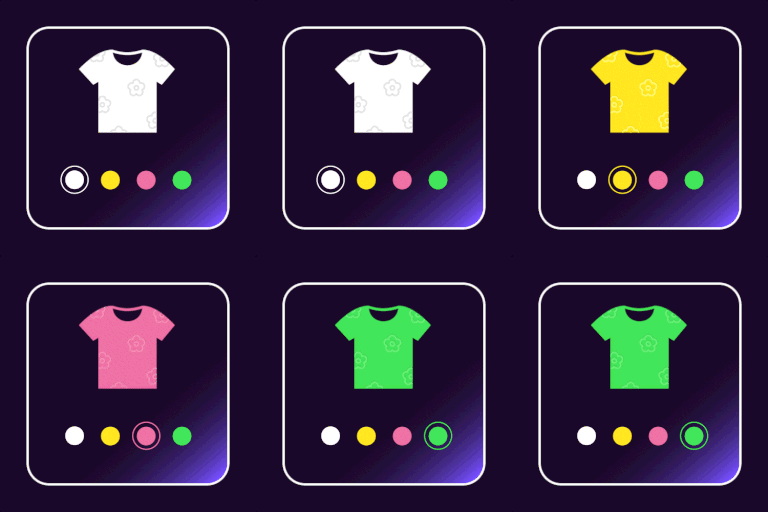
🔥 #1 Plugin for Adding Variation Swatches to WooCommerce Products The WooCommerce Product Variation Swatches plugin lets you configure & display product variations visually. This plugin improves product presentation, reduces customer confusion, and boosts conversions by providing a visually engaging and intuitive way to browse and choose product attributes, ensuring a smoother shopping journey across all devices. Why do you need Variation Swatches in your Store? Default WooCommerce variation dropdowns can be dull and unengaging, making it harder for customers to visualize product options. Variation Swatches solve this by replacing standard dropdowns with attractive color, image, and label/button swatches, allowing customers to quickly and easily select product variations like size, color, or material. This helps in improving user experience and boosting conversions. ✳️ Better Shopping Experience → Customers can visually select variations instead of guessing. ✳️ Faster Decision-Making → Eliminates confusion and speeds up the buying process. ✳️ More Professional Store Design →Gives your WooCommerce store a sleek, modern look. ✳️ Higher Conversion Rates→ By making it easier for customers to find and select the products they want, swatches can contribute to higher conversion rates ✳️ Reduced Returns→Clear visual representation of product variations can help prevent customers from ordering the wrong item, leading to fewer returns. ✳️ Works Seamlessly with WooCommerce Themes → Compatible with almost all major themes and plugins. 🔥 EXPLORE WHAT OUR FREE VERSION OFFERS Try Demo| Documentation| Get Pro ✅ SWATCH TYPES The free version offers four essential swatch types, allowing you to display product variations seamlessly 1. Color 2. Image 3. Label/Button 4. Radio Video tutorial ✅ AUTO CONVERT ALL VARIATION DROPDOWNS TO LABEL/BUTTON SWATCHES The selected swatch dropdown variation will automatically be converted into label swatches ✅ CUSTOMIZATION OPTIONS FOR SWATCHES This plugin offers a wide range of customization options allowing you to create common attribute styling like set icon height, width, shape & border color also other styling options like HOVER/SELECTION STYLING: Add a fixed amount to the total price when the field is selected. Hover Style: You can adjust the border color upon hover Selection style:You can change the border color, tick color and tick size of the selected swatch. Video tutorial 👉Note: Additionally you can customize the selection style for color and image swatches and button/label swatches separately. Color & Image swatch styling: For color and image swatches you can customize the appearance of the selected swatch using two options Border on selection Checkmark with border Button/label swatch styling: Customize the appearance of the selected button and label swatches with three options Border on selection Checkmark with border Background with font color TOOLTIP STYLING The term name of an attribute can be displayed as a tooltip, to which the following changes can be made Enable/Disable Tooltip Set the text color for term name Set the background color for term name Video tutorial SWATCH TYPES SPECIFIC STYLING 1. Button/ Label swatches: You can customize the appearance of button and label swatches by adjusting the following parameters: Set Icon height & width Set Icon font size Set Icon background & text color 2. Color/ Image swatches: Enable/ disable swatch drop-down style 🔥 Explore our Pro version for even more advanced swatch customization! ✅ OPTION TO SELECT ROUND AND SQUARE VARIATION SWATCH SHAPES The Variation Swatches plugin lets you choose both round and square icons for your product variation swatches. So, based on your store theme, a suitable icon shape can be chosen. ✅ DISPLAY OPTIONS FOR UNAVAILABLE & OUT-OF-STOCK VARIANTS WooCommerce notifies users about out-of-stock variants only after selection, which can be frustrating. 👉Note: This plugin lets you display Unavailable & Out-of-stock variants instantly with options like: Unavailable Variants Hide – Remove the swatch. Blur – Keep it visible but faded. Blur with a Cross – Mark it with a strikethrough. Out-of-stock Variants Blur – Keep it visible but faded. Blur with cross – Mark it with a strikethrough. ✅ Enable Swatches in Additional Info Once enabled, the swatches will automatically appear in the additional information, enhancing product presentation ✅ Clear on reselect Once enabled, it allows a customer to easily clear a chosen variation by reselecting it. 👉Note: Styling of the clear button is available in the Pro version ✅ Enable Lazy Load for Swatches Optimize performance by loading swatch images only when they come into view, ensuring faster page speed for variation-rich stores. ✅ Set AJAX Variation Threshold The plugin allows you to set the Ajax variation threshold value. So, based on this threshold value, the product availability check can be done through Ajax method or JavaScript. GET FULL ACCESS WITH PREMIUM NOW ! 🔥 SEE OUR PREMIUM FEATURES Want to give your store a more polished and seamless shopping experience? The pro version unlocks more flexibility, better styling options, and smarter ways to showcase your variations. It’s all about making product selection easier and more engaging for your customers. Try Demo| Documentation| Get Pro ✅ ADDITIONAL SWATCH TYPE In addition to Color, Image, Label/Button & Radio swatches available in the free version, the pro version introduces Image with Label providing a clearer and more informative way to display variations. ✅ CONVERT DEFAULT SWATCHES TO IMAGE SWATCHES The Variation Swatches plugin lets you convert the product variation dropdown into image swatches in a single click. ✅ ADVANCED SWATCHES CUSTOMIZATION & STYLING The Pro version provides advanced design flexibility, allowing you to create multiple unique styles for different attributes compared to the free version. 👉Note: This plugin offers a wide range of customization options allowing you to create common attribute styling like icon height, width, icon shapes other than round & square you can also customise the icon roundness, set border color & also set appearance for swatches, which we will explore! HOVER/SELECTION STYLING: Along with the general styling options in the free version,the pro version allows you to set the selection Hover style in two additional ways Border Style: Enlarge Style: TOOLTIP STYLING: Apart from the general tooltip styling, the pro version offers more advanced styling such as: Image Tooltip: Set border color, height & width for image Term Tooltip: Set text color, background color & font size Description Tooltip: Set text color, background color, font size and enable/disable box-shadow SWATCH TYPES SPECIFIC STYLING: The free version offers styling only for one swatch type Button/ Label swatches. However, the pro comes with an option for customising like 1. Radio swatch styling Set inner and outer color for the radio swatch upon hover. Set both inner & outer color for the selected swatches. 2. Select swatch Enable/ disable swatch drop-down style ADDITIONAL DISPLAY STYLING: You can also set the display styling for 1. Featured Swatches styling: set height, width & font size of the featured icon 2. Additional info page swatches styling: set height & width of swatches icon in the additional info section 3. Shop page swatches styling: set height, width & font size for swatches on the shop page ATTRIBUTE DESCRIPTION STYLING: Set font size & font color for attribute description ✅ FLEXIBLE SWATCH DISPLAY OPTIONS Beyond the default style, swatches can be displayed in five unique ways, allowing for a more dynamic and user-friendly shopping experience. Dropdown Slider Accordion Horizontal Scroller Vertical Scroller ✅ DISPLAY SWATCHES ON SHOP/ ARCHIVE PAGE By displaying variation swatches on your WooCommerce Shop page/Archive page, your shoppers can quickly understand the variations that are available and that are not. ✅ MULTI-COLOR VARIATION SWATCHES (BICOLOR) Showcase dual-colored products using bicolor swatches, where two colors appear inside a single icon. This feature is perfect for products with two-tone variations, making it easier for shoppers to visualize their options. ✅ ADDITIONAL DISPLAY OPTIONS FOR OUT-OF-STOCK VARIANTS The Pro version offers two extra display options Hide the variation and blur with cancel: to indicate out-of-stock variants Styling options: to customize their appearance for a seamless shopping experience. ✅ SET STOCK LEFT ALERT Alert shoppers when stock reaches a minimum level, creating urgency and encouraging faster purchases 👉Note: You can also display the stock left on the WooCommerce shop page, allowing shoppers to grab limited-stock products. Additionally, set a minimum value to trigger the stock left alert. ✅ GENERATE PRODUCT VARIATION LINK The pro version lets you generate direct links for specific variations making purchases faster and more convenient for customers. ✅ QUICK SEARCH FOR SWATCH DESIGN & ATTRIBUTES You can easily locate specific select swatch designs and attributes using the built-in search option, saving time and enhancing your experience. ✅ DISPLAY SWATCHES ON CART & CHECKOUT Display the chosen image and color variations as a swatch on the cart and checkout page. ✅ CLEAR BUTTON STYLING While the free version only has the option to clear on reset, the pro version of the variation swatch plugin helps in styling the clear button for your store themes ✅ SUPPORTED PLUGINS & THEMES 👉 PLUGINS Yith WooCommerce Quick View WooCommerce Product Bundle WooCommerce Composite Products WPC Smart Quick View for WooCommerce by WPClever Elementor Page Builder Plugin 👉 THEMES Store Front Flatsome Divi Builder Astra WoodMart OceanWP Porto Enfold Kedence Motor Hestia Sydney Neve Spacious Zakra etc.. Why ThemeHigh? At themehigh, we specialize in providing thoughtful solutions to help you create your store in the easiest and simplest way possible, providing you with a smooth and enjoyable customization experience. 🏆 2 Million+ Customers 🏆 Quickest Turn-around Support 🏆 Most Lightweight Plugins 🔥 Explore More If you like the Variation Swatches for WooCommerce, then consider checking out our other WordPress Plugins: 👉 Checkout Field Editor (Checkout Manager) for WooCommerce: This Checkout Plugin from Themehigh lets you add 20 different types of custom checkout fields. 👉Extra Product Options For WooCommerce: This Custom Product addons plugin lets you quickly add additional fields (19 custom field types) and sections to your WooCommerce Product page. 👉 Email Customizer for WooCommerce | Drag and Drop Email Templates Builder: Email Customizer is a plugin that helps you effortlessly customise your WooCommerce transactional emails using its intuitive drag-and-drop builder. 👉 MultiStep Checkout for WooCommerce: The Multistep checkout plugin helps you split the regular WooCommerce checkout process into multiple steps and create a simpler and more organized checkout experience. Happy Users of Variation Swatches Plugin Reza Manouchehri (@rezamnchr)⭐⭐⭐⭐⭐ I found this plugin the most useful among other ones, ReadMore indagraf (@indagraf )⭐⭐⭐⭐ Very good plugin but the support is even better. Good vibes and great professionalism in the support. Recommended 100%. myangelnz (@myangelnz) ⭐⭐⭐⭐⭐ I use the product options extension and it is fantastic! Does all you need and possibly more. I love the control you have with the options. Any issues or customisations I needed were completed efficiently and well. Thank You Theme High! dragoso (@dragoso) ⭐⭐⭐⭐⭐ Support is super speedy and the PRO plugin is totally awesome and works like a charm. Very happy with the purchase! Thank you guys! reza.sabourinejad (@rezasabourinejad) ⭐⭐⭐⭐⭐ Very high quality plugin with excellent features. Many features of this plugin are available in other plugins as premium features. But here you have everything available for free. Thanks to the plugin development and support team OTHER USEFUL LINKS 👉 VIEW ALL FEATURES 👉 GET DOCUMENTATION 👉 GET THEMEHIGH SUPPORT 👉 JOIN COMMUNITY 👉 FOLLOW US ON Facebook, LinkedIn, Twitter & YouTube. Reddit