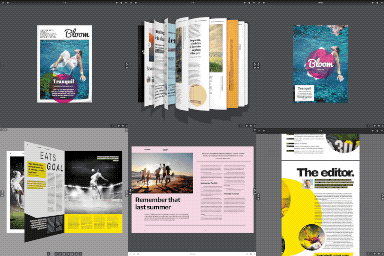
Flipbook PDF Viewer & Embedder
3D Flipbook PDF Viewer & Embedder is a free WordPress plugin for displaying PDF documents as a realistic, interactive 3D page-flip flipbook — or as a standard traditional PDF viewer — anywhere on your site. It’s the PDF viewer of choice for eBooks, digital magazines, product catalogs, brochures, manuals, newsletters, and reports. No coding required: upload a PDF, drop in a shortcode (or use the included Elementor widgets for full drag-and-drop setup), and you’re done. Built-in read/download counters, customizable action buttons, category organization, and a modern PDF Embed admin screen make it easy to manage a whole library of documents. Watch Live Demo Archive View Templates Supported List 📋 Grid 🟦 Newsletter 📰 Ebook 📚 Elementor Widgets Effortless Elementor Integration ⚡ Add Archive View and Single PDF View widgets to your pages with simple drag-and-drop. Instantly display PDF lists or single documents—full support for all shortcode attributes. Visually customize layouts, buttons, and counters—no coding needed. 🎨 Fully compatible with all Elementor-ready themes for maximum flexibility. Shortcodes Overview Easily embed and customize PDF displays using our shortcodes. Use the built-in generator for quick setup. 🛠️ Archive/Multiple PDFs Shortcode Use [pdfev_viewer] to display a list, grid, ebook, or newsletter-style archive of PDFs. Attributes: template Layout style: list, grid, ebook, newsletter (default: list) limit Number of items to show (default: 10) order Display order: asc, dsc (default: dsc) read Show Read button: yes, no (default: yes) download Show Download button: yes, no (default: yes) reading_count Show read counter: yes, no (default: yes) downloading_count Show download counter: yes, no (default: yes) show_description Show description: yes, no (default: yes) show_author Show author: yes, no (default: yes) show_publisher Show publisher: yes, no (default: yes) show_year Show published year: yes, no (default: yes) show_edition Show edition: yes, no (default: yes) Examples: [pdfev_viewer template="grid" limit="10" order="dsc" read="yes" download="yes" reading_count="yes" downloading_count="yes" show_description="yes" show_author="yes" show_publisher="yes" show_year="yes" show_edition="yes"] [pdfev_viewer template="list"] [pdfev_viewer template="ebook"] [pdfev_viewer template="newsletter"] Single PDF Shortcode Display a single PDF by post ID: [pdfev_embed_viewer id="post_id"] Features Embed PDFs Anywhere Add PDFs to any post or page with a shortcode—choose between traditional or interactive 3D Flipbook views. Seamless Theme Integration The single PDF page renders using your active theme’s own header and footer, including modern block themes—no mismatched styling or duplicated titles. Multiple Archive Templates Display your PDFs in list, grid, ebook, or newsletter layouts. Document Meta Visibility Controls Show or hide document Description, Author, Publisher, Published Year, and Edition information from settings. Flexible Shortcodes Use shortcodes to control layout, buttons, counters, and more. Shortcode Generator Create custom shortcodes easily from the plugin settings. Elementor Integration Drag-and-drop archive or single PDF widgets into your pages. Category Support Organize PDFs by category for easy browsing. Remote PDFs Support A remote PDF URL can be used directly, or cloned into your own Media Library with one click. Interactive Ebook View The ebook template opens each cover on hover with a smooth 3D animation and shows a real preview of the document’s next page, not just a placeholder. Reading Direction (RTL/LTR) Support Set each document’s reading direction individually — the flipbook, its Previous/Next arrows, and the ebook grid’s hover animation all mirror correctly for Arabic, Hebrew, and other right-to-left documents. 3D Flipbook & Standard Modes Let users switch between immersive 3D and standard PDF views. Usage Counters Track reads and downloads for each PDF. Admin Menu Manage all documents from a dedicated dashboard menu. Modern Settings Dashboard A sidebar-navigation settings page with card layouts, toggle switches, and styled dropdowns for a cleaner configuration experience. Redesigned PDF Editor Screen Manage General, Book Information, and Template settings from organized tabs when adding or editing a PDF. Color Customization Adjust colors from the settings page. Custom Archive URLs Change the archive page slug to fit your site. Download Button Toggle Enable or disable the download button as needed. Editable Archive Titles Set custom titles for archive pages. Archive & Single Shortcodes Show all documents or a single PDF with dedicated shortcodes. Demo Import Add sample content with one click. Multilingual Ready Compatible with translation plugins. Read & Download Button Control Show or hide Read and Download buttons as needed. Privacy Policy PDF Embed Viewer uses the Appsero SDK to collect basic telemetry data, but only after you give explicit consent via the admin notice. This data helps us improve the plugin and troubleshoot issues. 🛡️ By default, Appsero SDK does not collect any data. Data collection begins only if you allow it. No personal or sensitive information is gathered without your permission. For more details, see the Appsero Privacy Policy. 🔒 Languages English (en_US) Bengali (bn_BD) French (fr_FR)
Top keywords
- yes27×3.38%
- show23×2.88%
- pdf20×2.50%
- default13×1.63%
- archive11×1.38%
- viewer10×1.25%
- yes show10×1.25%
- default yes9×1.13%
- download9×1.13%
- yes no default9×1.13%
- ebook8×1.00%
- single8×1.00%
Real3D Flipbook – 3D FlipBook, PDF FlipBook, PDF Viewer, PDF Embedder
Live Demo Try Your PDF Create a 3D flipbook in WordPress in three steps: Upload a PDF or a set of images. Choose a viewer mode. Paste the shortcode, or drop the Real3D Flipbook block into any page or post. No conversion service, no account, no per-book fees – your PDF files stay on your own server. Works for magazines, catalogs, brochures, restaurant menus, portfolios, real estate listings, annual reports, newsletters, ebooks and product manuals. Readers get a realistic, interactive 3D flipbook with a lifelike page-turning effect: pages bend and cast shadows as they turn, and it works on all devices and browsers – swipe to flip on a phone, tap to zoom, open it inline or in a lightbox. Prefer something plainer? The same PDF can be displayed as a scroll, slide or simple PDF viewer instead, by changing one setting. Why Choose Real 3D Flipbook? Realistic 3D Page Flip Animation Experience the most realistic page-flipping effect with advanced 3D animations that captivate your audience. Scroll Viewer, Slide Viewer, Simple Viewer, CSS 3D FlipBook, CSS 2D FlipBook In addition to the realistic WebGL page-flip effect, you’ve got a range of other viewing modes and page-flip animations to pick from. Fully Responsive and Mobile-Friendly Flipbooks adapt perfectly to any screen size—desktops, tablets, or smartphones—ensuring a smooth user experience. Easy Integration with Gutenberg and Shortcodes Insert flipbooks effortlessly using Gutenberg blocks or shortcodes. No coding skills required. Multiple View Modes Choose from Lightbox, Normal, and Fullscreen modes to display your flipbooks the way you want. Customizable Design Personalize your flipbooks with various settings for toolbar, background, colors, and more to match your brand. SEO Optimized Built with SEO best practices to help your flipbooks rank higher in search results and attract more organic traffic. High Performance Optimized page loading and rendering so it works flawless on all devices Most Feature Rich Free Flipbook Plugin Lightbox flipbook Automatically open PDF links as flipbooks Auto generated flipbook thumbnail form PDF Auto generated flipbook post (permalink) Flipbook categories Enable / disable any toolbar button Zoom in to 100% page resolution Share on all social media Add HTML content to flipbook pages Import / Export flipbooks as JSON and much more Documentation User Manual Support For questions or support, open a ticket. Key Features 1. Realistic 3D Flipbooks Bring your content to life with the most realistic 3D page-flipping animations available. 2. Open PDF Links as Flipbooks Automatically convert PDF links into interactive flipbooks that open in a lightbox. Watch Video 3. Easy Migration from Other Plugins Seamlessly convert shortcodes from PDF Embedder, DearFlip, 3D Flipbook, Wonder PDF Embed, and PDF.js Viewer to Real3D Flipbook. 4. Create Flipbooks in 5 Simple Steps Add New Flipbook: Go to Real3D Flipbook > Add New. Select PDF or Images: Upload your content. Publish: Save your flipbook. Copy Shortcode: Grab the generated shortcode. Embed: Paste it into any post or page. Watch Tutorial 5. Multiple Display Modes Lightbox Flipbook: Open flipbooks in a fullscreen overlay triggered by buttons, links, or images. Embedded Flipbook: Place flipbooks directly within your posts or pages. 6. Self-Hosted for Speed and Security All files are stored on your server, ensuring fast load times and enhanced security. 7. Customizable Interface Tailor your flipbooks with customizable toolbar buttons, backgrounds, colors, and control settings. 8. Responsive and Touch-Friendly Optimized for touch interactions on mobile devices, providing a seamless experience for all users. Advanced Features in PRO Version Upgrade to Real3D FlipBook PRO to unlock: 4K Resolution Zoom: Pages stay razor sharp at any zoom level — fine print and detailed artwork included. Lite renders standard resolution. Optimized Page Loading: Multi-tier page textures — the right size per device and zoom level, for faster loading. PDF Hyperlinks: Links inside your PDF stay clickable in the flipbook. Text Search and Selection: Readers can search and select the full text of every page. Toolbar and UI Customization: 7 layouts, 3 skins, custom colors, icons and buttons. Google Analytics and Deep Linking: Track flipbook events and link directly to any page. Mobile and Global Settings: Different setup for phones, shared defaults for all flipbooks. See Lite vs PRO side by side — the same PDF rendered by both, and you can test your own PDF with PRO right on that page. Plans from $49/year with a 30-day money-back guarantee. All your existing flipbooks and settings carry over. Add-Ons Page Editor Addon: Add links, videos, sounds, YouTube, Vimeo and more to flipbook pages with a visual editor. Requires PRO. WooCommerce Addon: Display a flipbook on the WooCommerce single product page. PDF Tools Addon: Convert PDFs to images for faster loading and improved security. Requires PRO. Elementor Addon: Use Real3D Flipbook with Elementor as an element. Bookshelf Addon: Create responsive book shelves with flipbooks. WPBakery Addon: Use Real3D Flipbook with the WPBakery page builder. Preview Mode Addon: Show only the first N pages based on user login status. See all add-ons Upgrade to PRO for More Features PRO adds 4K resolution zoom, working PDF links, text search, full toolbar and UI customization, Google Analytics and more — and all your existing flipbooks carry over. See Lite vs PRO side by side and test your own PDF with PRO. Plans from $49/year with a 30-day money-back guarantee.