OPcache Manager
OPcache statistics and management right in the WordPress admin dashboard. OPcache Manager is a full featured OPcache management and analytics reporting tool. It allows you to monitor and optimize OPcache operations on your WordPress site or network. OPcache Manager works on dedicated or shared servers. In shared environments, its use has no influence on other hosted sites than yours. Its main management features are: individual script invalidation, forced invalidation and recompilation; manual site invalidation – a sort of ‘smart’ OPcache reset only for your site; manual site warm-up – to pre-compile all of you site files; optional scheduled site invalidation and/or warm-up. OPcache Manager is also a full featured analytics reporting tool that analyzes all OPcache operations on your site. It can report: KPIs: hit ratio, free memory, cached files, keys saturation, buffer saturation and availability; metrics variations; metrics distributions; OPcache related events. OPcache Manager supports multisite report delegation (see FAQ). OPcache Manager supports a set of WP-CLI commands to: invalidate or warmup cache – see wp help opcache invalidate and wp help opcache warmup for details; toggle on/off main settings – see wp help opcache settings for details; obtain operational statistics – see wp help opcache analytics for details. For a full help on WP-CLI commands in OPcache Manager, please read this guide. OPcache Manager is part of PerfOps One, a suite of free and open source WordPress plugins dedicated to observability and operations performance. OPcache Manager is a free and open source plugin for WordPress. It integrates many other free and open source works (as-is or modified). Please, see ‘about’ tab in the plugin settings to see the details. Support This plugin is free and provided without warranty of any kind. Use it at your own risk, I’m not responsible for any improper use of this plugin, nor for any damage it might cause to your site. Always backup all your data before installing a new plugin. Anyway, I’ll be glad to help you if you encounter issues when using this plugin. Please read carefully the FAQ at the bottom of this page before requesting support. Privacy This plugin, as any piece of software, is neither compliant nor non-compliant with privacy laws and regulations. It is your responsibility to use it with respect for the personal data of your users and applicable laws. This plugin doesn’t set any cookie in the user’s browser. This plugin doesn’t handle personally identifiable information (PII). Donation If you like this plugin or find it useful and want to thank me for the work done, please consider making a donation to La Quadrature Du Net or the Electronic Frontier Foundation which are advocacy groups defending the rights and freedoms of citizens on the Internet. By supporting them, you help the daily actions they perform to defend our fundamental freedoms!
Globe Visitors Counter
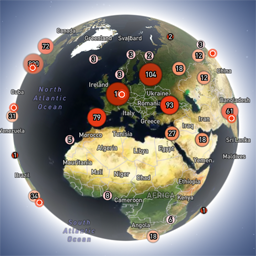
Globe Visitors Counter (Lite) adds a beautiful, fast, iframe-isolated 3D visitor globe to any WordPress site. It instantly shows your audience geography — fully locally, privately, and without any third-party tracking. This Lite version is designed for clarity, speed, and instant visual feedback — especially on landing pages and campaign pages. Use Case: Instant Visual Feedback for Advertising Campaigns The situation You have a product or a service. You launch an advertising campaign: Google Ads Facebook / Instagram TikTok banner ads email campaigns any other traffic source All traffic is sent to one landing page. Usually what comes next is boring: tables, charts, numbers, dashboards, “we’ll analyze it later”. The solution You place Globe Visitors Counter Lite directly on the landing page. No server setup. No external analytics. No configuration. And you start seeing your traffic with your own eyes. How it works (very simple) You launch the ads Visitors arrive at the page Each real visitor appears as a dot on the globe — in real time, from their actual location The globe comes alive and instantly shows: – whether people are coming at all – which countries and regions react – whether the campaign works or misses completely No dots — ads don’t work. Dots appear — ads are alive. Why Lite is perfect for landing pages Lite is not deep analytics. It’s a visual “life indicator”. Perfect when you need: – fast visual feedback – immediate confirmation that traffic is real – zero setup and zero learning curve – a simple “wow effect” for clients, teams, or investors You watch, not analyze. Key Features Interactive 3D Land-Cover globe included out of the box Real-time visitor logging using a tiny local JSON file Historical dots displayed automatically Zero configuration, works with all themes & editors Shortcode-based, easy placement on any page No cookies, no remote APIs, GDPR-friendly Ultra-fast loading thanks to iframe sandboxing How It Works When a page with the shortcode is opened, the plugin loads a fully self-contained viewer from: /wp-content/uploads/visitors-lite-landcover/ Each visit is logged locally as a minimal record (timestamp + coordinates + city + country) into: visitors.json Everything stays on your server. No tracking pixels. No third-party analytics. No cookies. Why Use It Ideal for landing pages and product launches Visualizes global audience instantly Safe for cached pages and CDNs Works even on heavily optimized sites When You May Need the Full Version Lite is intentionally simple and fast. If you need: – long-term statistics – multiple pages or sites – extended visitor history – advanced visual modes and skins – more control and customization …then the Full (Pro) version may be a better fit. Lite remains perfect for single pages, launches, tests, and quick visual validation. Tester Program (optional) We are tuning defaults and performance for upcoming builds. If you want to enable advanced features during testing at no cost (extra visual modes, effects, skins), join via Support: https://wordpress.org/support/topic/looking-for-testers-free-advanced-features-for-feedback/ Usage Shortcode: [visitors_globe_lite title=”VISITORS” width=”100%” height=”600″] Attributes: – title — optional caption above the globe – width — iframe width (100% or fixed px) – height — iframe height in px Place the shortcode anywhere — Classic or Block editor.