NewStatPress
NewStatPress is a new version of StatPress that was the first real-time plugin dedicated to the management of statistics about blog visits. It collects information about visitors, spiders, search keywords, feeds, browsers etc. Once the plugin NewStatPress has been activated it immediately starts to collect statistics information. Using NewStatPress you could spy your visitors while they are surfing your blog or check which are the preferred pages, posts and categories. In the Dashboard menu you will find the NewStatPress page where you could look up the statistics (overview or detailed). NewStatPress also includes a widget one can possibly add to a sidebar (or easy PHP code if you can’t use widgets!). With the new ajax/javascript usage for variables in widget, the plugin is faster for a user being visit your site even with 1GB or more of database to use! (requires the External API be enabled in NewStatPress>Options>API) IMPORTANT: all previous versions from 1.0.4 are subject to XSS and SQL injection from an old Statpress routine. You have to use at least version 1.0.6 to avoid security issue. PLEASE UPDATE always to the latest version available. Support Check at http://newstatpress.altervista.org What’s new? Simple adding index to database and changes some data fields for better database storing (from here http://www.poundbangwhack.com/2010/07/03/improve-the-performance-of-the-wordpress-plugin-statpress-and-your-blog/ where some modification comes from) Ban IP You could ban IP list from stats editing def/banips.dat file. DB Table maintenance NewStatPress can automatically delete older records to allow the insertion of newer records when limited space is present. This features is left as original StatPress but it will be replaced by the history data instead. External API External API are a way to gives the collected informations as a web service using a POST call. With it you can use (for example) your collected data of WordPress inside a Drupal site. The API must be enables by check a flag into the option (by default is disabled) and a private KEY must be entered (you can generate a random one). This KEY is for authenticate the called as a valid allowed client. Even if the API is for external usage, it will be used internally for speed up page generation using AJAX, so at some point you will need to activate it to continue to see overview and Details pages. Actually those are the available commands: Command | Parameters | Description version gives the Newstatpress version in use dashboard gives the Newstatpress dashboard overview table External API is actually used by Multi-NewStatPress (a software than manages data from multiple installation of NewStatPress in different servers). If you want to use the API you need to pass to POST those values: VAR the variable for the query (like ‘Version’) KEY the MD5 of date at minute level plus the key you enter into option (e.g in PHP: md5(gmdate(‘m-d-y H i’).key) ) PAR the parameter associated with the VAR TYP the type of result: JSON (default) of HTML into those url: your_site+”/wp-content/plugins/newstatpress/includes/api/external.php” NewStatPress Widget / NewStatPress_Print function Widget is customizable. These are the available variables: %thistotalvisits% – this page, total visits %alltotalvisits% – all page, total visits %totalpageviews% – total pages view %monthtotalpageviews% – total pages view in the month %todaytotalpageviews% – total pages view today %since% – Date of the first hit %visits% – Today visits %yvisits% – Yesterday visits %mvisits% – Month visits %wvisits% – Week visits %totalvisits% – Total visits %os% – Operative system %browser% – Browser %ip% – IP address %visitorsonline% – Counts all online visitors %usersonline% – Counts logged online visitors %toppost% – The most viewed Post %topbrowser% – The most used Browser %topos% – The most used O.S. %topsearch% – The most used search terms In widget, those are special html contropart: %br% => %ul% => * %/ul% => %li% => %/li% => Now you could add these values everywhere! NewStatPress offers a new PHP function newstatpress_print(). * i.e. newstatpress_print(“%totalvisits% total visits.”); New experimental functions: place this command [NewStatPress: xxx] every were in your WordPress blog pages and you will have the graph about the xxx function. Available functions are: * [NewStatPress: Overview] * [NewStatPress: Top days] * [NewStatPress: O.S.] * [NewStatPress: Browser] * [NewStatPress: Feeds] * [NewStatPress: Search Engine] * [NewStatPress: Search terms] * [NewStatPress: Top referrer] * [NewStatPress: Languages] * [NewStatPress: Spider] * [NewStatPress: Top Pages] * [NewStatPress: Top Days – Unique visitors] * [NewStatPress: Top Days – Pageviews] * [NewStatPress: Top IPs – Pageviews] License GPLv2 or later License URI https://www.gnu.org/licenses/gpl-2.0.html
Top keywords
- newstatpress32×4.35%
- visits10×1.36%
- api9×1.22%
- pages7×0.95%
- total7×0.95%
- external6×0.82%
- version6×0.82%
- key5×0.68%
- visitors5×0.68%
- widget5×0.68%
- available4×0.54%
- browser4×0.54%
Globe Visitors Counter
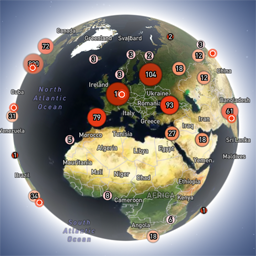
Globe Visitors Counter (Lite) adds a beautiful, fast, iframe-isolated 3D visitor globe to any WordPress site. It instantly shows your audience geography — fully locally, privately, and without any third-party tracking. This Lite version is designed for clarity, speed, and instant visual feedback — especially on landing pages and campaign pages. Use Case: Instant Visual Feedback for Advertising Campaigns The situation You have a product or a service. You launch an advertising campaign: Google Ads Facebook / Instagram TikTok banner ads email campaigns any other traffic source All traffic is sent to one landing page. Usually what comes next is boring: tables, charts, numbers, dashboards, “we’ll analyze it later”. The solution You place Globe Visitors Counter Lite directly on the landing page. No server setup. No external analytics. No configuration. And you start seeing your traffic with your own eyes. How it works (very simple) You launch the ads Visitors arrive at the page Each real visitor appears as a dot on the globe — in real time, from their actual location The globe comes alive and instantly shows: – whether people are coming at all – which countries and regions react – whether the campaign works or misses completely No dots — ads don’t work. Dots appear — ads are alive. Why Lite is perfect for landing pages Lite is not deep analytics. It’s a visual “life indicator”. Perfect when you need: – fast visual feedback – immediate confirmation that traffic is real – zero setup and zero learning curve – a simple “wow effect” for clients, teams, or investors You watch, not analyze. Key Features Interactive 3D Land-Cover globe included out of the box Real-time visitor logging using a tiny local JSON file Historical dots displayed automatically Zero configuration, works with all themes & editors Shortcode-based, easy placement on any page No cookies, no remote APIs, GDPR-friendly Ultra-fast loading thanks to iframe sandboxing How It Works When a page with the shortcode is opened, the plugin loads a fully self-contained viewer from: /wp-content/uploads/visitors-lite-landcover/ Each visit is logged locally as a minimal record (timestamp + coordinates + city + country) into: visitors.json Everything stays on your server. No tracking pixels. No third-party analytics. No cookies. Why Use It Ideal for landing pages and product launches Visualizes global audience instantly Safe for cached pages and CDNs Works even on heavily optimized sites When You May Need the Full Version Lite is intentionally simple and fast. If you need: – long-term statistics – multiple pages or sites – extended visitor history – advanced visual modes and skins – more control and customization …then the Full (Pro) version may be a better fit. Lite remains perfect for single pages, launches, tests, and quick visual validation. Tester Program (optional) We are tuning defaults and performance for upcoming builds. If you want to enable advanced features during testing at no cost (extra visual modes, effects, skins), join via Support: https://wordpress.org/support/topic/looking-for-testers-free-advanced-features-for-feedback/ Usage Shortcode: [visitors_globe_lite title=”VISITORS” width=”100%” height=”600″] Attributes: – title — optional caption above the globe – width — iframe width (100% or fixed px) – height — iframe height in px Place the shortcode anywhere — Classic or Block editor.