Loading content…

Nav Menu Roles vs Restaurant Food Menu by WP Darko – Drag & Drop Restaurant Menu Builder for WordPress
Side-by-side comparison
At a glance
| Metric | Nav Menu Roles | Restaurant Food Menu by WP Darko – Drag & Drop Restaurant Menu Builder for WordPress |
|---|---|---|
| Rating | 4.9 ★ | ★ 5.0 ★ |
| Total reviews | ★ 219 | 4 |
| Active installs | 70,000+ | 400+ |
| Free plan | — | — |
AppRanks verdict
Generated from live data on this pageThe call
On the measured data here, Nav Menu Roles leads on more dimensions (2 vs 0). Pick Restaurant Food Menu by WP Darko if one of the points where it leads is what you need.
Where Nav Menu Roles leads
- More published reviews: 219 vs 4.
- Ranks higher in Menu: #8 vs #96 of 505.
How this is generated
Built only from the WordPress Plugin Directory listing data shown on this page. AppRanks does not accept payment to influence comparisons. Read the methodology
Read each app's audit: Nav Menu Roles audit • Restaurant Food Menu by WP Darko – Drag & Drop Restaurant Menu Builder for WordPress audit
1. Listing metadata
Field-level data| Field | Nav Menu Roles | Restaurant Food Menu by WP Darko – Drag & Drop Restaurant Menu Builder for WordPress |
|---|---|---|
| Platforms | ||
| Developer |
2. Categories & rankings
Shared categories on the same row · in-category position inline3. Search rankings
Top 5 keywords · shared rankings prioritized| Keyword | Nav Menu Roles | Restaurant Food Menu by WP Darko – Drag & Drop Restaurant Menu Builder for WordPress |
|---|---|---|
| faq | #106 | Not ranked |
4. Activity in the last 90 days
Tracked changes · pricing, features, copy, screenshotsNav Menu Roles · 2 changes
- Oct 27descriptionListing copy updated
- Oct 27descriptionListing copy updated
Restaurant Food Menu by WP Darko – Drag & Drop Restaurant Menu Builder for WordPress · 0 changes
No tracked changes.
5. App details
Long-form descriptionNav Menu Roles
This plugin lets you hide custom menu items based on user roles. So if you have a link in the menu that you only want to show to logged in users, certain types of users, or even only to logged out users, this plugin is for you. Nav Menu Roles is very flexible. In addition to standard user roles, you can customize the functionality by adding your own check boxes with custom labels using the nav_menu_roles filter and then using the nav_menu_roles_item_visibility filter to check against whatever criteria you need. You can check against any user meta values (like capabilities) and any custom attributes added by other plugins. IMPORTANT NOTE In WordPress menu items and pages are completely separate entities. Nav Menu Roles does not restrict access to content. Nav Menu Roles is only for showing/hiding nav menu items. If you wish to restrict content then you need to also be using a membership plugin. Usage Go to Appearance > Menus Set the “Target audience” to either “Everyone”, “Logged In Users”, or “Logged Out Users”. “Everyone” is the default. If you wish to customize by role, set the “Target audience” to “Logged In Users” and under “Target role” check the boxes next to the desired roles. The item will be visible to users who have any of the checked roles. Roles are not hierarchical, so an item set to “Subscriber” is not visible to Administrators unless you also check “Administrator”. If no roles are checked, the item is visible to all logged in users. Set the “Display Mode” to “Show” to display the item only to the selected audience, or to “Hide” to hide the item from the selected audience and show it to everyone else. “Show” is the default. Support Support is handled in the WordPress forums. Please note that support is limited and does not cover any custom implementation of the plugin. Before posting, please read the FAQ. Also, please verify the problem with other plugins disabled and while using a default theme. Please report any bugs, errors, warnings, code problems to GitHub
Restaurant Food Menu by WP Darko – Drag & Drop Restaurant Menu Builder for WordPress
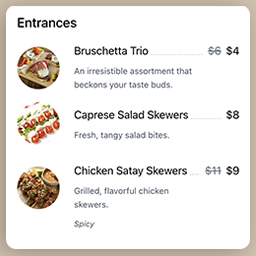
Quickly set up and display a restaurant menu on your website, fully responsive and easy to use. Create food items, add them to your restaurant menu and copy-paste the shortcode into any posts/pages. WordPress Restaurant Menu Builder plugin Introducing WP Darko’s new restaurant menu builder. We’ve designed this WordPress plugin to be as user-friendly as possible, making it ideal for beginners. You can begin building captivating food lists within minutes. When activated, WP Darko’s restaurant menu builder will add two new sections to your WordPress admin panel: “Food Items” and “Food Menus.” These sections will enable you to effortlessly create restaurant menus by adding food items (complete with food descriptions, regular and sale prices, food images, and more), add them to one or multiple menus and display them anywhere on your website using your restaurant menu shortcodes. Get Started in Minutes with Restaurant Food Menu Drag & Drop Restaurant Menu Builder Restaurant Food Menu is an intuitive drag & drop food menu builder plugin for WordPress. After you’ve added your food items in the admin panel, it only takes a few minutes to display your restaurant menu beautifully on your page. Simply create a new menu, then drag & drop your food items from the food list into your menu sections. Adjust the menu’s layout, add headings, and paragraphs to make it look like an authentic restaurant menu, and you’re good to go! With this WordPress plugin, WP Darko ensures that you can focus on what matters most: your restaurant business. Creating a restaurant menu for your WordPress site is easy with our menu builder, and you should be able to have yours ready in minutes. Available fields & settings When creating food items in the admin panel, you’ll be able to use the following fields: Food title Food image Regular and sale price: if you add a sale price to your food item, the regular price will be crossed out Additional info: this is a free field where you can add information about the food, such as spiciness level, allergies, gluten-free, vegetarian, and more Food description: here is where you can let your creativity shine and describe your food in a way that makes it sound delicious to your visitors Fully Responsive and Optimized Restaurant Food Menu is a 100% mobile-friendly and fully responsive restaurant menu builder plugin for WordPress that has been tested with a wide range of devices and browsers. The menu’s food sections will gracefully transition from 3-2 columns to a single column on smaller devices, ensuring they remain perfectly readable and visually appealing. Our WordPress restaurant menu plugin is also fully compatible with the latest versions of WordPress and PHP. The future of our Restaurant Food Menu WordPress plugin Restaurant Food Menu was recently released, and we have exciting plans for its future. We are planning to introduce new features very soon! Among these upcoming features, we will provide the option to include full-width images within the restaurant menu, allowing you to align it more closely with your food business. Additionally, we will be working on various options for indicating spiciness levels, allergies, and different dietary preferences. We have an extensive roadmap, and you can contribute to it by reaching out to us and sharing your ideas for the direction you’d like this food menu builder WordPress plugin to take!
Frequently asked
Common questions about this comparisonWhich has better reviews, Nav Menu Roles or Restaurant Food Menu by WP Darko – Drag & Drop Restaurant Menu Builder for WordPress?
Nav Menu Roles (4.9★, 219 reviews) and Restaurant Food Menu by WP Darko – Drag & Drop Restaurant Menu Builder for WordPress (5.0★, 4 reviews) are essentially tied on rating. Look at review velocity and individual reviewer quotes — both visible on each app's detail page — to differentiate.
Should I choose Nav Menu Roles or Restaurant Food Menu by WP Darko – Drag & Drop Restaurant Menu Builder for WordPress?
Restaurant Food Menu by WP Darko – Drag & Drop Restaurant Menu Builder for WordPress holds the higher average rating (5.0★ vs 4.9★). That is the one dimension AppRanks can separate them on here — read both apps' detail pages for the feature breakdown and recent listing changes.
Which is faster to set up, Nav Menu Roles or Restaurant Food Menu by WP Darko – Drag & Drop Restaurant Menu Builder for WordPress?
Both apps are one-click installs from the WordPress Plugin Directory. AppRanks doesn't measure setup time directly; Nav Menu Roles has more published reviews to read for user-reported install experience (219 vs 4).
Which works better for small vs large WordPress Plugin Directory site owners?
AppRanks cannot say which fits a larger or smaller operation — there is no store-size measurement in the WordPress Plugin Directory data. What it can show: Nav Menu Roles has 219 published reviews; Restaurant Food Menu by WP Darko – Drag & Drop Restaurant Menu Builder for WordPress has 4 published reviews. Compare plan limits and pricing tiers against your own volume.
Can I migrate data between Nav Menu Roles and Restaurant Food Menu by WP Darko – Drag & Drop Restaurant Menu Builder for WordPress?
Migration support varies by app and category. Nav Menu Roles and Restaurant Food Menu by WP Darko – Drag & Drop Restaurant Menu Builder for WordPress both publish their export options on their marketplace listing pages (or in their support docs); some apps offer one-click import from competitors, others require CSV. The fastest check: search "import from Restaurant Food Menu by WP Darko – Drag & Drop Restaurant Menu Builder for WordPress" in each app's help center. AppRanks does not track migration tooling directly — this is a category-specific capability worth verifying before commitment.