MotoPress Booking Calendar
Rent out anything. The only calendar booking system for WordPress that allows you to manage short-term and long-term rentals in the most human-friendly interface. Charge by the hour, day, or night. Enables clients to pick available time slots directly from the online booking calendar and reserve any number of dates and/or things. Booking Calendar Plugin Demo with the Dashboard access. Perfect for any rental type Absolutely agile, this free WordPress booking plugin was built to cover various rental periods and reservation-based business needs: Hourly rentals (bikes, services, rental studios). Daily rentals/full-day (tours, equipment, training). Nightly stays/changeover days (vacation rentals, inns, hotel rooms). Smart inventory and availability control Your booking resources are fully manageable: create an unlimited number of booking calendars, rental types, and inventory units. Create unlimited rental items with their own calendars or within one calendar. Add item variations within one calendar (VIP tickets, regular tickets, discounted tickets). Set quantity available per item (e.g. 2 double rooms and 1 single room). Create different timeslots for different days. Automatically track availability when items are booked – or change it manually. Display item images and descriptions right in the WordPress booking calendar. One screen to manage everything With our WordPress booking calendar, we’ve delivered a revolutionary calendar and rental management design to WordPress, where you can edit almost every key thing without leaving one screen. For every booking calendar, there is a smart customizable screen to edit your rental types, availability, prices, and inventory. Add or remove rental units. Set availability and prices. Update booking statuses. Customize admin timeline view. Bulk edit or drag across multiple days. Add images and text descriptions to your rentals. View statues per rental: Available, Booked, Fully Booked, Unavailable, and more. Jump to the calendar page to customize it. WordPress booking calendar with dynamic pricing The rental business is always about complex pricing scenarios! Use the price adjustment tools to integrate dynamic prices for customers using our WordPress booking plugin. Charge based on the rental type (e.g. VIP vs regular, deluxe vs basic). Charge based on the time slot (e.g. 5 AM – 10 AM: $50 vs 10 AM – 5 PM: $100). Set flat or fixed extra charges. (only in PRO) Apply fees depending on what the customer selects. (only in PRO) Drag-and-drop WordPress booking form builder Our WordPress booking calendar plugin relies on flexible forms you can build for personalized checkout experiences. Use WP booking calendar custom fields to meet your needs: Collect the exact data you need (e.g. the number of guests for a vacation rental). Use 10+ custom fields to tailor your forms (checkboxes, dropdowns, country selection, etc.). Create separate forms for different calendars. Custom form fields per rental type. Customize layout with Gutenberg blocks (headings, separators, columns). Save WordPress booking form templates and assign/re-use them for specific calendars. Automated email notifications Make your WordPress booking calendar function on autopilot with set-and-forget email alerts: Send emails to clients, admins, or team members. Trigger messages based on the calendar being used. Customize content, appearance, and recipient for each email type. Shopping cart-style experience Clients can book different items and dates in one transaction through the WordPress rental plugin. Provide them with a familiar e-commerce feel in your calendar booking system! Easy embedding and calendar display We love WordPress-native solutions. Add your WordPress booking calendar anywhere on your site: Use an automatically generated branded booking page for each calendar. Use a Gutenberg block or shortcode. PRO features What’s available only in the Premium version of this WordPress booking calendar plugin? The Price adjustment form field. This field is used to adjust/recalculate pricing by rental type using flat or percentage charges. Accept payments with Stripe. Premium support. Booking tools are what we do best Booking solutions and scheduling tools are what we do best. Check out our other WP calendar plugins built for niche businesses and backed by years of development and customer trust: Hotel Booking Plugin Appointment Booking Plugin Events Calendar Plugin Copyright MotoPress Booking Calendar plugin, Copyright (C) 2025, MotoPress https://motopress.com/ MotoPress Booking Calendar plugin is distributed under the terms of the GNU GPL.
WP Booking System – Booking Calendar
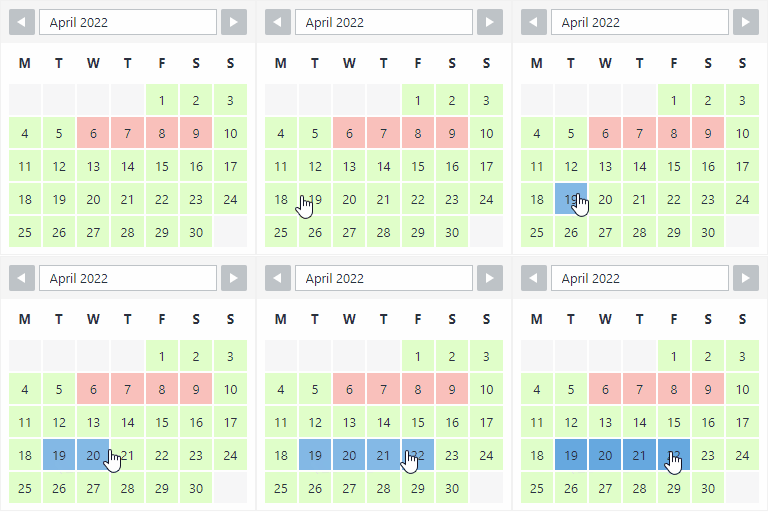
WP Booking System is a WordPress booking plugin and availability calendar designed for daily rentals. Used on more than 20,000 WordPress websites, it helps rental businesses accept bookings, manage availability and synchronize calendars. Is this booking calendar for you? Do you rent something out, like a holiday home, a boat or something else? Do you have a WordPress website and need a bit of help to keep track of your rentals through a booking calendar? …then yes! The WP Booking System is perfect for your needs. Get easy online booking with this lightweight and powerful booking system. A set-and-forget booking calendar for your rental business WP Booking System is a simple booking calendar for WordPress. You will be up and running in just a few minutes. You can create booking calendars and forms, and you can manage your bookings. You can easily customize the booking calendar to fit your needs. Start receiving bookings from your visitors today! Display available dates in your booking calendar With just one click you can create the first booking calendar for your holiday home or rental business. Already have bookings made? You can manually manage the calendar’s availability in just a few seconds. Now your booking calendar is up to date with the latest bookings and available dates! Create a form and enable clients to make bookings online The beauty of this WordPress booking calendar is that it allows your website visitors to book available calendar dates on the spot through a fully customizable booking calendar form. Enable your clients to use the rental calendar fast and easy. In just three simple steps, clients will be able to reserve a slot on your booking calendar: Hover over the booking calendar to pick a starting date. Click on it, then move the cursor to select the number of days to book. (clients can easily see booked days by using the booking system legend) Next, fill in the booking system form (you can edit the form fields at any time to make sure clients submit the most relevant information you need; mark fields as compulsory or optional) Finally, click the booking button to make a reservation. With the premium version of the booking system, you can allow customers to make online bookings using the top payment platforms available at the moment! Click here to see a demo of the premium version You can review and manage calendar bookings from the back-end, so you are always in control. You can even set up automatic calendar notifications so you will receive an email when a booking is made. Now you’re all set to receive online bookings through your booking calendar. Receive and manage bookings All your bookings are saved in your rental calendar and are beautifully displayed so you can easily access them and view the booking details. No time to read the description? Discover the top benefits of WP Booking System in just 40 seconds! Features of the Free version: Create your own booking system with one booking calendar and one booking form Receive and manage bookings directly from your WordPress dashboard Save extra booking information Create and customize your own calendar legend with custom statuses, colors and text Use split days for arrival and departure dates Display multiple months Change the first day of the week Change the start month / year Edit multiple dates with just one click Display tooltips with extra info Hide calendar bookings from the past from your visitors Show the week’s number on the booking calendar Set booking limits, including minimum and maximum stay lengths and allowed start and end days Automatically block booked days to help prevent double bookings Generate a shortcode to insert the booking calendar and booking form into a page or post Compatible with all major Page builders Use the Gutenberg block to embed the booking calendar Use the WP Booking System widget The booking calendar supports multiple languages EXTRA FEATURES OF THE PREMIUM BOOKING CALENDAR VERSION: Accept online and offline payments Add pricing, seasonal rates, extras, deposits, taxes and discounts to your bookings iCalendar Sync, Import and Export Create an unlimited number of booking calendars Create an unlimited number of booking forms Use the Advanced Booking Restrictions add-on for more powerful booking rules, including seasonal restrictions, fixed booking lengths, arrival and departure rules, booking windows and turnaround periods Display an overview reservation calendar Send and customize booking notifications User management within the booking system Very easy to translate into any language Professional support for any question related to the booking calendar Download the Premium version at: www.wpbookingsystem.com This WP Booking Calendar Plugin is for… Any rental business should use the WP Booking Calendar plugin to keep track of their rental calendar throughout the year. Property rentals: bed & breakfast, hotels, hotel rooms, cottages, apartments, houses, apartment rooms (use WP Booking System even when you are renting through AirBNB, Booking.com etc.) Boat rentals Car & motorcycle rentals Sports equipment rentals (full day ski equipment rental, bike rentals, skates rentals etc) Events rentals (full day trainings/courses, parties, weddings, baptisms, corporate events, business meetings, conferences etc) Speakers, singers, photographers, videographers, inspectors can also benefit from using WP Booking system The booking system will soon become an indispensable tool in your business, and you will find yourself using it daily to manage reservations in your calendar. How the booking calendar helps your clients Clients can make calendar bookings online, by accessing your website No need to call to make a reservation They can see the available calendar dates and manage their schedule to make a booking They can make simple and fast bookings from the comfort of their own home, directly from their mobile phones Key booking system benefits for your business Collect relevant information about your clients through the booking system form (configure the rental calendar form to your needs). No need to call or collect this information at the desk. Use the WP Booking System on the go, from your mobile phone. The WP Booking Calendar can be used from mobile devices with ease – simply log in to your website and make any necessary edits just like on a computer. Manage bookings offline – when you meet with a client 1:1 and they want to make a future booking, simply log in to your website, access the booking calendar and make the reservation on the spot, for them. With the Premium version, stay up to date with bookings using customizable email confirmations, notifications and reminders WP Booking System in a nutshell… Get organised and start receiving bookings with WP booking system. With this WP plugin you can create booking calendars, booking forms and accept bookings via your website. Setting it up is really easy and you will be up and running in just a few minutes. Bookings will be clearly listed in your booking calendar and you can stay organised. The booking calendar plugin works simply and it can be translated into several languages.