Multi-Page Campaign Tracking
Multi-Page Campaign Tracking automatically captures and persists specific URL parameters (like UTM tags and campaign data) across multiple page visits. This is essential for accurate marketing attribution and analytics tracking. Persistent UTM Parameters for Accurate Marketing Attribution Are You Missing Attribution On Your Marketing Campaigns? You launch an ad campaign, post on social media, send an email blast, or invest in a press release. Traffic starts coming in—but when you look at your analytics or CRM, attribution is incomplete or missing altogether. Visitors arrive on your site with UTM parameters in the URL, click to another page, fill out a form, and the original source data disappears. This leads to unclear reporting, unreliable conversion data, and marketing decisions based on guesses instead of facts. This plugin solves that problem. What This Plugin Does Persistent UTM Parameters ensures that UTM parameters—and other query parameters you define—persist as users navigate your website. If a visitor arrives on your site with tracking parameters in the URL, those parameters are automatically carried forward as they move from page to page. When the visitor eventually submits a form, requests a quote, or reaches a key conversion point, the original attribution data is still intact. This allows you to correctly attribute form submissions, lead sources, campaign performance, content engagement, and conversions with confidence. Why This Matters Without persistent parameters, attribution is often lost after the first page view, forms submit without source data, analytics platforms misclassify traffic, and even high-cost campaigns can appear ineffective. With persistent parameters in place, source, medium, and campaign data remain accurate throughout the user journey. Marketing ROI becomes measurable, CRM records receive clean attribution data, and analytics reflect how users actually discover, engage with, and convert on your site. This is especially important for marketing teams, agencies, lead-generation websites, SaaS companies, service businesses, and anyone who relies on accurate attribution to make informed decisions. Fully Customizable Parameter Support While UTMs are the most common use case, this plugin is not limited to them. You can choose which query parameters should persist, include custom parameters beyond standard UTMs, and adapt the plugin to your existing analytics, CRM, or form setup. This flexibility supports advanced marketing stacks, custom tracking needs, and non-standard attribution models. Simple Setup — Expert Help Available The plugin is designed to work out of the box with minimal configuration. For more advanced setups—such as passing parameters into specific form fields, CRMs, or analytics platforms—expert help is available to ensure everything is configured correctly. GET SUPPORT https://mediuminteractive.com/contact
Top keywords
- parameters13×3.07%
- attribution9×2.12%
- data7×1.65%
- marketing7×1.65%
- analytics6×1.42%
- campaign5×1.18%
- form5×1.18%
- page5×1.18%
- utm5×1.18%
- accurate4×0.94%
- persistent4×0.94%
- tracking4×0.94%
Globe Visitors Counter
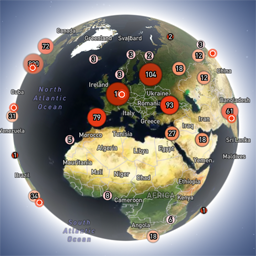
Globe Visitors Counter (Lite) adds a beautiful, fast, iframe-isolated 3D visitor globe to any WordPress site. It instantly shows your audience geography — fully locally, privately, and without any third-party tracking. This Lite version is designed for clarity, speed, and instant visual feedback — especially on landing pages and campaign pages. Use Case: Instant Visual Feedback for Advertising Campaigns The situation You have a product or a service. You launch an advertising campaign: Google Ads Facebook / Instagram TikTok banner ads email campaigns any other traffic source All traffic is sent to one landing page. Usually what comes next is boring: tables, charts, numbers, dashboards, “we’ll analyze it later”. The solution You place Globe Visitors Counter Lite directly on the landing page. No server setup. No external analytics. No configuration. And you start seeing your traffic with your own eyes. How it works (very simple) You launch the ads Visitors arrive at the page Each real visitor appears as a dot on the globe — in real time, from their actual location The globe comes alive and instantly shows: – whether people are coming at all – which countries and regions react – whether the campaign works or misses completely No dots — ads don’t work. Dots appear — ads are alive. Why Lite is perfect for landing pages Lite is not deep analytics. It’s a visual “life indicator”. Perfect when you need: – fast visual feedback – immediate confirmation that traffic is real – zero setup and zero learning curve – a simple “wow effect” for clients, teams, or investors You watch, not analyze. Key Features Interactive 3D Land-Cover globe included out of the box Real-time visitor logging using a tiny local JSON file Historical dots displayed automatically Zero configuration, works with all themes & editors Shortcode-based, easy placement on any page No cookies, no remote APIs, GDPR-friendly Ultra-fast loading thanks to iframe sandboxing How It Works When a page with the shortcode is opened, the plugin loads a fully self-contained viewer from: /wp-content/uploads/visitors-lite-landcover/ Each visit is logged locally as a minimal record (timestamp + coordinates + city + country) into: visitors.json Everything stays on your server. No tracking pixels. No third-party analytics. No cookies. Why Use It Ideal for landing pages and product launches Visualizes global audience instantly Safe for cached pages and CDNs Works even on heavily optimized sites When You May Need the Full Version Lite is intentionally simple and fast. If you need: – long-term statistics – multiple pages or sites – extended visitor history – advanced visual modes and skins – more control and customization …then the Full (Pro) version may be a better fit. Lite remains perfect for single pages, launches, tests, and quick visual validation. Tester Program (optional) We are tuning defaults and performance for upcoming builds. If you want to enable advanced features during testing at no cost (extra visual modes, effects, skins), join via Support: https://wordpress.org/support/topic/looking-for-testers-free-advanced-features-for-feedback/ Usage Shortcode: [visitors_globe_lite title=”VISITORS” width=”100%” height=”600″] Attributes: – title — optional caption above the globe – width — iframe width (100% or fixed px) – height — iframe height in px Place the shortcode anywhere — Classic or Block editor.