Input Mask For Elementor Form Fields
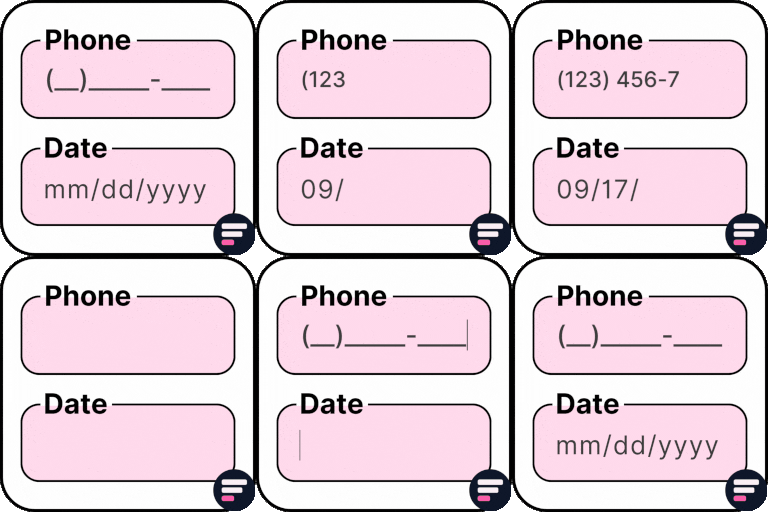
Input Mask For Elementor Form Fields is an Elementor addon that helps to add input masks on Elementor form fields. It helps you control how users enter data into form fields, ensuring properly formatted entries for phone numbers, credit cards, dates, Brazilian IDs, and more. Originally developed by Rodrigo Bogdanowicz, this plugin is now actively maintained and supported by the Cool Plugins team, who continue to add new features, bug fixes, and compatibility updates. This plugin works with Elementor Pro and the Hello Plus form widget. Simply edit your Elementor form, select a text field, and apply the desired mask. 👉 Check Live Demo Need more advanced Elementor form fields? Extend your forms with Cool FormKit (aka coolformkit). With Cool FormKit, you can add: Range Sliders Calculator Fields Signature Fields Rating Fields Conditional Logic Spam protection with hCaptcha and Cloudflare Turnstile Supported Input Masks Phone Masks: Add common phone number formats such as USA, Brazil, and more. 0000-0000 (000) 000-0000 (00) 0000-0000 (00) 0.0000-0000 Credit Card Masks: Format card numbers and expiry dates. Card: 0000-0000-0000-0000 Expiry: 00/00 Date & Time Masks: Keep date and time inputs consistent. Date: 00/00/0000 Time: 00:00:00 Date & Time: 00/00/0000 00:00:00 Currency Masks: Enforce correct money formats. Comma style: 00,000.00 Dot style: 00.000,00 Brazilian Formats (CPF, CNPJ, CEP): Capture accurate Brazilian IDs. CPF: 000.000.000-00 CNPJ: 00.000.000/0000-00 CEP: 00000-000 More Addons for Elementor Forms Conditional Fields for Elementor Form – Add conditional logic to show, hide, enable, or disable fields dynamically. Country Code for Elementor Form Telephone Field – Add a dropdown with country codes and flags for phone fields. Cool FormKit – A complete Elementor form builder addon that extends Pro forms and adds a full widget for Elementor Free. Other Popular Elementor Addons by Cool Plugins Timeline Widget for Elementor – Create stunning vertical and horizontal timelines inside Elementor editor easily. Events Widgets for Elementor – Add The Events Calendar in Elementor pages easily via using these events widgets. AutoPoly – AI Translation for Polylang – Translate Elementor websites automatically via AI and Polylang plugin. Loop Grid Extender for Elementor Pro – Add ACF repeater support and advanced taxonomy filters in Elementor loop builder. LocoAI – Auto Translate for Loco Translate – AI-powered string translation for plugins and themes inside Loco Translate. Use of 3rd Party Services: This plugin connects to the Cool Plugins feedback server only for optional usage data sharing and voluntary feedback submission (for example, during plugin deactivation). Data is transmitted solely after explicit user consent. No hidden tracking is performed, and no frontend visitor or site user data is collected. For more details, please review our Data Usage Policy, TOS, and Privacy Policy. Disclaimer: This plugin is not affiliated with or endorsed by the official Elementor team. Some links provided may be affiliate links, which means we could earn a small commission at no additional cost to you if you make a purchase. 👉 Get Cool FormKit – Advanced Elementor Form Builder
Unlock Addons for Elementor
UnlockAddons for Elementor is a high-performance WordPress plugin that brings premium design tools to Elementor. Features include Header & Footer Builder, exit-intent popups, live Google Sheets integration, and dynamic charts. Optimized for speed and SEO, build professional websites with custom layouts and lead-generation features – no Pro subscription required. Useful Links Demo | Docs | Videos | Support | Get Pro 40+ Premium Widgets Available in Free Version Build professional websites with powerful Elementor widgets. All widgets are fully customizable, mobile-responsive, and work seamlessly with Elementor Free. AI Text Generator: Generate engaging content instantly with AI-powered text generation for blog posts, product descriptions, and marketing copy. AI Chatbot: Add intelligent AI-powered live chat to engage visitors and provide 24/7 customer support automatically. Email Subscription: Capture leads with beautiful subscription forms. Includes category management, export functionality, and GDPR-compliant data handling. Popup Anywhere: Create exit-intent popups, modal windows, and custom overlays for promotions, lead capture, and announcements. Cookie Consent: Display GDPR-compliant cookie consent banners with customizable designs and multiple layout options. Sync Advantage: Automatically sync WooCommerce store with Google Sheets in real-time. Update products, prices, and inventory from spreadsheets. Google Sheet: Display live Google Sheets data anywhere in Elementor. Perfect for pricing tables, product catalogs, and real-time data visualization. Product Grid: Showcase WooCommerce products with customizable grid layouts, multiple templates, and responsive controls. Products Carousel: Create engaging product sliders with smooth animations and touch-friendly navigation. Header Logo: Display site logo with advanced styling, hover effects, and responsive settings. Header Menu: Build custom navigation menus with mega menus, dropdowns, and mobile-friendly navigation. Header Social: Add social media icons with customizable designs and hover effects for all major platforms. Circle Menu: Create stylish animated circular navigation menus for modern website designs. Header Sidebar: Add smooth sliding sidebar menu with mobile-friendly hamburger menu and customizable animations. Header Search: Integrate powerful search functionality with live results and WooCommerce product search support. Header Shop Cart: Display live shopping cart icon showing count, total price, and quick checkout access for WooCommerce stores. Footer Links: Organize footer links with customizable layouts, multi-column lists, and responsive controls. Footer Social: Showcase social media profiles with multiple layout options and customizable icons. Team: Showcase team members with professional layouts displaying photos, job titles, and social links. Event Timeline: Build interactive animated event timelines for company history, milestones, and schedules. Animated Text: Add eye-catching animated text effects including typewriter, fade, slide, and rotate animations. Dynamic Chart: Visualize data with interactive charts supporting line, bar, pie, and area charts with animations. Blog Grid: Display blog posts in stunning grid layouts with multiple templates and pagination options. Breadcrumbs: Improve navigation and SEO with customizable breadcrumb links and schema markup support. Showcase Slider: Present products, testimonials, or portfolios in attractive slider format with smooth transitions. Progress Bar: Display progress, skills, or statistics with animated progress bars and multiple styles. Promo Box: Highlight special offers and promotions in styled boxes with icons and customizable layouts. Image Hotspot: Add interactive hotspots to images with tooltips and custom content for product showcases. Customer Review: Display testimonials and reviews with star ratings to build trust and improve conversions. Business Hour: Show business hours and availability with multiple layout options and timezone support. Counter: Display animated number counters for statistics and achievements with smooth animations. 360 Photo Viewer: Create immersive 360-degree image viewing experiences for product showcases and virtual tours. Advanced Google Map: Embed interactive Google Maps with advanced controls and custom markers for location pages. On Page Navigation: Create smooth single-page navigation with anchor links and scroll effects for one-page websites. Video Gallery: Showcase video content in beautiful gallery layouts supporting YouTube, Vimeo, and self-hosted videos. Image Scroller: Display images in smooth horizontal scrolling layouts for logo carousels and galleries. Party Propz: Add fun animated decorative elements and props for celebrations and special events. Interactive Promo: Create attention-grabbing interactive promotional banners with hover effects and animations. Table of Contents: Improve content readability and SEO with automatic table of contents from headings. Powerful Features & Extensions Advanced feature modules extend your website’s capabilities for lead generation, content creation, user engagement, and data management. Email Subscription Module: Advanced email capture forms with category management, export functionality, IP tracking, GDPR compliance, and analytics for growing subscriber lists. AI Text Generator Module: AI-powered text generation for blog posts, product descriptions, and marketing copy. Save time with intelligent content suggestions and multiple writing styles. Popup Anywhere Module: Powerful popup functionality with exit-intent triggers, countdown timers, advanced triggers, and analytics for maximum conversions. Google Sheets Integration Module: Real-time Google Sheets synchronization. Display live data, sync WooCommerce products, and manage content from spreadsheets. Why Choose Unlock Addons for Elementor? Thousands of WordPress users trust Unlock Addons for professional-grade functionality without expensive Pro subscriptions. ✅ 100% Compatible with Elementor Free – All 40+ premium widgets work flawlessly with Elementor Free, no Pro subscription required. ✅ Lightning-Fast Performance – Intelligent asset loading loads only CSS/JS for widgets you use, ensuring zero bloat and optimal page speeds. ✅ 40+ Professional Widgets – Comprehensive collection covering lead capture, data visualization, e-commerce, and modern web design needs. ✅ Unlimited Customization – Complete design control through Elementor’s native styling system for colors, typography, spacing, animations, and responsive settings. ✅ WooCommerce Integration – Dedicated e-commerce widgets for product showcases, customer reviews, Google Sheets sync, and engaging shopping experiences. ✅ SEO-Optimized – Clean semantic HTML, proper schema markup, breadcrumb navigation, and WordPress coding standards for better search rankings. ✅ Fully Mobile Responsive – Mobile-first design with independent customization for mobile, tablet, and desktop layouts. ✅ Active Development – Regular updates with new features, performance improvements, and compatibility with latest WordPress and Elementor versions. Performance & Optimization Engineered for maximum performance with intelligent asset loading that only loads CSS/JS for widgets you use. All assets are minified and optimized. Fully compatible with all major caching plugins. Regular performance updates ensure optimal speed. Security & Privacy Your website’s security and your visitors’ privacy are our top priorities. Unlock Addons for Elementor implements industry-leading security practices and privacy compliance measures to protect your data and meet global regulations. GDPR & Privacy Compliance * Full GDPR Compliance – Built-in cookie consent widgets and privacy-compliant data handling ensure your website meets European General Data Protection Regulation requirements. Protect your business and respect user privacy. * Data Protection Features – Email capture includes IP tracking, consent management, and secure data storage. Export and manage user data easily to comply with data subject access requests. Enterprise-Grade Security * Regular Security Audits – Our code undergoes regular security reviews and vulnerability assessments. We follow WordPress security best practices and respond quickly to any identified issues. * Secure Coding Standards – All code follows WordPress security guidelines including data sanitization, validation, nonce verification, and SQL injection prevention. Your website stays protected. WordPress Standards Compliance * Coding Standards Adherence – Built following WordPress PHP, JavaScript, and CSS coding standards. Ensures compatibility, maintainability, and security across all WordPress environments. * Regular Security Updates – We actively monitor WordPress security advisories and update our plugin promptly to address any security concerns, keeping your site protected against emerging threats. Mobile Responsive Design In today’s mobile-first world, your website must look perfect on every device. Unlock Addons for Elementor ensures all widgets are fully responsive and provide exceptional user experiences across all screen sizes and devices. Universal Device Compatibility * Desktop Optimization – All widgets are optimized for desktop displays with full feature sets and rich interactions. Perfect for users on large screens who expect detailed, interactive experiences. * Tablet-Friendly Design – Touch-optimized layouts ensure widgets work flawlessly on tablets. Smooth gestures, appropriate sizing, and intuitive navigation make tablet experiences as engaging as desktop. * Mobile-First Approach – Every widget is designed mobile-first, ensuring perfect presentation on smartphones. Touch-friendly controls, optimized layouts, and fast loading times create exceptional mobile experiences. Advanced Responsive Controls * Independent Device Customization – Customize widget appearance separately for mobile, tablet, and desktop using Elementor’s responsive controls. Perfect typography, spacing, and layouts for each device type. * Flexible Layout Options – Widgets automatically adapt to different screen sizes with flexible grid systems, collapsible menus, and adaptive content display. Your design looks perfect on any device. * Orientation Support – Widgets work seamlessly in both portrait and landscape orientations, automatically adjusting layouts and interactions for optimal viewing experiences. Unlimited Design Flexibility Complete design freedom with full Elementor styling integration. Customize colors, typography, spacing, borders, shadows, backgrounds, and animations. Independent device customization for mobile, tablet, and desktop. Create websites that perfectly match your brand vision. Quick & Easy Installation Get started with Unlock Addons for Elementor in minutes! Our plugin installs quickly and integrates seamlessly with your existing WordPress and Elementor setup. Choose the installation method that works best for you. Install from WordPress Dashboard (Recommended) The fastest way to get started. Install Unlock Addons directly from your WordPress admin panel in just a few clicks: Navigate to Plugins – Go to your WordPress dashboard and click Plugins → Add New Search for Plugin – Type “Unlock Addons for Elementor” in the search box Install Plugin – Click the Install Now button next to Unlock Addons for Elementor Activate Plugin – After installation completes, click Activate to enable the plugin Start Building – Open any page in Elementor and find 40+ new widgets in the widget panel! Manual Installation Method Prefer to install manually? Download and upload the plugin file directly: Download Plugin – Get the latest version from WordPress.org Plugin Directory Access Upload Section – In your WordPress dashboard, go to Plugins → Add New → Upload Plugin Upload ZIP File – Click Choose File and select the downloaded ZIP file Install Plugin – Click Install Now and wait for the installation to complete Activate Plugin – Click Activate Plugin to start using Unlock Addons System Requirements Ensure your WordPress environment meets these requirements for optimal performance: WordPress Version – WordPress 5.5 or higher (WordPress 6.0+ recommended for best compatibility) Elementor Plugin – Elementor Free version 3.0 or higher (latest version strongly recommended) PHP Version – PHP 7.2 or higher (PHP 7.4+ or PHP 8.0+ recommended for better performance) MySQL Version – MySQL 5.6 or higher, or MariaDB 10.0 or higher Note: While the plugin works with Elementor Free, it’s also fully compatible with Elementor Pro if you’re using the premium version. Comprehensive Support & Resources We’re committed to your success! Unlock Addons for Elementor comes with extensive support resources to help you build amazing websites. Whether you’re a beginner or an advanced user, we have the tools and assistance you need. 📚 Complete Documentation Library Access our comprehensive documentation center with detailed guides for every widget and feature: Full Documentation – Step-by-step guides, feature explanations, and troubleshooting tips for all 40+ widgets Widget-Specific Guides – Detailed tutorials for each widget including setup instructions, customization options, and best practices FAQ Section – Answers to common questions and solutions to frequent issues Code Examples – Advanced customization examples and code snippets for developers 🎥 Video Tutorials & Training Learn visually with our extensive video library: YouTube Channel – Watch step-by-step video tutorials for every widget and feature Getting Started Series – Beginner-friendly guides to help you start building immediately Advanced Techniques – Pro tips and advanced customization tutorials for experienced users Use Case Examples – Real-world examples showing how to use widgets in different scenarios 💬 Community & Direct Support Get help from our team and connect with other users: Support Center – Submit support tickets and get personalized assistance from our team Community Forum – Join discussions, share tips, and learn from other Unlock Addons users Feature Requests – Suggest new widgets or improvements – we listen to our community! Regular Updates – Stay informed about new features, improvements, and security updates What You Get: * ✅ Detailed documentation for every widget and feature * ✅ Video walkthroughs and tutorials for visual learners * ✅ Responsive ticket-based support system * ✅ Active community of users and developers * ✅ Regular updates with new features and improvements * ✅ Compatibility updates for WordPress and Elementor Additional Information Official Plugin Page: WordPress.org Plugin Directory Developer Website: WPRealizer.com – Professional WordPress Development & Solutions Plugin Website: UnlockAddons.com – Explore widgets, view demos, and access resources License: GPLv2 or later – Open source and free to use License URI: GNU General Public License v2 Plugin Statistics & Community * Active installations across thousands of WordPress websites * Regularly updated with new features and security patches * Compatible with latest WordPress and Elementor versions * Active community of users and contributors * 5-star rated plugin with positive user reviews Stay Connected * Follow us for updates, tips, and new widget announcements * Share your creations and get featured in our showcase * Contribute feedback to help us improve the plugin Thank you for using Unlock Addons for Elementor! If you find this plugin helpful, please consider leaving a 5 star review. Your feedback helps us improve and helps other users discover the plugin.