maca Restu
maca Restu helps restaurants and cafés publish menus on WordPress with categories, thumbnails, PDF or image files, and smart scheduling. Features Menu categories with optional thumbnail images Upload menus as PDF or image (drag & drop or media library) Schedule by date range, weekdays, and daily time windows Website shows published menus for browsing; QR page shows only live menus Shortcode [maca_menu_list] and Gutenberg block (optional single-category filter in the editor) Short QR URL (e.g. /qrmeny/) with printable QR codes PDF rendering with bundled PDF.js (HTTPS-friendly) Inline, popup, or new-tab display modes Optional menu title and serving-hours notice on the website Close button on website menus (similar to QR view) Menu preview — pick date/time and compare website vs QR visibility Duplicate menu — copy an existing menu (file + schedule) in one click Swedish and English translations maca Restu Pro The free plugin above is complete on its own. maca Restu Pro adds online menus, ordering, booking, payments, and more. Free Pro PDF/image menus, scheduling, QR page, shortcode & block Yes Yes Menu preview (website vs QR at a date/time) Yes Yes Printable QR codes and bundled PDF.js Yes Yes Admin in Swedish and English Yes Yes Guest languages and bilingual menu content — Yes Backup and restore — Yes Online menu (dishes, prices, allergens, CSV import/export) — Yes Campaign menus and category scheduling on QR — Yes Table ordering, kitchen & waiter screens, live order status — Yes Table booking, floor plan, and waitlist — Yes Stripe payments and split bill — Yes Overview dashboard, charts, and dish statistics — Yes AI guest chat (your OpenAI key) — Yes Full comparison and licensing: maca.se/restu-pro. PDF menus, QR, and scheduling work in Pro without a license; the subscription unlocks the Pro-only rows above. Author: Maca Development Privacy: On activation, deactivation, and uninstall, the plugin sends your site URL, plugin version, WordPress version, PHP version, and locale to Maca at https://api.maca.se/v1/restu/events.php so we can improve the plugin and count active installations. If you choose to send deactivation feedback, your selected reason and optional comment are included. No menu files, categories, or visitor data are transmitted.
Restaurant Food Menu by WP Darko – Drag & Drop Restaurant Menu Builder for WordPress
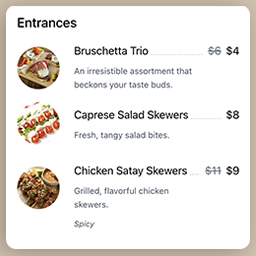
Quickly set up and display a restaurant menu on your website, fully responsive and easy to use. Create food items, add them to your restaurant menu and copy-paste the shortcode into any posts/pages. WordPress Restaurant Menu Builder plugin Introducing WP Darko’s new restaurant menu builder. We’ve designed this WordPress plugin to be as user-friendly as possible, making it ideal for beginners. You can begin building captivating food lists within minutes. When activated, WP Darko’s restaurant menu builder will add two new sections to your WordPress admin panel: “Food Items” and “Food Menus.” These sections will enable you to effortlessly create restaurant menus by adding food items (complete with food descriptions, regular and sale prices, food images, and more), add them to one or multiple menus and display them anywhere on your website using your restaurant menu shortcodes. Get Started in Minutes with Restaurant Food Menu Drag & Drop Restaurant Menu Builder Restaurant Food Menu is an intuitive drag & drop food menu builder plugin for WordPress. After you’ve added your food items in the admin panel, it only takes a few minutes to display your restaurant menu beautifully on your page. Simply create a new menu, then drag & drop your food items from the food list into your menu sections. Adjust the menu’s layout, add headings, and paragraphs to make it look like an authentic restaurant menu, and you’re good to go! With this WordPress plugin, WP Darko ensures that you can focus on what matters most: your restaurant business. Creating a restaurant menu for your WordPress site is easy with our menu builder, and you should be able to have yours ready in minutes. Available fields & settings When creating food items in the admin panel, you’ll be able to use the following fields: Food title Food image Regular and sale price: if you add a sale price to your food item, the regular price will be crossed out Additional info: this is a free field where you can add information about the food, such as spiciness level, allergies, gluten-free, vegetarian, and more Food description: here is where you can let your creativity shine and describe your food in a way that makes it sound delicious to your visitors Fully Responsive and Optimized Restaurant Food Menu is a 100% mobile-friendly and fully responsive restaurant menu builder plugin for WordPress that has been tested with a wide range of devices and browsers. The menu’s food sections will gracefully transition from 3-2 columns to a single column on smaller devices, ensuring they remain perfectly readable and visually appealing. Our WordPress restaurant menu plugin is also fully compatible with the latest versions of WordPress and PHP. The future of our Restaurant Food Menu WordPress plugin Restaurant Food Menu was recently released, and we have exciting plans for its future. We are planning to introduce new features very soon! Among these upcoming features, we will provide the option to include full-width images within the restaurant menu, allowing you to align it more closely with your food business. Additionally, we will be working on various options for indicating spiciness levels, allergies, and different dietary preferences. We have an extensive roadmap, and you can contribute to it by reaching out to us and sharing your ideas for the direction you’d like this food menu builder WordPress plugin to take!