LMN Site Monitor
LMN Site Monitor is a lightweight WordPress monitoring plugin that keeps track of your websites and alerts you when something goes wrong. Monitor uptime, SSL certificate expiration, and response time directly from your WordPress dashboard — no external SaaS required. Key features Uptime monitoring (HTTP/HTTPS) with configurable intervals. SSL certificate expiration checks with full SNI support. Domain expiry notifications. Malware scanning powered by Google Safe Browsing API and URLhaus (abuse.ch); per-site scheduled scans (never / daily / weekly); downloadable PDF security report. Response latency tracking with full history stored in a dedicated database table. Performance charts (bar, line, 3D bar, heatmap) powered by self-hosted Apache ECharts 5 — no external CDN, GDPR-safe. Statistics modal with per-site avg / min / max response time and uptime %; CSV and PDF export. Automatic retry after downtime to avoid false positives. Instant HTML email alerts (with automatic dark mode support). Dashboard widget with customizable monitor limits. CSV export/import of monitored sites. Fully translatable (16 languages) and optimized for modern PHP environments. LMN Site Monitor is designed to be fast, accessible, and WordPress-native — giving you essential monitoring tools without unnecessary complexity. Learn more at LMN Site Monitor official page: https://lumina.fmkr.net/site-monitor/ Localization This plugin is fully translatable and currently includes base translations for: English (en_US) Spanish (es_ES) Catalan (ca) French (fr_FR) Arabic (ar) Galician (gl_ES) German (de_DE) Basque (eu) Italian (it_IT) Japanese (ja) Korean (ko_KR) Dutch (nl_NL) Portuguese (pt_PT) Turkish (tr_TR) Ukrainian (uk) Simplified Chinese (zh_CN) If you would like to contribute a new translation, you can do so via WordPress.org’s translation platform. Version: 2026-08-19 — v1.1.1 FIX: the internal VERSION constant was still hardcoded to 1.0.1 after the 1.1.0 release, so the admin header badge, the About tab, and the Google Safe Browsing clientVersion field kept reporting the wrong version. Now matches the plugin header (1.1.1). Version: 2026-08-14 — v1.1.0 COMPAT: WordPress 7.1 confirmed — reviewed the iframed post editor, client-side media processing, @wordpress/components changes, persistent toolbar, and jQuery UI 1.14.2 update; none of these affect this plugin (no editor, media, toolbar, or jQuery UI hooks used). NEW: SSL certificate details in the WHOIS/DNS modal — issuer, TLS protocol version (best-effort probe), and Subject Alternative Names (SANs) now shown alongside the existing SSL expiry date. Version: 2026-07-15 — v1.0.1 COMPAT: WordPress 7.0.1 confirmed — reviewed the 7.0.1 patch file list; no changes affect admin_post, wp_ajax, admin_menu, cron, or wp_mail hooks used by this plugin. FIX: Uninstall cleanup — uninstall.php was leaving the lmnsimo_order option (card sort order) behind in wp_options after uninstall; now deleted along with the other plugin options. FIX: Uninstall cleanup — per-site malware scan schedules (lmnsimo_scan_site_cron) were not cleared on uninstall, leaving orphaned cron events; now cleared alongside lmnsimo_check_sites_cron. IMPROVE: Requires at least / Requires PHP added directly to the plugin file header, so WordPress core itself blocks activation on incompatible sites. Version: 2026-05-26 — v1.0.0 COMPAT: WordPress 7.0 full compatibility — tested and confirmed against WP 7.0 core changes (Modern theme, PHPMailer 7.0.2, PHP 7.4 minimum). IMPROVE: CSS scoping fix — postbox header rule (.hndle) now correctly scoped to .lm-scope, preventing style leakage to other dashboard widgets on index.php. NEW: Apache ECharts 5.6.0 + echarts-gl 2.0.8 bundled locally in /assets/ (no external CDN, GDPR-safe); Chart.js replaced as charting engine. NEW: 3D bar chart of response times per site via echarts-gl (WebGL). NEW: GitHub-style activity heatmap (checks per day/hour) powered by ECharts heatmap series. NEW: Toggle in the charts UI to switch between 2D and 3D view. IMPROVE: Dark mode for charts uses ECharts native ‘dark’ theme — no extra CSS required. IMPROVE: Chart.js and date-fns adapter removed from plugin bundle; replaced by ECharts 5.6.0 (self-hosted, Apache 2.0 licence). Version: 2026-05-16 — v0.9.4 NEW: Site thumbnail — each card now shows a screenshot preview via Automattic mshots (s0.wordpress.com/mshots/v1/). No API key required; images load lazily with CDN caching and dark-mode brightness filter. NEW: Telegram Bot alerts — new accordion in Settings → Alerts: Bot Token + Chat ID. Formatted HTML messages sent for all alert types (site down, recovery, SSL expiry, domain expiry). Works alongside email and Discord. NEW: Discord Webhook alerts — new accordion in Settings → Alerts: Webhook URL. Alerts delivered as color-coded embeds (red = down, orange = warning, green = recovery). SECURITY: Full secrets encryption — SMTP password, Telegram token, Discord URL, Google Safe Browsing key, and URLhaus key are encrypted with AES-256-CBC using AUTH_KEY + SECURE_AUTH_SALT before storage. Settings forms never return secret values to the browser. IMPROVE: i18n complete — 51 previously untranslated PHP strings added to the .pot template and fully translated across all 16 supported languages; all .po and .mo files recompiled. A pre-existing untranslated string (Google Safe Browsing optional key notice) also filled in for 7 languages. FIX: Closing the security scan modal no longer causes a flash from dark to light mode; page reload removed, scan results update in-place. FIX: Scan status label (“No incidents” / “Incidents detected”) now appears on the card immediately after scanning, without requiring a manual page reload. FIX: Plural-form translations in .mo files were corrupted (drag-to-reorder label was appearing in SSL/domain expiry day fields); all 16 .mo files recompiled with correct GNU gettext plural-form encoding. IMPROVE: Performance charts redesign — neon color palette for bar chart; trend chart shows filled min–max band with adaptive Y axis; distribution chart replaced with animated Polar Area chart; neon glow effect on all chart canvases in dark mode. Version: 2026-04-29 — v0.9.3 NEW: Animated toast notification system — success / error / warning toasts appear bottom-right, auto-dismiss 3.8 s, click to close, slide-in/out animation. Replaces silent AJAX operations. IMPROVE: “Force” and “Check all now” buttons change to “Checking…” and disable during server-side check. IMPROVE: Pin/Unpin actions show a success toast; AJAX errors show an error toast with UI rollback. IMPROVE: Card reorder now shows “Order saved” toast on server confirmation. IMPROVE: Site cards lift 2 px on hover with smooth shadow transition; suppressed during drag. IMPROVE: 5 new i18n strings added; translations for 16 languages pending. SECURITY: SSRF protection — admin-supplied URLs validated against private/reserved IP ranges before acceptance; only http/https allowed. SECURITY: error_msg sanitization — HTTP error body snippets sanitized with sanitize_text_field() before storage. NEW: Unified action bar (top + bottom) — Select all checkbox, bulk actions, Check all now, Scan all, Export CSV, Import CSV consolidated in one strip above and below the cards. NEW: Scan all — sequential background scan of all monitored sites with live badge updates and completion toast. IMPROVE: 3 new i18n strings (selectAll, scanAll, scanAllDone) translated in 16 languages. Version: 2026-04-02 — v0.9.2 FIX: URLhaus (abuse.ch) integration now requires an API key (Auth-Key header); added URLhaus API Key field in Settings → Security scanning. Without a key the URLhaus check is skipped gracefully. FIX: Scan modal failed to open with “i18n is not defined” JS error — resolved by declaring i18n from cfg.i18n inside initScanModal(). FIX: PDF security report printed blank — modal is now temporarily moved to document.body before window.print() and restored afterwards so @media print selectors work correctly. FIX: “Scanning…” text rendered as garbled bytes (double-encoded UTF-8) — replaced with an animated indeterminate progress bar. IMPROVE: Scan badge button removed from card header; scan result (shield icon + date + status label) now appears as an inline row inside the card metadata block, consistent with the rest of the card layout. FIX: “Scan” button font-size reduced to match the rest of the card action buttons (11 px). IMPROVE: Status labels renamed to “No incidents” / “Incidents detected” (es_ES: “Sin incidencias” / “Incidencias detectadas”), color-coded green and red respectively; all 16 .po/.mo files updated. NEW: Help tab with 12 documented sections covering all plugin features: Getting started, Uptime monitoring, SSL & domain expiry, Email alerts, Performance charts & statistics, Malware scanning, WHOIS / DNS lookup, Dashboard widget, CSV export / import, Card management, and step-by-step guides for both API keys (Google Safe Browsing and URLhaus). IMPROVE: Top toolbar now shows a compact API keys notice with direct links to Google Cloud Console and abuse.ch, replacing the old generic description block. IMPROVE: 21 new i18n strings added to all 16 supported languages. Version: 2026-03-25 — v0.9.1 NEW: Malware scanning powered by Google Safe Browsing API (free key required) and URLhaus (abuse.ch, no key required). Scan button on each site card opens a security report modal. NEW: Per-site automatic scan schedule (Never / Daily / Weekly) with WP Cron integration. NEW: Security report modal with per-source results, threat types, global status, and one-click PDF download (window.print()). NEW: Google Safe Browsing API Key field in Settings → Security scanning section. NEW: 28 new i18n strings added to all 16 supported languages. Version: 2026-03-16 — v0.9.1 NEW: Performance charts (bar, line, donut) powered by self-hosted Chart.js 4.5.1 (GDPR-safe, no external CDN). NEW: Response-time history stored in a dedicated database table (lmnsimo_response_log); rolling 500-entry window per site; table removed cleanly on uninstall. NEW: Statistics modal with per-site total checks, avg / min / max response time and uptime %; accessible from the Monitor tab. NEW: CSV export and Print/PDF export of the statistics table. NEW: Period selector (Last 24 h · Last 7 days · Last 30 days) for charts and statistics. NEW: 25 new strings fully translated across all 16 supported languages; .pot and all .po files updated. IMPROVE: Charts and statistics modal respect the plugin’s light/dark theme. Version: 2026-03-14 — v0.8.1 FIX: Fix translation errors. Version: 2026-03-14 — v0.8.0 NEW: New languages: Arabic, German, Basque, Italian, Japanese, Korean, Dutch, Portuguese, Turkish, Ukrainian, and Simplified Chinese. NEW: Automatic retry after downtime to avoid false positives. NEW: Domain expiry notifications. MAINT: i18n maintained; PHPCS/WPCS compliant. Version: 2026-03-03 — v0.7.0 NEW: Cards are now wider, displaying more information at a glance. NEW: Bulk actions now include sorting options: alphabetical (A→Z) and by date added. NEW: Drag-and-drop card reordering with persistent storage between sessions. NEW: Pin system — pin any site to keep it fixed at the top, excluded from sorting. NEW: WHOIS / DNS lookup button on each card: shows IP, DNS provider, NS, MX records, TTL and SSL expiry. Native PHP only, no external APIs or API keys required. NEW: JetBrains Mono font integrated for monospace elements, self-hosted (GDPR-safe, no external CDN). IMPROVE: Full PHPCS / WPCS compliance — zero warnings. Proper nonce and capability checks, sanitization and escaping throughout. IMPROVE: All new strings are fully translatable and i18n-compatible. IMPROVE: Responsive design preserved and refined across all screen sizes. FIX: Removed duplicate wp_mail_failed hook and unified error handlers. FIX: Native WP cron schedules (hourly, daily) are no longer overwritten. FIX: Added file_exists() check before reading changelog.txt. FIX: Added missing wp_unslash() in widget preferences handler. FIX: SSL badge severity now syncs with the user-configured expiry threshold. FIX: PHPCS MissingTranslatorsComment resolved in alert email builders. IMPROVE: Removed dead load_textdomain() method. IMPROVE: Fixed inconsistent indentation in ajax_save_order. Version: 2025-10-31 — v0.6.5 NEW: Full internationalization (en_US, es_ES, ca, fr_FR). NEW: Added Catalan (ca) and French (fr_FR) translations. IMPROVE: Hybrid textdomain loader – automatically loads WP.org language packs and falls back to /languages for ZIP installs. FIX: Added translators comments for all placeholders to comply with WordPress I18n standards. FIX: Escaped all dynamic outputs in admin interface and header tips. MAINT: Removed deprecated load_plugin_textdomain() function per Plugin Check recommendations. Version: 2025-10-25 — v0.6.4 – Full sanitization and 0 warnings – All PHPCS/WPCS warnings removed. – Full sanitization and reordered nonce verification. – PHP 8.3+ and WordPress 6.8.3+ compatibility. Version: 2025-10-16 — v0.6.3 UI: – FIX: Unique IDs in forms (nonces and submit buttons). – FIX: Console warnings removed for duplicated #_wpnonce and #submit IDs. – IMPROVE: Accessibility and DOM structure of the admin panel. Maintenance: – Version bumped to v0.6.3. Version: 2025-10-15 — v0.6.2 UI: – IMPROVE: Unified blue header (h2.hndle) with v0.6.2 badge. – ADD: Lightweight Markdown rendering (titles, lists, bold, code, separators). – KEEP: Consistent padding and structure (.postbox.lm-card > h2.hndle + .inside). Maintenance: – Version bumped to v0.6.2. Version: 2025-10-15 — v0.6.1 UI: – NEW: “Changelog” tab with direct reading of changelog.txt. – IMPROVE: Body with padding, clean background, and better typographic rhythm. – IMPROVE: Lightweight Markdown rendering: bold, code, titles (# ## ###), and highlighted list prefixes (NEW, FIX, IMPROVE…). Maintenance: – Version bumped to v0.6.1. Version: 2025-10-14 Functional: – SMTP operational: form aligned with real keys (smtp_*) and authentication. – Keeps SMTP password when saved empty (not overwritten). – Compatibility with Gmail (app passwords) and Office 365. UI: – Listing replaced by responsive card grid (auto-fit/minmax). – “OK” status (green/white text) and “Down” (red/white text). – Down sites with red border + soft pulse (respects reduced motion). – Inline styles cleaned → moved to assets/admin-theme.css. Maintenance: – Nonces and handlers verified; no changes in cron or check logic. – CSV import/export and bulk actions unchanged. Version: 2025-10-07 — v0.6.0 NEW: CSV import using the same format as export (adds URLs without removing existing ones). NEW: Bulk actions in list (Delete selected) using standard WordPress handlers. IMPROVE: Listing UI: master checkbox, batch action bar, and confirmations. IMPROVE: Error handling and post-action messages for imports or batch actions. Version: 2025-10-06 — v0.5.3 NEW: CSV export from the “About Site Monitor” section. NEW: “About Site Monitor” section with quick metrics and cron status. IMPROVE: Minor cleanup in headers and constants (VERSION). Version: 2025-10-06 — v0.5.2 NEW: “About Site Monitor” box in the right column of the admin dashboard. Version: 2025-10-06 — v0.5.1 CHANGE: Default light HTML email + automatic dark mode with prefers-color-scheme. Version: 2025-10-06 — v0.5.0 NEW: HTML alert email with badges, detail table, and action buttons. NEW: Per-user preference in dashboard widget (number of sites displayed). IMPROVE: Classic UI improved (light/dark theme, responsive tables and forms). FIX: Text contrast in dark theme (labels, cells, and descriptions). Version: 2025-10-05 — v0.4.0 NEW: Admin page with listing, quick actions, and settings. NEW: HTTP and SSL expiry checks with email alerts. NEW: Configurable cron (5 min, 15 min, hourly, daily) and “force check” option.
Top keywords
- version31×1.30%
- fix26×1.09%
- v023×0.97%
- now17×0.72%
- scan14×0.59%
- site14×0.59%
- card13×0.55%
- key12×0.50%
- wordpress12×0.50%
- added11×0.46%
- expiry10×0.42%
- i18n10×0.42%
MaxBoxy
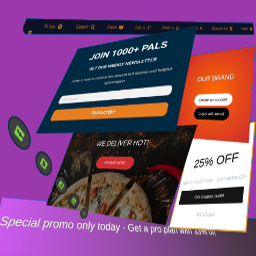
MaxBoxy is a tool that will help you in making engagement and conversion elements for your Website. To be concrete, with MaxBoxy create floating content, menus, info bars, popup or slide-in panels. Set them into rotating notification system, introduce them on page’s load or exit intend, offer coupons and much more. It can be used, for example, to: Engage visitors with your products and items Turn over site visitors to consumers, followers or buyers Increase social followers & connect with your social sites Get additional email subscribers Create eminent floating menus Stick necessary announcements Rotate exciting news and messages about your products Manage content boxes through different panel strains. Lets see beneath. Strain FloatAny Basically, with FloatAny strain – float any content on your site. Whatever you make with inside the panel will appear as a floating content box on your WordPress Website. Create popup boxes, notifications, alerts, info bars, banners, display ads… Strain InjectAny In essence, with InjectAny strain – inject any content on specified pages or over the whole site. Create alerts or highlighted content boxes and even dismissible notes. You can also inject CSS and JS code in predefined head and footer locations. Simplicity, Performance and Design The big chance is you’re going to like this, MaxBoxy’s interface is the same that WordPress is using for publishing posts and pages. This means that content of the panels are built with native WordPress’ blocks. This creates lightweight outcome, outputting mostly the resources your site is already using. This should produce faster page loading compared to the tools competitors provide. Conversion Set the goals inside your MaxBoxy content boxes and measure conversions. These goals can be set as click on buttons or newsletter/sign-up forms submission. So, after setting the panels, see the stats and how the visitors are engaging with your messages and action calls. Therefore, MaxBoxy allows you to simply extend the functionality of your Website and to create floating content or injecting content box in an easy and a way you should be already familiar with. Multiple styles and functionalities are there which will help you to engage your site’s guests and will enable additional interactions for them on the site. You see, by using WordPress blocks you assemble components to form different site elements, i.e. floating menus, popup boxes, newsletter signup forms, important announcements and alerts, rotating messages. As you guess, the way you form the content, is up to you. You can get really creative by yourself or use existing patterns. Documentation and other help when you need it After installing the plugin, the best way to start is to check the documentation on our site. We explain in details all the features the plugin have. To fully understand MaxBoxy’s features you can visit Demo section from our site. At the end, to get things easier we’ve created the import/export feature. This permits you to quickly move FloatAny and InjectAny content from one Website to a different one or to begin simply with the examples we have prepared for you. Once imported, you’ll be able to test different content panel types. More information on how to import exemple content is provided on our site. Note: Some features are part of the Premium addon. Free version allows usege of InjectAny with pre-defined locations and you can create FloatAny panels for the site overall disposal, while the Premium addon gives you more flexibility. With free version obtain the general impression regarding the plugin and if the site overall functionallity is all you need, you’re free to use it. However, with Premium version you get more features and options. Go Premium Premium Version Conditional appearance Restriction for any page, categories, user logged status, user roles, etc. Appear after event (time, scrolling, page’s element in view), etc. Scheduling campaings Geolocation targeting Trigger a panel “On click”, “On hover” – from the content’s button, link or image Output as a shortcode or through WordPress block interface and much more customization options… For additional information visit our site and see all features and benefits of upgrading to the MaxBoxy’s Premium version.