Social Chat
Ifat Chat adds a lightweight floating chat button to your WordPress site so visitors can instantly reach you on WhatsApp or Facebook Messenger. When a customer clicks the bubble, a new chat opens with a pre-filled message — ready to send. It works out of the box with every WordPress theme, including Full Site Editing (FSE) block themes like Twenty Twenty-Five and classic themes like Astra, Starter Templates, and Hello Elementor. Why Use Ifat Chat? Most customers prefer messaging over email or contact forms. A visible chat button removes friction and turns casual browsers into real conversations. One-click setup — Enter your phone number, enable the bubble, done. WhatsApp and Messenger — Support both platforms from a single button. If only one is configured, visitors go straight to that app with no extra step. Smart product messages — On WooCommerce product pages, the pre-filled message automatically includes the product name, price, and URL so you know exactly what the customer is asking about. Works everywhere — Block themes, classic themes, page builders, WooCommerce — the chat bubble renders correctly on all of them. Lightweight — Under 5 KB of CSS and JavaScript combined. No jQuery, no external scripts, no impact on page speed. Mobile-friendly — Choose whether to show or hide the bubble on mobile devices. What You Can Customize Position the bubble at the bottom-right or bottom-left corner Pick any color to match your brand Set the bubble size — small, medium, or large Write a custom panel header label Write separate messages for product pages and regular pages Choose where the bubble appears — all pages, homepage only, or WooCommerce pages only Exclude specific pages by ID How It Works Install and activate the plugin. Go to Ifat Chat in your WordPress admin menu. Enable the chat bubble and enter your WhatsApp number (international format). Optionally add your Facebook Page ID for Messenger support. Save — the floating chat button appears on your site immediately. When both platforms are configured, clicking the bubble opens a small panel where the visitor picks WhatsApp or Messenger. When only one platform is set up, clicking the bubble opens that app directly. WooCommerce Product Page Messages If WooCommerce is active, the plugin detects product pages and replaces merge tags in your message template: {{product_name}} — The product title {{product_price}} — The product price with currency symbol {{product_url}} — The product page URL Example message a customer sends: “Hi! I’m interested in Classic Leather Jacket ($89.00). https://yoursite.com/product/classic-leather-jacket/” On non-product pages, the default message you configure is used instead. Full Site Editing (FSE) and Block Theme Support Unlike plugins that depend on the wp_footer hook, Ifat Chat injects the bubble through JavaScript after the page loads. This means it works reliably with block themes like Twenty Twenty-Five, Twenty Twenty-Four, and any FSE theme — not just classic themes. Lightweight and Privacy-Friendly No external API calls or tracking scripts No cookies are set No user data is collected or stored The plugin only loads a small CSS file and a small JavaScript file on the frontend
Sticky Chat Widget – Floating Chat Icons, Contact Form, Call, Click to Chat,
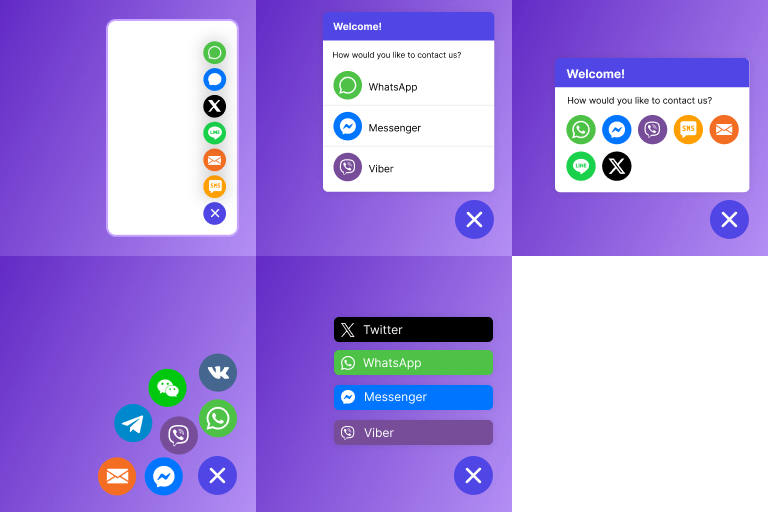
Engage your website visitors in seconds with Sticky Chat Widget. Add floating social chat buttons and contact options including WhatsApp, Messenger, Telegram, Instagram, LinkedIn, Twitter, Skype, WeChat, Viber, SMS, Email, Call Button, and more. Fully customizable and mobile-friendly, it helps businesses, blogs, and stores boost leads and customer satisfaction. The most effective Click to Chat and Call to Action buttons for website Easy Setup & Configuration – Install the plugin and add chat buttons within minutes, no coding required. Customizable Design – Change colors, icons, size, and position to match your website branding. Multi-Channel Support – Connect with visitors via 20+ platforms including chat apps, email, SMS, and call buttons. Lead Generation & Engagement – Get direct calls, messages, and inquiries that boost conversions. Improved Customer Experience – Make it simple for visitors to contact you, increasing trust and satisfaction. Want to connect with your customers in just a few seconds? Sticky Chat Widget makes it easy for your visitors to reach you instantly through their favorite messaging apps like Facebook, Instagram, Telegram, and more. Searching for the best chat plugin for WordPress? Your search ends here with Sticky Chat Widget. This powerful plugin supports 20+ platforms including WhatsApp, Facebook Messenger, Viber, Line, Email, Telegram, VKontakte, SMS, WeChat, Skype, Snapchat, LinkedIn, Twitter, Instagram, Waze, and even custom links. With support for almost every popular app, your customers can contact you directly using the channels they already have installed. Sticky Chat Widget is available in both Free and Pro versions. Why Choose Sticky Chat Widget? More Flexible than Live Chat: Unlike traditional live chat, which locks users into one channel and requires them to stay on your site, Sticky Chat Widget lets visitors connect via the apps they already use daily — Facebook, Instagram, Twitter, and more. They can message you anytime, even after leaving your website. One-Click Chat: Give your users the freedom to choose how they reach you. Add only the chat platforms where you’re active, so you can stay available without overwhelming your visitors. With a single click, they can start a conversation instantly. Share Your Location: Running a physical store? Platforms like Waze make it easy to share your location, guide customers directly to your shop, and convert visits into sales. Business Hours Control (Pro): Set specific days and times when chat icons are displayed on your site. Perfect for businesses that want to show availability only during working hours — included in the Pro version. Want to unlock the full power of our plugin and engage better with your website visitors? Check out our Pro Plans. Connect via 25+ Popular Channels Sticky Chat Widget seamlessly integrates with a wide range of social and communication platforms, giving your visitors multiple ways to reach you. Supported channels include: WhatsApp Facebook Messenger Viber Line Email Telegram VKontakte SMS Phone Call WeChat Skype Snapchat LinkedIn Twitter Slack Instagram Waze Google Maps Signal TikTok Contact Form Discord Microsoft Teams Zalo Custom Link Live Demo Want to see Sticky Chat Widget in action? Check out the Live Demo on Ginger’s demo site. Sticky Chat Widget – What’s Included in the Free Plan? With the free version of Sticky Chat Widget, you’ll enjoy powerful features to get started right away: 1. Unlimited Channels – Add as many chat buttons as you need for different platforms or support topics. 2. Flexible Position & Size – Place the widget on the left or right, adjust size, and fit it seamlessly into your site design. 3. Custom Colors & Fonts – Match widget colors, hover text, and fonts with your website branding. 4. Engaging Animations & Effects – Choose from fade, slide, spin, pulse, bounce, and more to grab attention. 5. Contact Form – Allow visitors to reach you even outside chat apps with a simple built-in form. 6. Smart Triggers – Show the widget on scroll, after a delay, or when users try to exit. 7. Pending Message Badge – Display notification icons to nudge visitors into starting a chat. 8. Dedicated WhatsApp Widget – Connect directly with users via WhatsApp. 9. Icon Modes – Display channels vertically or horizontally. 10. Device Control – Show or hide channels separately on desktop or mobile. 11. Custom Links – Add links to specific pages or resources inside the widget. Sticky Chat Widget – What’s Included in the PRO Plan? The PRO version includes everything from the Free Plan, plus powerful advanced features: 1. Custom Icons & Images – Upload your own icons or images for a branded, professional look. 2. Precise Positioning – Fine-tune the widget’s placement anywhere on your site. 3. Developer Controls – Add custom IDs or classes for advanced styling and CSS tweaks. 4. Page Targeting – Show the widget only on selected pages for tailored engagement. 5. Day & Time Rules – Display chat icons only during business hours or custom schedules. 6. Date Scheduling – Plan widget visibility for campaigns, promotions, or events. 7. Country Targeting – Personalize chat visibility based on visitor location. 8. Google Analytics Integration – Track widget usage and measure engagement insights. 9. Custom Contact Form Fields – Collect detailed info with fields like text, dropdowns, file upload, and more. 10. Lead Integrations – Sync leads with Mailchimp, Mailjet, and other email marketing tools. 11. Email Forwarding – Receive contact form submissions directly in your inbox. 12. Autoresponder – Send instant automated replies to set response expectations. Upgrade to Pro for just $25/year and unlock all premium features of Sticky Chat Widget. Give your website visitors the fastest and easiest way to connect with you — and boost your leads, support, and sales. How does each channel work? WhatsApp: Connect instantly with users through the world’s most popular messaging app, enabling fast conversations and customer support. Facebook Messenger: Engage directly with your audience on Facebook using Messenger for real-time communication and assistance. Viber: Allow users to chat and call you for free via Viber, enhancing accessibility and interaction. Line: Provide support through Line with free calls, messages, and multimedia sharing features. Email: Let visitors reach you via traditional email, offering a familiar and professional communication method. Telegram: Offer secure, fast, and private messaging for users who prefer Telegram. VKontakte: Reach audiences in Eastern Europe by integrating with VKontakte, a widely used social network. SMS: Enable direct text messaging for simple, quick, and convenient communication. Phone Call: Give users the option to call you directly for immediate voice support. WeChat: Tap into WeChat’s massive user base in China, providing chat and multimedia messaging. Skype: Offer voice calls, video calls, chat, and file sharing with Skype integration. Snapchat: Engage visually with users through Snapchat’s multimedia messaging and story features. LinkedIn: Connect with professionals on LinkedIn for business-related inquiries and support. Twitter: Provide fast support on Twitter, responding via direct messages or public tweets. Slack: Cater to teams and businesses by integrating with Slack for seamless collaboration and support. Instagram: Communicate visually with users on Instagram via direct messages and comments. Waze: Share your store location on Waze, making it easy for customers to navigate directly to you. Google Maps: Enhance accessibility by allowing visitors to find and contact you via Google Maps. Signal: Offer private and secure communication through Signal, ideal for users focused on privacy. TikTok: Use TikTok to engage with users through short-form video content and direct messaging. Contact Form: Provide a customizable contact form for inquiries, feedback, and support requests. Discord: Build community engagement with real-time chat and support on Discord. Microsoft Teams: Connect with business clients and teams through Microsoft Teams integration. Zalo: Engage with users in Vietnam using Zalo, a popular local chat and social networking platform. Sticky Chat Widget is GDPR Compliant Sticky Chat Widget is designed with privacy at its core. Along with being a powerful communication tool, it ensures user data is protected and handled responsibly. No Data Storage: The plugin does not store or process any visitor data on your servers. Direct to Social Channels: Users are redirected to platforms like WhatsApp, Messenger, and Telegram — all communication happens there, not inside your site. Contact Form Privacy: Only the information users voluntarily provide (name, email, custom fields) is collected, and you control how it is handled. GDPR Standards: Fully aligned with the General Data Protection Regulation (GDPR), ensuring the highest level of data protection. By taking a privacy-first approach, Sticky Chat Widget lets you engage with your visitors in real time while respecting and protecting their personal data.